
ATUVOS AT2204
ATUVOS Bluetooth Tracker Tag (Card Type) AT2204 User Manual
Model: AT2204
1. Introducció
This manual provides comprehensive instructions for the ATUVOS Bluetooth Tracker Tag (Card Type) AT2204. Please read this manual carefully before using the product to ensure proper operation and to prevent damage. Keep this manual for future reference.
Compatibilitat: This device is designed exclusively for iOS devices, including iPhone, Apple Watch, and macOS. It is not compatible with Android or other operating systems.
2. Producte acabatview
The ATUVOS Bluetooth Tracker Tag is a slim, card-type device designed to help you locate your valuables using Apple's "Find My" network. It integrates seamlessly with your iOS ecosystem to provide peace of mind against loss.

Imatge 1: Frontal view of the ATUVOS Bluetooth Tracker Tag. This image shows the sleek, black card-shaped tracker with the ATUVOS brand name and a subtle circular design element.
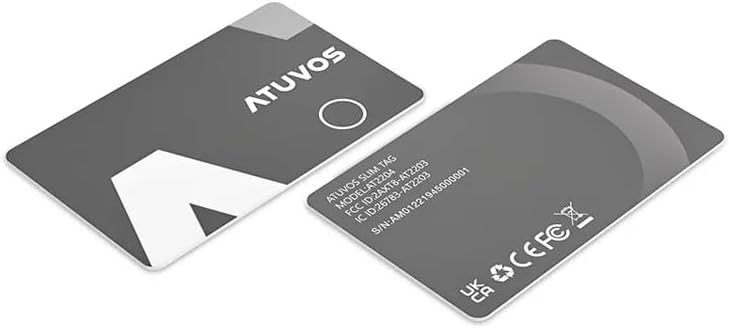
Imatge 2: Davant i darrere view of the ATUVOS Bluetooth Tracker Tag. One card displays the front design, while the other shows the reverse side with product information including the model number AT2204 and various regulatory compliance symbols.
Característiques principals:
- iOS Exclusive: Seamless integration with Apple's "Find My" app.
- Long-Range Tracking: Utilizes the vast Apple Find My network for location beyond Bluetooth range.
- Alerta audible: High-pitched buzzer (80-100dB) to locate items nearby.
- Disseny durador: Resistent a la pols i l'aigua IP67.
- Durada de la bateria ampliada: Up to 3 years with a non-replaceable built-in battery.
- Lost Mode with NFC: Allows finders to access your contact information via NFC.
- Protecció de privadesa: Anonymous and encrypted communication on the Find My network.
3. Configuració
Follow these steps to set up your ATUVOS Bluetooth Tracker Tag amb el teu dispositiu iOS:
- Activa el Bluetooth: Assegureu-vos que el Bluetooth estigui activat al vostre iPhone o iPad.
- Obre Cerca la meva aplicació: Launch the "Find My" app on your iOS device.
- Afegeix un article: Navigate to the "Items" tab, then tap the "+" icon and select "Add Other Item".
- Activate Tracker: Follow the on-screen instructions. The tracker should automatically be detected. If not, gently press the circular area on the tracker to activate it.
- Anomena el teu article: Assign a name to your ATUVOS Tracker Tag (e.g., "Wallet," "Keys," "Bag").
- Confirmeu: Confirm the pairing. Your tracker is now linked to your Apple ID and visible in the Find My app.
Nota: For optimal performance, ensure your iOS device is running the latest software version.
4. Instruccions de funcionament
4.1 Locating Your Item Nearby
When your ATUVOS Tracker Tag is within Bluetooth range (approximately 60 meters), you can make it play a sound:
- Open the "Find My" app.
- Aneu a la pestanya "Elements".
- Select your ATUVOS Tracker Tag de la llista.
- Tap "Play Sound." The tracker will emit a loud buzzer sound (80-100dB) to help you locate it.
Alternatively, you can use Siri by saying, "Hey Siri, find my [item name]," where [item name] is what you named your tracker.
4.2 Locating Your Item Far Away (Find My Network)
If your item is out of Bluetooth range, the Find My network can help you locate it:
- The "Find My" app will display the last known location of your tracker on a map.
- If another Apple device on the Find My network passes by your tracker, its location will be anonymously updated in your app.
- You can get directions to the tracker's last known location using the "Directions" feature in the Find My app.
4.3 Using Lost Mode
If your ATUVOS Tracker Tag is lost, activate Lost Mode to increase your chances of recovery:
- In the "Find My" app, select your tracker.
- Scroll down and tap "Enable" under "Lost Mode."
- Follow the prompts to enter a phone number or email address where you can be contacted.
- You can also write a custom message for the finder.
- When someone finds your tracker and taps it with an NFC-enabled smartphone, they will see your contact information and message.
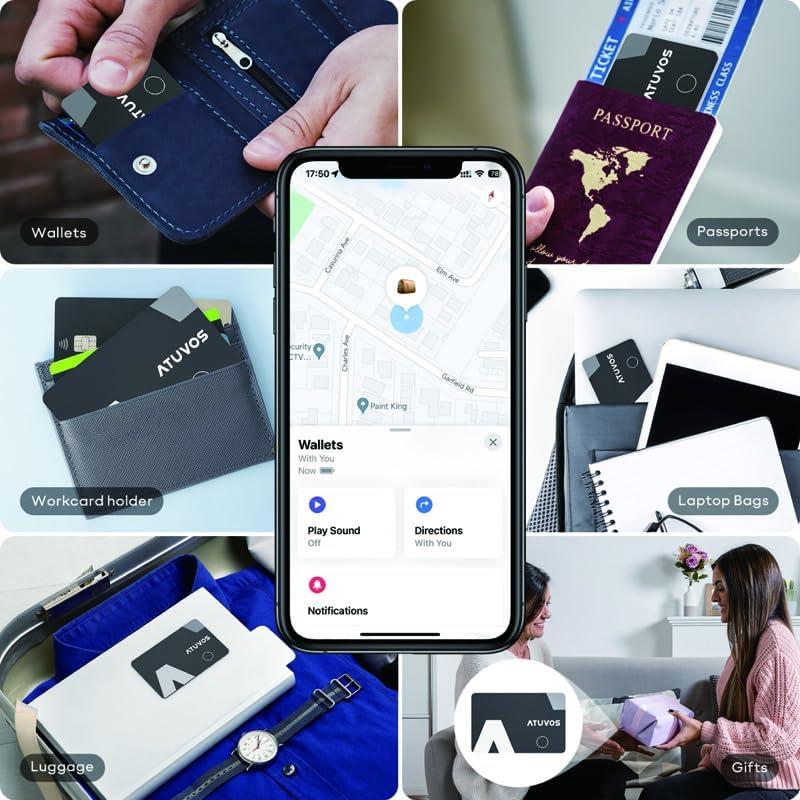
Image 3: Various applications of the ATUVOS Tracker Tag. This image illustrates how the slim tracker can be discreetly placed in wallets, passport holders, work card holders, laptop bags, luggage, or even attached to gifts, highlighting its versatility in preventing loss.
5. Manteniment
5.1 Neteja
To clean your ATUVOS Tracker Tag, wipe it gently with a soft, dry, lint-free cloth. Avoid using abrasive materials, solvents, or harsh chemicals, as these can damage the device.
5.2 Informació sobre la bateria
The ATUVOS Tracker Tag features a built-in, non-replaceable battery with a lifespan of up to 3 years. There is no need for charging or battery replacement during its operational life. When the battery is depleted, the device will cease to function and should be disposed of according to local electronic waste regulations.
6. Solució De Problemes
- Tracker not appearing in Find My app:
- Assegureu-vos que el Bluetooth estigui habilitat al vostre dispositiu iOS.
- Make sure the tracker is within Bluetooth range of your device during setup.
- Try gently pressing the circular area on the tracker to ensure it's active.
- Restart your iOS device and try the setup process again.
- No sound when "Play Sound" is tapped:
- Ensure the tracker is within Bluetooth range of your iOS device.
- Check if the tracker's battery is depleted (though it has a long lifespan, this is a possibility towards the end of its life).
- La ubicació no s'actualitza:
- If out of Bluetooth range, location updates rely on other Apple devices on the Find My network. Updates may not be instantaneous.
- Ensure your iOS device has an active internet connection to receive location updates.
- Lost Mode contact information not appearing via NFC:
- Ensure Lost Mode is activated in the Find My app for your tracker.
- The NFC-enabled smartphone tapping the tracker must have NFC enabled and be positioned correctly over the tracker.
7. Especificacions

Image 4: Specifications and Features of the ATUVOS Tracker Tag. This graphic details the physical dimensions (54mm x 85.5mm x 1.6mm) and highlights key functional specifications such as the 80-100dB buzzer, IP67 water resistance rating, approximately 60m Bluetooth connection range, and a battery life of up to 3 years.
| Característica | Especificació |
|---|---|
| Número de model | AT2204 |
| Compatibilitat | iOS only (iPhone, Apple Watch, macOS) |
| Connexió | Bluetooth |
| Interval Bluetooth | Aprox. 60 metres (200 peus) |
| So d'alerta | 80-100 dB Buzzer |
| Font d'alimentació | Built-in Battery (Non-replaceable) |
| Durada de la bateria | Fins a 3 anys |
| Resistència a l'aigua | IP67 (Dust tight, protected against temporary immersion up to 1 meter for 30 minutes) |
| Dimensions (L x P x A) | 54 mm x 85.5 mm x 1.6 mm |
| Pes | Aprox. 12 g |
| Certificacions | MIC, Industrial Design, MFi, RoHS, Technical Conformity Mark |
8. Informació de seguretat
- Do not attempt to open, disassemble, or modify the device. This may cause damage, void the warranty, and pose safety risks.
- The battery is non-replaceable. Do not attempt to replace the battery.
- Avoid exposing the device to extreme temperatures (hot or cold), direct sunlight, or fire.
- While the device is IP67 water-resistant, it is protected against temporary immersion. Avoid continuous submersion or exposure to high-pressure water jets.
- Mantingueu el dispositiu allunyat dels nens i de les mascotes.
- Dispose of the device responsibly according to local electronic waste regulations at the end of its lifespan.
9. Garantia i Suport
For warranty information and customer support, please refer to the documentation provided with your purchase or contact ATUVOS customer service through the retailer where the product was purchased.
Privacy Note: All communications on the Find My network are anonymous and encrypted to protect user privacy. Location data and history are not stored on the tracker card itself.