
LG 17Z90TL-GU89J
LG gram 17 Laptop User Manual
Model: 17Z90TL-GU89J
Marca: LG
Introducció
Welcome to the user manual for your new LG gram 17 laptop, Model 17Z90TL-GU89J. This guide provides essential information for setting up, operating, maintaining, and troubleshooting your device. The LG gram 17 combines a large 17-inch WQXGA anti-glare display with a lightweight design (approximately 1389g), powered by the Intel® Core™ Ultra 7 Processor 258V. It features 32GB of RAM and a 1TB SSD, making it a high-performance AI PC ready for the future with Windows 11 Home and integrated AI capabilities like Copilot+ PC and gram AI.

Image: The LG gram 17 laptop, showcasinpel seu disseny elegant i la seva gran pantalla.
Configuració
1. Desembalatge i primera engegada
Carefully remove your LG gram 17 from its packaging. Ensure all included accessories, such as the AC-DC adapter, USB Type-C cable, installation guide, and warranty card, are present. Connect the AC-DC adapter to the laptop and a power outlet. Press the power button to turn on your device for the first time. Follow the on-screen instructions to complete the initial Windows 11 Home setup.
2. Connexió de perifèrics
Your LG gram 17 is equipped with various ports for connecting external devices:
- USB Type-C (Thunderbolt™ 4): Two ports for high-speed data transfer (up to 40Gbps) and external display connections (up to 5120x3200@60Hz).
- USB Type-A (USB 3.2 Gen2x1): Two ports for connecting standard USB devices (up to 10Gbps).
- Sortida HDMI: One port for connecting to external displays (up to 4096x2160@60Hz).
- Stereo Mini Jack: Per a auriculars i micròfon.

Image: Diagram illustrating the various ports available on the LG gram 17 laptop, including USB Type-C, USB Type-A, HDMI, and headphone jack.
Operating Your LG gram 17
Característiques de visualització
The 17-inch IPS WQXGA (2560x1600) anti-glare display offers a 16:10 aspect ratio and DCI-P3 99% color gamut, providing clear and vibrant visuals. The anti-glare panel reduces reflections, making it comfortable for extended use in various lighting conditions.

Image: The LG gram 17 display showing a high-resolution image, highlighting its anti-glare properties and wide aspect ratio.
Teclat i Touchpad
The laptop features a Japanese 104-key keyboard with a 19.05x18.5mm key pitch and 1.65±0.2mm key stroke, including a 10-key numeric pad and backlight. The large touchpad (131.5x83.3mm) supports scrolling and gesture functions for intuitive navigation.

Imatge: Primer pla view of the LG gram 17's full-size keyboard with numeric pad and large touchpad.
AI Features: Copilot+ PC and gram AI
Your LG gram 17 is a next-generation AI PC, featuring Intel® Core™ Ultra 7 Processor 258V and dedicated AI capabilities. This includes support for Copilot+ PC features in Windows 11 Home and LG's proprietary gram AI.
- Copilot+ PC: Utilize advanced AI functions within Windows 11, such as Recall (search past activities), Co-Creator (generate images from text), Live Captions (translate audio in real-time), and Windows Studio Effects (background blur, noise cancellation for video calls).
- gram AI: LG's hybrid AI leverages both on-device processing (gram chat On-Device) for secure, personalized answers from your data and cloud AI (gram chat Cloud) for comprehensive answers using GPT-4o.

Image: Visual representation of Copilot+ PC features on the LG gram 17, including Recall, Co-Creator, Live Captions, and Windows Studio Effects.

Image: Diagram illustrating LG's hybrid AI, gram AI, with on-device and cloud chat capabilities for enhanced productivity.
Enllaç de grams de LG
The LG gram Link application allows seamless integration with your iOS or Android mobile devices. Easily share photos, videos, and documents, use your tablet as a secondary display, and manage your media efficiently with AI-powered photo organization.

Image: Screenshots demonstrating LG gram Link features, including wireless file transfer, tablet as sub-display, and AI gallery for efficient media management across devices.
Vídeos oficials de productes
LG gram AI Introduction Film
Video: An introduction to LG's proprietary Hybrid AI, "gram AI," explaining its on-device and cloud capabilities for enhanced productivity and data security.
LG gram Pro Product Introduction Video (Short)
Video: A short product introduction video for the LG gram Pro, highlighting its key features and design.
Manteniment
Cura de la bateria
The LG gram 17 is equipped with a 77Wh lithium-ion battery, offering up to 14.5 hours of video playback and 21.5 hours of idle time. To maximize battery lifespan, avoid fully discharging the battery frequently and store the laptop in a cool, dry place when not in use for extended periods. Full charging takes approximately 3 hours.

Image: The LG gram 17 laptop displaying its battery status, indicating long-lasting power for extended use.
Durabilitat
The LG gram 17 is built to withstand various environmental conditions, having cleared 7 items of the U.S. Department of Defense standard "MIL-STD-810H" tests. This ensures robust durability for everyday use and travel.

Image: Icons representing the MIL-STD-810H durability tests, including high temperature, low temperature, low pressure, salt spray, dust, vibration, and shock drop.
Neteja del teu ordinador portàtil
Use a soft, lint-free cloth to clean the screen and exterior surfaces. For stubborn smudges, slightly dampen the cloth with water or a screen-cleaning solution. Avoid harsh chemicals or abrasive materials that could damage the finish.
Resolució de problemes
If you encounter issues with your LG gram 17, refer to the following common solutions:
- Sense energia: Ensure the AC adapter is securely connected and the power outlet is functional. Try a different outlet if necessary.
- Problemes de visualització: If the screen is blank or flickering, try adjusting the brightness settings. For external monitors, ensure the cable is properly connected and the correct input source is selected on the monitor.
- Rendiment lent: Close unnecessary applications, check for Windows updates, and ensure sufficient free space on your SSD.
- Problemes de connectivitat: For Wi-Fi or Bluetooth issues, try restarting the laptop and your router/Bluetooth device. Ensure drivers are up to date.
For more detailed troubleshooting, consult the LG Easy Guide software pre-installed on your laptop or visit the LG support weblloc.
Especificacions
| Característica | Detall |
|---|---|
| Nom del model | LG gram 17 (17Z90TL-GU89J) |
| Mida de la pantalla | 17.0 polzades |
| Tipus de visualització | IPS LCD, WQXGA (2560x1600), 16:10 Aspect Ratio, Anti-Glare, DCI-P3 99% |
| Freqüència d'actualització | 60 Hz |
| Processador | Intel® Core™ Ultra 7 Processor 258V (Series 2), 2.2 GHz (Max 4.8 GHz) |
| Gràfics | Intel® Arc™ Graphics 140V (Integrated) |
| RAM | 32GB LPDDR5X 8533MHz (Onboard, not expandable) |
| Emmagatzematge | 1TB NVMe™ SSD (PCIe4.0x4, 1 empty M.2 2280 slot) |
| Sistema operatiu | Windows 11 Home |
| Ports | 2x USB4 Gen3x2 (Thunderbolt™ 4), 2x USB 3.2 Gen2x1 Type-A, 1x HDMI, 1x Stereo Mini Jack (Headphone/Mic Combo) |
| Connectivitat sense fil | Wi-Fi 6 (IEEE802.11ax), Bluetooth® 5.3 |
| Weblleva | Full HD (1080p) |
| Seguretat | Reconeixement d'empremtes digitals |
| Bateria | 77Wh Lithium-ion (4-cell) |
| Durada de la bateria | Approx. 14.5 hours (video playback), 21.5 hours (idle) |
| Dimensions (AxPxA) | 378.8 x 258.8 x 16.8 mm (excluding protrusions) |
| Pes | Aprox. 1389 g |
| Programari inclòs | My gram, gram Chat, LG gram Link, Quick Share, LG Easy Guide, LG TroubleShooting, LG Glance by Mirametrix, LG On Screen Display 3, LG Display Extension, LG Lively Theme, Dolby Atmos, McAfee® LiveSafe™ (30-day trial), Intel® Connectivity Performance Suite |
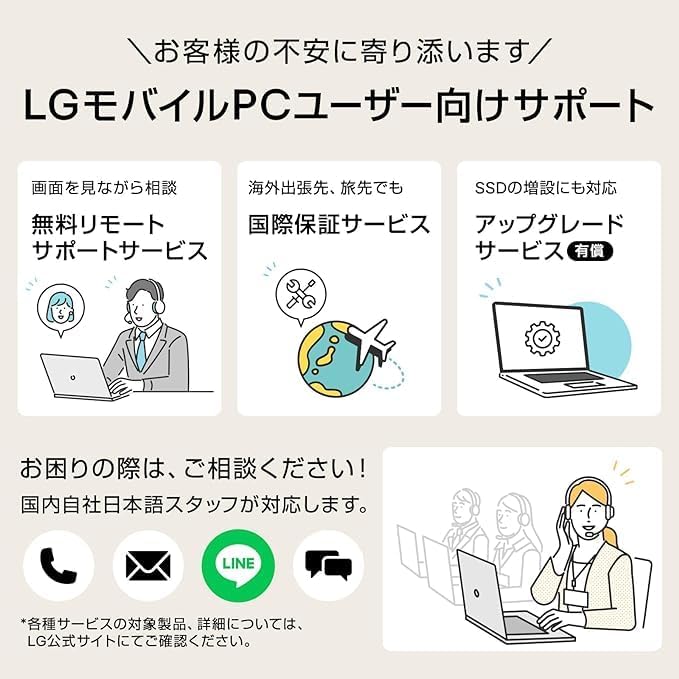
Image: Diagram showing the dimensions of the LG gram 17 laptop, including width, depth, and thickness.
Informació de la garantia
Your LG gram 17 comes with a 1-year manufacturer's warranty (6 months for the battery). By registering your product on the LG official website, you may be eligible for an extended warranty of up to 4 years (1 year standard + 3 years extended). Please refer to the official LG website for detailed terms and conditions regarding warranty extensions.
LG Extended Warranty Information
Image: Promotional image for LG's extended warranty program, indicating up to 4 years of coverage upon product registration.
Suport
For further assistance, LG offers comprehensive support services for mobile PC users:
- Free Remote Support Service: Get assistance while viewing your screen.
- International Warranty Service: Support available even when traveling abroad.
- SSD Upgrade Service (Paid): Options for SSD expansion.
Please contact LG customer service for any inquiries. Japanese-speaking staff are available domestically.
Image: Visual representation of LG's customer support services, including remote support, international warranty, and SSD upgrade options.