
1. Introducció
This manual provides essential information for the safe and effective use of your GT POWER AC Adapter, Model 102. This adapter is specifically designed to provide power to the Cadence Blood Pressure Monitor TMB-2092-G. It features built-in protection mechanisms to ensure reliable operation and device safety.
2. Informació de seguretat
AVÍS: Per reduir el risc de descàrrega elèctrica, incendi o lesions, seguiu sempre aquestes precaucions de seguretat bàsiques.
- Aquest adaptador està dissenyat per a NOMÉS ÚS INTERIOR. Do not expose to rain, moisture, or extreme temperatures.
- Ensure the adapter is connected to a power outlet with the correct voltage as specified on the adapter label.
- Do not disassemble, modify, or attempt to repair the adapter. Refer all servicing to qualified personnel.
- Keep the adapter and its cable away from heat sources, sharp edges, and excessive pressure.
- Unplug the adapter from the power outlet when not in use for extended periods or during electrical storms.
- Do not operate the adapter with a damaged cord or plug.
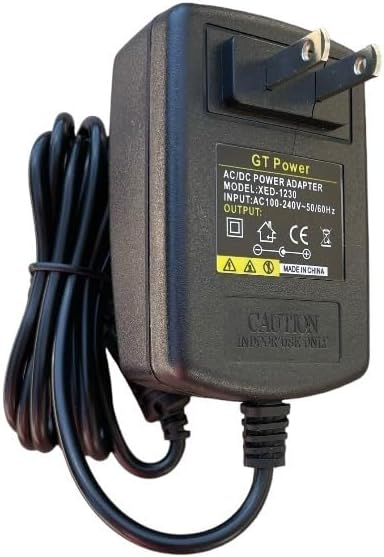
Figura 1: Frontal view of the GT POWER AC Adapter. The label indicates "GT Power AC/DC Power Adapter", "MODEL: XED-1230", "INPUT: AC100-240V~50/60Hz", and "OUTPUT: DC". A "CAUTION INDOOR USE ONLY" warning is visible.
3. Configuració
- Inspeccioneu l'adaptador: Before first use, visually inspect the AC adapter and its cable for any signs of damage. Do not use if damaged.
- Connecta't al dispositiu: Locate the power input port on your Cadence Blood Pressure Monitor TMB-2092-G. Carefully insert the DC output plug of the GT POWER AC Adapter into this port. Ensure a secure connection.
- Connecteu-vos a la presa de corrent: Plug the two-prong AC input plug of the adapter into a standard wall power outlet (AC 100-240V, 50/60Hz).
- Verifica l'alimentació: Once connected, your blood pressure monitor should receive power. Refer to your blood pressure monitor's manual for specific power indicators.

Figure 2: Close-up of the DC output connector, which plugs into the Cadence Blood Pressure Monitor.
4. Instruccions de funcionament
Once properly connected, the GT POWER AC Adapter will continuously supply power to your Cadence Blood Pressure Monitor TMB-2092-G. The adapter is designed for continuous operation within its specified limits.
This adapter incorporates several protection features:
- OVP (Over Voltage Protecció): Safeguards your device from damage due to excessive input voltage.
- OCP (Protecció sobre corrent): Prevents damage from excessive output current.
- SCP (Protecció contra curtcircuits): Automatically shuts down power in case of a short circuit, protecting both the adapter and the connected device.

Figura 3: lateral view of the adapter, illustrating the compact design and the attached power cord.
5. Manteniment
- Neteja: Disconnect the adapter from the power outlet and the device before cleaning. Use a soft, dry cloth to wipe the adapter. Do not use liquid cleaners or aerosols.
- Emmagatzematge: When not in use, store the adapter in a cool, dry place, away from direct sunlight and moisture. Avoid tightly coiling the cable to prevent damage.
- Cura del cable: Do not pull on the cable to disconnect the adapter. Always grasp the plug firmly. Avoid placing heavy objects on the cable or bending it sharply.

Figure 4: The 48-inch heavy-duty power cable, designed for durability.
6. Solució De Problemes
If you experience issues with your GT POWER AC Adapter, refer to the following common solutions:
- Sense alimentació al dispositiu:
- Ensure the adapter is securely plugged into both the wall outlet and the blood pressure monitor.
- Comproveu si la presa de corrent funciona connectant-hi un altre dispositiu.
- Inspect the adapter cable and plugs for any visible damage. If damaged, discontinue use.
- L'adaptador s'escalfa:
- It is normal for the adapter to feel slightly warm during operation.
- If the adapter becomes excessively hot, unplug it immediately and discontinue use. This could indicate an internal fault or an overloaded circuit.
- Mal funcionament del dispositiu:
- If the blood pressure monitor is not functioning correctly even with power, consult the monitor's own instruction manual or contact its manufacturer for support.
7. Especificacions
| Característica | Detall |
|---|---|
| Marca | GT POWER |
| Número de model | 102 |
| Entrada Voltage | CA 100-240V, 50/60Hz |
| Tipus de sortida | DC |
| Longitud del cable | 48 inches (approx. 1.2 meters) |
| Característiques especials | Més del voltagProtecció contra sobrecorrent (OVP), protecció contra sobrecorrent (OCP), protecció contra curtcircuits (SCP) |
| Font d'alimentació | Elèctric amb cable |
| Pes de l'article | 0.4 lliures (aprox. 181 grams) |
| Dimensions del paquet | 8 x 4.5 x 1.5 polzades |
| UPC | 781834739976 |
8. Garantia i Suport
Your GT POWER AC Adapter Model 102 comes with the following:
- Garantia de devolució de 30 dies: Si no esteu satisfets amb la vostra compra, podeu retornar-la en un termini de 30 dies per obtenir un reemborsament complet.
- Garantia d’un any: This product is covered by a one-year warranty against manufacturing defects from the date of purchase.
For technical support or warranty claims, please contact your retailer or the manufacturer, GTPOWER, directly. Please have your purchase information and product model number (102) available.