
1. Introducció
The Fanvil V60W is an advanced desktop IP phone designed for modern communication needs. It combines elegant design with robust functionality, featuring a 2.4-inch color display for an intuitive user interface. This device supports up to 4 SIP lines and includes 6 programmable keys for optimal customization. High-definition audio quality and 6-way audio conferencing capabilities make this phone ideal for professional communications. Versatile connectivity is provided through integrated dual-band 2.4G/5G WiFi (WiFi 6) and Bluetooth 5, eliminating the need for additional cables. Two 10/100 ports with PoE support ensure easy integration into your existing network. Its modern black design seamlessly fits into any office environment, while the ergonomic handset with a coiled cord ensures comfort during extended conversations.
2. Contingut del paquet
Please verify that all items are present and in good condition upon opening the package. If any items are missing or damaged, please contact your vendor.
- Fanvil V60W IP Phone Unit
- Telèfon
- Cable de l'auricular
- Cable Ethernet
- Adaptador d'alimentació (si no feu servir PoE)
- Guia d'instal·lació ràpida
3. Producte acabatview
Familiarize yourself with the components of your Fanvil V60W IP Phone.
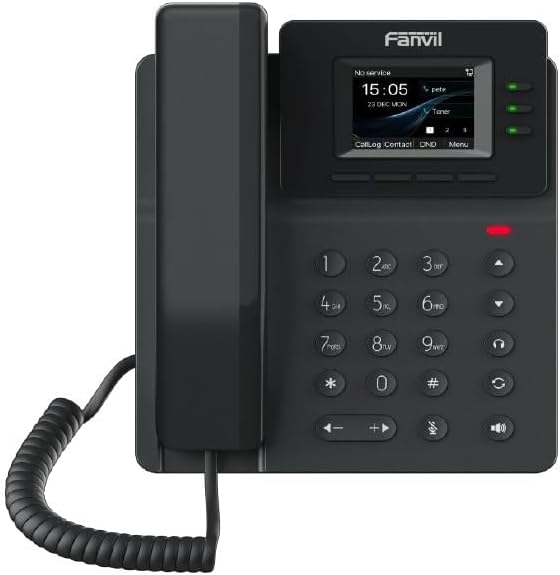
Figure 3.1: Fanvil V60W IP Phone Front View
This image displays the front of the Fanvil V60W IP Phone. It features a black handset on the left, connected by a coiled cord. The main unit on the right includes a color display showing "No service", "15:05", "23 DEC MON", and menu options like "CallLog", "Contact", "DND", and "Menu". Above the display, the "Fanvil" logo is visible. To the right of the display are three green indicator lights. Below the display is a standard numeric keypad (0-9, *, #) along with navigation keys (up, down, left, right), volume controls, and dedicated function keys for headset, speakerphone, mute, and redial/transfer. A red indicator light is visible above the keypad.
Components clau:
- Pantalla de visualització: 2.4-inch color display (320 x 240 resolution) for user interface and information.
- Tecles programables: 6 keys for custom functions.
- Teclat numèric: Standard 0-9, *, # for dialing.
- Tecles de navegació: Per a la navegació pel menú.
- Tecles de funció: Dedicated keys for common features like speakerphone, mute, headset.
- Auricular: Ergonomic design for comfortable calls.
- Indicadors LED: For call status, message waiting, etc.
4. Configuració i instal·lació
Follow these steps to set up your Fanvil V60W IP Phone.
4.1 Connexió del telèfon
- Connecteu el telèfon: Connecteu un extrem del cable en espiral del auricular a l'auricular i l'altre extrem al port d'auricular de la base del telèfon.
- Connecteu-vos a la xarxa:
- Ethernet (PoE or Adapter): Connect an Ethernet cable from the LAN port on the phone to your network switch or router. If using Power over Ethernet (PoE), the phone will power on automatically.
- Power Adapter (if no PoE): If PoE is not available, connect the power adapter to the power port on the phone and then to a power outlet.
- Connexió a l'ordinador (opcional): If you wish to connect a computer through the phone, connect an Ethernet cable from the PC port on the phone to your computer.
4.2 Configuració inicial
Upon first boot, the phone will attempt to obtain network settings via DHCP. You may need to configure SIP accounts manually or via auto-provisioning.
- Accés a la configuració: Premeu el botó Menú key on the phone to access system settings.
- Configuració de la xarxa: Navega a Settings > Advanced Settings > Network to configure IP address, subnet mask, gateway, and DNS if not using DHCP.
- Registre de compte SIP: Navega a Settings > Advanced Settings > Accounts to add or modify SIP accounts. You will need your SIP server address, SIP user ID, and password provided by your VoIP service provider.
- Configuració Wi-Fi: Navega a Configuració > Wi-Fi to enable Wi-Fi and connect to an available wireless network.
5. Funcionament bàsic
5.1 Fer una trucada
- Lift the Handset o premeu el botó Altaveu clau.
- Marca el número utilitzant el teclat.
- Premeu el botó Marqueu key or wait a few seconds for the call to connect automatically.
5.2 Respondre a una trucada
Quan sona el telèfon:
- Lift the Handset, o
- Premeu el botó Altaveu clau, o
- Premeu el corresponent Línia clau.
5.3 Finalització d'una trucada
Per finalitzar una trucada activa:
- Replace the Handset, o
- Premeu el botó Finalitzar la trucada key (if available on screen or as a function key).
5.4 Ajust del volum
Durant una trucada, utilitzeu Puja el volum (+) i Baixar el volum (-) keys to adjust the handset, headset, or speakerphone volume.
6. Funcions avançades
The Fanvil V60W offers several advanced features to enhance your communication experience.
- Trucada en espera: Premeu el botó Aguanta key during an active call to place it on hold. Press again to resume.
- Transferència de trucades:
- Transferència a cegues: Durant una trucada, premeu Transferència, dial the new number, and press Transferència de nou.
- Trasllat assistit: Durant una trucada, premeu Transferència, dial the new number, wait for the other party to answer, then press Transferència de nou per completar.
- 6-Way Audio Conferencing:
- Make a call to the first party.
- Premeu el botó Conf key. The first party is put on hold.
- Dial the second party's number and wait for them to answer.
- Premeu el botó Conf key again to establish the conference.
- Repeat steps 2-4 for additional parties (up to 6 participants total).
- Connectivitat Bluetooth: Pair your Bluetooth headset or mobile device via Configuració > Bluetooth for hands-free communication or contact synchronization.
- Tecles programables: Customize the 6 programmable keys via the phone's web interfície o Settings > DSS Key to assign speed dials, BLF (Busy Lamp Field), or other functions.
7. Manteniment
Proper maintenance ensures the longevity and optimal performance of your Fanvil V60W IP Phone.
- Neteja: Feu servir un drap suau i sec per netejar la superfície del telèfon. Per a marques difícils, fregueu lleugeramentamp Es pot utilitzar un drap amb un netejador suau i no abrasiu. Eviteu la humitat excessiva i els productes químics agressius.
- Eliminació de pols: Regularly wipe down the display and keypad to prevent dust buildup.
- Condicions ambientals: Keep the phone in a dry environment, away from direct sunlight, extreme temperatures, and sources of moisture.
- Actualitzacions de firmware: Periodically check for firmware updates from Fanvil's official website or through your service provider. Firmware updates can improve performance, add features, and fix bugs.
8. Solució De Problemes
This section addresses common issues you might encounter with your Fanvil V60W IP Phone.
| Problema | Causa possible | Solució |
|---|---|---|
| El telèfon no s'encén. | No power from adapter or PoE. | Check power adapter connection or ensure PoE is active on the Ethernet port. Try a different power outlet or Ethernet port. |
| No dial tone / Cannot make calls. | Network connectivity issue; SIP account not registered. | Verify Ethernet cable connection. Check network settings (IP address, gateway). Ensure SIP account status is "Registered" in the phone's settings. Contact your VoIP service provider. |
| Poor audio quality (echo, static). | Network congestion; faulty cable; environmental interference. | Check network bandwidth. Replace Ethernet cable. Move phone away from other electronic devices. Adjust volume settings. |
| Connexió Wi-Fi inestable. | Weak signal; interference; incorrect password. | Move phone closer to Wi-Fi router. Check Wi-Fi password. Ensure router firmware is up to date. |
If the problem persists after attempting these solutions, please contact your technical support or VoIP service provider for further assistance.
9. Especificacions
Detailed technical specifications for the Fanvil V60W IP Phone.
- Visualització: 2.4-inch (320x240) color screen
- Línies SIP: 4
- Tecles programables: 6
- Àudio: HD Audio, 6-way audio conferencing
- Connectivitat: Dual-band 2.4G/5G Wi-Fi (Wi-Fi 6), Bluetooth 5
- Ports Ethernet: 2 x 10/100 Mbps (with PoE support)
- Dimensions (L x A x A): 22 x 25 x 15 cm (aproximadament)
- Pes: 600 grams (aproximadament)
- Material: Plàstic
- Color: Negre
- Font d'alimentació: Power adapter or PoE
- Dispositius compatibles: Ehs
10. Garantia i Suport
For warranty information and technical support, please refer to the documentation provided with your purchase or visit the official Fanvil weblloc web. Conserveu el rebut de compra com a comprovant de compra per a reclamacions de garantia.
- Fabricant: Fanvil
- Contacte d'assistència: Refer to Fanvil's official website for support channels (e.g., support portal, email, phone).
- Actualitzacions de programari: Information regarding software updates is not available in the product data. Please check the manufacturer's weblloc per a les darreres actualitzacions.
- Recanvis: Information regarding spare parts availability is not available.