
Introducció
This manual provides essential instructions for the safe and effective operation of your Pentax Optio Z10 digital camera. Please read this manual thoroughly before using the camera and retain it for future reference.
Contingut del paquet
Verify that all items are present in your package. The standard package for the Pentax Optio Z10 typically includes:
- Pentax Optio Z10 Digital Camera Body
- Bateria recarregable de ions de liti
- Carregador de bateria
- Cable USB
- Corretja de canell
- Software CD-ROM (if applicable)
- Manual d'usuari (aquest document)
- SD/SDHC Memory Card (may be included depending on retailer/bundle)
- Memory Card Reader (may be included depending on retailer/bundle)
- Camera Case (may be included depending on retailer/bundle)
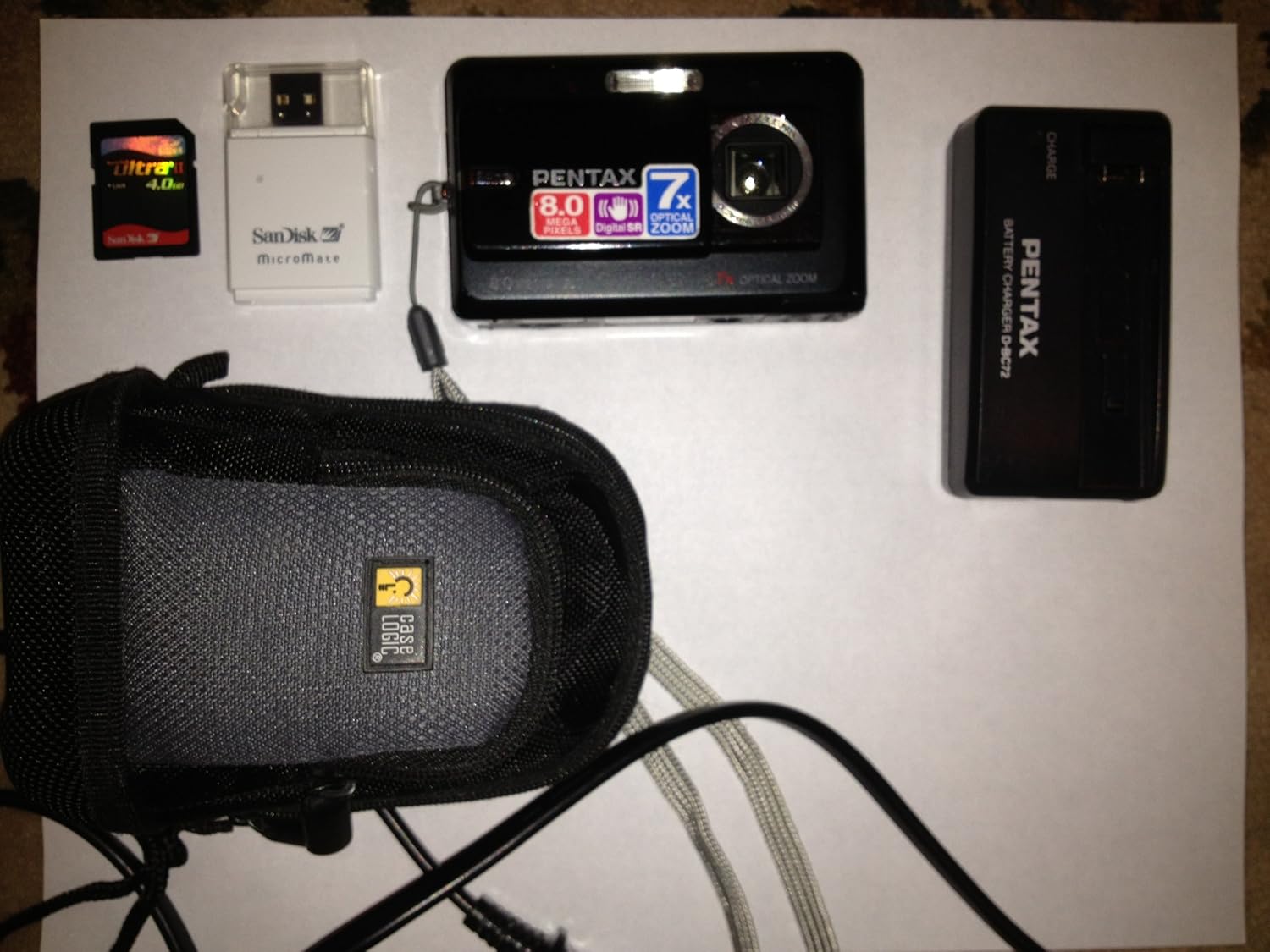
Figure 1: Pentax Optio Z10 Camera and Accessories. This image displays the Pentax Optio Z10 digital camera, an SD memory card, a SanDisk MicroMate USB card reader, a Pentax D-BC72 battery charger, and a Case Logic camera case. These items represent typical components that may be included with the camera.
Configuració
1. Carregant la bateria
- Insert the rechargeable lithium-ion battery into the provided battery charger. Ensure correct orientation.
- Connect the battery charger to a power outlet using the appropriate power cable.
- The charging indicator light on the charger will illuminate (e.g., orange or red) during charging.
- Once charging is complete, the indicator light will change color (e.g., green) or turn off. Remove the battery from the charger.
2. Inserció de la bateria i la targeta de memòria
- Obriu la tapa del compartiment de la bateria/targeta de memòria de la càmera.
- Insert the charged battery into the compartment, ensuring the correct polarity.
- Insert an SD or SDHC memory card into the designated slot. Push until it clicks into place.
- Tanqueu la coberta del compartiment de manera segura.
3. Configuració inicial de la càmera
Upon first power-on, you may be prompted to set the date, time, and language. Follow the on-screen instructions using the camera's navigation buttons and LCD monitor.
Funcionament de la càmera
1. Encès / apagat
Premeu el botó PODER botó per encendre o apagar la càmera. L'objectiu s'estendrà quan s'engegui.
2. Modes bàsics de fotografia
The Pentax Optio Z10 features various shooting modes, accessible via the mode dial or menu:
- Auto Picture Mode: The camera automatically detects the scene type and applies optimal settings.
- Program AE Mode: Allows manual adjustment of some settings while the camera sets aperture and shutter speed.
- Modes d'escena: Pre-set modes for specific situations (e.g., Portrait, Landscape, Night Scene).
- Mode pel·lícula: Per gravar vídeo.
3. Fer una foto
- Enceneu la càmera.
- Enquadra la teva foto amb el monitor LCD de 2.5 polzades.
- Press the shutter button halfway down to activate autofocus and exposure. The focus frame will turn green when focus is achieved.
- Premeu el botó de l'obturador completament cap avall per capturar la imatge.
4. Operació de zoom
Use the zoom lever (typically around the shutter button) to adjust the 7x optical zoom. Push towards 'W' for wide-angle and 'T' for telephoto.
5. Mode de reproducció
Premeu el botó REPRODUCCIÓ botó per tornarview captured images and videos. Use the navigation buttons to scroll through files.
6. Connexió a un ordinador
Connect the camera to a computer using the supplied USB cable. The camera will appear as a removable disk, allowing you to transfer photos and videos.
Manteniment i cura
- Neteja de la lent: Use a soft, lint-free cloth specifically designed for camera lenses. Avoid touching the lens with fingers.
- Cleaning the LCD Monitor: Gently wipe with a soft, dry cloth. Do not use abrasive cleaners.
- Cura de la bateria: Store batteries in a cool, dry place. Do not expose to extreme temperatures.
- Emmagatzematge: Quan no la feu servir durant períodes prolongats, traieu la bateria i guardeu la càmera en un entorn sec i sense pols.
- Resistència a l'aigua: The Pentax Optio Z10 is no resistent a l'aiguaEviteu l'exposició a l'aigua o a una humitat elevada.
Resolució de problemes
| Problema | Possible causa/solució |
|---|---|
| La càmera no s'encén. | Battery is discharged. Charge the battery. Battery is inserted incorrectly. Reinsert with correct polarity. |
| No es poden fer fotos. | La targeta de memòria està plena. Suprimeix les imatges innecessàries o insereix-ne una de nova. Memory card is not inserted. Insert an SD/SDHC card. Battery is low. Charge the battery. |
| Les imatges són borroses. | Subject is too close. Ensure minimum focus distance. Camera shake. Use Digital Shake Reduction or a tripod. La lent està bruta. Netegeu la lent. |
| LCD monitor is blank. | Camera is in power-saving mode. Press any button to wake. Brightness setting is too low. Adjust in menu. |
Especificacions
- Sensor d'imatge: CCD de 8.0 megapíxels (1/2.5 polzades)
- Píxels efectius: 8.0 megapíxels
- Lent: Pentax Zoom Lens, 7x Optical Zoom (equivalent to 38-266mm in 35mm format)
- Zoom digital: Aprox. 5.1x
- Monitor LCD: 2.5-inch TFT color LCD, approx. 230,000 dots
- Mitjans d'emmagatzematge: SD/SDHC memory card, 52 MB built-in memory
- File Format: Still images: JPEG (Exif 2.21), Movies: AVI (Motion JPEG)
- Resolució de vídeo: 640 x 480 / 320 x 240, 30 fps
- Sensibilitat ISO: Auto, Manual (80-3200)
- Velocitat d'obturació: 1/1440 a 4 segons
- Font d'alimentació: Bateria recarregable de ions de liti
- Dimensions (L x A x P): Aproximadament 97 x 58 x 22 mm (3.8 x 2.3 x 0.9 polzades)
- Pes: Approximately 145g (5.12 oz) without battery and memory card
- Connectivitat: USB 2.0
- Característiques especials: Digital Shake Reduction, High-speed Face Recognition, Auto Picture mode
Garantia i Suport
This Pentax Optio Z10 camera, if purchased as "Renewed," typically comes with a 90-day limited warranty. Please refer to your purchase documentation or contact your retailer for specific warranty terms and conditions.
For technical support or service inquiries, please visit the official Pentax support website or contact their customer service department. Keep your proof of purchase handy when seeking support.
Note: As this is a renewed product, warranty terms may differ from new products.