
Kittyhok CDP2 2K Dual Lens Security Camera System User Manual
Model: CDP2 Camera with 16-Channel WiFi 6 NVR
1. Introducció
This manual provides detailed instructions for the installation, operation, and maintenance of your Kittyhok CDP2 2K Dual Lens Security Camera System. Please read this manual thoroughly before using the product to ensure proper setup and functionality. Keep this manual for future reference.

Imatge 1.1: acabatview of the Kittyhok CDP2 Dual Lens Security Camera System, highlighting its key features.
2. Producte acabatview
2.1 Contingut del paquet
- Kittyhok CDP2 Dual Lens Security Camera(s)
- 16-Channel WiFi 6 Network Video Recorder (NVR)
- Power Adapters for Camera(s) and NVR
- Cable Ethernet
- Cargols i taps de muntatge
- Guia d'inici ràpid
2.2 Característiques clau
- 2K Dual-Lens: Provides enhanced clarity and coverage with two 2K lenses.
- 360° Coverage with Auto Tracking: One fixed lens monitors a key area while the other pans 355° and tilts 90° with automatic tracking. Supports up to 6 preset points.
- WiFi 6 NVR & Dual-Band Cameras: Supports 2.4/5GHz WiFi for superior speed and reliability, ideal for multi-story homes.
- Visió nocturna millorada: Features 6 spotlights for vibrant color night vision and reliable infrared for all-day protection.
- Detecció humana: Advanced AI for accurate human detection, reducing false alarms.
- Remote Access & Smart Alerts: Live stream and playback via app (up to 8 simultaneous users). Instant alerts with spotlights, siren, or app notifications.
- Enregistrament 24/7: Continuous recording to a built-in 1TB HDD (expandable to 6TB) and optional cloud storage.

Image 2.1: The Kittyhok 16-Channel WiFi 6 Network Video Recorder (NVR).
3. Instruccions de configuració
Follow these steps to set up your Kittyhok security camera system.
3.1 Initial NVR and Camera Connection
- Connecteu el NVR al router: Connect the NVR to your router using an Ethernet cable. This is required for initial setup and remote access.
- Connecteu el NVR al monitor: Connect the NVR to a monitor or TV using an HDMI or VGA cable.
- Engegar l'NVR: Plug in the NVR power adapter and turn on the NVR.
- Encendre les càmeres: Connect the power adapters to your CDP2 cameras and plug them into power outlets.
- Assistent de configuració inicial: Follow the on-screen instructions on your monitor to complete the NVR's initial setup, including network settings and time zone.
Video 3.1: User Manual for Kittyhok Plug-in Wireless Security System. This video demonstrates the setup process for the NVR and cameras, including connecting to a router and monitor, and initial power-up.
3.2 Col·locació i muntatge de la càmera
Strategically place your cameras to maximize coverage. The CDP2 camera offers 360° pan and tilt capabilities, allowing for flexible monitoring.
- Seleccioneu la ubicació: Trieu una ubicació de muntatge que proporcioni una vista clara view of the area you wish to monitor and is within range of your WiFi network.
- Muntatge: Use the provided screws and plugs to securely mount the camera to a wall or ceiling. Ensure the camera is positioned to allow for full pan and tilt movement.
- Connexió d'alimentació: Ensure the camera's power adapter is connected to a reliable power source.

Imatge 3.1: Ex.ample of the Kittyhok CDP2 camera mounted on an outdoor wall.
3.3 App and PC Access
- Descarregar l'aplicació: Download the Kittyhok app from the App Store (iOS) or Google Play Store (Android).
- Registra't/Inici de sessió: Registra un compte nou o inicia la sessió amb un d'existent.
- Afegeix un dispositiu: In the app, tap the '+' icon to add your NVR by scanning the QR code displayed on the NVR's monitor or found in its settings.
- PC/Mac Access: Download and install the CMS (Central Management Software) on your computer. Log in with your app account; the system will automatically sync.
4. Instruccions de funcionament
4.1 Viu View i la reproducció
- Access live camera feeds through the Kittyhok app or CMS software.
- Utilitzeu la funció de reproducció per tornarview foo gravattage stored on the NVR's HDD or cloud.
- The system supports up to 8 users simultaneously for live viewing.
4.2 Control de panoràmica, inclinació i zoom (PTZ)
Control the pan (horizontal), tilt (vertical), and digital zoom functions of your CDP2 camera via the app or CMS.
- pa: Gira la càmera horitzontalment fins a 355°.
- Inclinació: Ajusta la càmera verticalment fins a 90°.
- Preset Points: Configure up to 6 preset monitoring points for quick navigation.

Image 4.1: The dual lens system provides both fixed and flexible pan-tilt views, accessible via the mobile app.
4.3 Seguiment automàtic i detecció humana
- Enable auto tracking in the app settings. The camera will automatically follow detected human movement within its field of view.
- Human detection minimizes false alarms by distinguishing human shapes from other moving objects.
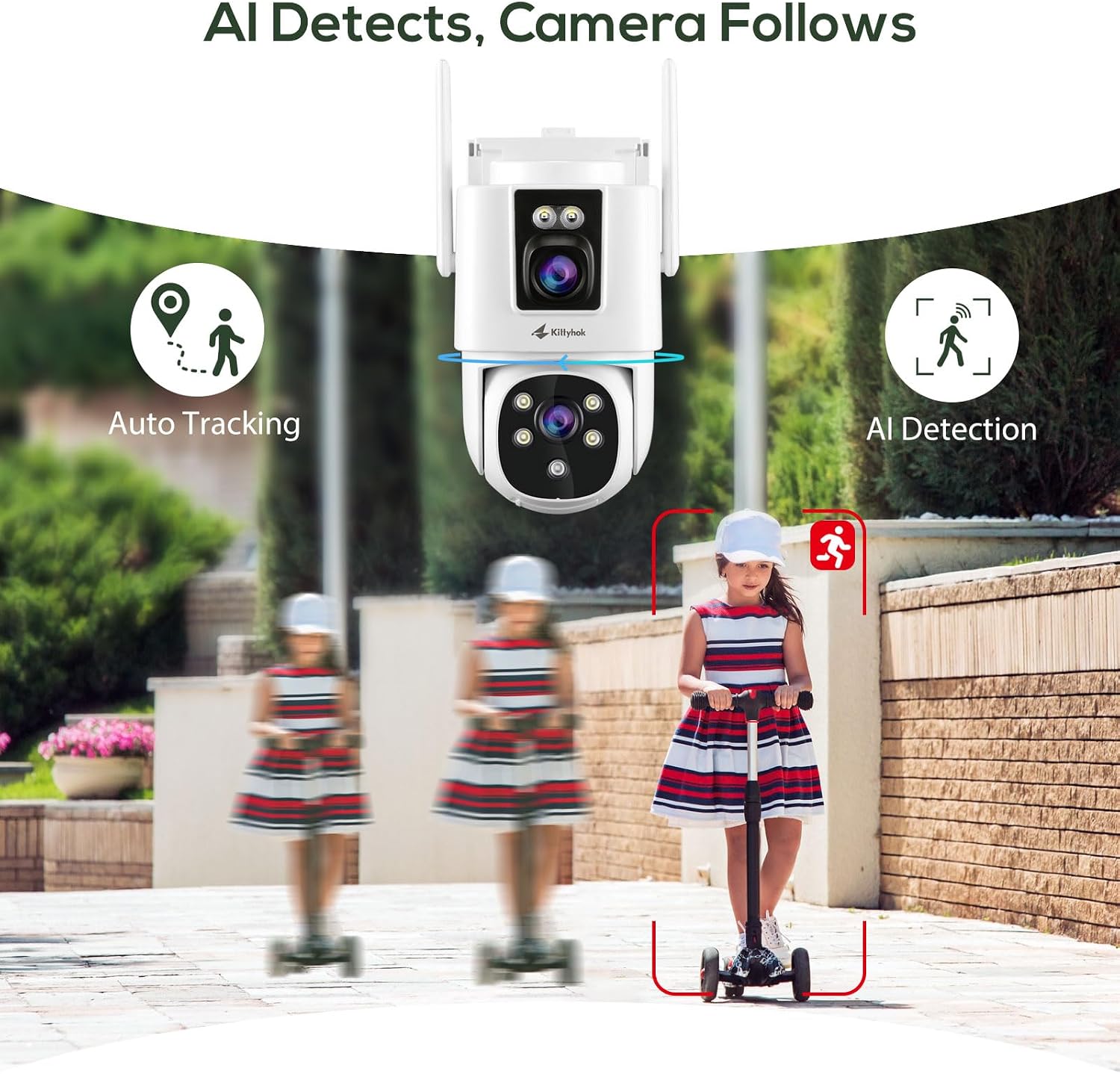
Image 4.2: The camera's AI detection and auto-tracking feature in action.
4.4 Modes de visió nocturna
The CDP2 camera offers multiple night vision options:
- Visió nocturna en color: Activated by the built-in spotlights, providing full-color video in low-light conditions.
- Visió nocturna per infrarojos (IR): Provides clear black-and-white video in complete darkness.

Image 4.3: Demonstrating the difference between Color Night Vision and IR Night Vision.
4.5 Smart Alerts and Two-Way Audio
- Alertes personalitzables: Set up motion detection zones and sensitivity levels. Choose to receive app notifications, email alerts, or trigger the camera's siren and spotlights upon detection.
- Àudio bidireccional: Use the built-in microphone and speaker to communicate with visitors or deter intruders remotely via the app.

Image 4.4: Smart alert notifications on a mobile device.
5. Manteniment
- Neteja: Regularly clean the camera lenses with a soft, dry cloth to ensure clear image quality. Do not use harsh chemicals.
- Actualitzacions de firmware: Check for and install firmware updates via the Kittyhok app or CMS to ensure optimal performance and security.
- Gestió de cables: Assegureu-vos que tots els cables estiguin connectats correctament i protegits de danys ambientals.
- Gestió d'emmagatzematge: Periòdicament review foo gravattage and manage storage space on the NVR's HDD. Consider backing up important footage.
6. Solució De Problemes
6.1 Sense canal de vídeo
- Comproveu la potència: Ensure both the camera and NVR are properly powered on.
- Connexió de xarxa: Verify the NVR is connected to the router and the cameras are connected to the NVR's WiFi network.
- Intensitat del senyal: If cameras are far from the NVR, consider repositioning or checking for obstructions that might interfere with the WiFi signal.
- NVR Output: Ensure the NVR is correctly connected to your monitor/TV and the input source is selected.
6.2 Cannot Connect to App/CMS
- Connexió a Internet: Confirm your smartphone/PC has a stable internet connection.
- NVR Internet Access: Ensure the NVR has internet access (check network settings on the NVR).
- Account Credentials: Double-check your login details for the Kittyhok app/CMS.
- Codi QR: If adding the NVR, ensure the QR code is clean and well-lit for scanning.
6.3 Problemes d'enregistrament
- HDD Status: Check the NVR's HDD status in the settings. Ensure it is initialized and has sufficient space.
- Programa de gravació: Verify that the recording schedule is correctly configured (24/7 or motion-triggered).
- Emmagatzematge al núvol: If using cloud storage, ensure your subscription is active and the NVR is connected to the internet.
- Targeta MicroSD: For camera-side recording (if applicable), ensure the microSD card is inserted correctly and formatted.

Image 6.1: Storage options including microSD card and cloud for 24/7 recording.
7. Especificacions
| Característica | Especificació |
|---|---|
| Resolució de la càmera | 2K (Dual Lenses) |
| Interval de panoràmica/inclinació | Panorama 355°, inclinació 90° |
| Connectivitat sense fil | 2.4GHz / 5GHz Dual-Band WiFi (WiFi 6 NVR) |
| Visió nocturna | Color Night Vision (with spotlights), Infrared Night Vision |
| Opcions d'emmagatzematge | NVR: Built-in 1TB HDD (expandable to 6TB), Camera: MicroSD Card (up to 256GB, not included), Cloud Storage (optional) |
| Detecció | Detecció humana, seguiment automàtic |
| Àudio | Àudio bidireccional |
| Temperatura de funcionament | Typically -10°C to 50°C (14°F to 122°F) for outdoor cameras |
8. Garantia i Suport
- 1 any de garantia: Kittyhok offers a 1-year warranty for replacement only, no repair.
- Garantia de devolució de 30 dies: Gaudeix d'una garantia de devolució de 30 dies a partir de la data de compra.
- Assistència en línia 24/7: Dedicated 1-to-1 online support is available for any technical assistance or inquiries.
For further assistance, please visit the official Kittyhok store or contact customer support through the app or weblloc.

Image 8.1: Kittyhok customer support and warranty details.