
1. Introducció
Thank you for choosing the Fenge 42.5 Inch White Monitor Stand Riser. This product is designed to elevate your monitor to an ergonomic viewing height, reduce neck and shoulder strain, and optimize your desk space. Its robust construction of thickened panels and metal legs ensures stability and durability. This manual provides essential information for assembly, operation, maintenance, and troubleshooting.
2. Informació de seguretat
- Ensure the monitor stand is placed on a stable, flat surface.
- No supereu la capacitat de càrrega màxima de 66 lliures (30 kg).
- Mantingueu les peces petites allunyades dels nens durant el muntatge.
- Avoid placing the stand in direct sunlight or near heat sources to prevent material damage.
- Reviseu regularment tots els cargols i connexions per assegurar-vos que estiguin ben ajustats.
3. Contingut del paquet
Si us plau, comproveu que tots els components siguin presents abans de començar el muntatge:
- 1x Top Shelf Panel (White)
- 2x Metal Support Legs (White)
- 4x cargols
- 1x clau Allen
- 4x Non-slip Pads

Figure 3.1: Components and assembly steps for the Fenge monitor stand.
4. Instruccions de muntatge i instal·lació
The Fenge Monitor Stand Riser is designed for quick and easy assembly, typically taking less than 2 minutes.
- Step 1: Attach the Support Legs
Align the two metal support legs with the pre-drilled holes on the underside of the top shelf panel. Insert the screws and tighten them securely using the provided Allen wrench. Ensure the legs are firmly attached to prevent wobbling. - Step 2: Apply Non-slip Pads
Peel the backing from the four non-slip pads and apply one to the bottom of each metal support leg. These pads protect your desk surface and enhance stability.
Figure 4.1: Visual guide for tightening screws and applying non-slip pads during assembly.
5. Instruccions de funcionament
This versatile monitor stand can be used in various configurations to enhance your workspace.
5.1 Ergonomic Monitor Placement
Place your computer monitor(s) on the top shelf. The stand elevates your screen by 3.9 inches, promoting a comfortable line of sight and reducing strain on your neck and spine. This improved posture can lead to increased focus and comfort during extended use.
5.2 Space Optimization
Utilize the space beneath the stand to store your keyboard, mouse, notebooks, or other peripherals when not in use. This helps to keep your desktop tidy and organized, maximizing your available workspace.

Figure 5.1: The monitor stand provides under-shelf storage for a tidy desk.
5.3 Multipurpose Use
The Fenge monitor stand is adaptable for various applications:
- Configuració del monitor dual: Accommodates two monitors side-by-side for an expansive viewzona d'ing.
- Printer Station: Provides a stable platform for a printer, with space underneath for paper or supplies.
- Suport de TV: Can be used to elevate a television, creating storage space below for media devices.
- Suport per a ordinador portàtil: Elevates a laptop for improved ergonomics or to connect to an external monitor.

Figura 5.2: Examples of the monitor stand's versatile applications.

Figure 5.3: An organized desk setup featuring the Fenge monitor stand.
6. Manteniment
To maintain the appearance and longevity of your Fenge Monitor Stand Riser:
- Netegeu la superfície amb un suau, damp tela.
- Eviteu utilitzar productes químics agressius o netejadors abrasius, ja que poden danyar l'acabat.
- Periodically check and retighten any loose screws to ensure stability.
7. Solució De Problemes
If you encounter any issues with your monitor stand, consider the following:
- El suport està inestable: Ensure all screws are fully tightened. Verify that the stand is on a flat, even surface.
- Stand appears scratched: The non-slip pads are designed to prevent scratches to your desk. Ensure they are properly applied to the bottom of each leg.
- Cannot support weight: Confirm that the total weight of items placed on the stand does not exceed the 66-pound (30 kg) load capacity.
8. Especificacions
| Marca | Fenge |
| Número de model | G04C1 |
| Color | Blanc |
| Material | Metal, Wood (Thickened Panels) |
| Dimensions de l'article (L x A x A) | 42.5 x 9.25 x 3.94 polzades (1080 x 235 x 100 mm) |
| Capacitat de càrrega | 66 lliures (30 kg) |
| Nombre de nivells | 1 (with under-shelf storage) |
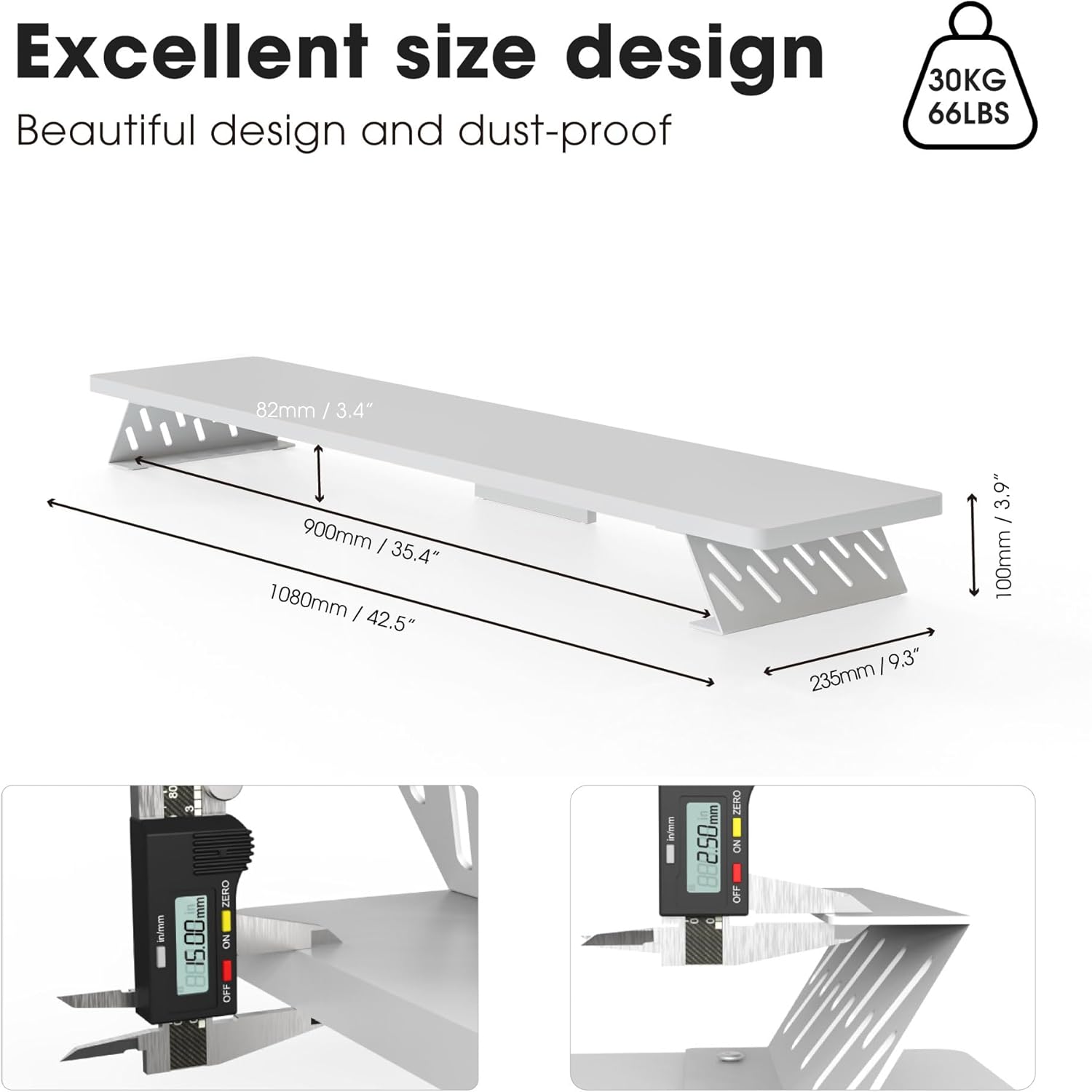
Figure 8.1: Detailed dimensions and material thickness of the monitor stand.
9. Garantia i Suport
Fenge products are manufactured with quality and durability in mind. This product comes with a standard manufacturer's warranty against defects in materials and workmanship. For warranty claims, technical support, or any questions regarding your Fenge Monitor Stand Riser, please contact Fenge customer service through the retailer's platform or the official Fenge weblloc.
Si us plau, conserveu el comprovant de compra per motius de garantia.