
DOOGEE Blade GT Pro
DOOGEE Blade GT Pro 5G Rugged Smartphone User Manual
Model: Blade GT Pro
1. Introducció
Welcome to the user manual for your DOOGEE Blade GT Pro 5G Rugged Smartphone. This guide provides essential information to help you set up, operate, maintain, and troubleshoot your device. Please read this manual thoroughly to ensure optimal performance and longevity of your smartphone.

Imatge 1.1: Davant i darrere view of the DOOGEE Blade GT Pro 5G Rugged Smartphone.
2. Contingut del paquet
Verifiqueu que tots els elements siguin presents al paquet del producte:
- 1 x DOOGEE Blade GT Pro Rugged Smartphone
- 1 x cable USB tipus C
- 1 carregador de 18 W
- 1 x Screen-printed Protective Film (Pre-applied)
- 1 x Anti-explosion Film
- 1 x Funda del telèfon
- 1 x Caixa d'embalatge
- 1 x User Manual and Warranty Card

Image 2.1: Illustration of the DOOGEE Blade GT Pro package contents.
3. Dispositiu acabatview
Familiarize yourself with the physical components and features of your DOOGEE Blade GT Pro smartphone.
3.1 Physical Dimensions and Durability
The Blade GT Pro features a slim 10.5 mm body and weighs approximately 260 grams, designed for a comfortable grip. It is built with aerospace-grade metal for enhanced durability.

Image 3.1: Device thickness and weight for ergonomic handling.
3.2 LED Light Effect
The device includes a customizable LED light bar on the back that provides visual alerts for calls, messages, and music synchronization. It supports various effects triggered by scenarios such as charging, gaming mode, or party mode. Brightness and lighting styles (constant-on, strobe) are adjustable.

Image 3.2: Customizable RGB lighting effects.
4. Configuració
4.1 Instal·lació de la targeta SIM i la targeta MicroSD
- Localitza la safata de la targeta SIM al lateral del dispositiu.
- Introduïu l'eina d'expulsió de la SIM al forat petit que hi ha al costat de la safata i premeu fermament fins que la safata surti.
- Col·loqueu la targeta (o targetes) Nano-SIM i/o la targeta MicroSD a les ranures designades de la safata. Assegureu-vos que els contactes daurats estiguin mirant cap avall.
- Torneu a inserir la safata amb cura al telèfon fins que quedi alineada amb la carcassa del dispositiu.

Image 4.1: Dual-card slot for SIM and MicroSD.
4.2 Encès inicial
- Press and hold the Power button (located on the side of the device) until the DOOGEE logo appears on the screen.
- Segueix les instruccions que apareixen a la pantalla per completar la configuració inicial, inclosa la selecció d'idioma, la connexió Wi-Fi i la configuració del compte de Google.
5. Instruccions de funcionament
5.1 Pantalla i navegació
The Blade GT Pro features a 6.72-inch FHD+ IPS display with a 120Hz refresh rate for smooth visuals. Navigation is primarily via touchscreen gestures and on-screen buttons.

Image 5.1: High refresh rate display for smooth visuals.
5.2 Ús de la càmera
The device is equipped with a 108MP main camera, an 8MP wide-angle lens, a 2MP macro camera, and a 32MP selfie camera. Various modes are available for different photographic needs.
- Càmera principal: Per a fotos d'alta resolució.
- Lent gran angular: Capturar escenes més àmplies.
- Càmera macro: Per a primers plans detallats.
- Càmera selfie: For self-portraits and video calls.
- Modes especials: HDR, Night Mode, 360° Panorama, and Underwater Mode.

Image 5.2: Camera features and example shots.
5.3 Funcions de seguretat
The Blade GT Pro offers multiple security options:
- Desbloqueig per empremta digital lateral: Registra la teva empremta digital per a un accés ràpid i segur.
- Identificació facial: Utilitza el reconeixement facial per desbloquejar el dispositiu.
- PIN/Patró/Contrasenya: Opcions de seguretat estàndard d'Android.
5.4 Funcionalitat NFC
NFC (Near Field Communication) allows for contactless transactions and quick pairing with compatible devices. Enable NFC in your phone's settings to use features like Google Pay.
6. Manteniment
6.1 Neteja del vostre dispositiu
To clean your smartphone, use a soft, lint-free cloth. Avoid abrasive materials or harsh chemicals that could damage the screen or casing. For stubborn dirt, slightly dampen el drap amb aigua.
6.2 Water, Dust, and Drop Resistance
The DOOGEE Blade GT Pro is certified with IP68/IP69K and MIL-STD-810H standards, indicating strong resistance to water, dust, and drops. While designed for rugged use, proper care is still recommended:
- Assegureu-vos que totes les cobertes dels ports estiguin ben tancades abans d'exposar el dispositiu a l'aigua o la pols.
- Avoid intentional submersion in water beyond specified depths or durations.
- Esbandiu el telèfon amb aigua neta si està exposat a aigua salada o altres líquids corrosius i eixugueu-lo bé.
- While drop-resistant, extreme impacts can still cause damage.
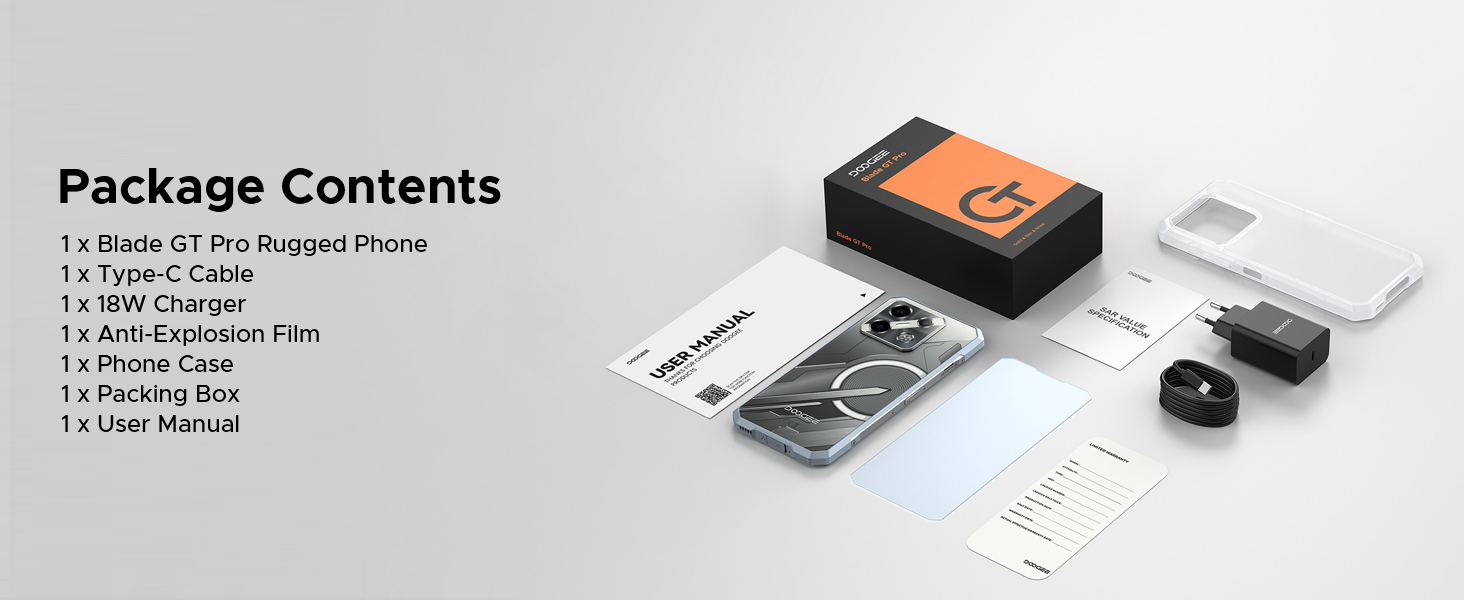
Image 6.1: Durability features for outdoor use.
6.3 Actualitzacions de programari
Regularly check for and install software updates to ensure your device has the latest features, security patches, and performance improvements. You can usually find this option in the 'Settings' menu under 'System' or 'About Phone'.
7. Solució De Problemes
This section addresses common issues you might encounter with your DOOGEE Blade GT Pro.
| Problema | Possible solució |
|---|---|
| El dispositiu no s'encén | Assegureu-vos que la bateria estigui carregada. Connecteu el carregador i espereu uns minuts abans d'intentar tornar-lo a engegar. Si no respon, feu un reinici forçat mantenint premut el botó d'engegada durant 10-15 segons. |
| Mala connectivitat de xarxa | Check if the SIM card is correctly inserted. Verify that you are within network coverage. Restart the device. Ensure your carrier supports the device's frequency bands (Note: Does not support Verizon and AT&T networks). |
| La bateria s'esgota ràpidament | Reduce screen brightness. Close unused applications running in the background. Disable Wi-Fi, Bluetooth, or GPS when not in use. Check for power-intensive apps in battery settings. |
| Les aplicacions es bloquegen o es bloquegen | Clear the cache of the problematic app. Update the app to its latest version. If the issue persists, uninstall and reinstall the app. Ensure the phone's operating system is up to date. |
| Fingerprint scanner not working | Ensure your finger is clean and dry. Re-register your fingerprint. Check for any physical obstruction or damage to the sensor. |
8. Especificacions
Key technical specifications for the DOOGEE Blade GT Pro 5G Rugged Smartphone:
| Característica | Detall |
|---|---|
| Model | Blade GT Pro |
| Sistema operatiu | Android 14 |
| Processador | MediaTek Dimensity 7250, 6nm Octa-core |
| RAM | 32GB (12GB physical + 20GB extended) LPDDR5 |
| Emmagatzematge intern | 256 GB (ampliable fins a 2 TB amb MicroSD) |
| Mostra | 6.72-inch FHD+ IPS, 1080x2408 resolution, 120Hz Refresh Rate, 380 nits brightness |
| Càmera posterior | 108MP Main, 8MP Wide-Angle, 2MP Macro |
| Càmera frontal | 32MP |
| Bateria | 5800mAh, 18W Fast Charging, OTG Support |
| Connectivitat | 5G, Wi-Fi 6, Bluetooth, NFC, USB Type-C |
| Durabilitat | IP68/IP69K, MIL-STD-810H (Waterproof, Dustproof, Drop-resistant) |
| Seguretat | Side Fingerprint Unlock, Face ID |
| Dimensions | 10.5 mm de gruix |
| Pes | 260 grams |
9. Garantia i Suport
9.1 Informació de la garantia
Your DOOGEE Blade GT Pro smartphone comes with a limited manufacturer's warranty. Please refer to the 'User Manual and Warranty Card' included in your package for specific terms, conditions, and duration of the warranty. Keep your proof of purchase for warranty claims.
9.2 Atenció al client
For further assistance, technical support, or service inquiries, please contact DOOGEE customer service through their official weblloc web o la informació de contacte que es proporciona a la documentació de la garantia.
Ask a question about this manual
Ask about setup, troubleshooting, compatibility, parts, safety, or missing instructions. Manuals+ will review the question and use this page’s manual context to help answer it.