
1. Introducció
This manual provides detailed instructions for the installation, operation, and maintenance of your DATOUBOSS 11KW 48V Hybrid Pure Sine Wave Inverter. Please read this manual thoroughly before installation and use to ensure proper function and safety. Keep this manual for future reference.

Figure 1: DATOUBOSS 11KW Hybrid Pure Sine Wave Inverter units.
2. Característiques clau
- Sortida d'alta potència: 11KW 48V DC to 230V AC pure sine wave hybrid inverter.
- Integrated MPPT: Features two built-in 160A MPPT charge controllers.
- Connectivitat flexible: Supports parallel operation of up to 9 units and grid connection.
- Pantalla avançada: Equipped with an LCD display for real-time system data and operational status.
- Paràmetres configurables: Vol d’entradatage range and AC/solar charger priority can be configured via LCD settings.
- Power Statistics: View power statistics and analysis, with data storage for extended periods, even without Wi-Fi connection.
- Multiple Priority Modes: Three selectable priority modes: grid priority, solar priority, and battery priority, ensuring continuous power supply.
- Sortida d'ona sinusoïdal pura: Provides stable, high-quality AC power for sensitive electronics.
- Protecció integral: Includes short circuit, overcurrent, overvoltage, minvartage, overtemperature, overload, and fuse reverse connection protection.
- Gestió de la bateria: Supports lithium battery activation function and regular charging/discharging to extend battery life.
- Ports de sortida dual: Connects to two sockets, one for common output and the other for backup.
- Aplicació àmplia: Suitable for RVs, camping boats, home emergencies, and various appliances like stoves, rice cookers, lamps, TVs, and fans.
3. Contingut del paquet
Upon opening the package, verify that all items listed below are present and undamaged. If any items are missing or damaged, please contact your dealer immediately.
- DATOUBOSS 11KW Hybrid Inverter Unit
- Cargols i accessoris de muntatge
- Communication Cables (USB, RS232, RS485)
- Manual d'usuari
Video 1: Unboxing the DATOUBOSS 11KW Hybrid Inverter, showing the unit and included accessories.
4. Producte acabatview i Components
Familiarize yourself with the inverter's physical layout and connection points.

Figura 2: Panell posterior view of the DATOUBOSS Inverter, highlighting various input and output ports.
Panell frontal:
- Pantalla LCD: Shows system data and operational status.
- Indicadors d'estat: AC/INV (AC/Inverter), CHG (Charging), FAULT (Error).
- Tecles de funció: ESC, UP, DOWN, ENTER for navigation and settings adjustment.
Connexions del panell posterior:
- PV1 & PV2 Inputs: For connecting solar panel arrays.
- Entrada de CA: For connecting to the utility grid or generator.
- Sortida principal: Primary AC output for loads.
- Second Output: Secondary AC output for loads.
- RS232 & RS485 Ports: For communication and monitoring.
- Parallel Connection Port: For connecting multiple inverters in parallel.
- Contacte sec: For external control or signaling.
- Entrada de corrent continu: For connecting to the battery bank.
- Interruptor d'encesa / apagat: To power the unit on or off.

Figura 3: Detallada view of the inverter's rear panel, showing all connection points and their labels.
5. Especificacions
The following table outlines the technical specifications for the DATOUBOSS DT4811B Hybrid Inverter:
| Paràmetre | Valor |
|---|---|
| Model | DT4811B |
| Capacitat | 11000VA/11000W |
| Interval de temperatura de funcionament | -10~50°C |
| Grau de Protecció | IP21 |
| Entrada de CC (bateria) | 48VDC, 254.6A |
| Sortida de CA | 230VAC, 50/60Hz, 47.8A, 1Φ |
| Carregador de CA | 54VDC, 150A |
| AC Input (Grid/Generator) | 230VAC, 50/60Hz, 60A, 1Φ |
| Potència del panell solar | 2x5500W |
| Max Charging Current (Solar) | 150A |
| Solar VoltagInterval e (Vmp) | 90-500VDC |
| Best VoltagInterval e (Vmp) | 300-400VDC |
| Max Solar Voltage | 500VDC |
| Pes | 19.2 quilos |
| Dimensions | 70.8 x 57 x 24.1 cm |
| Número de sèrie (Ex.ample) | 20241020 0476 |

Figure 4: Product label displaying detailed technical parameters and serial number.
6. Configuració i instal·lació
Safety Warning: During any installation or maintenance operation, please ensure the power supply is completely turned off to prevent electric shock or damage to the equipment.
6.1 Connexió de la bateria
- Remove the side panel of the inverter to access the battery terminals.
- Connect the positive (red) battery cable to the inverter's positive (+) DC input terminal.
- Connect the negative (black) battery cable to the inverter's negative (-) DC input terminal.
- Ensure correct polarity before tightening the connections. Verify that all wiring is secure.
6.2 AC Input and Output Connections
- Connect the AC input wires (Live, Neutral, Ground) to the designated AC Input terminals on the inverter.
- Connect the main AC output wires (Live, Neutral, Ground) to the Main Output terminals.
- If using, connect the second AC output wires to the Second Output terminals.
- It is recommended to install an appropriate fuse or circuit breaker for both AC input and output lines for protection.
6.3 Connexió del panell solar
Connect your solar panel arrays to the PV1 and PV2 inputs. Ensure the total voltage and current from your solar panels do not exceed the inverter's maximum ratings (Max Solar Voltage: 500VDC, Max Charging Current: 150A).
Video 2: Demonstrates battery and AC wiring connections, emphasizing safety and correct polarity.
7. Instruccions de funcionament
After all connections are securely made, you can power on the inverter and configure its settings using the LCD display and function keys.
7.1 Engegada/apagada
- Assegureu-vos que tot el cablejat sigui correcte i segur.
- Turn on the DC input breaker (if installed) for the battery.
- Flip the Power ON/OFF switch on the inverter to the 'ON' position.
- The LCD display will light up, and the inverter will initiate its startup sequence.
Pantalla LCD 7.2 i navegació
The LCD display provides real-time information and allows for system configuration. Use the function keys (ESC, UP, DOWN, ENTER) to navigate through menus and adjust settings.
- ESC: Exits the current menu or setting.
- AMUNT AVALL: Navega per les opcions del menú o ajusta els valors.
- ENTRAR: Selecciona una opció o confirma una configuració.
Refer to the detailed user manual for specific menu structures and parameter settings, including output voltage range, charger priority (AC/solar), and battery type configuration.
8. Operació en paral·lel
The DATOUBOSS 11KW Hybrid Inverter supports parallel operation of up to 9 units to increase overall power capacity. This feature allows for scalable power solutions tailored to specific energy demands.
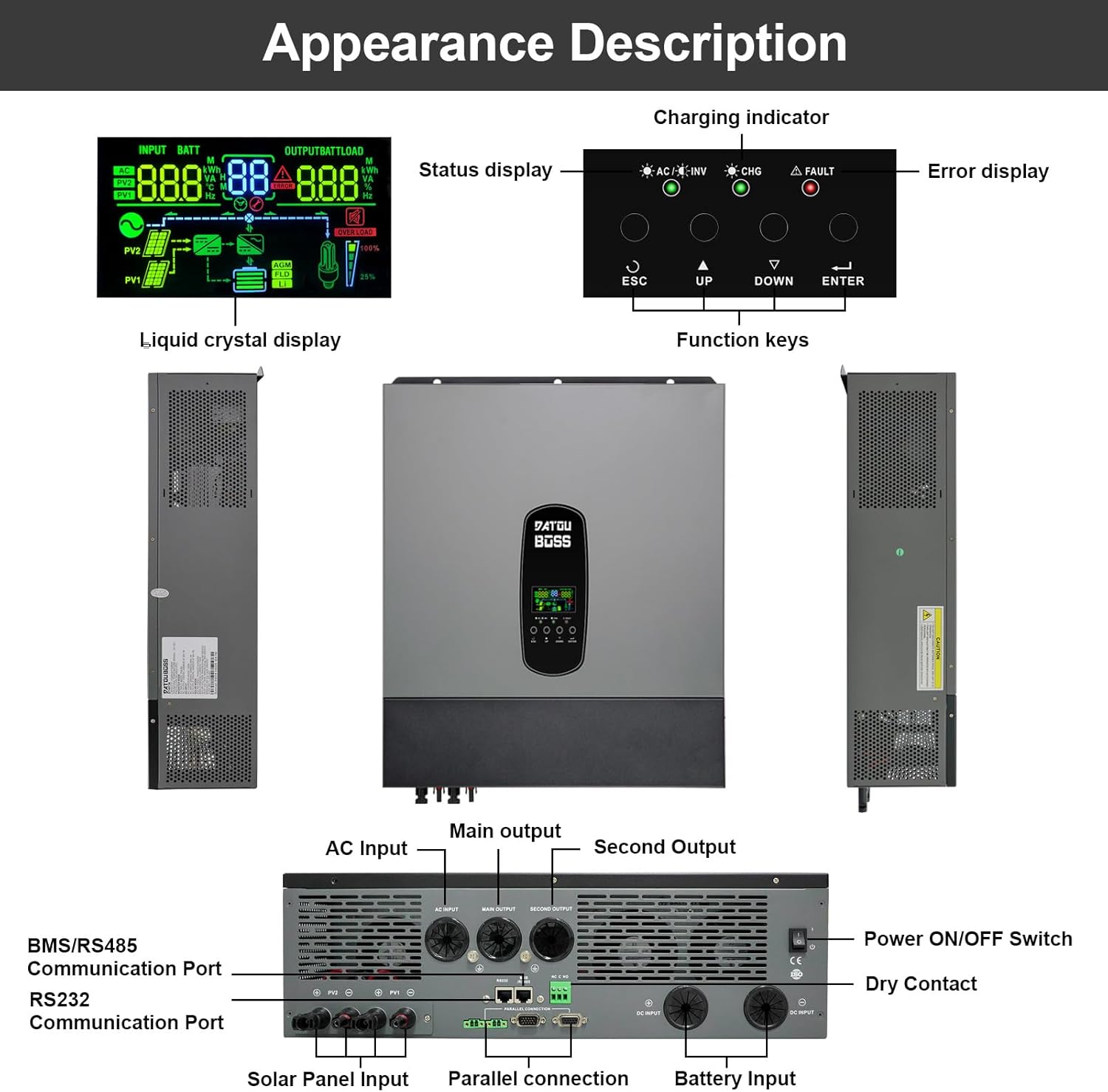
Figure 5: Diagrams illustrating the wiring for two and three inverters in parallel, including communication connections.
For detailed instructions on parallel connection, including wiring diagrams and configuration steps, please consult the comprehensive user manual provided with your inverter. Proper communication cabling and settings are crucial for stable parallel operation.
9. Battery-Free Operation
This hybrid inverter supports battery-free operation, allowing it to be powered directly from photovoltaic (PV) modules to supply alternating current for homes or other loads without the need for batteries. This feature offers greater flexibility in system design and can reduce initial investment or battery usage.
9.1 How Battery-Free Operation Works:
- Direct PV Power: The inverter directly converts DC power from the PV modules into AC power for connected loads.
- Grid-Assisted Supply: If PV generation is insufficient to meet load demand, the system can draw energy from the grid to ensure continuous power supply.
9.2 Avançtages:
- Reduced Initial Costs: Operate the system without batteries initially, adding them later if needed.
- Improved System Flexibility: Direct use of solar power during peak generation, reducing grid dependence.
- Reduced Battery Loss: Extends battery life by skipping battery usage when solar power is abundant.
9.3 Limitations and Precautions:
- No Power Supply at Night: In battery-free mode, there is no power supply from the inverter at night or on cloudy days if there is no grid access.
- PV Generation Fluctuations: Load power supply may be affected by unstable solar generation (e.g., cloudy weather).
9.4 Applicable Scenarios:
- Daytime peak electricity users.
- Industrial and agricultural pumping stations in areas with sufficient sunlight.

Figure 6: Visual explanation of battery-free operation, its benefits, and how it functions.

Figure 7: Summary of advantages, limitations, and applicable scenarios for battery-free operation.
10. Característiques de protecció
The DATOUBOSS 11KW Hybrid Inverter is equipped with multiple protection functions to ensure safe and reliable operation of your system and connected appliances.

Figura 8: Mésview of the inverter's comprehensive 360-degree protection features.
- Protecció contra curtcircuits: Prevents damage from short circuits in the output.
- Protecció de sobrecàrrega: Shuts down the inverter if the connected load exceeds its capacity.
- Protecció sobre corrent: Mesures de seguretat contra el flux excessiu de corrent.
- Protecció de farciment: Impedeix el flux de corrent invers.
- Més del voltage Protecció: Protects against excessively high voltage nivells.
- Protecció contra sobretemperatura: Shuts down the unit if internal temperatures become too high.
- Sota el voltage Protecció: Prevents damage from excessively low voltage nivells.
- Protecció de sobrecàrrega: Protegeix les bateries de la sobrecàrrega.
11. Manteniment
Un manteniment regular garanteix la longevitat i el rendiment òptim del vostre inversor.
- Neteja: Periodically clean the inverter's exterior and ventilation openings to prevent dust accumulation, which can hinder cooling. Use a dry, soft cloth.
- Comprovacions de connexió: Regularly inspect all electrical connections (battery, AC, solar) for tightness and signs of corrosion. Tighten any loose connections.
- Condicions ambientals: Ensure the inverter is operated within its specified temperature range (-10~50°C) and in a well-ventilated area.
- Actualitzacions de firmware: Comproveu el del fabricant weblloc web per a qualsevol actualització de firmware disponible per garantir un rendiment òptim i l'accés a noves funcions.
12. Solució De Problemes
Aquesta secció proporciona els passos bàsics per a la resolució de problemes comuns. Per a problemes més complexos, poseu-vos en contacte amb l'atenció al client.
Problemes comuns i solucions:
- L'inversor no s'encén:
- Check battery connections for proper polarity and tightness.
- Comproveu el volum de la bateriatage es troba dins del rang de funcionament.
- Ensure the Power ON/OFF switch is in the 'ON' position.
- Sense sortida de CA:
- Check AC output wiring and circuit breakers.
- Verify that the inverter is not in fault mode (FAULT indicator).
- Check for overload conditions; reduce connected loads.
- Problemes de càrrega:
- For solar charging, check solar panel connections and ensure sufficient sunlight.
- For AC charging, verify AC input connection and grid power availability.
- Check charging settings on the LCD display.
- Codis d'error a la pantalla LCD:
- Refer to the detailed user manual for a list of error codes and their corresponding solutions.
13. Garantia i Suport
DATOUBOSS is committed to product quality and customer satisfaction.
- Garantia: Aquest producte ve amb una garantia de 5 anys.
- Atenció al client: We provide 24-hour professional customer service.
- Contacte: If you have any product-related questions or require technical assistance, please do not hesitate to contact us through the Amazon reserved area. We have a specialized technical service team available to assist you.

Figure 9: Icons representing 10 years lifespan, 5 years guarantee, 24 hours response, and local warehouses.


