
Introducció
This manual provides essential instructions for the safe and efficient use of your JUKI jupre HZL-009S embroidery machine. Please read this manual thoroughly before operating the machine and keep it for future reference.
Instruccions importants de seguretat
- Always unplug the machine from the electrical outlet immediately after using and before cleaning, making any adjustments, or removing any parts.
- No permeteu que els nens facin funcionar la màquina sense supervisió.
- Mantingueu els dits allunyats de totes les parts en moviment. Es requereix una cura especial al voltant de l’agulla de la màquina de cosir.
- Utilitzeu només els accessoris especificats pel fabricant.
- Never operate the machine if it has a damaged cord or plug, if it is not working properly, or if it has been dropped or damaged.
Components del producte
The JUKI jupre HZL-009S embroidery machine set includes the following main components and accessories:
- JUKI jupre HZL-009S Sewing Machine Body
- EM-2 Embroidery Machine Unit
- Instruction Manual (PDF print)
- Thread (1 spool)
- Bobbin (1 unit)
- Test Sewing Fabric
- Various Presser Feet
- Embroidery Presser Foot
- Medium Embroidery Hoop
- Thread Spool Holder
- Coberta de la màquina
- Bonus Embroidery Data Card (1 unit)
- Operation DVD

Image: JUKI jupre HZL-009S embroidery machine shown with its included accessories and the instruction manual.
Configuració
1. Desembalatge i col·locació
Carefully remove all components from the packaging. Place the machine on a stable, level surface. Ensure there is adequate space around the machine for operation and ventilation.

Imatge: Lateral view of the JUKI jupre HZL-009S embroidery machine, showing its compact design and power input.
2. Connexió d'alimentació
Connect the power cord to the machine and then to a suitable electrical outlet. Ensure the voltage matches your local power supply. The machine features an LED bulb for improved visibility during operation.
3. Enfilar la màquina
Follow the threading path indicated on the machine. This model includes an automatic needle threader for convenience. Ensure the bobbin is correctly inserted into its compartment.

Imatge: Primer pla view of the needle and presser foot area, showing the needle threaded and ready for sewing.

Image: Open bobbin compartment, illustrating the correct placement of the bobbin for proper thread tension.
4. Attaching the Embroidery Unit (EM-2)
If performing embroidery, attach the EM-2 embroidery unit to the main machine body as per the instructions in the dedicated embroidery unit manual. Secure the embroidery hoop with your fabric.
Funcionament
1. Basic Sewing Functions
The HZL-009S supports various basic sewing functions, including straight stitching, zigzag stitching, and buttonhole stitching. Select your desired stitch pattern and adjust stitch length and width as needed using the control panel.

Imatge: A sample of test stitches on black fabric, demonstrating the machine's capability for various stitch types, including straight, zigzag, and decorative patterns. It also shows stitching through multiple layers of fabric.
2. Embroidery Operation
When using the EM-2 embroidery unit, load your desired embroidery design using the bonus embroidery data card or other compatible media. The machine will guide you through the color changes and stitching process. The operation DVD provides visual guidance for beginners.
Video: This video demonstrates the JUKI jupre HZL-009S embroidery machine actively stitching a detailed corn design. The needle precisely follows the pattern, showcasing the machine's embroidery capabilities.

Image: A close-up of a finished embroidered corn design on white fabric, highlighting the detail and color accuracy of the stitching.
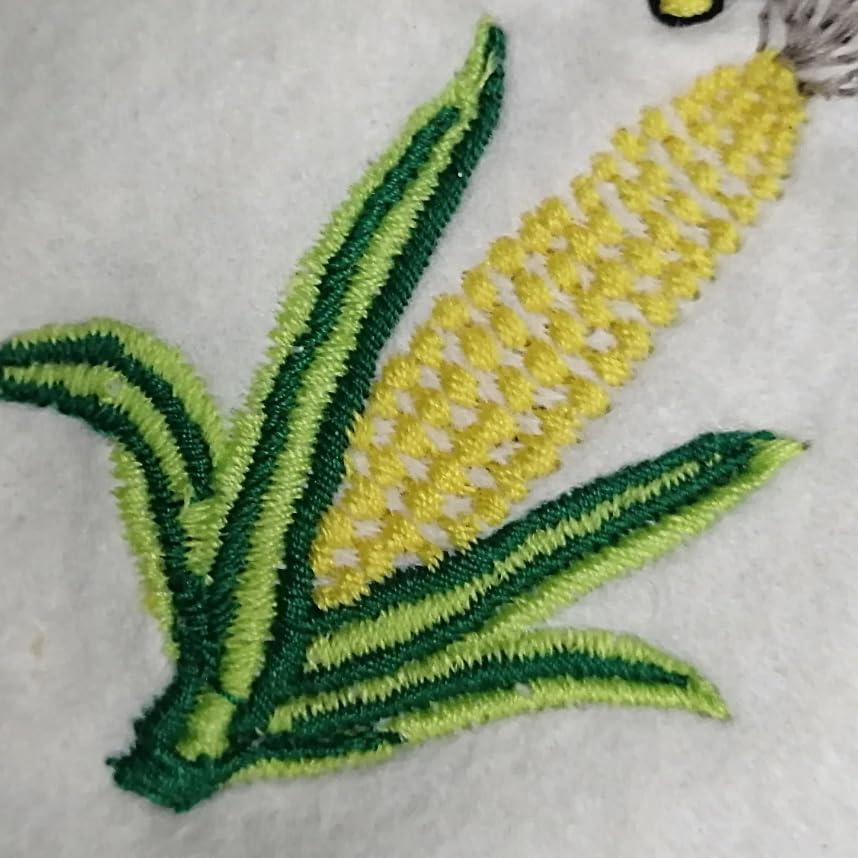
Image: A close-up of a finished embroidered cartoon figure design on white fabric, demonstrating the machine's ability to create various decorative patterns.
3. Automatic Thread Cutter
The machine is equipped with an automatic thread cutter function. This feature automatically trims the upper and bobbin threads at the end of a sewing or embroidery sequence, saving time and effort.
Manteniment
1. Neteja
Regularly clean the bobbin area, feed dogs, and needle plate to remove lint and dust. Use a soft brush or a small vacuum cleaner attachment. Always unplug the machine before cleaning.
2. Substitució d'agulla
Replace the needle frequently, especially when working with different fabric types or if the needle becomes dull or bent. The machine uses general-purpose HA needles. Currently, a #16 needle (for thick fabrics) is installed.
3. Lubricació
Refer to the full instruction manual for specific lubrication points and frequency. Over-lubrication can cause issues.
Resolució de problemes
| Problema | Causa possible | Solució |
|---|---|---|
| Punts saltats | Agulla incorrecta, agulla doblegada, enfilat incorrecte. | Replace needle, re-thread machine, ensure correct needle type for fabric. |
| Trencament del fil | Incorrect thread tension, poor quality thread, burr on needle plate. | Adjust tension, use quality thread, check for burrs and clean. |
| La màquina no arrenca | Power cord not connected, safety switch engaged. | Check power connection, ensure presser foot is down and embroidery unit is correctly attached. |
For more detailed troubleshooting, please refer to the comprehensive instruction manual or the operation DVD.
Especificacions
| Característica | Detall |
|---|---|
| Marca | JUKI |
| Model | jupre HZL-009S |
| Dimensions de la unitat principal (amplada x alçada x profunditat) | 464 x 309 x 188 mm (18.27 x 12.17 x 7.4 polzades) |
| Pes de la unitat principal | 12.2 kg (26.9 lliures) |
| Embroidery Unit (EM-2) Dimensions (W x H x D) | 365 x 130 x 320 mm (14.37 x 5.12 x 12.6 polzades) |
| Material | Ferro |
| Color | Blanc |
| Stitch Functions | Zigzag stitching, Buttonhole stitching, Straight stitching, Pattern stitching |
| Tipus d'agulla | General-purpose sewing machine HA needle (currently #16 for thick fabric) |
| Il·luminació | Bombeta LED |
| Característiques especials | Automatic thread cutter, Automatic needle threader |
Garantia i Suport
This product is a maintained used item. Please refer to the seller's terms and conditions for specific warranty information. For technical support or inquiries, please contact the seller directly.


