
Amazon Kindle Scribe Colorsoft
Amazon Kindle Scribe Colorsoft 32GB User Manual
Model: Kindle Scribe Colorsoft
Introducció
The Amazon Kindle Scribe Colorsoft is an advanced e-reader and digital notebook featuring an 11-inch paper-like color display. It is designed for reading, writing, and organizing notes, documents, and books with a natural pen-on-paper feel. This manual provides essential information for setting up, operating, and maintaining your device.
Característiques clau
- 11-inch Colorsoft Display: High-contrast, paper-like color display with front light for comfortable viewing and writing.
- Premium Pen: Included stylus for a natural writing experience, requiring no charging.
- Built-in Notebook with AI Tools: Organize thoughts, generate summaries, refine handwriting, and convert notes to text.
- Document Import: Directly import documents from Google Drive and Microsoft OneDrive for markup.
- Disseny prim i lleuger: At 5.4mm thin and 400g light, it offers portability and a large workspace.
- Llarga vida útil de la bateria: Weeks of battery life for both reading and writing on a single charge.

Image: The Amazon Kindle Scribe Colorsoft device shown with its Premium Pen. This is the main product image, highlighting the device's sleek design.

Image: The Kindle Scribe Colorsoft shown from an angle, emphasizing its thin profile and light weight, with text stating "Thin. Light. Fast."
Guia de configuració
- Carregueu el vostre dispositiu: Before first use, fully charge your Kindle Scribe Colorsoft using the included USB-C charging cable and a 20W USB-C power adapter. A full charge takes less than 3 hours.
- Encès: Manteniu premut el botó d'engegada situat al costat del dispositiu fins que la pantalla s'il·lumini.
- Escolliu l'idioma: Segueix les instruccions que apareixen a la pantalla per seleccionar l'idioma que prefereixis.
- Connecta't a Wi-Fi: Select your Wi-Fi network from the list and enter the password. The device supports 2.4 GHz and 5.0 GHz networks with WEP, WPA, WPA2, and WPA3 security.
- Registra el teu dispositiu: Sign in with your Amazon account credentials. If you do not have an Amazon account, you will be prompted to create one.
- Premium Pen Setup: The included Premium Pen does not require charging. It is typically paired automatically upon initial setup. If not, follow on-screen instructions to pair it.

Image: The Kindle Scribe Colorsoft displaying a page titled "Notes on creativity," demonstrating its note-taking capabilities during initial use.
Operating Your Kindle Scribe Colorsoft
Llibres de lectura
Access your library from the home screen. Tap on a book cover to open it. Use the touch screen to turn pages. Adjust font size, line spacing, and margins through the reading menu. The Colorsoft display provides a comfortable reading experience with its paper-like color and adjustable front light.

Image: A user holding the Kindle Scribe Colorsoft, demonstrating its auto-adjusting front light for comfortable reading in various lighting conditions.
Writing and Note-Taking
The Kindle Scribe Colorsoft allows you to write directly on books and documents, or create dedicated notebooks. The Premium Pen offers a natural writing feel due to the textured display surface and ultra-fast responsiveness.
- In Books/Documents: Tap on the screen to bring up the writing toolbar. Use the Premium Pen to highlight, annotate, or write notes. Active Canvas creates space for your notes, allowing you to expand margins or collapse them.
- Quaderns: Create new notebooks from the home screen. Utilize AI-powered tools to search, summarize, and gain insights from your notes. You can also refine your handwriting or convert notes to text.

Image: The Kindle Scribe Colorsoft screen showing colorful handwritten notes and diagrams, highlighting the Colorsoft display's ability to make notes stand out.

Imatge: Un primer pla view of the Premium Pen writing on the Kindle Scribe Colorsoft, emphasizing the textured surface and natural paper-like feel.

Image: The Kindle Scribe Colorsoft displaying a notebook with organized notes and a summary, illustrating its smart notebook features and AI capabilities.
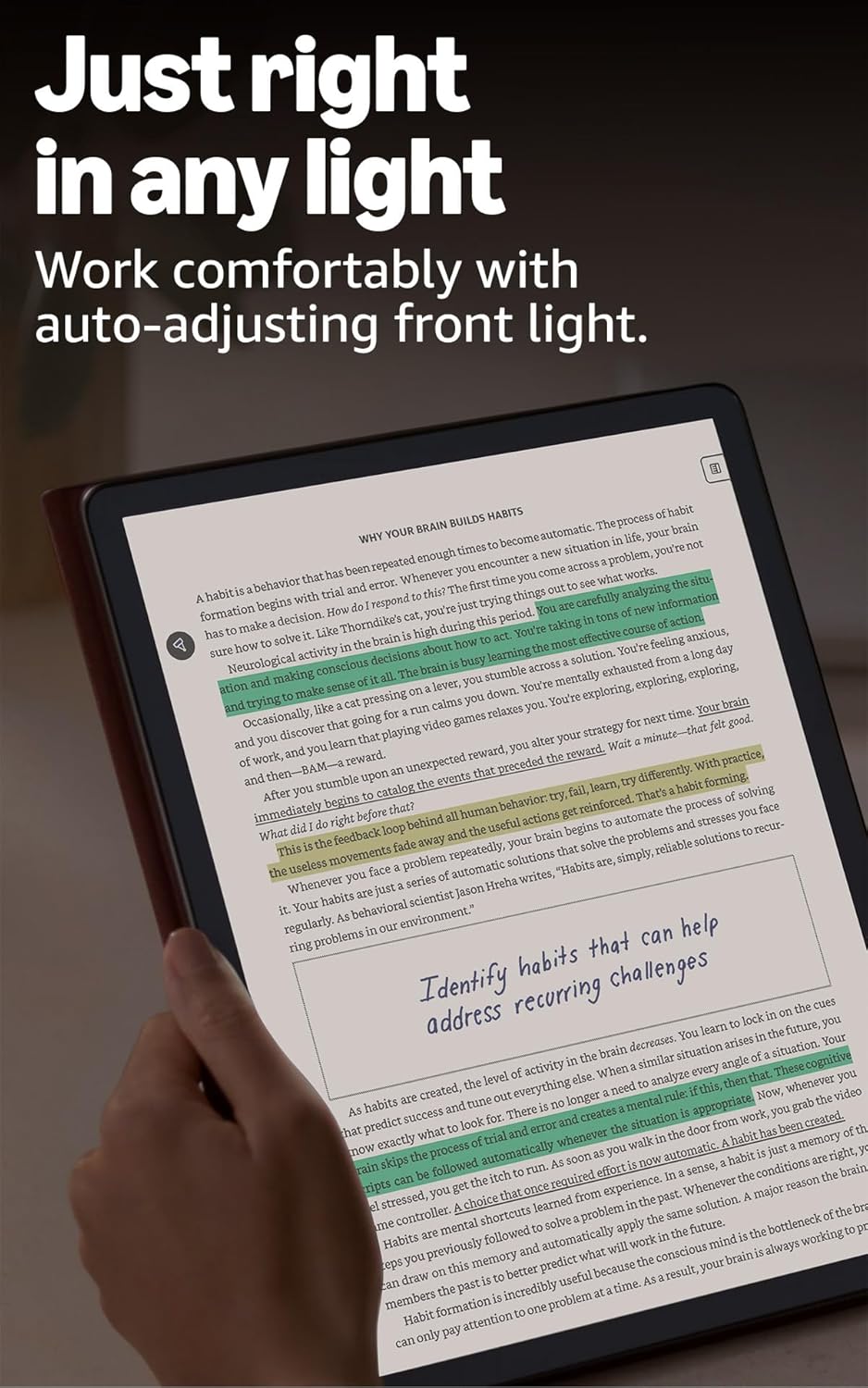
Image: A user making handwritten marks and notes directly on a document displayed on the Kindle Scribe Colorsoft, demonstrating the ability to annotate freely.
Importing and Exporting Documents
You can import documents directly from cloud services like Google Drive and Microsoft OneDrive for markup. Export your notebooks to Microsoft OneNote for further integration.
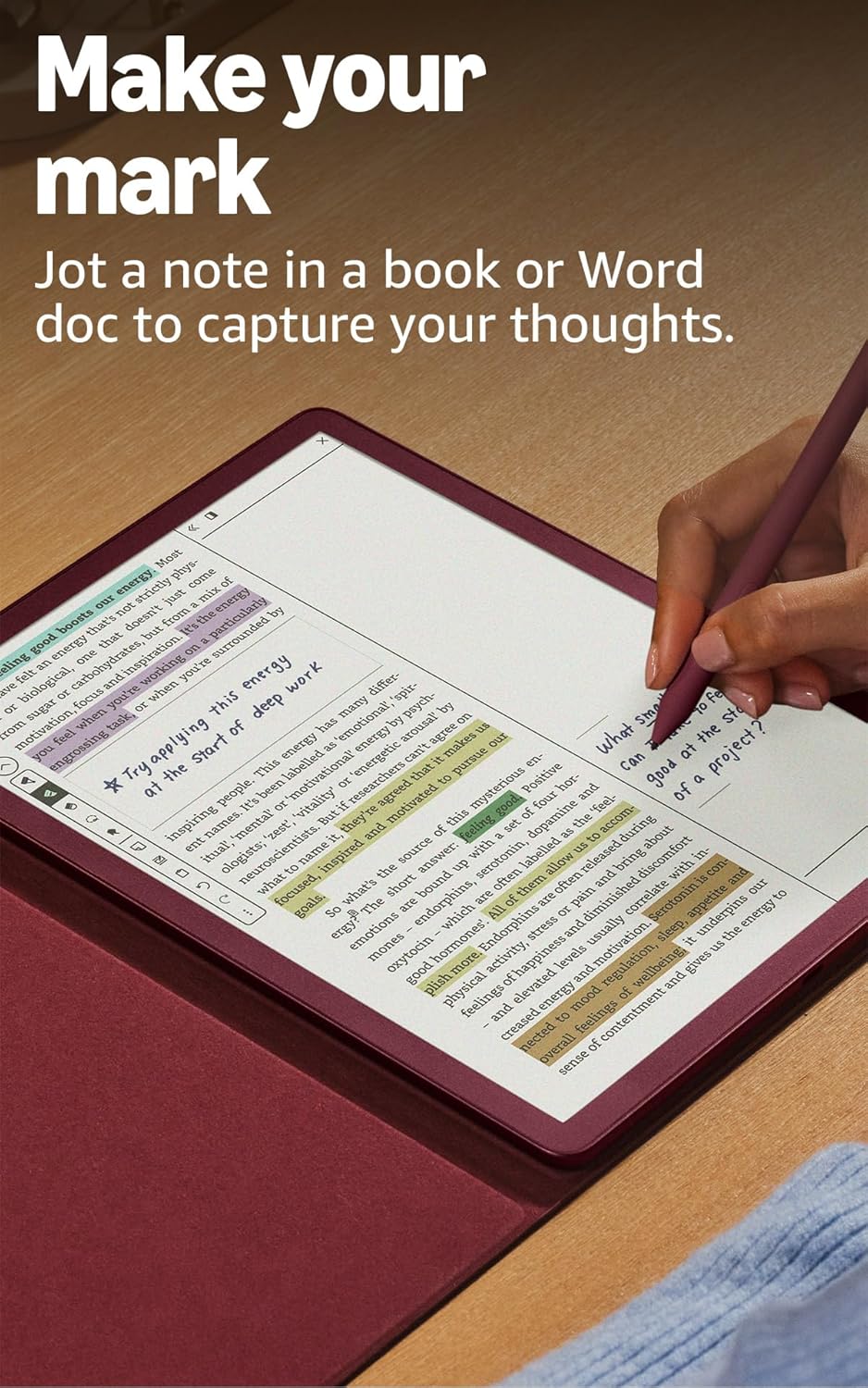
Image: The Kindle Scribe Colorsoft displaying a document with handwritten annotations, illustrating the "Docs on demand" feature for importing files from Google Drive and Microsoft OneDrive.
Manteniment
- Neteja de la pantalla: Use a soft, lint-free cloth to gently wipe the screen. Avoid abrasive materials or harsh cleaning solutions.
- Premium Pen Tip Replacement: The Premium Pen comes with replacement tips. If the tip wears down, gently pull out the old tip and insert a new one.
- Cura de la bateria: To maximize battery life, avoid exposing the device to extreme temperatures. Charge the device regularly, but it is not necessary to fully discharge it before recharging.
- Actualitzacions de programari: Your device will receive automatic software security updates for at least four years from its last availability as a new unit. Ensure your device is connected to Wi-Fi to receive these updates.
Resolució de problemes
- El dispositiu no respon: If your Kindle Scribe Colorsoft is unresponsive, press and hold the power button for 40 seconds until the device restarts.
- No es pot connectar a Wi-Fi: Ensure your Wi-Fi password is correct and that you are within range of your router. Try restarting your router and then your Kindle Scribe.
- El bolígraf no escriu: Check if the Premium Pen tip is properly seated. If the tip is worn, replace it with a new one. Ensure the pen is not damaged.
- La bateria s'esgota ràpidament: Reduce screen brightness, turn off Wi-Fi when not needed, and ensure no applications are running in the background. Battery life can vary based on usage, especially with heavy writing or annotation.
- Ajuda addicional: For more detailed troubleshooting or specific issues, refer to the Guia de l'usuari de Kindle or visit Amazon's customer support weblloc.
Especificacions
| Mostra | Amazon’s 11” Colorsoft display technology with built-in light, 300 ppi B&W, 150 ppi color, optimized font technology, 16-level gray scale. |
| Size (Device) | 7.4” x 9.6 x .21” (189 x 245 x 5.4mm excluding feet) |
| Size (Premium Pen) | 6.1” x .35” (155 x 8.8 mm) |
| Emmagatzematge al dispositiu | 32 GB (21 GB available to user) |
| Pes (dispositiu) | 14.1 oz (400 g) |
| Weight (Premium Pen) | .6oz (17g) |
| Connectivitat Wi-Fi | Supports 2.4 GHz and 5.0 GHz networks with WEP, WPA, WPA2, and WPA3 security. |
| Formats de contingut compatibles | Format Kindle 8 (AZW3), Kindle (AZW), TXT, PDF, MOBI sense protecció, PRC de forma nativa; PDF, DOCX, DOC, HTML, EPUB, TXT, RTF, JPEG, GIF, PNG, BMP mitjançant conversió; Format d'àudio Audible (AAX). |
| Battery Life (Reading) | Up to 8 weeks (half hour/day, wireless off, light setting 13). |
| Battery Life (Writing) | Up to 2 weeks (half hour/day, wireless off, light setting 13). |
| Temps de càrrega | Less than 3 hours with a 20W USB-C power adapter. |
| Inclòs a la Caixa | Kindle Scribe Colorsoft, Premium Pen, USB-C charging cable, and replacement tips. |
Garantia i Suport
Your Kindle Scribe Colorsoft includes a Servei i garantia limitada de 1 anys. Optional extended warranties (1-year, 2-year, or 3-year) are available for purchase separately for U.S. customers.
For warranty claims, technical support, or additional information, please visit the official Assistència per a dispositius d'Amazon weblloc web o contacteu amb el servei d'atenció al client d'Amazon.
For more information on accessibility features, including VoiceView screen reader, please visit Accessibilitat per a Kindle.
Ask a question about this manual
Ask about setup, troubleshooting, compatibility, parts, safety, or missing instructions. Manuals+ will review the question and use this page’s manual context to help answer it.