
1. Introducció
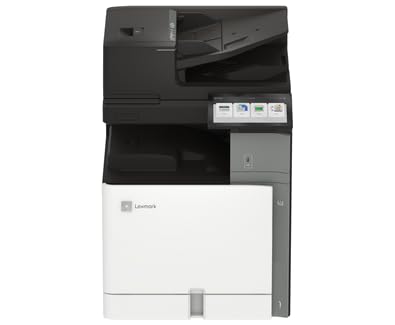
This manual provides essential information for the safe and efficient operation of your Lexmark CX962se MFP Color Laser Printer. Please read it thoroughly before using the device. The Lexmark CX962se is an A3 multifunction color laser printer designed for versatility and productivity, offering vivid prints up to 45 pages per minute, an intuitive 10-inch color touchscreen, and single-pass two-sided scanning capabilities.
2. Informació de seguretat
- Seguretat elèctrica: Always connect the printer to a grounded power outlet. Do not use damaged power cords. Disconnect the power cord before cleaning or servicing.
- Radiació làser: This product uses a laser. Use of controls or adjustments or performance of procedures other than those specified herein may result in hazardous radiation exposure.
- Superfícies calentes: Internal components of the printer can become hot during operation. Avoid touching areas marked with a hot surface warning.
- Ventilació: Ensure adequate space around the printer for proper ventilation to prevent overheating. Do not block ventilation openings.
- Cartutxos de tòner: Handle toner cartridges carefully. If toner comes into contact with skin or clothing, wash immediately with soap and cold water. Keep toner out of reach of children.
3. Contingut del paquet
Verifiqueu que tots els elements siguin presents al paquet:
- Lexmark CX962se MFP Color Laser Printer
- Cable d'alimentació
- Cartutxos de tòner inicials (negre, cian, magenta, groc)
- Guia de configuració
- Software and Documentation (may be provided via download link)
4. Configuració
Follow these steps to set up your Lexmark CX962se printer:
- Desembalatge: Carefully remove the printer from its packaging. Remove all protective tapes, films, and packing materials from the exterior and interior of the printer. Refer to the Setup Guide for specific locations.
- Col·locació: Place the printer on a stable, level surface with adequate space for ventilation and access to power and data ports.
- Connectar l'alimentació: Connecteu el cable d'alimentació a la impressora i després a una presa de corrent amb connexió a terra.
- Encesa inicial: Press the power button. Follow the on-screen instructions on the 10-inch color touchscreen to select language, region, and initial settings.
- Instal·leu els cartutxos de tòner: If not pre-installed, open the front cover and insert the toner cartridges into their corresponding slots until they click into place.
- Instal·lació de programari: Insert the software CD (if provided) into your computer or visit the official Lexmark support website to download the latest drivers and utilities for your operating system. Follow the on-screen instructions to complete the installation.
- Connexió a l'ordinador: Connect the printer to your computer using a USB cable (not included) or configure network connectivity as per the software instructions.
5. Instruccions de funcionament
This section covers basic operations of your printer.
- Tauler de control: The 10-inch color touchscreen provides access to all printer functions. Navigate through menus by tapping icons and swiping.
- Càrrega de paper: Open the paper tray, adjust the paper guides to fit the paper size (up to 8.5 x 11 inch), and load up to 250 sheets of plain paper. Ensure the paper is not creased or bent.
- Impressió: From your computer, open the document you wish to print. Select "Print" from the application's menu, choose the Lexmark CX962se printer, adjust settings as needed (e.g., color, duplex), and click "Print."
- Còpia: Place your document face-down on the scanner glass or face-up in the Automatic Document Feeder (ADF). On the printer's touchscreen, select "Copy," adjust settings like quantity, color, and duplex, then press "Start."
- Escaneig: Place your document on the scanner glass or in the ADF. On the touchscreen, select "Scan." Choose your desired scan destination (e.g., computer, network folder, email) and adjust scan settings (e.g., resolution, file type), then press "Start."
6. Manteniment
Un manteniment regular garanteix un rendiment òptim i una llarga vida útil de la impressora.
- Replacing Toner Cartridges: When a toner cartridge is low or empty, a message will appear on the touchscreen. Open the front cover, press the release lever for the empty cartridge, pull it out, and insert a new Lexmark genuine toner cartridge until it clicks into place. Close the cover.
- Neteja de la impressora: Use a soft, lint-free cloth to wipe the exterior of the printer. For the scanner glass, use a glass cleaner applied to the cloth (not directly to the glass) to remove smudges. Periodically clean the interior of the printer as instructed in the full user guide available on the Lexmark weblloc.
- Actualitzacions de firmware: Periodically check the Lexmark support website for firmware updates. Installing the latest firmware can improve performance and add new features. Follow the instructions provided with the update.
7. Solució De Problemes
Aquesta secció tracta problemes comuns que podeu trobar.
- Embussos de paper: If a paper jam occurs, the touchscreen will display instructions on how to clear it. Carefully open the indicated access points and remove any jammed paper, ensuring no torn pieces remain.
- Problemes de qualitat d'impressió: If prints are faded, streaky, or have incorrect colors, check the toner levels. Perform a print quality diagnostic from the printer's control panel. Clean the print heads or transfer belt if recommended.
- Problemes de connectivitat: Ensure the USB cable is securely connected to both the printer and the computer. If using a network connection, verify network cables are connected and IP settings are correct. Restart both the printer and the computer.
- Codis d'error: If an error code appears on the display, note the code and refer to the Lexmark support website or the comprehensive user guide for detailed solutions.
8. Especificacions
| Marca | Lexmark |
| Nom del model | CX962se (20L8250) |
| Tecnologia d'impressió | Làser |
| Funcions | Imprimir, copiar, escanejar |
| Velocitat màxima d'impressió (color) | 15 ppm |
| Velocitat màxima d'impressió (monocrom) | 35 ppm |
| Resolució | 600 x 600 ppp |
| Tecnologia de connectivitat | USB |
| Tipus d'escàner | ADF (alimentador automàtic de documents) |
| Capacitat màxima de fulls | 250 fulls |
| Mida màxima del suport | 8.5 x 11 polzada |
| Dimensions del producte (P x A x A) | 29" x 43" x 31" |
| Color de tinta | Negre, Cian, Magenta, Groc |
| Característica especial | Encès automàtic |
9. Garantia i Suport
Your Lexmark CX962se MFP Color Laser Printer comes with a Garantia limitada. For specific terms and conditions of the warranty, please refer to the documentation included with your product or visit the official Lexmark weblloc.
For further assistance, technical support, driver downloads, and additional documentation, please visit the official Lexmark support weblloc web. També hi podeu trobar informació de contacte per al servei d'atenció al client.
Oficial de Lexmark Weblloc: www.lexmark.com