
1. Producte acabatview
The NJTY T21L is a high-precision digital multimeter designed for electricians, DIY enthusiasts, and anyone requiring accurate electrical measurements. This versatile tool offers a wide range of functions, including voltage, current, resistance, capacitance, inductance, frequency, temperature, diode, and continuity testing.
Les característiques clau inclouen:
- Pantalla HD gran: A 6000-count display provides clear, easy-to-read measurements without parallax issues.
- Multifunctional Measurement: Capable of measuring DC/AC Voltage, DC/AC Current, Resistance, Capacitance, Inductance, Temperature, Diode, and Circuit Continuity.
- Vol. Sense contactetagDetecció de e (NCV): Detecta amb seguretat el volum de CAtage without direct contact, indicated by a light and buzzer alarm.
- Secure Test Lead Jacks: Designed for smooth and tight insertion of test leads, ensuring accurate and reliable connections.
- Retroiluminació i llanterna: Equipped with a display backlight and a built-in flashlight for convenient operation in low-light environments.

Davant view of the NJTY T21L Digital Multimeter, showcasing its large display and rotary switch.
2. Configuració i preparació
2.1 Instal·lació de la bateria
The NJTY T21L multimeter requires three (3) 1.5V AAA batteries (not included) for operation.
- Localitzeu la tapa del compartiment de la bateria a la part posterior del multímetre.
- Feu servir un tornavís per obrir la tapa del compartiment de la bateria.
- Insert three 1.5V AAA batteries, ensuring correct polarity (+ and -).
- Substituïu la tapa del compartiment de la bateria i fixeu-la amb el cargol.
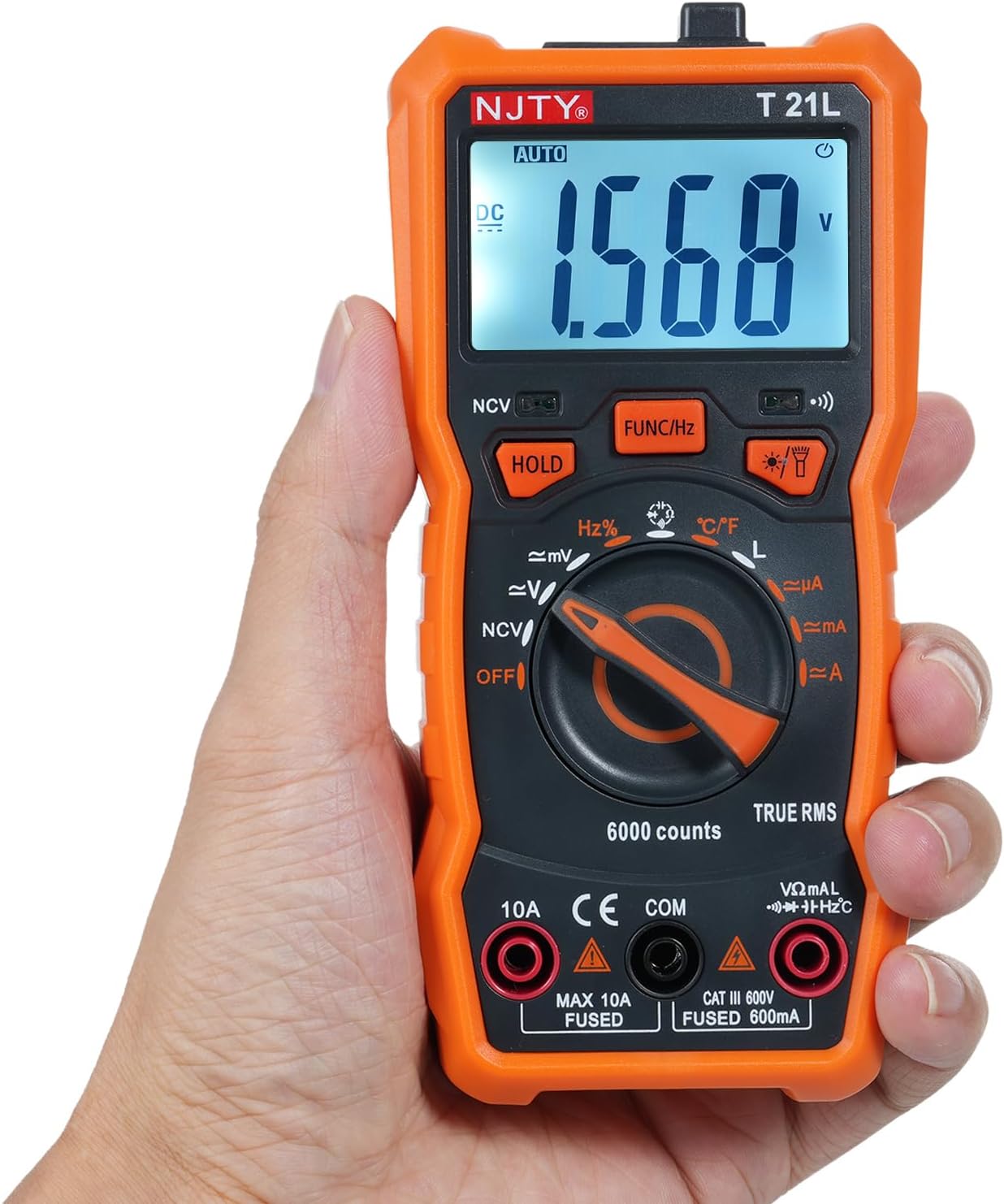
Image showing the open battery compartment for installing 3 AAA batteries.
2.2 Connexió dels cables de prova
Assegureu-vos sempre que els cables de prova estiguin connectats correctament abans de prendre mesures.
- Inseriu el negre cable de prova a la COM (Common) input terminal.
- Per a la majoria de mesures (voltage, resistance, capacitance, frequency, temperature, diode, continuity, and current up to 600mA), insert the vermell cable de prova a la VΩmA terminal d'entrada.
- Per a mesures de corrent elevat (fins a 10 A), inseriu el vermell cable de prova a la 10A terminal d'entrada.

The included red and black test leads used for making electrical measurements.

The multimeter with its test leads properly connected to the input terminals.
3. Instruccions de funcionament
3.1 Components del multímetre
Familiarize yourself with the various parts of the NJTY T21L multimeter:

This diagram identifies all key components and controls of the NJTY T21L digital multimeter.
- Llanterna: Located at the top, provides illumination for work areas.
- NCV Sensing Area: Top-front area for non-contact voltage detecció.
- Pantalla LED: Mostra lectures de mesurament i indicadors.
- Buzzer Indicator Light: Illuminates and buzzes for NCV and continuity.
- Flashlight/Backlight Button: Activates the flashlight and display backlight.
- Gear Rotary Switch: Selects the primary measurement function.
- Resistència/Volumtage Input Terminal (VΩmA): Per al voltage, resistance, capacitance, frequency, temperature, diode, continuity, and low current measurements.
- Common Terminal (COM): For the black test lead.
- Current Input Terminal (10A): For high current measurements (up to 10A).
- Data Hold Button (HOLD): Congela la lectura actual a la pantalla.
- Function Switch/Frequency Button (FUNC/Hz): Toggles between sub-functions within a rotary switch setting (e.g., AC/DC voltage, diode/continuity) or activates frequency measurement.
- NCV Indicator Light: Illuminates during NCV detection.
3.2 Basic Measurement Procedures
Always ensure the multimeter is set to the correct function and range before connecting to a circuit. Start with a higher range if the expected value is unknown.
3.2.1 DC/AC Voltage Measurement (V~, V=)
- Poseu el commutador rotatiu a la V~ (Volum AC)tage) o V= (DC Voltage) posició.
- Connecteu el cable de prova vermell al VΩmA terminal i el test negre condueixen al COM terminal.
- Connecteu les sondes de prova en paral·lel al component o circuit que s'ha de mesurar.
- Llegeix el voltage valor a la pantalla.
3.2.2 Mesura de resistència (Ω)
- Poseu el commutador rotatiu a la Ω Posició (de resistència).
- Connecteu el cable de prova vermell al VΩmA terminal i el test negre condueixen al COM terminal.
- Assegureu-vos que el circuit estigui desenergitzat abans de mesurar la resistència.
- Connecteu les sondes de prova a través del component.
- Llegiu el valor de resistència a la pantalla.
3.2.3 Continuity Test and Diode Test
- Poseu el commutador rotatiu a la Díode/Continuitat posició.
- Connecteu el cable de prova vermell al VΩmA terminal i el test negre condueixen al COM terminal.
- Premeu el botó FUNC/Hz button to toggle between Diode Test and Continuity Test.
- For Continuity: Touch the probes to the ends of the circuit. A continuous beep indicates continuity.
- For Diode: Connect the red probe to the anode and the black probe to the cathode. The display shows the forward voltage drop. Reverse the probes; an open circuit (OL) indicates a good diode.
3.2.4 Mesura de la capacitança (F)
- Poseu el commutador rotatiu a la Capacitat posició.
- Connecteu el cable de prova vermell al VΩmA terminal i el test negre condueixen al COM terminal.
- Assegureu-vos que el condensador estigui completament descarregat abans de la mesura.
- Connecteu les sondes de prova als terminals del condensador.
- Llegiu el valor de la capacitat a la pantalla.
3.2.5 DC/AC Current Measurement (µA, mA, A)
Precaució: Always connect the multimeter in series with the circuit. Never connect it in parallel across a voltage source when measuring current, as this can damage the meter and the circuit.
- Set the rotary switch to the appropriate current range (µA, mA, or A).
- For currents up to 600mA, connect the red test lead to the VΩmA terminal. For currents up to 10A, connect the red test lead to the 10A terminal. The black test lead always goes to COM.
- Open the circuit where current is to be measured and insert the multimeter in series.
- Llegiu el valor actual a la pantalla.
3.2.6 Vol. sense contactetage (NCV) Detecció
- Poseu el commutador rotatiu a la NCV posició.
- Move the NCV sensing area (top of the meter) close to the AC voltage font.
- El llum indicador NCV s'il·luminarà i el brunzidor sonarà, amb incrementsasing frequency as the meter gets closer to the voltage font.
3.2.7 Mesura de temperatura (°C/°F)
- Poseu el commutador rotatiu a la ° C / ° F posició.
- Connect the temperature probe (if included) to the VΩmA i COM terminals, observing polarity.
- Place the tip of the temperature probe on the object or area whose temperature is to be measured.
- Llegiu el valor de la temperatura a la pantalla. Premeu FUNC/Hz per canviar entre Celsius i Fahrenheit.
3.3 Funcions especials
- Conservació de dades: Premeu el botó MANTENIM per congelar la lectura actual a la pantalla. Premeu-lo de nou per alliberar-la.
- Retroiluminació/Llanterna: Premeu el botó Flashlight/Backlight Button to turn on the display backlight. Press and hold to activate the top flashlight. Press again to turn off.
- Apagat automàtic: El multímetre s'apagarà automàticament després d'un període d'inactivitat per estalviar bateria.
4. Manteniment
4.1 Neteja
Per netejar el multímetre, netegeu la carcassa amb aiguaamp drap i un detergent suau. No utilitzeu abrasius ni dissolvents. Assegureu-vos que el dispositiu estigui apagat i desconnectat de qualsevol circuit abans de netejar-lo.
4.2 Substitució de la bateria
Quan aparegui l'indicador de bateria baixa a la pantalla, substituïu les piles immediatament per garantir lectures precises. Seguiu els passos d'instal·lació de la bateria a la Secció 2.1.
4.3 Precaucions de seguretat
- Always turn off the multimeter and disconnect test leads before opening the case for battery replacement or fuse inspection.
- No feu funcionar el mesurador si la tapa de la bateria no està correctament tancada.
- No utilitzeu el mesurador si sembla danyat o si l'aïllament dels cables de prova està compromès.
5. Solució De Problemes
- Sense pantalla: Comproveu si les piles estan correctament instal·lades i tenen prou càrrega. Substituïu-les si cal.
- Lectures incorrectes: Ensure the rotary switch is set to the correct function and range. Check test lead connections. Verify the circuit is properly connected.
- "OL" on Display: This usually indicates an over-range condition (measurement exceeds the selected range) or an open circuit (e.g., when measuring resistance of an open circuit).
- Indicador de bateria baixa: Replace the batteries as soon as possible to maintain accuracy.
6. Especificacions
The following table details the technical specifications and measurement ranges for the NJTY T21L Digital Multimeter:

This table details the measurement ranges and accuracies for all functions of the NJTY T21L multimeter.
| Paràmetre | Especificació |
|---|---|
| Model | T21L |
| DC Voltage | 60mV, 600mV, 6V, 60V, 600V; ±(0.5% reading + 5 digits) |
| Vol. ACtage | 60mV, 600mV, 6V, 60V, 600V; ±(1% reading + 4 digits) |
| Corrent DC | 600µA, 6000µA, 60mA, 600mA, 6A, 10A; ±(1.2% reading + 5 digits) for µA/mA, ±(3% reading + 5 digits) for A |
| Corrent alterna | 600µA, 6100µA, 60mA, 600mA, 6A, 10A; ±(1.2% reading + 5 digits) for µA/mA, ±(3% reading + 5 digits) for A |
| Resistència | 600Ω, 6kΩ, 60kΩ, 600kΩ, 6MΩ, 60MΩ; ±(0.8% reading + 5 digits) |
| Freqüència | 9.999Hz, 99.99Hz, 999.9Hz, 9.999KHz, 99.99KHz, 999.9KHz, 9.999MHz; ±(1.5% reading + 5 digits) |
| Capacitat | 6000pF, 60nF, 600nF, 6µF, 60µF, 600µF, 6mF, 60mF, 100mF; ±(4.0% reading + 5 digits) |
| Temperatura | -20 ℃ ~ 1000 ℃ / -4 ℉ ~ 1832 ℉ |
| Inductància | 600µH, 6mH, 60mH, 600mH, 6H, 60H; ±(4.0% reading + 5 digits) |
| Prova de díode | Sí |
| ON-OFF Buzzing (Continuity) | Sí |
| NCV (vol sense contacte).tage) | Sí |
| Retenció de dades | Sí |
| Llum de fons / Llanterna | Sí |
| Apagat automàtic | Sí |
| Volum baixtage Indicador | Sí |
| Mostra | 6000 recomptes |
| Font d'alimentació | 3 * 1.5V AAA batteries (Not included) |
| Mida | 147 * 71 * 45 mm |
| Fabricant | EVTSCAN |
| Manufacturer Reference Number | EVTSCANgfqdsmt5na |
7. Garantia i Suport
Specific warranty information for the NJTY T21L Digital Multimeter is not provided in the product details. For warranty claims, technical support, or service inquiries, please contact your retailer or the manufacturer, EVTSCAN, directly. Retain your proof of purchase for any warranty-related requests.