1. Introducció
Gràcies per la compraasing the Generic R36S Handheld Retro Game Console. This portable gaming device is designed to provide a nostalgic gaming experience with a vast library of pre-installed games and support for multiple emulators. Featuring a high-definition IPS screen and a long-lasting battery, it's perfect for gaming on the go or at home.

Figura 1: Frontal view of the R36S Red Edition handheld game console.

Figura 2: Esquena view of the R36S Red Edition handheld game console, highlighting the trigger buttons.
2. Què hi ha a la caixa
- Dispositiu de joc
- Cable de càrrega
- Micro SD Card (128GB with pre-installed games)
3. Característiques del producte
- High-Performance CPU: Equipped with a 1.5GHz 64-bit RK3326 CPU and Mali-G31MP dual-core GPU for responsive and smooth performance.
- Ample RAM: Features 4GB*2 RAM DDR3L.
- Biblioteca de jocs àmplia: Pre-installed with over 20,000 games and supports 45 emulators.
- Emmagatzematge ampliable: Includes a 128GB Micro SD card, with support for additional expandable memory.
- Pantalla d'alta definició: 3.5-inch IPS screen with a resolution of 640x480 pixels for excellent picture quality.
- Controls ergonòmics: Dual 3D joysticks, L/R bumpers, and standard gaming buttons for comfortable control.
- Connectivitat: Type-C-OTG adapter support for large screen or external controller connection, built-in speaker, and 3.5mm headphone jack.
- Llarga vida útil de la bateria: Built-in rechargeable battery provides 5-6 hours of continuous gaming.

Figure 3: The console features a 3.5-inch HD IPS display for clear visuals.
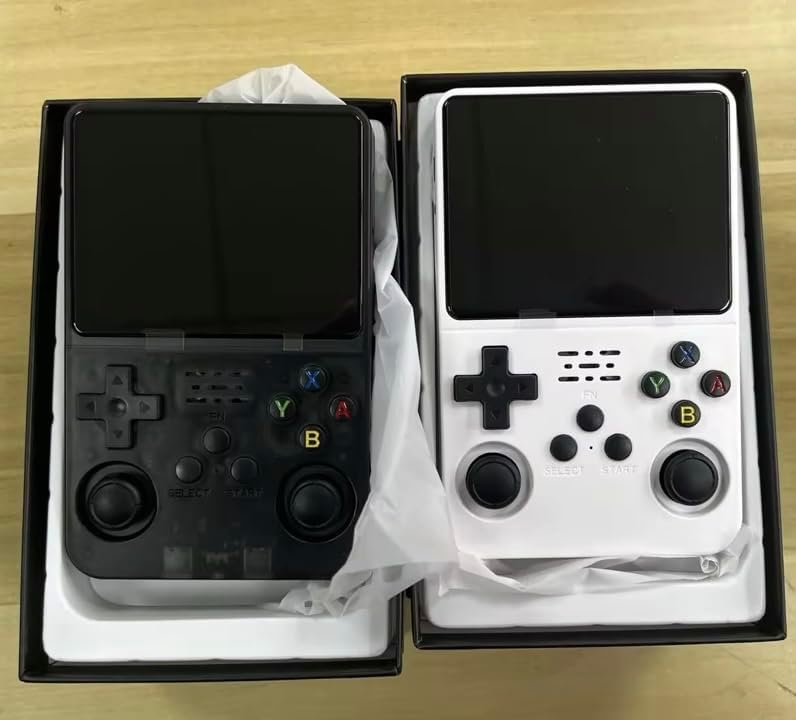
Figure 4: The console is equipped with a built-in rechargeable battery for extended playtime.
4. Configuració
- Remove the console from its packaging.
- Charge the console using the provided USB charging cable if needed. The charging port is located on the bottom of the device.
- Ensure the 128GB Micro SD card is properly inserted into the designated slot on the side of the console.
5. Instruccions de funcionament
5.1 Funcionament bàsic
- Press the power button (located on the side) to turn on the console.
- Use the joysticks and directional pad (D-pad) to navigate the menu and select a game.
- Press the 'A' button to confirm selections and 'B' button to go back.
- Start playing your selected game.
5.2 Controlsview

Figure 5: Key Description of the R36S console's buttons and ports.
- 1. Power On Key
- 2. Tecla de restabliment
- 3. High resolution and high-definition color screen
- 4. TF card storage card 2-GAME
- 5. Horn hole
- 6. Cross direction key (D-pad)
- 7. Main menu/return key
- 8. Operating lever (left joystick)
- 9. Tecla de selecció
- 10. Tecla Inici/Pausa
- 11. Game function keys (A, B, X, Y)
- 12. L1/L2 key function keys on the back
- 13. R1/R2 key function keys on the back
- 14. Volume adjustment button
- 15. TF card storage card 1-OS
- 16. Polymer ion batteries
- 17. Port de càrrega
- 18. Audio hole (3.5mm headphone jack)
- 19. OTG adapter port
5.3 Saving and Loading Games
The console supports saving game progress. Refer to the in-game menu or the console's system settings for specific instructions on how to save and load game states for each emulator.
6. Game Library
The R36S comes pre-installed with over 20,000 games across 45 different emulators, including classic systems like Super Nintendo, Game Boy, PlayStation, and more. Games are categorized by console for easy navigation.

Figure 6: Game selection menu showing different console categories.
6.1 Adding More Games
The console's 128GB Micro SD card can be expanded. Users can add additional games by transferring ROM files to the appropriate emulator folders on the Micro SD card via a computer. Ensure ROM files are compatible with the supported emulators.
6.2 Vídeo oficial del producte
Vídeo 1: Un overview of the R36S Pro HD Gaming Console, highlighting its 20,000+ preloaded games and features. This video is provided by RARE TECH SUPPLY LLC.
7. Manteniment
- Keep the console clean by wiping it with a soft, dry cloth.
- Eviteu exposar el dispositiu a temperatures extremes, llum solar directa o humitat.
- Store the console in a safe place to prevent physical damage.
- Regularly back up any custom game saves or added ROMs from the Micro SD card to prevent data loss.
8. Solució De Problemes
| Problema | Possible solució |
|---|---|
| La consola no s'encén. | Ensure the battery is charged. Connect the console to the charging cable and allow it to charge for at least 30 minutes before attempting to power on again. |
| Games are not loading or crashing. | Check if the Micro SD card is properly inserted. Ensure game ROMs are compatible with the emulator and are not corrupted. Try restarting the console. |
| La pantalla no respon o s'ha bloquejat. | Press the Reset Key (if available) or hold the Power On Key for 10-15 seconds to force a shutdown, then restart the console. |
| Sense so o amb un volum baix. | Adjust the volume using the volume adjustment button. Check if headphones are connected and functioning correctly. |
9. Especificacions
- Número de model: 033AA
- CPU: 1.5GHz 64-bit RK3326
- GPU: Mali-G31MP dual-core
- RAM: 4GB*2 DDR3L
- Mida de la pantalla: 3.5 polzades
- Tipus de visualització: LCD IPS
- Resolució de pantalla: 640 x 480
- Capacitat d'emmagatzematge de memòria: 128 GB (Micro SD card included)
- Durada de la bateria: 5-6 hores
- Tipus de bateria: Lithium-Ion Polymer (Included)
- Font d'alimentació: Funciona amb bateria
- Tipus de controlador: Joystick
- Material: Plàstic
- Dimensions del producte: 3 x 4 x 5 polzades
- Pes de l'article: 10.5 unces
- Fabricant: Rare Tech Supply
- Edat recomanada: 10 anys i més
10. Informació important de seguretat
- Només per a ús extern.
- Do not attempt to disassemble or modify the console. This may cause damage and void the warranty.
- Use only the provided charging cable or a certified charger to prevent battery damage or fire.
- Mantingueu el dispositiu allunyat de l'aigua i altres líquids.
- Avoid dropping or subjecting the console to strong impacts.
- Superviseu els nens durant l'ús.
11. Garantia i Suport
For warranty information and customer support, please refer to the contact details provided by the manufacturer, Rare Tech Supply, or your point of purchase. Keep your proof of purchase for any warranty claims.


