
1. Introducció
El concentrador CalDigit E5 Thunderbolt 5 Element 5 és una solució de connectivitat compacta i potent dissenyada per ampliar les capacitats del vostre ordinador. Proporciona diversos ports d'alta velocitat per a la transferència de dades, la connectivitat de la pantalla i el subministrament d'energia, millorant el vostre flux de treball i la configuració de l'escriptori.
2. Què hi ha a la caixa
- 1 x Hub Element 5
- 1 cable Thunderbolt 5 (0.8 m)
- 4 tires de peus de goma
- 1 x font d'alimentació (180 W)
- 1 x cable d'alimentació
3. Configuració
3.1 Connexió de la font d'alimentació
Connecteu la font d'alimentació de 180 W proporcionada al port d'entrada de CC (20 V | 9 A) a la part posterior del concentrador Element 5. Endolleu el cable d'alimentació a una presa de corrent.
3.2 Connexió a l'ordinador amfitrió
Feu servir el cable Thunderbolt 5 inclòs per connectar l'Element 5 Hub al port Thunderbolt 5, Thunderbolt 4, Thunderbolt 3, USB4 o USB-C del vostre ordinador. El port amfitrió del concentrador es troba al lateral i està etiquetat com a "Ordinador".

Imatge: Concentrador CalDigit E5 Thunderbolt 5 Element 5 amb diversos cables connectats als seus ports, mostrantasinpel seu disseny compacte i les múltiples opcions de connectivitat.
3.3 Connexió de perifèrics
Connecteu els vostres dispositius USB-A, USB-C i altres dispositius Thunderbolt als ports disponibles de l'Element 5 Hub. El concentrador inclou 4 ports Thunderbolt 5/USB4 v2, 3 ports USB-A de 10 Gb/s i 2 ports USB-C de 10 Gb/s.

Imatge: El concentrador CalDigit E5 connectat a un ordinador portàtil, amb diversos cables que s'estenen a diversos perifèrics, cosa que il·lustra el seu paper com a punt central de connectivitat.
4. Funcionament
4.1 Port Overview
- 1 x Port amfitrió Thunderbolt 5: Ample de banda de fins a 120 Gb/s.
- 3 ports Thunderbolt 5/USB4 v2: 80 Gb/s cadascun, compatible amb tecnologia PCIe de 64 Gb/s per a SSD ultraràpids (fins a 6,200 MB/s).
- 3 ports USB-A: Transferència de dades de 10 Gb/s.
- 2 ports USB-C: Transferència de dades de 10 Gb/s.

Imatge: Frontal view del concentrador CalDigit E5, destacant els ports de dades USB-C i USB-A disponibles per connectar diversos perifèrics.

Imatge: Part posterior view del CalDigit E5 Hub, que mostra els ports Thunderbolt 5, un port USB-A addicional i l'entrada d'alimentació de CC.
4.2 Rendiment i amplada de banda
L'Element 5 Hub aprofita la tecnologia Thunderbolt 5 per oferir un rendiment excepcional. Ofereix un ample de banda de 80 Gb/s a través dels seus ports Thunderbolt 5. Quan es connecten pantalles que requereixen un ample de banda intensiu, el concentrador pot permetre... Augment de l'ample de banda, assignant fins a 120 Gb/s per a pantalles i reservant 40 Gb/s per a altres dispositius. Aquesta funció requereix un Mac o PC compatible amb Thunderbolt 5.
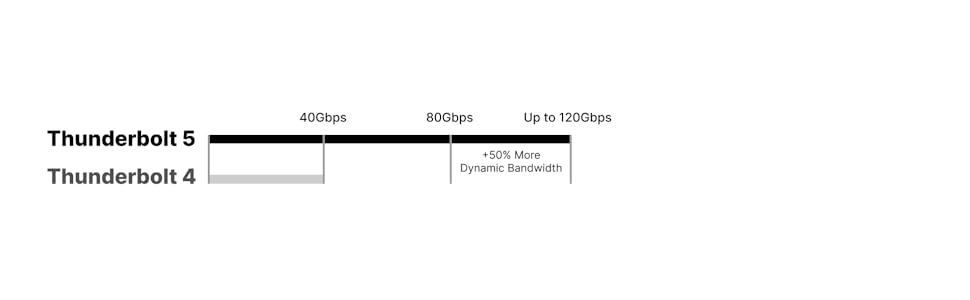
Imatge: Un diagrama que il·lustra les capacitats d'amplada de banda de Thunderbolt 5 (fins a 120 Gbps amb mode Boost) en comparació amb Thunderbolt 4 (40 Gbps).
4.3 Suport de visualització
L'Element 5 Hub admet diverses configuracions de pantalla segons les capacitats de l'ordinador amfitrió:
- macOS: Connecteu fins a dues pantalles de 6K a 60 Hz o 8K a 60 Hz, o dues pantalles de 4K a 240 Hz en Macs compatibles amb aquestes resolucions. Nota: Els Macs Base M1-M3 no admeten dues pantalles externes.
- Windows: Connecteu fins a tres pantalles 4K a 144 Hz en ordinadors amfitrions Windows compatibles amb Thunderbolt 5. Les pantalles triples no són compatibles amb ordinadors macOS, Thunderbolt 4/3 o USB-C.

Imatge: Un MacBook connectat al CalDigit E5 Hub, que controla dues pantalles externes i demostra la compatibilitat amb dues pantalles a macOS.

Imatge: Un portàtil amb Windows connectat al concentrador CalDigit E5, que controla tres pantalles externes i que il·lustra la compatibilitat amb tres pantalles en sistemes Windows compatibles.

Imatge: Un gràfic detallat que descriu la compatibilitat de pantalla, les resolucions i les freqüències d'actualització del CalDigit E5 Hub en diferents models d'ordinador Mac (M1-M4) i Windows (Thunderbolt 4/5).
4.4 Lliurament d'energia
L'Element 5 Hub proporciona fins a 90 W de subministrament d'energia sostingut al vostre ordinador portàtil, tauleta o telèfon amfitrió. Cada port Thunderbolt 5/USB4 v2 de baixada proporciona 15 W (5 V/3 A) i cada port USB-A/USB-C proporciona 7.5 W (5 V/1.5 A). El concentrador també admet la càrrega fora de línia, cosa que us permet carregar dispositius fins i tot quan no estan connectats a un ordinador amfitrió.

Imatge: Un diagrama que mostra la distribució d'energia des del concentrador CalDigit E5 a diversos dispositius connectats, com ara un ordinador portàtil, un iPad, un iPhone i altres accessoris USB.
4.5 Compatibilitat
L'Element 5 Hub és compatible amb una àmplia gamma de dispositius:
- macOS 15 o posterior
- Windows 11 o posterior
- iPadOS
- Chrome OS
- Ordinadors amb Thunderbolt 5, 4 i 3 (Mac)
- Ordinadors, tauletes i telèfons USB-C (USB4, USB4 v2)
- iPads amb Thunderbolt/USB4
- Chromebooks USB-C
*Es requereix Thunderbolt 5 o USB4 v2 per a la funcionalitat sense restriccions de l'Element 5 Hub.

Imatge: El CalDigit E5 Hub connectat a un iPad Pro, demostrant la seva compatibilitat amb tauletes per a una connectivitat ampliada.
5. Manteniment
Per garantir un rendiment òptim i una llarga durada del vostre CalDigit E5 Hub, guardeu-lo en una zona ben ventilada per evitar el sobreescalfament. Comproveu regularment si hi ha actualitzacions de firmware del lloc web oficial de CalDigit. weblloc per mantenir la compatibilitat i el rendiment.
6. Solució De Problemes
Si teniu problemes amb la connectivitat del dispositiu o el subministrament d'energia, proveu el següent:
- Assegureu-vos que tots els cables estiguin ben connectats.
- Reinicieu l'ordinador amfitrió i l'Element 5 Hub.
- Verifiqueu que els controladors del vostre ordinador per a Thunderbolt/USB estiguin actualitzats.
- Comproveu el suport de CalDigit weblloc web per a guies de resolució de problemes o preguntes freqüents específiques.
7. Especificacions
| Característica | Especificació |
|---|---|
| Dimensions del producte | 4.5 x 2.75 x 1.12 polzades (114 x 70 x 28.5 mm) |
| Pes de l'article | 8.9 unces (0.25 kg) |
| Nombre de Ports | 9 (1 x amfitrió Thunderbolt 5, 3 x Thunderbolt 5/USB4 v2 de baixada, 3 x USB-A 10 Gb/s, 2 x USB-C 10 Gb/s) |
| Càrrega de l'amfitrió | Fins a 90 W |
| Alimentació del port Thunderbolt 5/USB4 v2 a baix | 15 W (5 V/3 A) cadascun |
| Port USB-A/USB-C d'alimentació | 7.5 W (5 V/1.5 A) cadascun |
| Font d'alimentació | 180 W (20 V | 9 A) |
| Interfície del maquinari | Thunderbolt 5, Thunderbolt 4, Thunderbolt 3, USB 4, USB 3.1 Tipus A, USB 3.1 Tipus C, USB 3.2 Gen 2 |
| Color | Gris espacial |
8. Vídeos oficials de productes
CalDigit Element 5 Thunderbolt Hub ReviewPorts i funcions
Vídeo: Una revisió completaview del concentrador CalDigit Element 5 Thunderbolt, que detalla els seus diversos ports, característiques i funcionalitat general. Aquest vídeo ofereix una visió detallada de com el concentrador pot millorar la vostra experiència informàtica.
Ports i característiques de Caldigit Element 5
Vídeo: Un resum concísview dels ports i les característiques clau del CalDigit Element 5 Hub, ideal per a una comprensió ràpida de les seves capacitats i opcions de connectivitat.
Comparació de l'estació d'acoblament Caldigit Thunderbolt 5: TS5 E5 TS5+
Vídeo: Una anàlisi comparativa de les estacions d'acoblament Thunderbolt 5 de CalDigit, incloent-hi l'E5, el TS5 i el TS5+, que ajuda els usuaris a entendre les diferències i a triar la millor opció per a les seves necessitats.
9. Garantia i Suport
Per obtenir informació sobre la garantia i assistència tècnica, consulteu la pàgina oficial de CalDigit. weblloc web o contacteu directament amb el servei d'atenció al client. Conserveu el rebut de compra per a reclamacions de garantia.