
1. Introducció
The GIGABYTE B840M D2H Motherboard is designed to support AMD Ryzen 9000, 8000, and 7000 Series Processors, offering a robust platform for personal computing. This motherboard features a 5+2+2 phases VRM solution, supports DDR5 memory up to 7600MHz, and includes multiple high-speed connectivity options such as PCIe 4.0 M.2 slots and 2.5GbE LAN. This manual provides essential information for setting up, operating, and maintaining your motherboard.
2. Característiques clau
- X3D Turbo Mode: Enhances gaming performance.
- Sòcol AMD AM5: Supports AMD Ryzen 9000 / 8000 / 7000 Series Processors.
- Digital 5+2+2 Phases VRM: Proporciona un subministrament d'energia estable.
- DDR5 de doble canal: Two DIMM slots with AMD EXPO Memory Module Support for high-speed memory.
- EZ-Latch: PCIe x16 Slot with Quick Release Design for easy component installation.
- Friendly UI: Multi-Theme, AIO Fan Control, and Q-Flash Auto Scan in BIOS and Software.
- Emmagatzematge ultraràpid: Two M.2 slots, including one PCIe 4.0 x4 for high-speed NVMe SSDs.
- Xarxa ràpida: Integrated 2.5GbE LAN for high-speed internet connectivity.
3. Especificacions
| Característica | Especificació |
|---|---|
| Marca | GIGABYTE |
| Nom del model | B840M D2H |
| Socket de CPU | Presa AM5 |
| Processadors compatibles | AMD Ryzen sèrie 7000, AMD Ryzen sèrie 8000, AMD Ryzen sèrie 9000 |
| Tipus de xipset | AMD B840 |
| Tecnologia de memòria RAM | DDR5 |
| Velocitat de rellotge de memòria | 7600 MHz |
| Ranures de memòria disponibles | 2 |
| Ram Memory Maximum Size | 128 GB |
| Interfície de la targeta gràfica | PCI Express |
| Total PCIe Ports | 2 |
| Total M.2 Slots | 2 (1x PCIe 4.0 x4, 1x PCIe 3.0 x4) |
| Total SATA Ports | 4 |
| Ports USB totals | 6 (various generations) |
| Nombre de ports Ethernet | 1 (2.5GbE) |
| Total Number of HDMI Ports | 1 |
| Tipus de connector d'alimentació principal | 24-pins |
| Plataforma | Windows 10, Windows 11 |
| Pes de l'article | 940 g |
| Dimensions de l'article (L x A x A) | 9.61" x 9.61" x 1.38" |
4. Configuració i instal·lació
Before beginning installation, ensure your system is powered off and unplugged. Always handle the motherboard by its edges to avoid static discharge. Refer to the official GIGABYTE manual for detailed, step-by-step instructions specific to your motherboard model.
4.1 Desembalatge i inspecció
Carefully remove the motherboard from its packaging. Inspect for any visible damage during shipping. Ensure all accessories listed in the packing contents are present.
4.2 Instal·lació de la CPU
Locate the Socket AM5 on the motherboard. Open the CPU retention mechanism. Align the triangular mark on the CPU with the mark on the socket, then gently place the CPU into the socket. Close the retention mechanism to secure the CPU. Do not force the CPU into the socket.

Imatge: De dalt a baix view of the GIGABYTE B840M D2H Motherboard, highlighting the central Socket AM5 for CPU installation and the two DDR5 DIMM slots.
4.3 Instal·lació del refrigerador de CPU
Instal·leu el refrigerador de CPU compatible segons les instruccions del fabricant. Assegureu-vos d'aplicar la pasta tèrmica correctament i d'un muntatge segur per a una dissipació eficaç de la calor.
4.4 Instal·lació de memòria (RAM)
Open the clips on both ends of the DDR5 DIMM slots. Align the notch on the memory module with the key in the slot. Press down firmly on both ends of the memory module until the clips snap into place. Install memory modules in the recommended slots for dual-channel operation, typically indicated in the full manual.
4.5 Motherboard Mounting
Install the I/O shield into your computer case. Align the motherboard with the standoffs in the case and carefully place it. Secure the motherboard with screws, ensuring not to overtighten.

Imatge: Anglesa view of the GIGABYTE B840M D2H Motherboard, providing a comprehensive look at its layout, including the M.2 slots, PCIe slots, and various headers.
4.6 Connexió de l'alimentació i els perifèrics
Connect the 24-pin ATX power connector and the 8-pin CPU power connector from your power supply to the motherboard. Connect SATA drives, front panel headers (power button, reset, USB, audio), and any other necessary cables. Install your graphics card into the primary PCIe x16 slot and secure it.
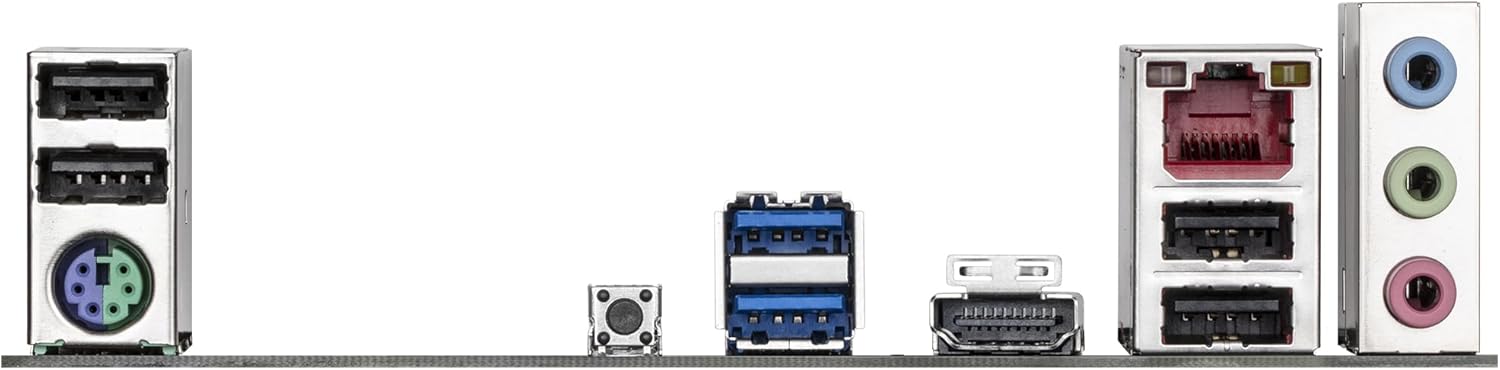
Image: Rear I/O panel of the GIGABYTE B840M D2H Motherboard, displaying the available ports including USB, 2.5GbE LAN, HDMI, and audio jacks for external device connections.
5. Instruccions de funcionament
5.1 Arrencada inicial i configuració de la BIOS/UEFI
After assembly, connect a monitor, keyboard, and mouse. Power on your system. Press the designated key (usually DEL or F2) during startup to enter the BIOS/UEFI setup utility. Here you can configure boot order, system time, and other advanced settings. Save and exit to continue booting.
5.2 Instal·lació del sistema operatiu
Insert your operating system installation media (USB drive or DVD). Follow the on-screen prompts to install your preferred operating system (e.g., Windows 10, Windows 11). Ensure all necessary drivers are installed after the OS installation for optimal performance.
5.3 Instal·lació del controlador
Install the latest drivers for your motherboard's chipset, LAN, audio, and other components from the GIGABYTE official website. This ensures proper functionality and performance of all hardware.
5.4 BIOS Updates (Q-Flash)
The motherboard supports Q-Flash for convenient BIOS updates. Download the latest BIOS version from the GIGABYTE website, save it to a USB flash drive, and follow the Q-Flash utility instructions in the BIOS to update. Ensure stable power during the update process.
6. Manteniment
Regular maintenance helps ensure the longevity and stable operation of your motherboard and PC components.
- Neteja de pols: Periodically clean dust from inside your PC case, especially around fans, heatsinks, and motherboard components, using compressed air. Ensure the system is powered off and unplugged before cleaning.
- Gestió de cables: Assegureu-vos que els cables estiguin ben encaminats per millorar el flux d'aire i evitar interferències.
- BIOS/Driver Updates: Keep your BIOS and drivers updated to the latest versions from the GIGABYTE website to benefit from performance improvements, bug fixes, and security updates.
- Comproveu les connexions: Occasionally check that all power and data cables are securely connected to the motherboard and components.
7. Solució De Problemes
If you encounter issues, consider the following basic troubleshooting steps. For complex problems, consult the GIGABYTE support website or a qualified technician.
- Sense alimentació/Sense POST:
- Verifiqueu que tots els cables d'alimentació (ATX de 24 pins, CPU de 8 pins) estiguin connectats correctament.
- Assegureu-vos que la font d'alimentació funcioni i estigui connectada.
- Reinstal·la els mòduls de RAM. Prova d'arrencar només amb una unitat de RAM.
- Torneu a col·locar la targeta gràfica.
- Clear CMOS (refer to the full manual for jumper location).
- Inestabilitat/Avaries del sistema:
- Comproveu les temperatures de la CPU i la GPU.
- Assegureu-vos que tots els controladors estiguin actualitzats.
- Executeu eines de diagnòstic de memòria per comprovar la integritat de la RAM.
- Verificar l'estabilitat del subministrament elèctric.
- Perifèric no detectat:
- Ensure the peripheral is correctly connected.
- Consulteu el gestor de dispositius per detectar problemes de controladors.
- Prova un port o cable diferent.
8. Garantia i Suport
The GIGABYTE B840M D2H Motherboard is manufactured by GIGABYTE. For detailed warranty information, technical support, driver downloads, and the latest BIOS updates, please visit the official GIGABYTE weblloc web. També hi podeu trobar recursos addicionals i preguntes freqüents.
GIGABYTE Official Store: Visita la botiga GIGABYTE a Amazon