
Janome 500E
Janome Memory Craft 500E Limited Edition Embroidery Machine User Manual
Model: 500E | Brand: Janome
1. Introducció
The Janome Memory Craft 500E Limited Edition embroidery machine is designed to empower users to create personalized and intricate embroidery projects. This machine offers a wide range of features, including a large embroidery area, extensive built-in designs, multiple monogramming fonts, and advanced on-screen editing capabilities. With a stitching speed of up to 860 stitches per minute, it provides efficiency and precision for various creative endeavors, from embellishing garments to decorating home accessories.

Image: The Janome Memory Craft 500E embroidery machine positioned on a white desk in a well-lit crafting environment, showcasinel seu disseny compacte i la seva interfície d'usuari.
2. Instruccions de seguretat
Before operating your Janome Memory Craft 500E, please read and understand all safety instructions to prevent accidents and ensure proper machine function. Keep this manual for future reference.
- Always unplug the machine from the electrical outlet when cleaning, making adjustments, or when the machine is not in use.
- Do not operate the machine with a damaged cord or plug. If the machine is not working properly, has been dropped, or damaged, contact authorized service personnel.
- Keep fingers away from all moving parts, especially around the needle area.
- Utilitzeu només accessoris recomanats pel fabricant.
- No deixeu caure ni introduïu cap objecte a cap obertura.
- No utilitzar a l'aire lliure.
- Always ensure the machine is placed on a stable, level surface during operation.
3. Contingut del paquet
Verify that all items are present in your Janome Memory Craft 500E Limited Edition package:
- Janome Memory Craft 500E Embroidery Machine
- Four Embroidery Hoops (various sizes for diverse projects)
- USB Drive with 30 Exclusive Large Designs
- Extra-Wide Extension Table (for expanded workspace and project support)
- Standard Accessories (e.g., power cord, foot controller, bobbins, needles, cleaning brush, screwdriver, instruction manual)
4. Configuració
Follow these steps to set up your embroidery machine for first use:
- Desembalatge: Carefully remove the machine and all accessories from the packaging. Retain the original packaging for storage or transport.
- Col·locació: Place the machine on a stable, flat surface. Attach the extra-wide extension table if desired, ensuring it is securely fastened.
- Connexió d'alimentació: Connect the power cord to the machine and then to a suitable electrical outlet. Ensure the power switch is in the OFF position before connecting.
- Attaching the Embroidery Unit: Slide the embroidery unit onto the machine as instructed in the detailed manual. Ensure it clicks into place securely.
- Enfilar la màquina: Follow the threading guides on the machine for both the upper thread and bobbin thread. Refer to the detailed manual for specific instructions on bobbin winding and insertion.
- Attaching the Hoop: Select the appropriate embroidery hoop for your project. Place your fabric, along with stabilizer, into the hoop and secure it. Attach the hooped fabric to the embroidery unit.

Image: The Janome Memory Craft 500E machine, viewed from the front, with its embroidery unit detached, highlighting the main machine body and the integrated touchscreen display.
5. Instruccions de funcionament
The Janome Memory Craft 500E offers intuitive operation through its integrated touchscreen. Here are key operational aspects:
5.1. Design Selection and Editing
- Dissenys integrats: Access 160 integrated designs directly from the machine's menu. The large miniature previews on the screen facilitate easy selection.
- USB Designs: Insert a USB drive (including the provided one with 30 exclusive designs) to import additional embroidery patterns.
- On-Screen Editing: Utilize the machine's editing functions to customize your designs. These include:
- Resizing designs to fit your project.
- Combining multiple designs.
- Duplicating elements.
- Flipping designs horizontally or vertically.
- Arcing text or designs.
- Grouping and ungrouping elements.
- Drag and drop functionality for precise placement.
- Enlarging specific areas for detailed viewing.
- Tracing design outlines.
- Choosing and changing thread colors.
5.2. Monogramming
Personalize items with 2- or 3-letter monograms using the six included monogramming fonts: Gothic, Cyrillic, Cyrillic 2, Cyrillic 3, Script, and Cheltenham. Select the desired font and input your initials via the touchscreen.
5.3. Starting Embroidery
Once your design is selected, edited, and the fabric is hooped and attached, press the start button on the machine. The machine will begin stitching at a speed between 400 and 860 stitches per minute, depending on the design complexity and your settings. The maximum embroidery area is 7.9 inches by 11 inches.
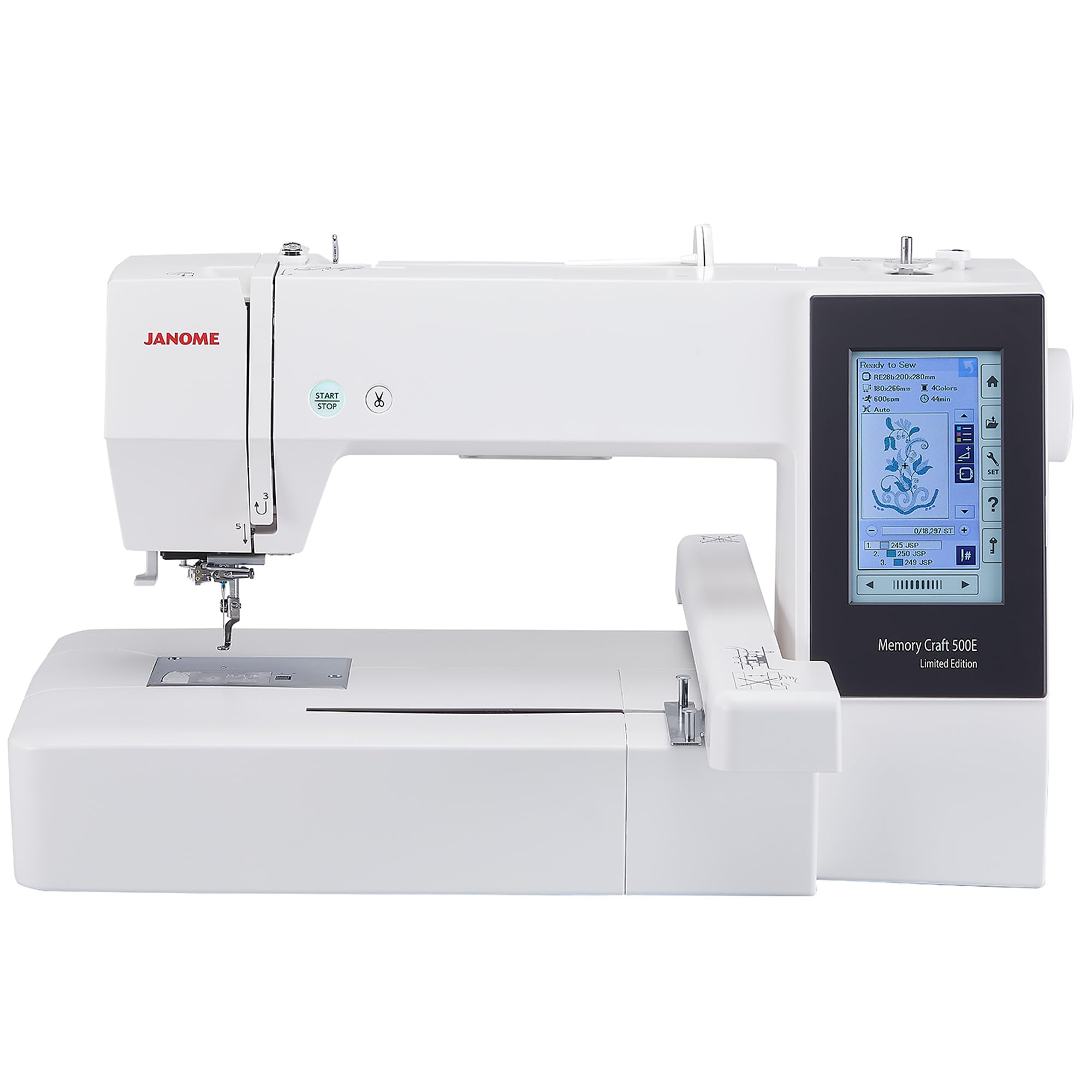
Image: The Janome Memory Craft 500E embroidery machine in operation, with a needle actively stitching a colorful floral pattern onto light blue fabric held taut by an embroidery hoop.
6. Manteniment
Regular maintenance ensures the longevity and optimal performance of your embroidery machine.
- Neteja: Regularly clean the bobbin case, feed dogs, and needle plate area using the provided brush to remove lint and thread residue. Refer to the manual for detailed cleaning instructions.
- Substitució de l'agulla: Replace the needle frequently, especially after 8-10 hours of embroidery or if it becomes bent or dull. Using a fresh, sharp needle prevents skipped stitches and fabric damage.
- Lubricació: Follow the manufacturer's guidelines for lubrication, if required. Over-oiling can attract lint and cause issues.
- Emmagatzematge: Quan no estigui en ús, cobriu la màquina per protegir-la de la pols. Guardeu-la en un entorn sec i estable.
7. Solució De Problemes
This section addresses common issues you might encounter. For more complex problems, consult the full instruction manual or contact customer support.
- Trencaclosques: Check if the machine is threaded correctly, the tension settings are appropriate for your fabric and thread, the needle is inserted correctly and is not dull or bent, and the bobbin is wound evenly.
- Trencament d'agulles: Ensure the correct needle size and type are used for the fabric. Verify the needle is inserted fully and correctly. Avoid pulling or pushing the fabric while embroidering.
- Punts saltats: Often caused by a bent or dull needle, incorrect needle insertion, or improper threading. Replace the needle and re-thread the machine.
- La màquina no arrenca: Check if the power cord is securely plugged in, the power switch is on, and the foot controller (if applicable) is connected. Ensure no error messages are displayed on the screen.
- Arrugament del teixit: This can be due to incorrect stabilizer choice, improper hooping tension, or unsuitable thread tension. Adjust stabilizer, re-hoop the fabric, and check tension settings.
8. Especificacions
| Característica | Especificació |
|---|---|
| Marca | Janome |
| Número de model | 500ELE |
| Tipus de producte | Màquina de brodar |
| Color | Blanc |
| Material | Metall |
| Pes de l'article | 34 lliures |
| Font d'alimentació | AC/DC |
| Elèctric | Sí |
| UPC | 732212467882 |
| Àrea màxima de brodat | 7.9 polzades x 11 polzades |
| Stitching Speed | 400 to 860 stitches per minute |
| Dissenys integrats | 160 |
| Monogramming Fonts | 6 |
9. Garantia i Suport
Your Janome Memory Craft 500E Limited Edition embroidery machine comes with a manufacturer's warranty. Please refer to the warranty card included in your package for specific terms and conditions, including coverage duration and what is covered.
For technical assistance, troubleshooting beyond this manual, or to inquire about service, please contact Janome customer support. Contact information can typically be found on the Janome official weblloc web o a la documentació que s'inclou amb la màquina.
Documents relacionats500E


Ask a question about this manual
Ask about setup, troubleshooting, compatibility, parts, safety, or missing instructions. Manuals+ will review the question and use this page’s manual context to help answer it.