
1. Introducció
This manual provides comprehensive instructions for the setup, operation, and maintenance of your BESIGN PS01 Projector Foldable Mount Stand. Please read this manual carefully before use to ensure proper functionality and longevity of the product. The BESIGN PS01 is designed to securely hold projectors, cameras, phone clips, and photo lights with a 1/4 inch mounting screw, offering adjustable height and angle for various applications.
2. Producte acabatview
The BESIGN PS01 Projector Stand features a robust, foldable design made from premium metal materials, ensuring stability and durability. It supports devices up to 8 lbs (4 kg) and includes rubber pads on the holder hands for secure placement. The stand is equipped with a universal 1/4 inch mounting screw for wide compatibility.

Figure 2.1: The BESIGN PS01 Projector Stand in its unfolded state, ready for device attachment.

Figure 2.2: The BESIGN PS01 Projector Stand with a projector securely mounted, demonstrating its primary use.
3. Instruccions de configuració
Setting up your BESIGN PS01 stand is a straightforward process. Follow these steps to prepare your stand for use:
- Desplegueu el suport: Gently unfold the stand from its compact, folded position. The hinges are designed for smooth movement.
- Ajusta l'alçada i l'angle: Position the stand to your desired height and angle. The stand offers 0°-180° angle adjustment. Ensure all joints are firm once adjusted.
- Connecta el teu dispositiu: Align the 1/4 inch mounting screw on the stand with the corresponding screw hole on your projector, camera, or other compatible device. Rotate your device clockwise onto the screw until it is securely fastened.
- Assegura el dispositiu: Ensure the device is stable and does not wobble. If necessary, tighten any adjustable screws on the stand to prevent movement.
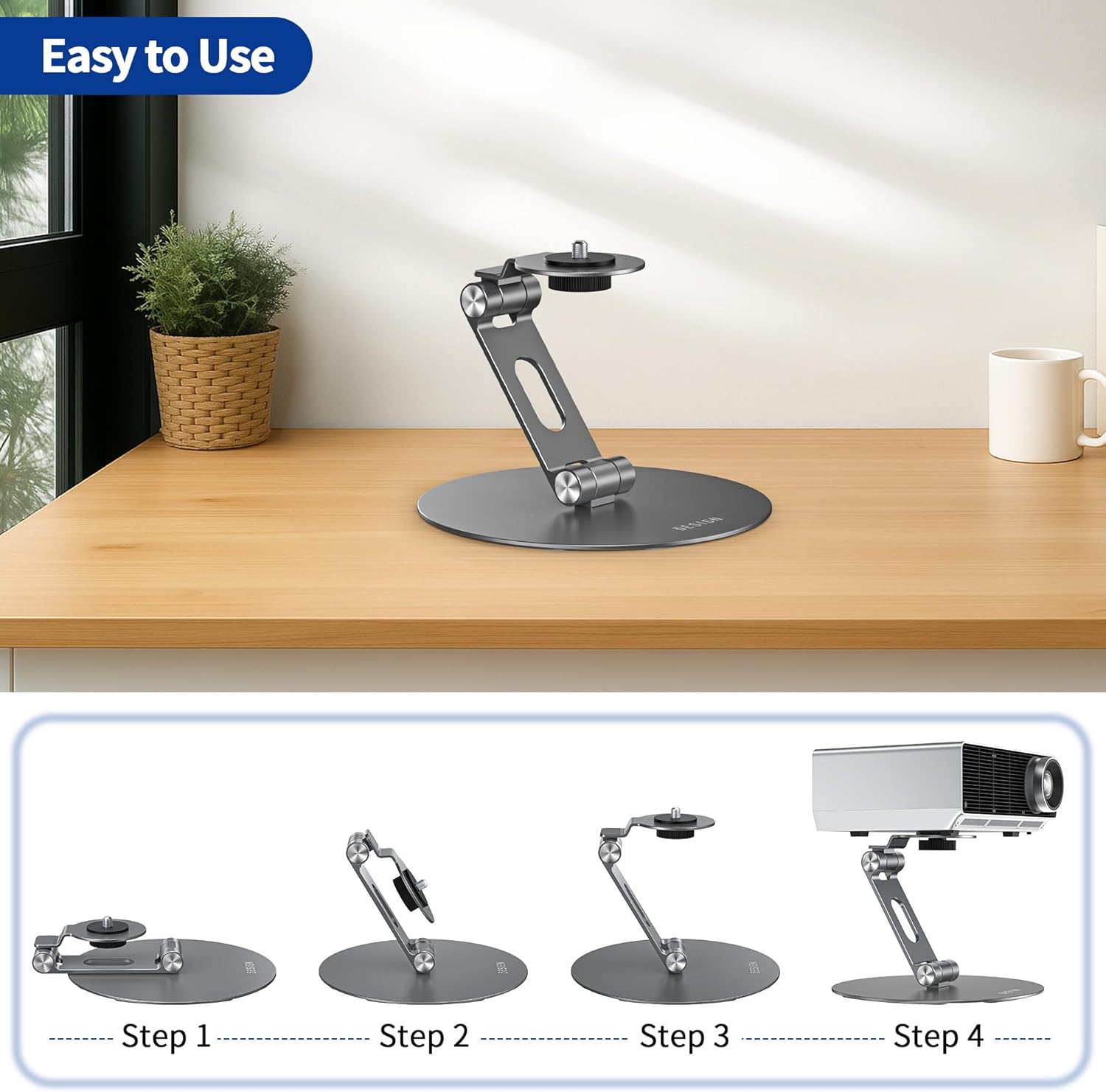
Figure 3.1: Visual guide illustrating the four steps to set up the BESIGN PS01 stand and mount a projector.
4. Instruccions de funcionament
4.1 Ajust d'angle
The BESIGN PS01 stand allows for flexible angle adjustments from 0° to 180°. To adjust the angle, gently hold your device and the stand, then pivot the arm to the desired position. The stand's robust hinges are designed to hold the set angle firmly. Always ensure the device is balanced and the stand is stable after adjustment.

Figure 4.1: Illustration of the 0°-180° angle adjustment capability of the PS01 stand, demonstrating its versatility.
4.2 Compatibilitat àmplia
The stand is equipped with a standard 1/4 inch mounting screw, making it compatible with a wide range of devices. This includes, but is not limited to, most projectors, digital cameras, phone clips (with a 1/4 inch adapter), action cameras, ring lights, and weblleves.

Figure 4.2: Visual representation of the 1/4 inch mounting screw and examples of compatible devices such as projectors, cameras, and phone clips.
5. Manteniment
To ensure the longevity and optimal performance of your BESIGN PS01 stand, follow these simple maintenance guidelines:
- Neteja: Wipe the stand with a soft, dry cloth to remove dust and fingerprints. Avoid using abrasive cleaners or solvents, as these can damage the finish.
- Emmagatzematge: When not in use, fold the stand into its compact form for easy storage. Store it in a dry place away from extreme temperatures.
- Inspecció: Periodically check all joints and screws to ensure they are tight. If any looseness is detected, gently tighten the screws.
6. Solució De Problemes
If you encounter any issues with your BESIGN PS01 stand, please refer to the following common problems and solutions:
| Problema | Causa possible | Solució |
|---|---|---|
| El suport trontolla o és inestable. | Screws are loose; device is too heavy; uneven surface. | Ensure all screws are tightened. Verify device weight does not exceed 8 lbs (4 kg). Place the stand on a flat, stable surface. |
| Device does not attach securely. | Incorrect screw size; device not fully rotated onto the screw. | Confirm your device has a 1/4 inch mounting screw hole. Rotate the device clockwise until it is firmly attached. |
| Angle adjustment does not hold. | Joints are loose; device is too heavy for the angle. | Tighten the joint screws. Ensure the device weight is within limits, especially at extreme angles. |
7. Especificacions
Key specifications for the BESIGN PS01 Projector Foldable Mount Stand:
- Número de model: PS01
- Marca: BESIGN
- Material: Premium Metal
- Cargol de muntatge: 1/4 inch universal
- Capacitat de pes: Fins a 8 lliures (4 kg)
- Ajust d'angle: 0° - 180°
- Pes de l'article: 15.5 unces
- Dimensions del paquet: 7.36 x 6.18 x 1.54 polzades
- Color: Gris

Figure 7.1: Detailed dimensions of the PS01 stand, including its height (120mm/4.7in) and base diameter (145mm/5.7in).
8. Garantia i Suport
BESIGN is committed to providing high-quality products. For any questions, concerns, or support needs regarding your PS01 Projector Foldable Mount Stand, please contact BESIGN customer service through the retailer's platform or the official BESIGN website. Please retain your proof of purchase for warranty claims, if applicable. Specific warranty details may vary by region and retailer.