
1. Introducció
Welcome to the user manual for your new DOOGEE Tab G6 Android 15 Tablet. This guide provides comprehensive instructions on setting up, operating, maintaining, and troubleshooting your device. Please read this manual carefully to ensure optimal performance and longevity of your tablet.
2. Què hi ha a la caixa
Your DOOGEE Tab G6 Android 15 Tablet comes with a complete accessory kit to enhance your experience and protect your device. Please verify all items are present upon unboxing.
- 1 x DOOGEE TAB G6 VIP Tablet
- 1 x cable USB tipus C
- 1 x Carregador
- 1 x Stylus (VIP Edition)
- 1 x Pre-applied Protective Film
- 1 x Bluetooth Mouse (VIP Edition)
- 1 x Leather Protective Case (VIP Edition)
- 1 x Bluetooth Keyboard (VIP Edition)
- 1 x SIM Card Tool
- 1 x Caixa d’envasos
- 1 x Manual d'usuari
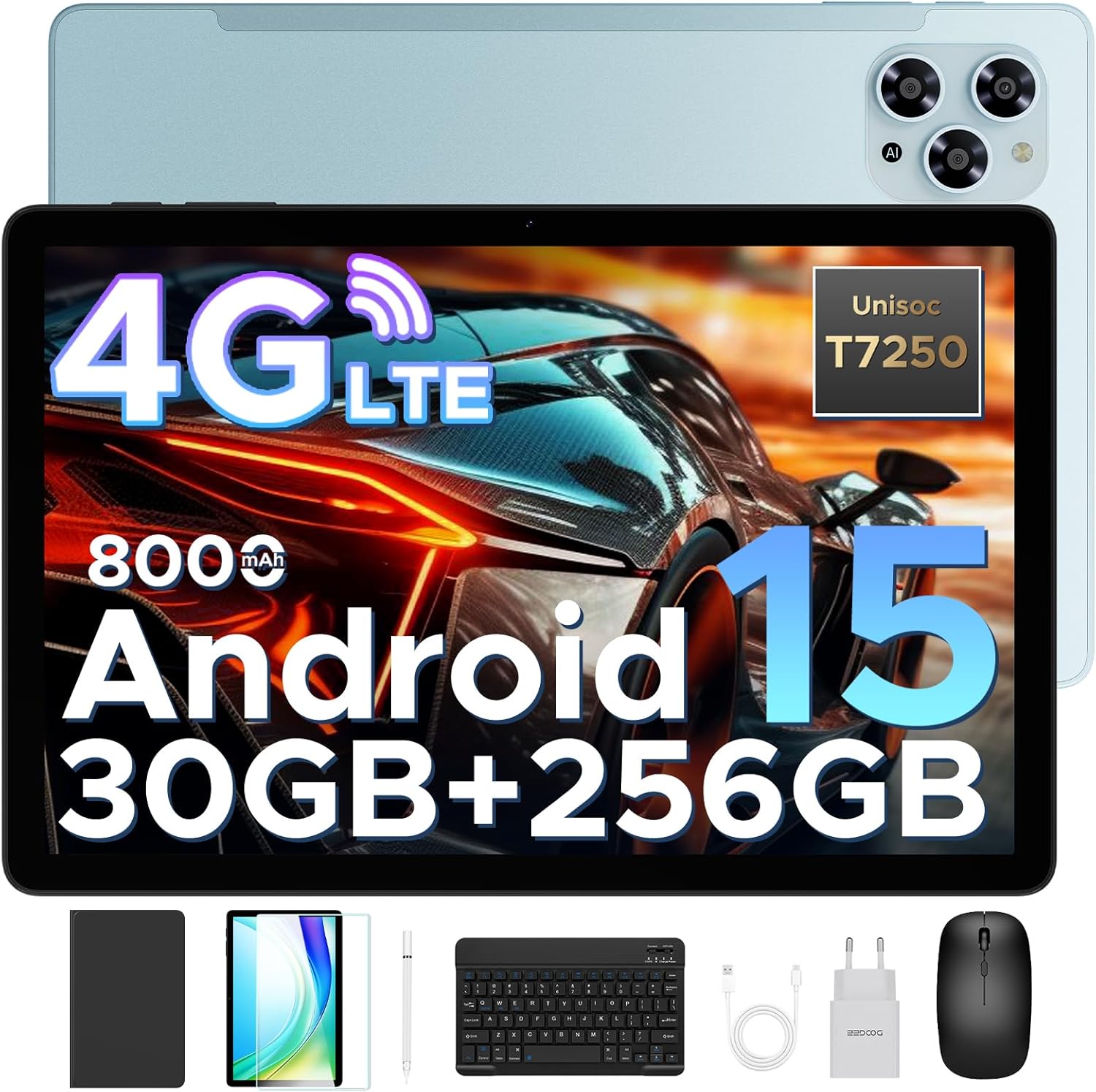
Image: The DOOGEE Tab G6 tablet displayed with all its included accessories, such as the keyboard, mouse, stylus, charger, cables, and protective case.
3. Configuració
3.1 Càrrega inicial
Before first use, fully charge your DOOGEE Tab G6 tablet using the provided USB Type-C cable and charger. Connect the cable to the tablet's charging port and the charger to a power outlet. The battery indicator on the screen will show charging progress.
3.2 Inserció de targetes SIM i TF
The DOOGEE Tab G6 supports dual SIM cards and a TF (microSD) card for expandable storage. Use the provided SIM card tool to open the SIM tray.
- Localitza la safata de la targeta SIM al lateral de la tauleta.
- Insert the SIM card tool into the small hole next to the tray and gently push until the tray ejects.
- Col·loqueu les targetes Nano-SIM i/o la targeta TF a les ranures designades de la safata, assegurant-vos que l'orientació sigui correcta.
- Empenyeu amb cura la safata cap a dins de la tauleta fins que encaixi al seu lloc.

Image: A visual representation of the tablet's dual SIM and TF card slots, illustrating how to insert the cards for 4G LTE connectivity.
3.3 Engegada/apagada
- Per encendre: Press and hold the Power button until the DOOGEE logo appears on the screen.
- Per apagar: Mantingueu premut el botó d'engegada fins que aparegui el menú d'opcions d'engegada i, a continuació, seleccioneu "Apagar".
- Per reiniciar: Mantingueu premut el botó d'engegada fins que aparegui el menú d'opcions d'energia i, a continuació, seleccioneu "Reiniciar".
3.4 Assistent de configuració inicial
Upon first power-on, the tablet will guide you through an initial setup process. Follow the on-screen prompts to select your language, connect to Wi-Fi, set up your Google account, and configure basic settings.
4. Instruccions de funcionament
4.1 Navegació bàsica
The DOOGEE Tab G6 features an intuitive touchscreen interface. Use the following gestures for navigation:
- Toca: Per seleccionar un element o obrir una aplicació.
- Llisca: To scroll through pages or menus.
- Pessiga per fer zoom: Per ampliar o reduir imatges o web pàgines.
- Premsa llarga: Per accedir a menús contextuals o moure icones.
4.2 Connexió d'accessoris
Your tablet comes with a Bluetooth keyboard, mouse, and a stylus for enhanced productivity.
- Bluetooth Keyboard/Mouse: Turn on the keyboard/mouse and put it into pairing mode (refer to their respective manuals). On your tablet, go to Configuració > Dispositius connectats > Bluetooth, turn on Bluetooth, and select the device from the list to pair.
- stylus: The stylus is pressure-sensitive and does not require Bluetooth pairing. Simply use it directly on the screen for writing or drawing.
4.3 Android 15 System Features
The DOOGEE Tab G6 runs on the latest Android 15 operating system, offering improved security, smoother performance, and smart multitasking capabilities.
- Multi-User System: Create separate user profiles for different family members, each with their own apps, settings, and data. Access this feature in Configuració > Sistema > Diversos usuaris.
- Control parental: Manage app usage, screen time, and content access for children through Google Family Link, integrated with Android 15.
- Bedtime Mode: Schedule a time for your screen to turn grayscale and silence notifications for a better night's sleep. Configure this in Benestar digital i controls parentals.
- Identificació facial: Unlock your tablet quickly and securely using facial recognition. Set up Face ID in Settings > Security & privacy > Face unlock.
- WPS Office: The tablet comes with built-in WPS Office, allowing you to view and edit documents, spreadsheets, and presentations.

Image: An illustration highlighting the key features of the Android 15 system, including Bedtime Mode, Multi-User System, and Parental Control.
5. Connectivitat
5.1 Dual SIM 4G LTE
With dual SIM card slots, the DOOGEE Tab G6 supports common 4G LTE networks, allowing you to make calls and access high-speed internet even without Wi-Fi. This ensures network freedom and faster data transfer.
5.2 connexions Wi-Fi
Connect to available Wi-Fi networks for internet access. Go to Configuració > Xarxa i Internet > Wi-Fi, activeu el Wi-Fi i seleccioneu la xarxa que vulgueu. Introduïu la contrasenya si se us demana.
Bluetooth 5.3
Enable Bluetooth to connect to wireless headphones, speakers, or other Bluetooth-enabled devices. Go to Configuració > Dispositius connectats > Bluetooth.
5.4 Navegació GPS
The tablet supports GPS, Glonass, Galileo, and Beidou navigation systems, ensuring accurate positioning for maps and location-based services.

Image: A tablet screen showing a navigation map, with icons representing GPS, Glonass, Galileo, and Beidou navigation systems, indicating precise location tracking.
6. Característiques de la pantalla
The DOOGEE Tab G6 features an 11-inch HD IPS display with a 90Hz refresh rate, providing vibrant colors and smooth visuals for all your content.
- 11-inch HD IPS Display: Enjoy clear and vivid images with a resolution of 1280 x 800 pixels and a 16:10 aspect ratio.
- Freqüència de refresc de 90 Hz: Experience fluid scrolling and responsive touch control, ideal for gaming and video playback.
- Suport Widevine L1: Stream 1080p HD content from popular platforms like Netflix, Hulu, and Amazon Prime Video.
- Eye-Caring Mode: Reduces blue light emission to protect your eyes during prolonged use.
- Mode fosc: Provides a darker color scheme for the user interface, reducing eye strain in low-light conditions.
- Pantalla dividida: Multitask efficiently by running two applications side-by-side on the screen.

Image: The tablet's 11-inch HD IPS display with a 90Hz refresh rate, showcasing its visual clarity and smooth performance.
7. Rendiment
Processador 7.1
The DOOGEE Tab G6 is powered by the Unisoc T7250 Octa-Core processor, ensuring smooth and efficient performance for various tasks, from browsing to gaming.

Image: A detailed diagram of the Unisoc T7250 Octa-Core processor, highlighting its 1.8GHz clock speed and 12nm manufacturing process for enhanced speed and efficiency.
7.2 Memòria i emmagatzematge
La tauleta ofereix ample memory and storage for all your applications, media, and documents.
- 30 GB de RAM: Comprising 6GB base RAM and 24GB extended RAM, providing smooth multitasking.
- 256 GB de memòria ROM: Generous internal storage for your files.
- 2TB TF Card Expansion: Expand storage further with a TF (microSD) card (sold separately) up to 2TB.
- LPDDR4X: Utilizes advanced LPDDR4X memory technology for efficient performance.

Image: The tablet screen displaying numerous app icons, emphasizing the massive storage capacity with 30GB RAM, 256GB ROM, and 2TB expandable storage for videos and music.
8. Gestió de la bateria
The DOOGEE Tab G6 is equipped with a large 8000mAh battery for extended usage throughout the day.
- Bateria de 8000 mAh: Provides long-lasting power for work, entertainment, and study.
- Càrrega ràpida de 10 W: Quickly recharge your tablet to minimize downtime.
- 5W Reverse Charging (OTG): Use your tablet as a power bank to charge other devices in emergencies via an OTG cable (not included).

Imatge: Una imatge interna view of the tablet highlighting the 8000mAh battery, with icons indicating 10W fast charging and 5W reverse charging capabilities.
9. Característiques de la càmera
Capture clear photos and videos with the tablet's dual cameras.
- Càmera principal de 13MP: For capturing high-resolution images.
- Càmera frontal de 5MP: Ideal per a videotrucades i selfies.

Imatge: Un primer pla view of the tablet's rear and front cameras, indicating the 13MP main camera and 5MP front camera for capturing vivid moments.
10. Funcions d'àudio
- Altaveus duals: Enjoy immersive audio with high-quality dual speakers.
- Ràdio FM: Connect wired headphones to use the built-in FM radio feature.
11. Manteniment
To ensure the longevity and optimal performance of your DOOGEE Tab G6, follow these maintenance guidelines:
- Neteja: Feu servir un drap suau i sense borrissol per netejar la pantalla i el cos de la tauleta. Eviteu utilitzar productes químics agressius o materials abrasius.
- Protecció: Always use the provided protective case and screen protector to guard against scratches and minor impacts.
- Temperatura: Avoid exposing the tablet to extreme temperatures (hot or cold) or direct sunlight for extended periods.
- Exposició a l'aigua: The tablet is not waterproof. Keep it away from water and high humidity.
- Actualitzacions de programari: Regularly check for and install system updates to ensure your tablet has the latest features and security patches. Go to Configuració > Sistema > Actualització del sistema.
12. Solució De Problemes
If you encounter any issues with your DOOGEE Tab G6, refer to the following common troubleshooting steps:
La tauleta 12.1 no s'encén
- Assegureu-vos que la bateria estigui carregada. Connecteu el carregador i espereu uns minuts abans d'intentar engegar-lo.
- Mantingueu premut el botó d'engegada durant almenys 10-15 segons per forçar un reinici.
12.2 La pantalla no respon
- Reinicieu la tauleta.
- Assegureu-vos que les vostres mans estiguin netes i seques.
- If a screen protector is installed, ensure it is properly applied and not interfering with touch sensitivity.
12.3 Wi-Fi/4G Connectivity Issues
- Toggle Wi-Fi/Mobile Data off and on in Quick Settings or Configuració > Xarxa i Internet.
- Restart your Wi-Fi router (for Wi-Fi issues).
- Ensure your SIM card is correctly inserted and activated (for 4G issues).
- Check your data plan with your mobile carrier.
12.4 Les aplicacions es bloquegen o es bloquegen
- Tanqueu l'aplicació i torneu-la a obrir.
- Esborra la memòria cau i les dades de l'aplicació Configuració > Aplicacions > [Nom de l'aplicació] > Emmagatzematge i memòria cau.
- Assegureu-vos que l'aplicació estigui actualitzada a la seva darrera versió des de Google Play Store.
- Free up storage space if your tablet is running low on memory.
12.5 Rendiment lent
- Tanca les aplicacions en segon pla innecessàries.
- Esborra les dades de la memòria cau regularment.
- Reinicieu la tauleta periòdicament.
- Assegureu-vos que hi hagi prou espai d'emmagatzematge lliure.
Si els problemes persisteixen, considereu fer un restabliment de fàbrica (primer feu una còpia de seguretat de les dades) o poseu-vos en contacte amb l'atenció al client.
13. Especificacions
Detailed technical specifications for your DOOGEE Tab G6 Android 15 Tablet:
| Característica | Especificació |
|---|---|
| Marca | DOOGEE |
| Nom del model | TABG6 VIP |
| Número de model | DOOGEE TABG6-V |
| Sistema operatiu | Android 15 |
| Processador | Unisoc T7250 Octa-Core (1.8 GHz) |
| Coprocessador gràfic | Mali-G57 MC2 |
| RAM | 30 GB (6GB + 24GB extended) |
| Emmagatzematge intern (ROM) | 256 GB |
| Emmagatzematge ampliable | Fins a 2 TB (targeta TF) |
| Mida de la pantalla | 11 polzades |
| Resolució de visualització | 1280 x 800 píxels |
| Freqüència d'actualització | 90 Hz |
| Capacitat de la bateria | 8000 mAh |
| Carregant | 10W Fast Charging, 5W Reverse Charging (OTG) |
| posterior WebResolució de la càmera | 13 MP |
| Davant WebResolució de la càmera | 5 MP |
| Connectivitat | 4G LTE, Wi-Fi (Dual Band 2.4G/5G), Bluetooth |
| Navegació | GPS, Glonass, Galileo, Beidou |
| Àudio | Dual Speakers, FM Radio |
| Dimensions | 28.16 x 17.22 x 0.79 cm |
| Pes de l'article | 500 g |
| Color | TABG6-V(Blue) |
14. Garantia i Suport
DOOGEE is committed to providing excellent customer service and product quality.
- Garantia de devolució de 30 dies: Enjoy a 30-day money-back guarantee and free returns.
- Garantia limitada de 2 anys: Your DOOGEE Tab G6 is covered by a 2-year limited warranty from the date of purchase. This warranty covers manufacturing defects and workmanship. Please retain your proof of purchase for warranty claims.
- Assistència en línia 24/7: For any technical assistance or inquiries, please contact our customer support team available 24/7. Refer to the contact information provided in the packaging or on the official DOOGEE weblloc.