
1. Introducció
The Fanvil V66-Pro is a professional IP phone designed for modern business communication. It features a 7-inch adjustable touch screen, supports 20 SIP lines, and includes built-in 2.4G/5G Wi-Fi (Wi-Fi 6) and a wireless Bluetooth handset. This manual provides detailed instructions for the proper installation, configuration, and operation of your Fanvil V66-Pro IP Phone.
2. Contingut del paquet
Verifiqueu que tots els articles siguin presents al vostre paquet. Si falta algun article o està malmès, poseu-vos en contacte amb el vostre venedor immediatament.
- Fanvil V66-Pro IP Phone Unit
- Auricular Bluetooth sense fil
- Cable de l'auricular
- Cable Ethernet
- Adaptador d'alimentació
- Suport d'escriptori
- Guia d'instal·lació ràpida
3. Sobrecàrrega físicaview
Familiarize yourself with the components of your Fanvil V66-Pro IP Phone.
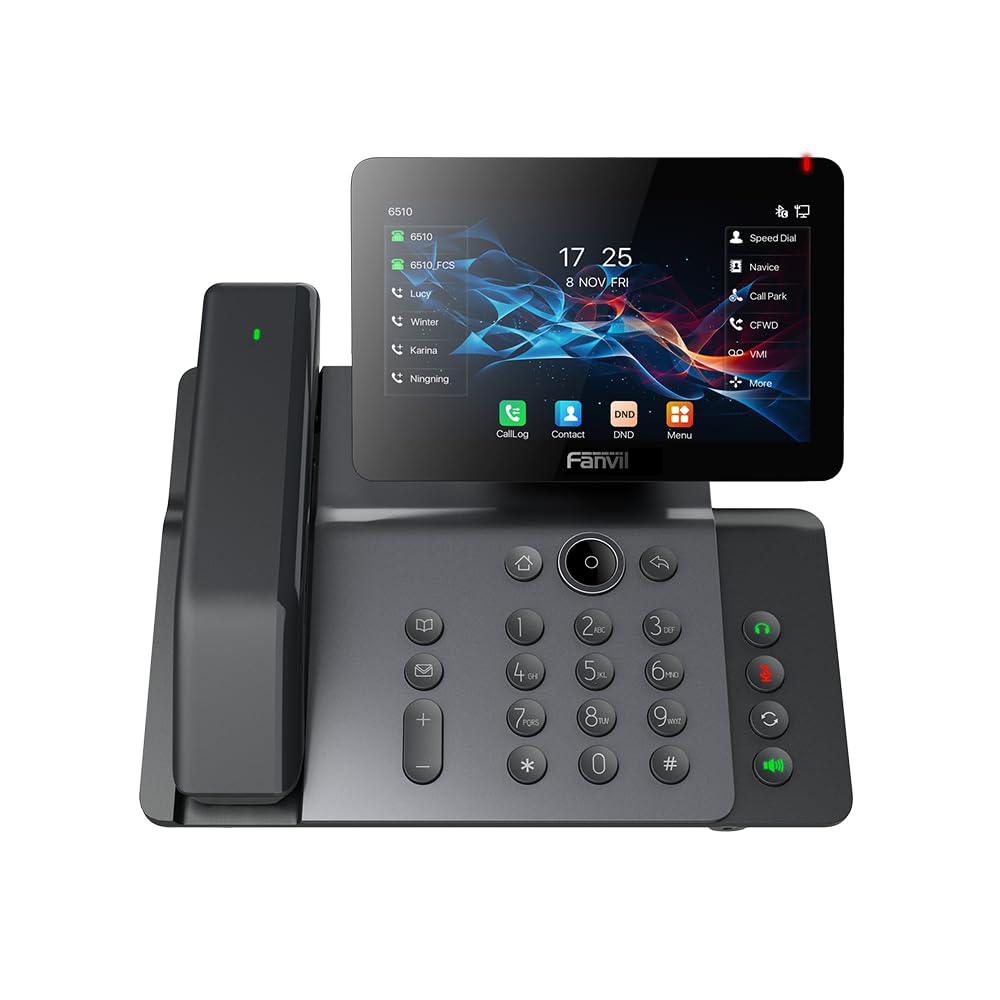
Figure 3.1: Fanvil V66-Pro IP Phone with its wireless Bluetooth handset shown separately.
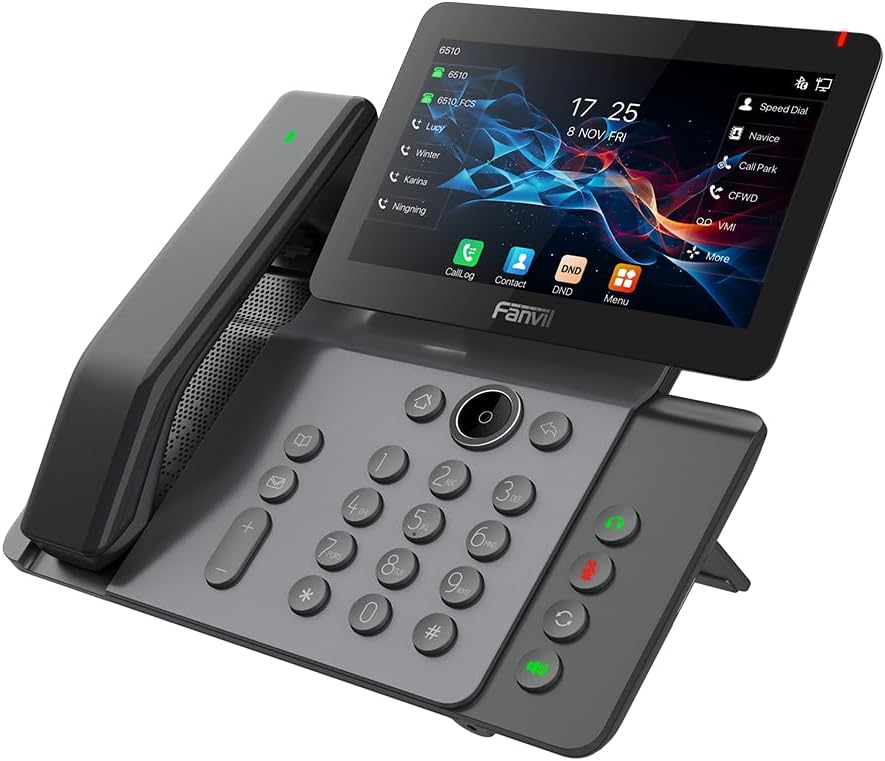
Figura 3.2: Frontal view of the Fanvil V66-Pro IP Phone with the handset attached to the main unit.
3.1 Components clau
- Adjustable Touch Screen: 7-inch color display for navigation and information.
- Teclat: Standard numeric and function keys for dialing and control.
- Wireless Bluetooth Handset: For cordless communication.
- Altaveu: Integrated speaker and microphone for hands-free calls.
- Tecles de funció: Dedicated buttons for common features like message, hold, transfer, and conference.
- Ports: Ethernet ports (LAN/PC), Power port, USB port, Headset port.
4. Configuració
4.1 Assembling the Phone
- Attach the desk stand to the main phone unit.
- Connect the coiled handset cord to the main unit and the wired handset (if using a wired handset). For the wireless Bluetooth handset, ensure it is placed on the charging cradle.
4.2 Connexió a la xarxa i a l'alimentació
- Connexió de xarxa: Connect one end of the Ethernet cable to the LAN port on the back of the phone and the other end to your network switch or router. If connecting a PC, use the PC port on the phone.
- Connexió d'alimentació: Connect the power adapter to the power port on the phone and then plug it into an electrical outlet. The phone will automatically power on.
4.3 Initial Boot-Up and Configuration
Upon first power-up, the phone will display a boot-up sequence. Once complete, it will attempt to obtain network settings via DHCP. If your network requires static IP configuration or specific SIP server details, these can be configured via the phone's menu or a web interface. Consult your network administrator for specific settings.
5. Instruccions de funcionament
5.1 Fer i rebre trucades
- Per fer una trucada: Pick up the handset, press the speakerphone button, or press a line key. Dial the number and press the Dial soft key or #.
- Per respondre una trucada: Pick up the handset, press the speakerphone button, or press the Answer soft key.
- Per finalitzar una trucada: Hang up the handset, press the speakerphone button again, or press the End Call soft key.
5.2 Ús de la pantalla tàctil
The 7-inch touch screen allows for intuitive navigation. Tap icons to access features like Call Log, Contacts, DND (Do Not Disturb), and Menu. Swipe gestures may be supported for additional screens or options.
5.3 Funcions bàsiques de trucada
- Manteniu: Durant una trucada activa, premeu Aguanta soft key. Press it again to resume the call.
- Transferència: Durant una trucada activa, premeu Transferència soft key. Dial the number to transfer to, then press the Transferència soft key again (blind transfer) or wait for the party to answer and then press Transferència (trasllat assistit).
- Conferència: Durant una trucada activa, premeu Conferència soft key. Dial the second party's number and wait for them to answer. Press the Conferència soft key again to join all parties.
5.4 Wi-Fi and Bluetooth Setup
- Wi-Fi: Navigate to the phone's menu, select 'Settings' > 'Wi-Fi'. Enable Wi-Fi, scan for available networks, select your network, and enter the password if required.
- Bluetooth: Navigate to the phone's menu, select 'Settings' > 'Bluetooth'. Enable Bluetooth. For the wireless handset, ensure it is charged and in pairing mode. Select the handset from the discovered devices list to pair.
6. Manteniment
6.1 Neteja del dispositiu
Use a soft, dry cloth to clean the phone's surface and screen. Avoid using liquid cleaners or abrasive materials, as they may damage the device. For stubborn marks, a slightly damp cloth with water may be used, ensuring no moisture enters openings.
6.2 Actualitzacions de programari
Periodically check for firmware updates to ensure optimal performance and access to new features. Updates can typically be performed via the phone's web interface or through your service provider's provisioning system. Consult your network administrator or service provider for guidance on updates.
7. Solució De Problemes
7.1 No Dial Tone
- Check all cable connections (Ethernet, power, handset).
- Ensure the phone is powered on and the screen is active.
- Verifiqueu la connectivitat de la xarxa.
- Contact your service provider to confirm SIP registration status.
7.2 Cannot Connect to Network
- Ensure the Ethernet cable is securely connected to the LAN port and your network.
- Check if your network switch or router is functioning correctly.
- If using Wi-Fi, verify the correct network is selected and the password is entered accurately.
- Restart the phone and your network equipment.
7.3 Problemes de visualització
- If the screen is blank, ensure the phone is powered on.
- Adjust screen brightness settings in the phone's menu.
- Reinicieu el telèfon.
8. Especificacions
| Característica | Detall |
|---|---|
| Dimensions del producte | 9 x 7 x 5.6 polzades |
| Pes de l'article | 3.3 lliures |
| ASIN | B0DYKWF779 |
| Fabricant | Fanvil |
| Color | negre |
| Tipus de telèfon | Cordat |
| Material | Metall, plàstic |
| Font d'alimentació | Elèctric amb cable |
| Tipus de contestador | Digital |
| Dispositius compatibles | VoIP Services, Traditional Phone Networks |
| Capacitat de trucades de conferència | Bàsica |
| Operació multilínia | Operació multilínia |
9. Informació de la garantia
Fanvil products are typically covered by a limited manufacturer's warranty. The specific terms and duration of the warranty may vary by region and retailer. Please refer to the warranty card included with your product or visit the official Fanvil weblloc web per obtenir informació detallada sobre la garantia. Conserveu el rebut de compra com a comprovant de compra per a reclamacions de garantia.
10. Suport
For technical assistance, product inquiries, or further support, please contact your vendor or visit the official Fanvil support weblloc:
Fanvil Official Weblloc: www.fanvil.com
You may find FAQs, firmware downloads, and additional documentation on their support pages.