
Fanvil V61G
Fanvil V61G Prime Business Phone
Manual d'usuari
Model: V61G | Brand: Fanvil
Producte acabatview
The Fanvil V61G is a sophisticated and user-friendly business IP phone designed to meet diverse corporate communication requirements. It features a 2.4-inch color display (320x240) that provides an intuitive interface, simplifying navigation and access to its extensive features. Supporting four simultaneous SIP lines, the V61G enables efficient management of multiple accounts, making it an ideal solution for dynamic work environments. A key highlight is its six-way audio conferencing capability, facilitating seamless team collaboration and reducing the necessity for in-person meetings. The device delivers HD audio quality, enhanced by advanced noise reduction and echo cancellation algorithms, ensuring crystal-clear conversations even in noisy settings. Equipped with dual Gigabit ports, the V61G ensures fast and stable network connections crucial for business productivity. Furthermore, its compatibility with various VoIP systems guarantees easy integration into existing communication infrastructures. Its modern and functional design enhances any workspace, providing an efficient and pleasant communication experience.
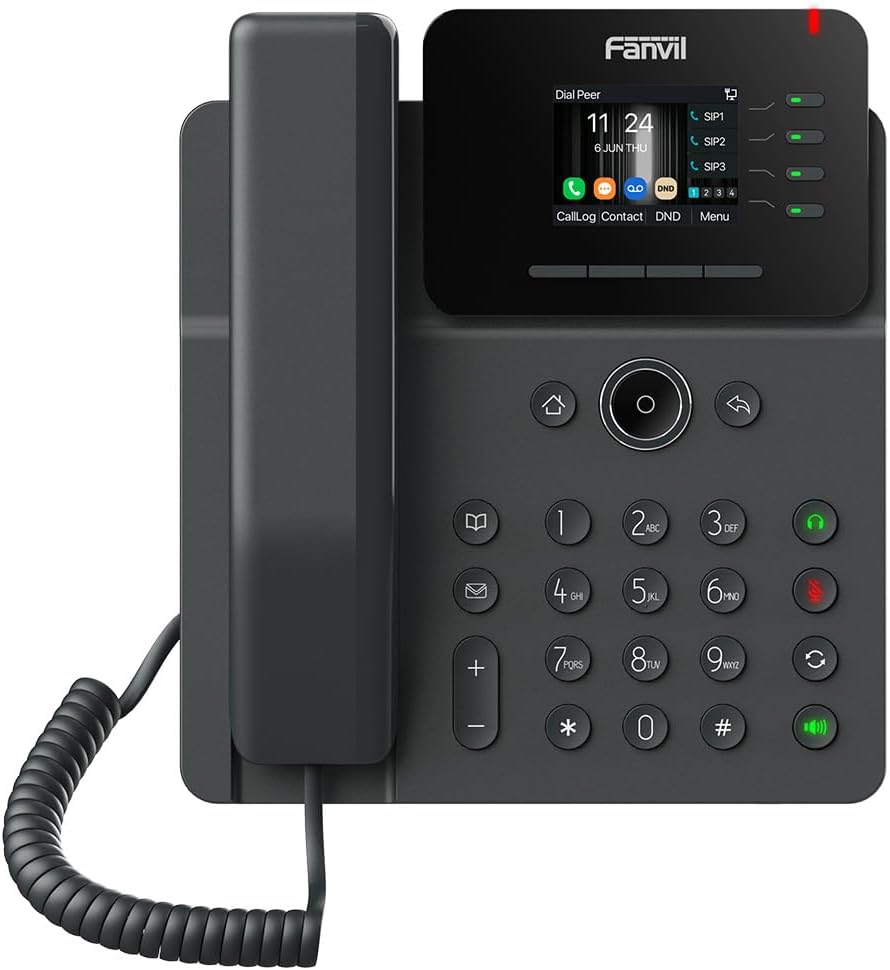
Imatge: Frontal view of the Fanvil V61G Prime Business Phone, showcasinla seva pantalla, el teclat numèric i el telèfon.
Característiques clau
- 2.4-inch color screen: Provides an intuitive and clear interface for easy navigation.
- Supports four simultaneous SIP lines: Allows for efficient management of multiple calls and accounts.
- Six-way audio conferencing: Enables robust collaboration with multiple participants.
- HD audio with noise reduction and echo cancellation: Ensures crystal-clear conversations.
- Dual Gigabit ports: Offers high-speed and stable network connections for optimal performance.
Configuració
1. Desembalatge i contingut del paquet
Desembaleu amb cura tots els elements de la caixa. Verifiqueu que hi hagi tots els components:
- Fanvil V61G IP Phone Unit
- Handset and Handset Cord
- Cable Ethernet
- Power Adapter (if not using Power over Ethernet - PoE)
- Suport d'escriptori
2. Muntatge del telèfon
- Attach the Desk Stand: Align the tabs on the desk stand with the slots on the back of the phone unit and slide it into place until it clicks securely.
- Connecteu el telèfon: Plug one end of the coiled handset cord into the handset and the other end into the handset port on the phone unit (marked with a handset icon).
3. Connexió a la xarxa i a l'alimentació
- Connexió de xarxa:
- Connect one end of the Ethernet cable to the LAN port on the phone (marked with a network icon).
- Connecteu l'altre extrem del cable Ethernet a un commutador o encaminador de xarxa.
- Si la vostra xarxa admet Power over Ethernet (PoE), el telèfon s'encendrà automàticament.
- Power Connection (if no PoE):
- If PoE is not available, connect the power adapter to the DC 12V port on the phone.
- Connecteu l'adaptador d'alimentació a una presa de corrent estàndard.
4. Arrencada inicial
Once connected, the phone will automatically power on and begin the boot-up sequence. The display will show the Fanvil logo, followed by network configuration and SIP registration status. This process may take a few minutes.
Upon successful boot-up, the main screen will display the date, time, and SIP line status. Ensure that your SIP lines show as registered (typically indicated by a green light or icon next to the SIP line on the display).
Instruccions de funcionament
1. Funcions de trucada bàsiques
- Fer una trucada:
- Agafeu el telèfon o premeu Altaveu botó.
- Marqueu el número de telèfon desitjat amb el teclat.
- Premeu el botó Marcar/Enviar button (often a green phone icon) or wait a few seconds for automatic dialing.
- Respondre una trucada:
- Quan soni el telèfon, agafeu l'auricular o premeu la tecla Altaveu botó.
- Finalització d'una trucada:
- Torneu a col·locar l'auricular a la base o premeu la tecla Finalitzar la trucada button (often a red phone icon).
2. Gestió de trucades
- Ajust de volum: Utilitza el Volum +/- buttons during a call to adjust the handset, speakerphone, or headset volume.
- Silenciar: Premeu el botó Silenciar botó per silenciar el micròfon durant una trucada. Premeu-lo de nou per activar el so.
- Manteniu: Premeu el botó Aguanta button to put an active call on hold. Press the button again or the corresponding line key to resume the call.
- Transferència:
- Durant una trucada activa, premeu Transferència botó.
- Dial the number you wish to transfer the call to.
- Premeu el botó Transferència button again to complete the transfer (blind transfer) or wait for the other party to answer and then press Transferència (trasllat assistit).
- 6-Way Audio Conferencing:
- Durant una trucada activa, premeu Conf Botó (Conferència).
- Dial the number of the next participant and press Marqueu.
- Once the new participant answers, press the Conf button again to add them to the conference.
- Repeat for up to six participants.
3. Using SIP Lines
The V61G supports up to four SIP lines. Each line key on the display or next to it indicates the status of that line (e.g., green for idle, red for in-use, flashing for incoming call). Press a line key to select it for making a call or to switch between active calls on different lines.
4. Navegació i menú
- Tecles de navegació: Use the directional keys (up, down, left, right) around the central OK button to navigate through menus and options on the display.
- Botó D'acord: Premeu el centre OK botó per confirmar les seleccions.
- Tornar/Tornar: Premeu el botó Enrere button (often an arrow icon) to go back to the previous screen or menu.
- Botó de menú: Premeu el botó Menú soft key on the display to access phone settings, call history, contacts, and other advanced features.
- Tecles programades: The buttons directly below the display (e.g., CallLog, Contact, DND, Menu) are context-sensitive soft keys. Their function changes depending on the current screen or call status.
Manteniment
1. Neteja del telèfon
To maintain the appearance and functionality of your Fanvil V61G phone:
- Desconnecteu sempre el telèfon de l'alimentació abans de netejar-lo.
- Use a soft, dry, anti-static cloth to wipe the phone's surface.
- Per a marques difícils, esbandiu lleugeramentampen the cloth with water. Do not use liquid cleaners, aerosol cleaners, or harsh chemicals as they may damage the phone's finish or internal components.
- Eviteu que entri humitat a cap obertura.
2. Actualitzacions de programari
Periodically, Fanvil may release firmware updates to improve performance, add features, or address security vulnerabilities. It is recommended to keep your phone's firmware updated.
- Firmware updates are typically managed by your IT administrator or VoIP service provider.
- If you manage your own phone, refer to the Fanvil official website or the phone's web interface for instructions on checking for and applying updates.
Resolució de problemes
This section provides solutions to common issues you might encounter with your Fanvil V61G phone. If the problem persists, contact your IT administrator or Fanvil support.
1. No Power / Phone Does Not Turn On
- Comproveu la connexió d'alimentació: Ensure the power adapter is securely plugged into the phone and a working electrical outlet.
- Check PoE: If using Power over Ethernet (PoE), ensure the Ethernet cable is connected to a PoE-enabled port on your network switch and that PoE is active. Try connecting to a different PoE port or using the power adapter.
- Punt de sortida de prova: Plug another device into the electrical outlet to confirm it is functional.
2. No Dial Tone / Cannot Make or Receive Calls
- Comproveu la connexió de xarxa: Ensure the Ethernet cable is securely connected to both the phone's LAN port and the network. The network indicator light on the phone (if present) should be active.
- Check SIP Registration: On the phone's display, verify that your SIP lines are registered (usually indicated by a green icon or text). If not, there might be an issue with your network or SIP server configuration.
- Reinicia el telèfon: Disconnect and reconnect the power cable to restart the phone.
- Problemes de xarxa: Confirm your network is operational. Try accessing the internet from another device connected to the same network.
3. Poor Audio Quality (Echo, Static, Low Volume)
- Ajustar el volum: Use the volume buttons during a call to increase the listening volume.
- Check Handset/Headset Connection: Ensure the handset cord or headset cable is securely plugged into the correct port.
- Congestió de la xarxa: Poor audio can be caused by network congestion or insufficient bandwidth. Consult your network administrator.
- Soroll ambiental: Ensure you are in a quiet environment, or utilize the phone's noise reduction features.
4. Problemes de visualització
- Sense pantalla/pantalla en blanc: Ensure the phone is powered on. If it is, try restarting the phone.
- Pantalla congelada: Restart the phone by disconnecting and reconnecting the power.
Especificacions
| Característica | Detall |
|---|---|
| Dimensions del producte | 12 x 10 x 3 polzades |
| Pes de l'article | 2 lliures |
| Número de model | V61G |
| Marca | Fanvil |
| Tipus de telèfon | Cordat |
| Font d'alimentació | Corded Electric (supports PoE) |
| Tipus de contestador | Digital |
| Mostra | 2.4-inch (320x240) high-Definition Color Screen |
| SIP Lines | Supports 4 SIP Lines |
| Audioconferència | 6-Way Audio Conferencing |
| Ports de xarxa | Dual Gigabit Ports |
| UPC | 889837003848 |
Garantia i Suport
Fanvil products are designed for reliability and performance. For specific warranty terms and conditions, please refer to the warranty card included with your product or visit the official Fanvil weblloc.
For technical support, troubleshooting assistance beyond this manual, or service inquiries, please contact your vendor, IT administrator, or Fanvil's official support channels. You can typically find contact information on the Fanvil weblloc o a l'embalatge del producte.
Recursos en línia:
- Official Fanvil Weblloc: www.fanvil.com (for product information, downloads, and support)
Ask a question about this manual
Ask about setup, troubleshooting, compatibility, parts, safety, or missing instructions. Manuals+ will review the question and use this page’s manual context to help answer it.