
1. Introducció
The TUOPUONE LCD1602 I2C Module is a character liquid crystal display designed for integration with various microcontrollers and development boards. It features a 16x2 character display and utilizes an I2C communication interface, requiring only two signal pins (SCL, SDA) for operation, thereby conserving I/O resources on your host device. This module is compatible with both 3.3V and 5V operating voltages and includes an adjustable backlight.
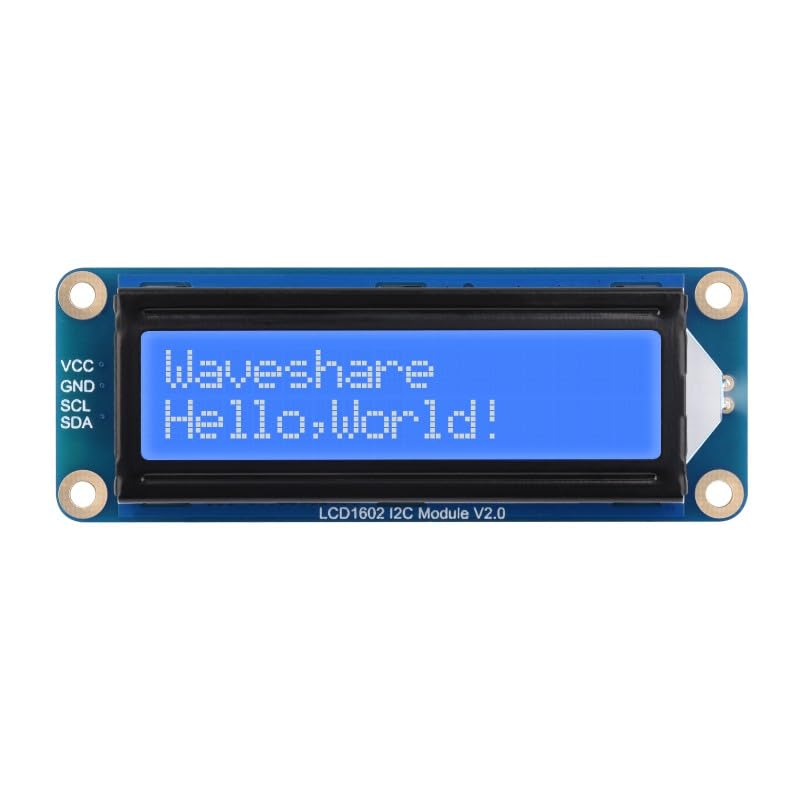
Figura 1: Frontal view of the LCD1602 I2C Module.
2. Característiques
- Incorporates a character LCD panel, model LCD1602.
- I2C control interface, requiring only two signal pins (SCL, SDA) to save I/O resources.
- Compatible with 3.3V and 5V operating voltages.
- Onboard AiP31068 LCD driver and SN3193 backlight driver.
- Adjustable backlight for varied lighting conditions.
- Comes with online development resources and example code for Raspberry Pi, Jetson Nano, ESP32, and Arduino.

Figura 2: Mésview of LCD1602 I2C Module features and display options.
3. Especificacions
| Paràmetre | Valor |
|---|---|
| Interfície de comunicació | I2C |
| Controlador LCD | AiP31068 |
| Vol. Operatiutage | 3.3V ~ 5V |
| Controlador de llum de fons | SN3193 |
| Panell de visualització | LCD de caràcters |
| Personatges | 16 × 2 |
| Mida de la pantalla | 64.5 × 16.0 mm |
| Temperatura de funcionament | -20 ~ +70 °C |
| Dimensions | 87.0 × 32.0 × 13.0 mm |

Figure 3: Detailed specifications and features summary.
4. Pinout and Interface
The LCD1602 I2C Module uses a 4-pin interface for I2C communication and power supply. The pins are clearly labeled on the module.

Figura 4: Esquena view of the module highlighting the I2C interface pins.
| Pin | Descripció |
|---|---|
| VCC | Power supply input (3.3V ~ 5V) |
| GND | Terra |
| SCL | Línia de rellotge I2C |
| SDA | Línia de dades I2C |
5. Configuració i connexió
To connect the LCD1602 I2C Module to your development board (e.g., Raspberry Pi, Arduino), follow these steps:
- Connecteu el VCC pin of the module to the 3.3V or 5V power output of your development board. Ensure the voltage matches the board's I2C logic level.
- Connecteu el GND pin of the module to the Ground pin of your development board.
- Connecteu el SCL pin of the module to the I2C Clock (SCL) pin of your development board.
- Connecteu el SDA pin of the module to the I2C Data (SDA) pin of your development board.
A typical connection example with a Raspberry Pi is shown below:
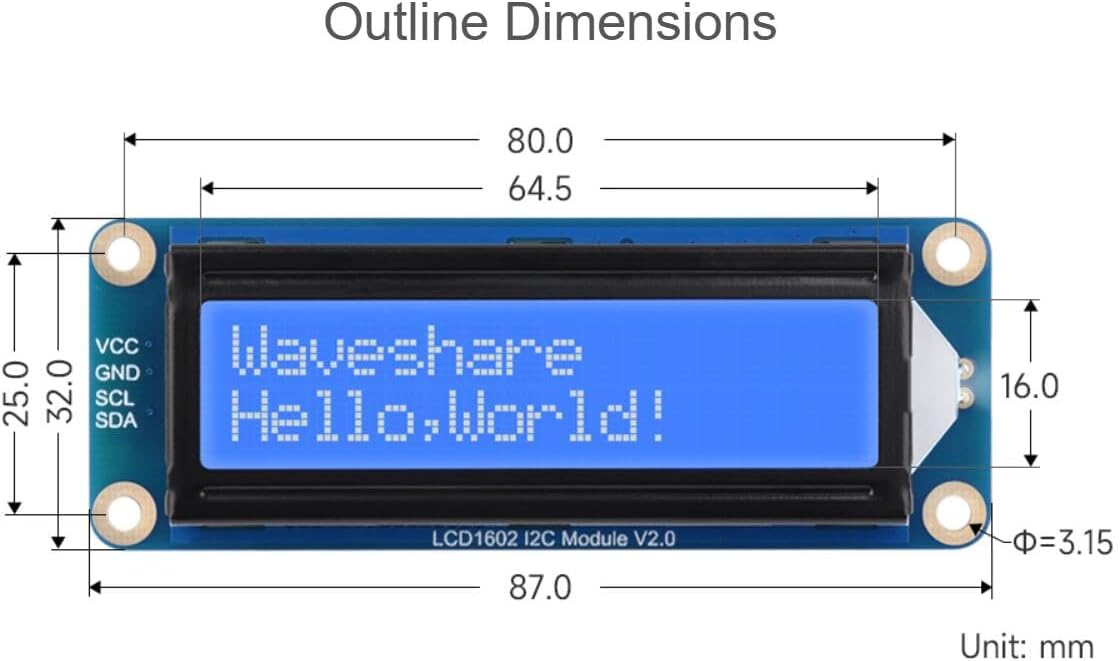
Figura 5: Example connection of the LCD1602 I2C Module to a Raspberry Pi. (Raspberry Pi is not included).
6. Compatibilitat
The LCD1602 I2C Module is designed for broad compatibility with various popular development platforms, including:
- Raspberry Pi (various models)
- Raspberry Pi Pico
- Jetson Nano
- ESP32
- Arduino (various models)
- STM32
Online development resources and user manuals are available to facilitate integration and development on these platforms.

Figure 6: Compatible development platforms.
7. Instruccions de funcionament
To operate the LCD1602 I2C Module, you will typically need to:
- Install I2C Library: For most platforms (e.g., Arduino, Raspberry Pi), you will need to install a compatible I2C LCD library. Common libraries include the "LiquidCrystal_I2C" library for Arduino or
smbusii2c-toolsfor Raspberry Pi. - Troba l'adreça I2C: The default I2C address for the module is often 0x27 or 0x3F. You may need to run an I2C scanner sketch/script to confirm the address if the display does not initialize.
- Inicialitzar la pantalla: Use the installed library to initialize the LCD with its I2C address and dimensions (16 columns, 2 rows).
- Escriure text: Use the library's functions to print text to the display, set cursor position, clear the screen, and control the backlight.
- Ajusta la llum de fons: The module typically has a potentiometer on the back to adjust the backlight brightness.
Refer to the online development resources and examples provided by TUOPUONE for specific code examples and detailed instructions for your chosen platform.
8. Manteniment
- Neteja: Use a soft, dry cloth to gently clean the display surface. Avoid abrasive cleaners or solvents.
- Emmagatzematge: Store the module in a dry, dust-free environment away from direct sunlight and extreme temperatures.
- Manipulació: Handle the module by its edges to avoid touching the display area or sensitive electronic components.
- Font d'alimentació: Assegureu-vos sempre el volum de funcionament correctetage (3.3V or 5V) is applied to prevent damage.
9. Solució De Problemes
- Display shows blank or blocks:
- Check power connections (VCC, GND).
- Verify I2C connections (SCL, SDA) are correct.
- Adjust the potentiometer on the back of the module. This controls contrast and can make the display appear blank if set incorrectly.
- Ensure the correct I2C address is used in your code. Run an I2C scanner to confirm.
- La retroiluminació està apagada:
- Check if the backlight control in your code is enabled.
- Ensure the backlight potentiometer is not turned all the way down.
- Garbled text:
- Confirm the correct I2C address and LCD dimensions (16x2) are set in your code.
- Ensure the I2C library is correctly installed and initialized.
- Mòdul no detectat per l'escàner I2C:
- Double-check all wiring, especially SCL and SDA.
- Ensure the host board's I2C interface is enabled (e.g.,
raspi-configfor Raspberry Pi). - Verify the module is receiving power.
10. Cotes del contorn
The physical dimensions of the LCD1602 I2C Module are provided below for integration into your projects.

Figure 7: Outline dimensions of the LCD1602 I2C Module (Unit: mm).
11. Contingut del paquet
El paquet estàndard inclou els següents elements:
- LCD1602 I2C Module (Blue) x1
- PH2.0 4PIN wire x1
12. Garantia i Suport
For warranty information, technical support, and additional resources, please refer to the official TUOPUONE website or contact your retailer. Online development resources and examples for various platforms are available to assist with integration and programming.
Per obtenir més ajuda, visiteu el TUOPUONE Store on Amazon.