
Introducció
This manual provides detailed instructions for the proper use and maintenance of your 82Ms-A Scientific Calculator. Designed for students and professionals, this calculator features a 2-line display, multi-function keys, and supports up to 240 functions, including trigonometric calculations. Please read this manual thoroughly to ensure optimal performance and longevity of your device.
Què hi ha a la caixa

Image: The 82Ms-A Scientific Calculator as packaged, indicating one unit is included.
- 82Ms-A Scientific Calculator (1 unit)
- Manual d'usuari (aquest document)
Configuració
Instal·lació de la bateria

Imatge: Una imatge detallada view showing the open battery compartment of the calculator, revealing two AAA batteries.
The 82Ms-A Scientific Calculator is powered by a long-lasting battery. To install or replace batteries:
- Assegureu-vos que la calculadora estigui engegada OFF.
- Localitzeu la tapa del compartiment de la bateria a la part posterior de la calculadora.
- Feu lliscar la coberta en la direcció indicada per la fletxa (si n'hi ha).
- Insert new batteries, ensuring correct polarity (+/-) as marked inside the compartment.
- Torneu a col·locar la tapa del compartiment de la bateria fins que sentiu un clic i quedi ben fixada al seu lloc.
Instruccions de funcionament
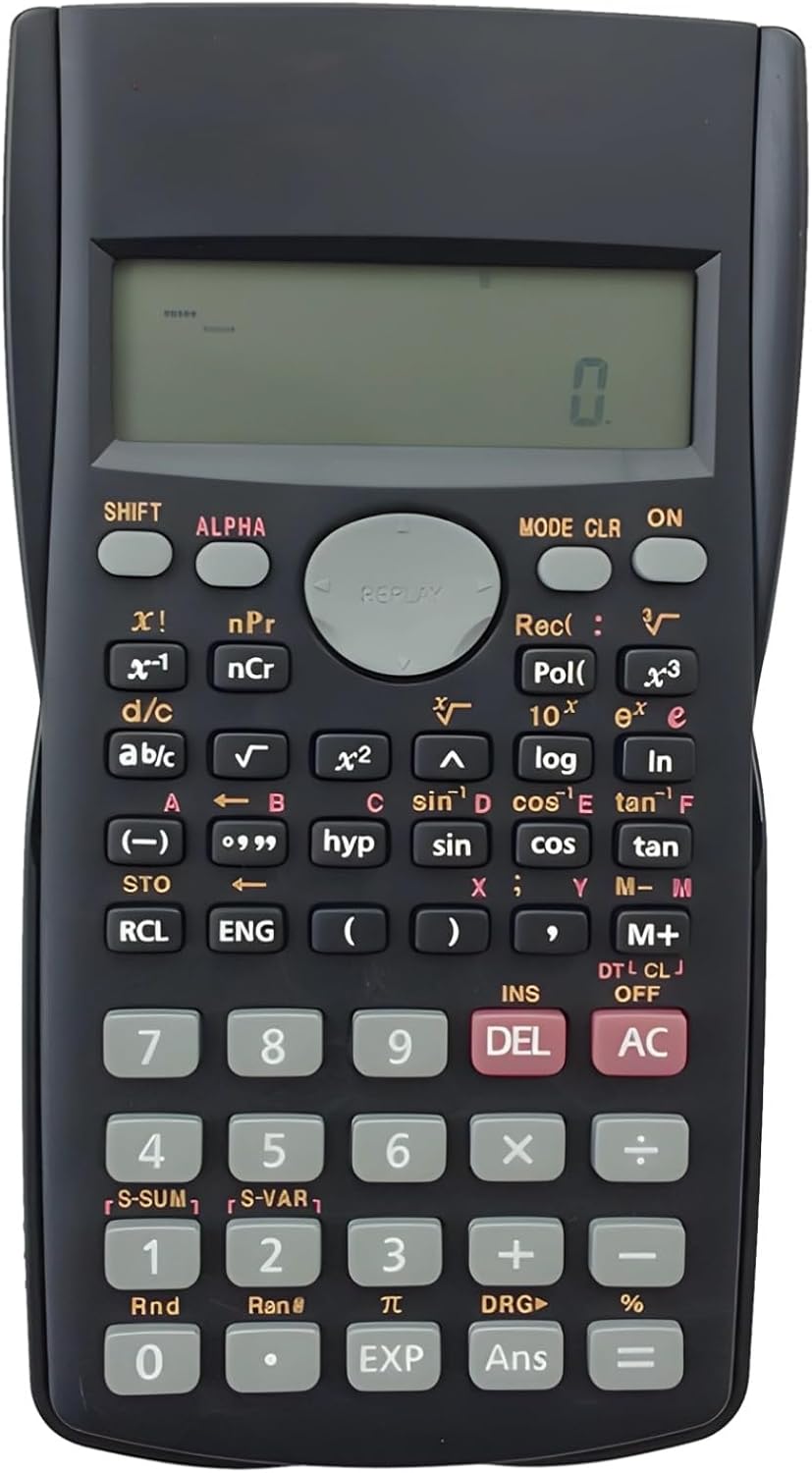
Image: The full layout of the 82Ms-A Scientific Calculator, highlighting its 2-line display and various function keys.
Encès/Apagat
- Per encendre: premeu la tecla ON clau.
- Per apagar: premeu MAJÚS aleshores AC (DESACTIVAT).
Càlculs bàsics
Introduïu números amb el teclat numèric. Feu servir el +, -, ×, i ÷ keys for standard arithmetic operations. Press = per mostrar el resultat.
Multi-Function Keys and 2-Line Display
The calculator features a 2-line display, showing both the input expression and the result simultaneously. Many keys have multiple functions, indicated by colored labels above or below them. These functions are accessed using the MAJÚS i ALFA claus.
- MAJÚS: Activates the yellow-labeled functions. Press MAJÚS, then the desired key.
- ALFA: Activates the red-labeled functions (variables, constants). Press ALFA, then the desired key.
- MODE: Changes the calculator's mode (e.g., COMP, STAT, EQN). Press MODE repeatedly to cycle through options.
- CLR: Clears specific data or settings. Press MAJÚS aleshores CLR to access clear options.
- DEL: Deletes the character at the cursor position.
- AC: Clears all input and returns to the initial state.
Funcions avançades
The 82Ms-A supports 240 functions, including trigonometric (sin, cos, tan), logarithmic (log, ln), power (x², x³), roots (√, ³√), fractions (a b/c), and statistical calculations. Refer to the specific key labels and their SHIFT/ALPHA functions for detailed usage.
- Funcions trigonomètriques: Ús pecat, cos, bronzejat keys. For inverse functions (sin⁻¹, cos⁻¹, tan⁻¹), use MAJÚS with these keys.
- Logarithmic Functions: Ús registre (base 10) i ln (natural logarithm) keys.
- Power and Root Functions: Ús x² per al quadrat, MAJÚS aleshores x² for square root (√). For other powers and roots, use x³ or MAJÚS aleshores x³ (³√).
- Fraccions: Utilitzeu el ab/c key to input and convert fractions.
Manteniment
Neteja
Per netejar la calculadora, feu servir un drap suau i sec. Per a la brutícia resistent, netegeu lleugerament.ampen the cloth with water or a mild, non-abrasive cleaner. Do not use strong solvents, alcohol, or abrasive cleaners, as these can damage the casing i pantalla.
Emmagatzematge
Store the calculator in a cool, dry place away from direct sunlight and extreme temperatures. If storing for an extended period, it is recommended to remove the batteries to prevent leakage.
Resolució de problemes
| Problema | Causa possible | Solució |
|---|---|---|
| La calculadora no s'encén. | Piles gastades o instal·lades incorrectament. | Substituïu les piles per unes de noves, assegurant la polaritat correcta. |
| La pantalla està tènue o en blanc. | Potència de bateria baixa. | Substituïu les piles. |
| Resultats de càlcul incorrectes. | Incorrect mode setting or previous calculation error. | Premeu AC to clear. Check the current mode using the MODE key and adjust if necessary. |
| Les tecles no responen. | Dust or debris under keys; internal malfunction. | Netegeu suaument el voltant de les tecles. Si el problema persisteix, contacteu amb el servei d'assistència. |
Especificacions

Image: The 82Ms-A Scientific Calculator with its length, width, and thickness measurements indicated.
| Característica | Detall |
|---|---|
| Número de model | 71T71524TQPRRJC1J26SKQF |
| Tipus de visualització | Pantalla de dues línies |
| Nombre de funcions | Fins a 240 funcions |
| Font d'alimentació | Funciona amb bateria |
| Dimensions (L x A x A) | 6.1 x 3.27 x 0.39 polzades |
| Pes de l'article | 5.3 unces |
| Color | Negre |
| Material | Plàstic |
Garantia i Suport
Specific warranty information for this product is not provided within this manual. For warranty details, technical support, or service inquiries, please refer to the product packaging or contact the retailer from whom the product was purchased. Keep your purchase receipt as proof of purchase.