
Producte acabatview
The GOBOULT Y1 Pro Wireless Earbuds are designed to provide a high-quality audio experience with features like extended playtime, clear calling, and low-latency gaming. This manual provides detailed instructions for setting up, operating, and maintaining your earbuds.

Imatge: Una mostra de collageasing key features of the GOBOULT Y1 Pro Earbuds, including 60 hours playtime, Zen Quad Mic ENC, 45ms low latency gaming, 13mm bass drivers, Type-C fast charging, and Bluetooth 5.3.
Contingut del paquet
- GOBOULT Y1 Pro Wireless Earbuds
- Estoig de càrrega
- Cable de càrrega USB tipus C
- Coixins per a les orelles (diverses mides)
- Puntes d'orella (diverses mides)
- Targeta de garantia
Configuració
1. Càrrega dels auriculars i l'estoig
Before initial use, ensure both the earbuds and the charging case are fully charged. This optimizes battery life and performance.
- Connect the provided USB Type-C charging cable to the charging port on the case and to a compatible USB power adapter (not included).
- The LED indicator on the charging case will illuminate to show charging status.
- A full charge typically takes a few hours. A quick 10-minute charge can provide approximately 120 minutes of playtime.

Image: The GOBOULT Y1 Pro earbuds and charging case, illustrating the Type-C fast charging capability, where 10 minutes of charge provides 120 minutes of playtime.
2. Maridatge inicial
Segueix aquests passos per emparellar els auriculars amb el dispositiu per primera vegada:
- Remove any protective film from the charging contacts on the earbuds.
- Place both earbuds into the charging case and close the lid for a few seconds.
- Open the charging case lid. The earbuds will automatically power on and enter pairing mode, indicated by flashing LED lights.
- Al telèfon intel·ligent o a un altre dispositiu amb Bluetooth, aneu a la configuració de Bluetooth.
- Cerca available devices and select "GOBOULT Y1 Pro" de la llista.
- Un cop connectat, un missatge de veu confirmarà l'emparellament correcte.

Image: A diagram illustrating the initial setup steps, including removing protective film and opening the case, along with a detailed guide to the touch controls for both left and right earbuds.
3. Reconnexió automàtica
After initial pairing, the earbuds will automatically connect to the last paired device when removed from the charging case and Bluetooth is enabled on the device.

Image: GOBOULT Y1 Pro earbuds and charging case, demonstrating Bluetooth 5.3 for stable, efficient, and fast pairing with a connected smartphone.
Instruccions de funcionament
Encès/Apagat
- Encès: Open the charging case lid. The earbuds will power on automatically. Alternatively, if outside the case, long press the touch area on both earbuds for 3 seconds.
- Apagar: Place both earbuds back into the charging case and close the lid. They will power off automatically. Alternatively, long press the touch area on both earbuds for 5 seconds.
Controls tàctils
The GOBOULT Y1 Pro earbuds feature intuitive touch controls for managing music, calls, and other functions. Refer to the diagram below and the following list for specific actions:
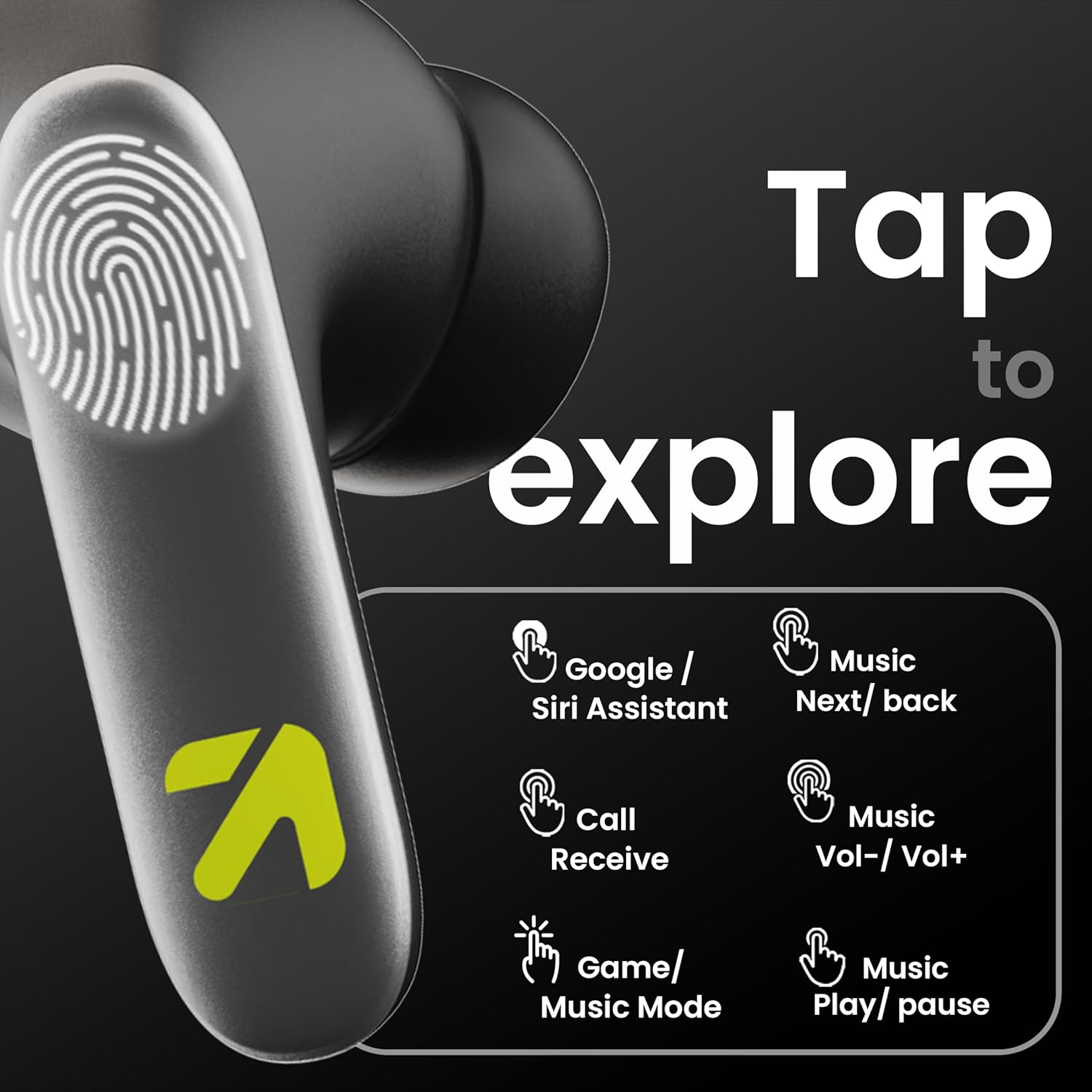
Image: A visual guide to the touch controls on the GOBOULT Y1 Pro earbuds, detailing actions for Google/Siri Assistant, music navigation, call management, volume control, and game/music mode switching.
- Single Tap (Left/Right): Reproduir/Pausar música, Respondre/Finalitzar trucada.
- Doble toc (auricular esquerre): Cançó anterior.
- Doble toc (auricular dret): Cançó següent.
- Triple toc (auricular esquerre): Baixa el volum.
- Triple toc (auricular dret): Puja el volum.
- Long Press (2 seconds, Left/Right): Reject incoming call, Activate Voice Assistant (Google/Siri).
- Four Taps (Left/Right): Activate/Deactivate Gaming Mode.
Mode de joc
For an enhanced gaming experience, activate the ultra-low latency Gaming Mode:
- Activació: Tap the touch area four times on either earbud.
- Desactivació: Tap the touch area four times again.

Image: GOBOULT Y1 Pro earbuds and charging case, highlighting the 45ms low latency gaming mode for real-time audio synchronization, activated by four taps.
Assistent de veu
Quickly access your device's voice assistant (Siri or Google Assistant) for hands-free control:
- Activació: Perform a long tap on the touch area of either earbud.

Image: Illustration showing how to access Siri or Google Assistant with a long tap on the earbud's touch sensor.
Cancel·lació de soroll ambiental (ENC)
The GOBOULT Y1 Pro features Zen Quad Mic ENC technology, ensuring crystal-clear calls by effectively filtering out ambient noise from your surroundings.

Image: A diagram explaining how Environmental Noise Cancellation (ENC) works by isolating your voice from environmental noise, ensuring clear communication during calls.
Manteniment
Neteja
- Netegeu regularment els auriculars i l'estoig de càrrega amb un drap suau, sec i sense borrissol.
- Ensure the charging contacts on both the earbuds and inside the case are free from dust and debris to maintain proper charging.
- Do not use abrasive cleaners, solvents, or harsh chemicals, as these may damage the product.
Resistència a l'aigua
The GOBOULT Y1 Pro earbuds are rated IPX5 water-resistant. This means they are protected against low-pressure water jets from any direction, making them suitable for workouts and light splashes.
- No submergiu els auriculars a l'aigua.
- Avoid exposing them to heavy rain or extreme moisture.
- Assegureu-vos que els auriculars estiguin secs abans de tornar-los a col·locar a l'estoig de càrrega per evitar que es facin malbé.

Image: GOBOULT Y1 Pro earbuds with water droplets, illustrating their IPX5 water resistance, providing protection against sweat and splashes.
Resolució de problemes
If you encounter any issues with your GOBOULT Y1 Pro earbuds, refer to the following common troubleshooting steps:
Els auriculars no s'emparellan ni es connecten
- Ensure both earbuds and the charging case have sufficient battery.
- Turn off Bluetooth on your device, wait 5 seconds, then turn it back on.
- On your device, "Forget" or "Unpair" "GOBOULT Y1 Pro" from the Bluetooth list, then attempt the pairing process again.
- Place both earbuds back into the charging case, close the lid, wait 10 seconds, then open the lid to re-enter pairing mode.
Només funciona un auricular
- Assegureu-vos que els dos auriculars estiguin carregats.
- Torna a col·locar els dos auriculars a l'estoig de càrrega, tanca la tapa i torna-la a obrir. Sovint això els torna a sincronitzar.
- If the issue persists, try resetting the earbuds (refer to the manufacturer's weblloc web per obtenir instruccions específiques de restabliment si no es detallen aquí).
Mala qualitat de so o baix volum
- Ensure the earbuds are properly seated in your ears to create a good seal. Try different sized eartips.
- Netegeu qualsevol residu de les reixetes dels auriculars.
- Check the audio source device's volume and sound settings.
- Apropeu-vos al dispositiu connectat per evitar interferències de senyal.
Problemes de càrrega
- Assegureu-vos que el cable de càrrega estigui connectat correctament tant a la carcassa com a la font d'alimentació.
- Try a different USB Type-C charging cable or power adapter.
- Netegeu els contactes de càrrega dels auriculars i de l'interior de la funda amb un bastonet de cotó sec.
Especificacions
| Característica | Detall |
|---|---|
| Marca | GOBOULT |
| Nom del model | AirBass |
| Versió Bluetooth | 5.3 |
| Col·locació de l'orella | A l'orella |
| Control de soroll | Cancel·lació de soroll ambiental (ENC) |
| Mida del controlador d'àudio | 13 Mil·límetres |
| Temps de joc total | Fins a 60 hores (amb estoig de càrrega) |
| Latència baixa | 45 ms (mode de joc) |
| Tipus de càrrega | Càrrega ràpida tipus C |
| Resistència a l'aigua | IPX5 |
| Mètode de control | Toca |
| Dispositius compatibles | Telèfons intel·ligents, tauletes, ordinadors portàtils, ordinadors de sobretaula, altaveus intel·ligents |
| Pes de l'article | 50 grams |
| País d'origen | Xina |
Informació de la garantia
The GOBOULT Y1 Pro Wireless Earbuds are covered by a 1 anys de garantia del fabricant des de la data de compra.
This warranty covers manufacturing defects. Please retain your proof of purchase for any warranty claims. The warranty does not cover damage caused by misuse, accidents, unauthorized modifications, or normal wear and tear.
Suport
For further assistance, technical support, or warranty inquiries, please contact:
- Fabricant: Exotic Mile Private Limited, B-67 Wazirpur Industrial Area, New Delhi 110052
- Importador: Exotic Mile Pvt. Ltd. , B67 Wazirpur Industrial Area , New Delhi 110052
- For customer service contact details, please refer to the GOBOULT official weblloc web o la plataforma on vau comprar el producte.