
Introducció
Welcome to the user manual for your new AOLON Mars R3 Smartwatch. This guide provides detailed instructions on how to set up, operate, maintain, and troubleshoot your device. The Mars R3 Smartwatch features a 3D flexible surface design, high-definition Bluetooth calling capabilities, and comprehensive notification display. It is designed to keep you connected and track your daily activities with ease.
Les característiques clau inclouen:
- True IP68 waterproof rating for enhanced durability.
- 3D flexible surface design for a sleek aesthetic.
- HD Bluetooth calls, allowing you to answer calls directly from your wrist.
- Large screen display for clear viewing of messages and notifications.
- Support for custom photo wallpapers and a variety of default clock displays.
- Integrated activity tracking features.
Producte acabatview
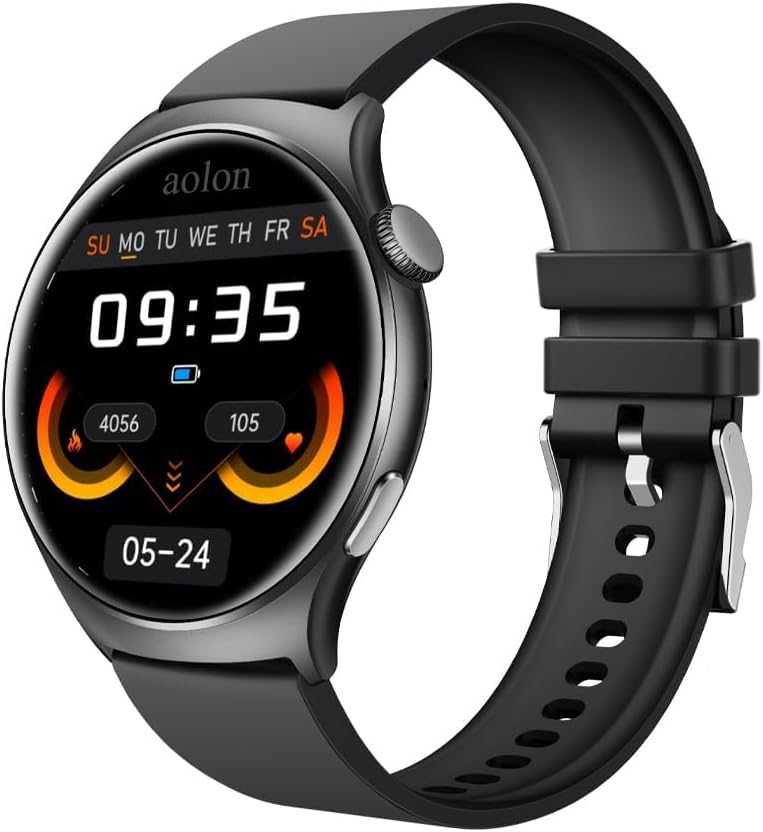
Figure 1: The AOLON Mars R3 Smartwatch, showcasing its round display and black silicone strap. The screen displays the current time, date, and various health metrics.
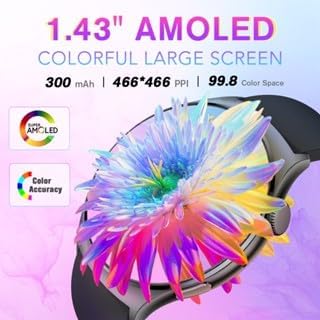
Figure 2: The 1.83-inch AMOLED colorful large screen of the Mars R3 Smartwatch, highlighting its vibrant display capabilities and high resolution.

Figure 3: The Bluetooth call feature of the Mars R3 Smartwatch, demonstrating how users can answer or hang up calls directly from their wrist, seamlessly switching between the watch and mobile phone.
Configuració
1. Càrrega inicial
Before first use, fully charge your Mars R3 Smartwatch. Connect the magnetic charging cable to the charging contacts on the back of the watch and plug the USB end into a standard USB power adapter (not included) or a computer USB port. The watch display will indicate charging status.
2. Encès / apagat
- Per encendre: Press and hold the side button until the AOLON logo appears.
- Per apagar: Mantingueu premut el botó lateral i, a continuació, seleccioneu l'opció "Apagar" a la pantalla.
3. Instal·lació i emparellament de l'aplicació
To unlock the full functionality of your smartwatch, you need to install the companion application on your smartphone. The watch operates with an Android 7.0 based system, ensuring broad compatibility.
- Scan the QR code provided in the watch's quick start guide or search for the official AOLON smartwatch app in your smartphone's app store (Google Play Store for Android, Apple App Store for iOS).
- Baixeu i instal·leu l'aplicació.
- Activa el Bluetooth al teu telèfon intel·ligent.
- Open the AOLON app and follow the on-screen instructions to pair your Mars R3 Smartwatch. Ensure the watch is powered on and within Bluetooth range of your phone.
- Confirma la sol·licitud d'emparellament tant al telèfon com al rellotge intel·ligent.
Instruccions de funcionament
1. Navegació bàsica
- Pantalla tàctil: Llisca cap a l'esquerra, la dreta, amunt o avall per navegar pels menús i les pantalles. Toca per seleccionar un element.
- Botó lateral: Premeu per tornar a la pantalla d'inici o activar la pantalla. Premeu llargament per veure les opcions d'engegada.
2. Fer i rebre trucades
The Mars R3 Smartwatch supports HD Bluetooth calls, allowing you to manage calls directly from your wrist.
- Per respondre una trucada: Quan rebis una trucada, toca la icona verda de resposta a la pantalla del rellotge.
- To Decline a Call: Tap the red decline icon on the watch screen.
- Per fer una trucada: Access the dialer or contacts list through the watch's menu. Tap to dial a number or select a contact. Ensure your watch is connected to your phone via Bluetooth.
3. Notificacions
Rebre i view notifications from your smartphone directly on your smartwatch screen.
- Ensure notification permissions are enabled in the AOLON app on your smartphone.
- Llisca cap avall des de la part superior de l'esfera del rellotge fins a view notificacions recents.
- Messages from social media applications will display their content on the large screen.
4. Seguiment d'activitat
The smartwatch automatically tracks various activities and health metrics.
- View daily steps, distance, and calories burned directly on the watch face or in the activity tracking menu.
- Detailed historical data and additional health insights are available in the companion app.
5. Personalització de les esferes del rellotge
Personalize your smartwatch with various watch faces.
- Al rellotge: Long press the current watch face to enter the watch face selection menu. Swipe left or right to browse available faces and tap to select.
- Mitjançant l'aplicació: Use the 'App Jam Display Market' within the AOLON app to explore a wider range of watch faces. You can also set your own photos as wallpaper through the app.
Manteniment
1. Neteja del teu rellotge intel·ligent
Regular cleaning helps maintain the appearance and functionality of your device.
- Netegeu la pantalla i el cos amb un drap suau i sense borrissol. Si cal,ampHumitegeu lleugerament el drap amb aigua.
- Do not use harsh chemicals, abrasive cleaners, or solvents, as these can damage the watch's finish and seals.
- Clean the charging contacts periodically with a dry cloth to ensure good connection.
2. Resistència a l'aigua (IP68)
The Mars R3 Smartwatch has a True IP68 waterproof rating, meaning it is protected against dust ingress and can withstand immersion in water up to 1.5 meters for up to 30 minutes.
- It is suitable for everyday use, including hand washing, rain, and brief immersion.
- Avoid using the watch in hot water, saunas, or steam rooms, as steam can penetrate seals.
- No premeu botons sota l'aigua.
- After exposure to water, especially saltwater, rinse the watch with fresh water and dry it thoroughly before charging.
3. Cura de la bateria
- Eviteu descarregar completament la bateria amb freqüència.
- Charge the watch regularly, ideally before the battery level drops too low.
- Store the watch in a cool, dry place if not used for extended periods, with the battery charged to about 50%.
Resolució de problemes
1. El rellotge no s'encén
- Assegura't que el rellotge estigui completament carregat. Connecta'l al carregador durant almenys 30 minuts.
- Comproveu si el cable de càrrega i l'adaptador estan danyats.
- Proveu un altre port USB o adaptador de corrent.
2. No es pot emparellar amb el telèfon
- Assegura't que el Bluetooth estigui activat al telèfon i al rellotge.
- Make sure the watch is within close proximity to your phone.
- Reinicieu tant el telèfon com el rellotge intel·ligent.
- Forget the device in your phone's Bluetooth settings and try pairing again through the AOLON app.
- Ensure the AOLON app has necessary permissions enabled (e.g., location, Bluetooth).
3. No apareixen notificacions
- Verify that notification permissions are granted to the AOLON app in your phone's settings.
- Check if the app's notification settings are configured correctly for the desired applications.
- Ensure the watch is connected to the phone via Bluetooth.
- Disable and re-enable notifications in the app.
4. Inaccurate Activity Tracking
- Assegureu-vos de portar el rellotge ben ajustat al canell, ni massa fluix ni massa ajustat.
- Update the AOLON app to the latest version.
- Calibrate the watch if an option is available in the app.
Especificacions
| Característica | Especificació |
|---|---|
| Número de model | aolon |
| Mida de la pantalla | 1.83 polzades |
| Mida de la pantalla de peu | 1.83 polzades |
| Forma | Rectangular |
| Sistema operatiu | Android7.0 |
| Capacitat d'emmagatzematge de memòria | 128 MB |
| Mida instal·lada de la memòria RAM | 128 MB |
| Tecnologia de connectivitat | Bluetooth |
| Comunicació sense fils estàndard | Bluetooth |
| Capacitat de la bateria | 244.98 milionsamp Hores |
| Composició de les cèl·lules de la bateria | Ió de liti |
| Característica especial | Seguidor d'activitats |
| GPS | Sense GPS |
| Pes de l'article | 1.96 unces (55.5 grams) |
| Dimensions del paquet | 1.1 x 0.28 x 0.26 polzades |
| Què hi ha a la caixa | Rellotge intel·ligent |
Garantia i Suport
Informació de la garantia
Specific warranty details for your AOLON Mars R3 Smartwatch are typically provided with your purchase documentation or can be found on the official AOLON weblloc web. Si us plau, conserveu el comprovant de compra per a reclamacions de garantia.
Atenció al client
For further assistance, technical support, or inquiries regarding your AOLON Mars R3 Smartwatch, please visit the official AOLON website or contact their customer service department. You can often find FAQs, troubleshooting guides, and contact information on the manufacturer's support pages.
Visit the AOLON Store: AOLON Official Store