
1. Acabatview
The Microsoft Surface Pro 2-in-1 Laptop/Tablet (2025) is a versatile device designed to adapt to various computing needs. It functions as both a powerful laptop and a flexible tablet, powered by the Snapdragon X Plus (8 Core) processor and running Windows 11 Copilot+ PC.
Key features include a brilliant 12-inch PixelSense touchscreen display, up to 16 hours of battery life, and an integrated AI engine capable of 45 trillion operations per second for smooth, responsive performance. This device is built to enhance productivity, creativity, and entertainment.

Image: Microsoft Surface Pro 2-in-1 Laptop/Tablet (2025) in Ocean color, showcasing its sleek design with the detachable keyboard and kickstand.
2. Què hi ha a la caixa
Upon unboxing your Microsoft Surface Pro, verify that all the following items are included:
- Surface Pro Device
- Cable de càrrega USB-C
- Guia d'inici ràpid (QSG)
- Documents de seguretat i garantia
Nota: A power unit (charger) is not included and must be purchased separately. The minimum wattage to charge Surface Pro is 27W.

Image: The contents of the Surface Pro box, including the device, USB-C charging cable, and essential documentation.

Image: A visual reminder that the power unit for the Surface Pro is sold separately, specifying a minimum of 27W USB Power Delivery.
3. Configuració
Follow these steps to set up your new Microsoft Surface Pro:
- Carregueu el dispositiu: Connect the USB-C charging cable to your Surface Pro and a compatible power adapter (sold separately). Allow the device to charge for at least 30 minutes before initial use.
- Encès: Press and hold the power button located on the top edge of the device until the Microsoft logo appears on the screen.
- Configuració inicial: Follow the on-screen prompts to select your language, region, and connect to a Wi-Fi network. You will also be guided through setting up your Windows account and other preferences.
- Connecteu accessoris (opcional): If you have a Surface Pro Keyboard or Surface Slim Pen (sold separately), attach them now. The keyboard connects magnetically to the bottom edge of the tablet.

Image: The Microsoft Surface Pro (2025) in Ocean color, showing the initial Windows 11 setup screen, prompting for keyboard layout and network connection.
4. Instruccions de funcionament
The Surface Pro offers flexible operating modes:
Mode tauleta
Use the device as a standalone tablet for touch-based interactions, browsing, and media consumption. The 12-inch touchscreen is highly responsive.

Image: The Surface Pro (2025) used in tablet mode, showcasing its vibrant 12-inch PixelSense display while streaming video content.
Mode portàtil
Attach the Surface Pro Keyboard (sold separately) to transform your device into a full-fledged laptop. The integrated kickstand allows for adjustable viewangles d'ajust.
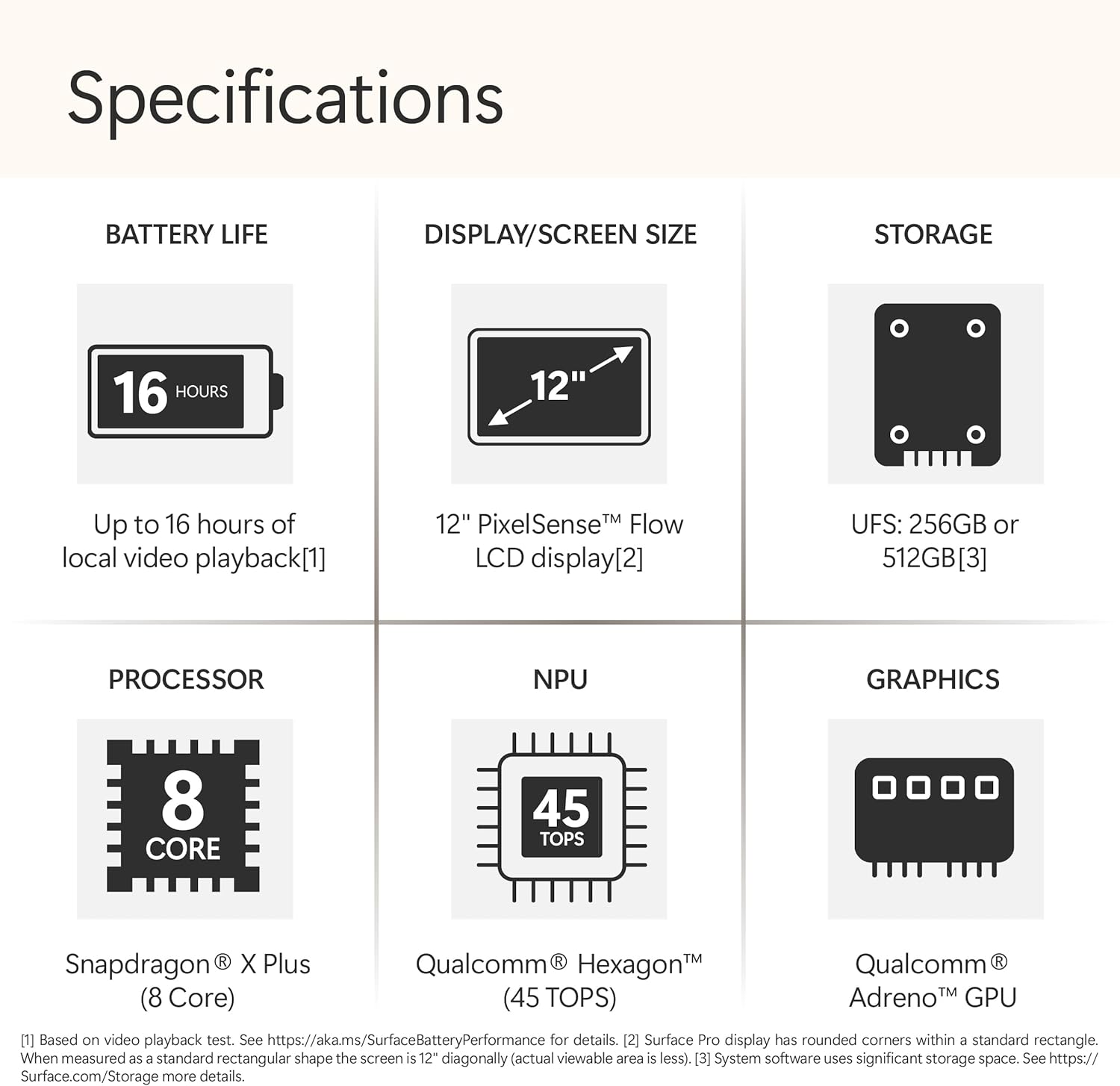
Image: The Surface Pro (2025) configured as a laptop with its detachable keyboard, illustrating its use for productivity tasks.
Using the Surface Slim Pen (Optional)
The Surface Slim Pen (sold separately) provides precise input for writing, drawing, and navigating. It can be magnetically attached to the device for storage and charging.

Image: A user interacting with the Surface Pro (2025) using the Surface Slim Pen, highlighting its utility for note-taking and creative work.
Copilot+ PC Features
Leverage the built-in AI capabilities of Windows 11 Copilot+ PC for enhanced productivity and creativity. These features include:
- Recorda: Instantly find anything you've seen on your PC.
- Windows Search: Confidently find files and information faster.
- Eines creatives: Utilize AI-powered tools for writing, summarizing, and image creation.
Video: An official Microsoft video demonstrating the 'Recall' feature on Copilot+ PC, showing how users can quickly find past activities and content on their device.
Video: An official Microsoft video showcasing the improved Windows Search functionality on Copilot+ PC, highlighting its speed and efficiency in finding files and information.
5. Característiques
The Microsoft Surface Pro (2025) is engineered with advanced features for optimal performance and user experience:
- Processador: Powered by the Snapdragon X Plus (8 Core) processor, delivering fast and efficient performance for demanding tasks.
- Motor d'IA: Features an AI engine with up to 45 trillion operations per second (TOPS) for intelligent task handling and Copilot+ PC experiences.
- Visualització: 12-inch PixelSense touchscreen display with 2196 x 1464 pixels resolution, 16:10 aspect ratio, and 400 Nit maximum brightness.
- Memòria i emmagatzematge: Equipped with 16GB RAM and 512GB SSD storage for ampespai lliure i multitasca fluida.
- Durada de la bateria: Up to 16 hours of typical device usage, allowing for all-day productivity and entertainment.
- Connectivitat: Includes Wi-Fi 6E (802.11ax) and Bluetooth 5.1 for high-speed wireless connections. Features 2 USB-C ports with USB4® and Thunderbolt™ 4 technology.

Image: An icon representing the impressive 16-hour battery life of the Surface Pro (2025).

Imatge: Una imatge detallada view of the 12-inch PixelSense Flow LCD display, highlighting its visual clarity.

Image: A diagram illustrating the Snapdragon X Plus (8 Core) processor, emphasizing its powerful computing capabilities.

Image: A diagram of the Qualcomm Hexagon NPU, highlighting its 45 TOPS for advanced AI processing.
6. Especificacions
| Atribut | Detall |
|---|---|
| Marca | Microsoft |
| Nom del model | Surface Pro |
| Número de model | EP2-33676 |
| Sistema operatiu | Windows 11 Home |
| Processador | Snapdragon X Plus (8 Core) |
| Velocitat del processador | 3.4 GHz |
| Memòria RAM instal·lada | 16 GB |
| Capacitat d'emmagatzematge de memòria | SSD de 512 GB |
| Mida de la pantalla | 12 polzades |
| Resolució de pantalla màxima | 2196 x 1464 píxels |
| Tipus de visualització | LCD |
| Relació d'aspecte | 16:10 |
| Maximum Display Brightness | 400 nits |
| Mostra la taxa d'actualització | 60 Hz |
| Coprocessador gràfic | Adreno |
| Tecnologia sense fils | Wi-Fi 6E (802.11ax), Bluetooth 5.1 |
| Ports USB totals | 2 (USB-C with USB4® and Thunderbolt™ 4) |
| Durada mitjana de la bateria | 16 hores |
| Tipus de pila de bateria | Ió de liti |
| Dimensions de l'article (L x A x Gruix) | 8.24 cm de llargada x 11.55 cm d'amplada x 1.43 cm de gruix |
| Color | Oceà |
| Front Photo Sensor Resolution | 2.07 MP |
| Rear Facing Camera Photo Sensor Resolution | 10 MP |
| Resolució de captura de vídeo | 10 megapíxels |

Image: A diagram illustrating the physical dimensions of the 12-inch Surface Pro, including its length, width, and thickness.
7. Manteniment
Per garantir la longevitat i el rendiment òptim del teu Surface Pro, segueix aquestes pautes de manteniment:
- Neteja: Feu servir un drap suau i sense borrissol per netejar la pantalla i l'exterior. Per a taques difícils, fregueu lleugeramentampen the cloth with water or an approved screen cleaner. Avoid harsh chemicals.
- Actualitzacions de programari: Comproveu i instal·leu regularment si hi ha actualitzacions de Windows per assegurar-vos que el dispositiu tingui els pegats de seguretat i les millores de rendiment més recents. Aneu a Configuració > Actualització de Windows.
- Cura de la bateria: To maximize battery lifespan, avoid fully discharging the battery frequently. It is recommended to keep the battery charge between 20% and 80% when possible.
- Gestió d'emmagatzematge: Periòdicament review i eliminar innecessaris files and applications to free up storage space and maintain performance.
- Condicions ambientals: Operate your Surface Pro within recommended temperature ranges. Avoid exposing it to extreme heat, cold, or direct sunlight.
8. Solució De Problemes
If you encounter issues with your Surface Pro, try these common troubleshooting steps:
- El dispositiu no respon: Mantingueu premut el botó d'engegada durant 10-15 segons per realitzar un apagat forçat i, a continuació, premeu-lo de nou per reiniciar.
- Problemes de connectivitat Wi-Fi: Ensure Wi-Fi is enabled in Settings. Try restarting your router and the Surface Pro. If the issue persists, forget the network and reconnect.
- La bateria no es carrega: Verify that the USB-C charging cable and power adapter are securely connected and functioning correctly. Try a different power outlet or adapter if available.
- Pantalla tàctil que no respon: Restart the device. If the issue continues, check for available Windows updates or consider recalibrating the touchscreen in device settings.
- Accessory Not Detected: Ensure the accessory (e.g., keyboard, pen) is properly attached or paired via Bluetooth. Check the accessory's battery level.
9. Garantia i Suport
Your Microsoft Surface Pro (2025) comes with a 1-year manufacturer's limited warranty. This warranty covers defects in materials and workmanship under normal use.
For detailed warranty information, product support, or to register your device, please visit the official Microsoft Support website or refer to the safety and warranty documents included in your product packaging.
Fabricant: Microsoft
Assistència en línia: support.microsoft.com/surface