
1. Introducció
The Kaiser MSA-2073 is a portable rechargeable speaker designed for versatile audio playback. It features integrated LED lights, KSR-LINK 9.2 technology for connecting multiple speakers, Bluetooth 5.3 for stable wireless connection, FM radio, and inputs for microphone and SD cards. This speaker delivers natural sound with clarity and precision, and includes a hands-free function for managing calls while connected to your smartphone.
2. Informació de seguretat
- Llegiu totes les instruccions abans d'utilitzar el dispositiu.
- Mantingueu l'altaveu allunyat de l'aigua, la humitat i les temperatures extremes.
- No intenteu obrir ni reparar la unitat vosaltres mateixos. Encarregueu tot el manteniment a personal qualificat.
- Feu servir només el cable de càrrega i els accessoris proporcionats.
- Eviteu col·locar l'altaveu a prop de fonts de calor o sota la llum solar directa.
- Assegureu-vos que hi hagi una ventilació adequada al voltant de l'altaveu durant l'ús.
3. Contingut del paquet
Si us plau, comproveu que tots els elements siguin presents al paquet:
- 1 x Kaiser MSA-2073 Portable Speaker
- 1 x Manual d'usuari
- 1 x cable d'àudio
- 1 x cable de càrrega USB
4. Producte acabatview
Davant View

Imatge: Frontal view of the Kaiser MSA-2073 speaker, showcasing the integrated colorful LED lights and speaker grilles.
Tauler de control superior

Image: Top panel of the Kaiser MSA-2073 speaker, displaying controls for volume, bass, treble, microphone, and input modes.
- Interruptor d'alimentació: Activa o desactiva l'altaveu.
- Botó de VOLUM: Ajusta el volum mestre.
- BAJOS (Bass) Knob: Ajusta el nivell de greus.
- AGUDOS (Treble) Knob: Ajusta el nivell dels aguts.
- VOL GUIT (Guitar Volume) Knob: Adjusts the volume for a connected guitar.
- ECO MIC (Microphone Echo) Knob: Ajusta l'efecte d'eco del micròfon.
- VOL MIC (Microphone Volume) Knob: Ajusta el volum del micròfon.
- Botó MODE: Canvia entre els modes d'entrada (Bluetooth, FM, USB, SD, AUX).
- Botó LED: Controla els modes de llum LED.
- Botó BT: Activa el mode d'emparellament Bluetooth.
- MUDO (Mute) Button: Silencia la sortida d'àudio.
- EFECTO VOZ (Voice Effect) Button: Cycles through five voice effects for the microphone.
- Controls de reproducció: Previous track, Play/Pause, Next track.
- MICRO SD Slot: For inserting an SD card.
- Port USB: For connecting a USB drive.
- Entrada AUX: Entrada d'àudio de 3.5 mm.
- MIC 1 / MIC 2 Inputs: 6.35mm inputs for microphones.
- GUITARRA (Guitar) Input: 6.35mm input for a guitar.
- CARGA (Charging) Indicator: Llum que indica l'estat de càrrega.
- ALIMENTACIÓN (Power) Input: Power connection port.
posterior View
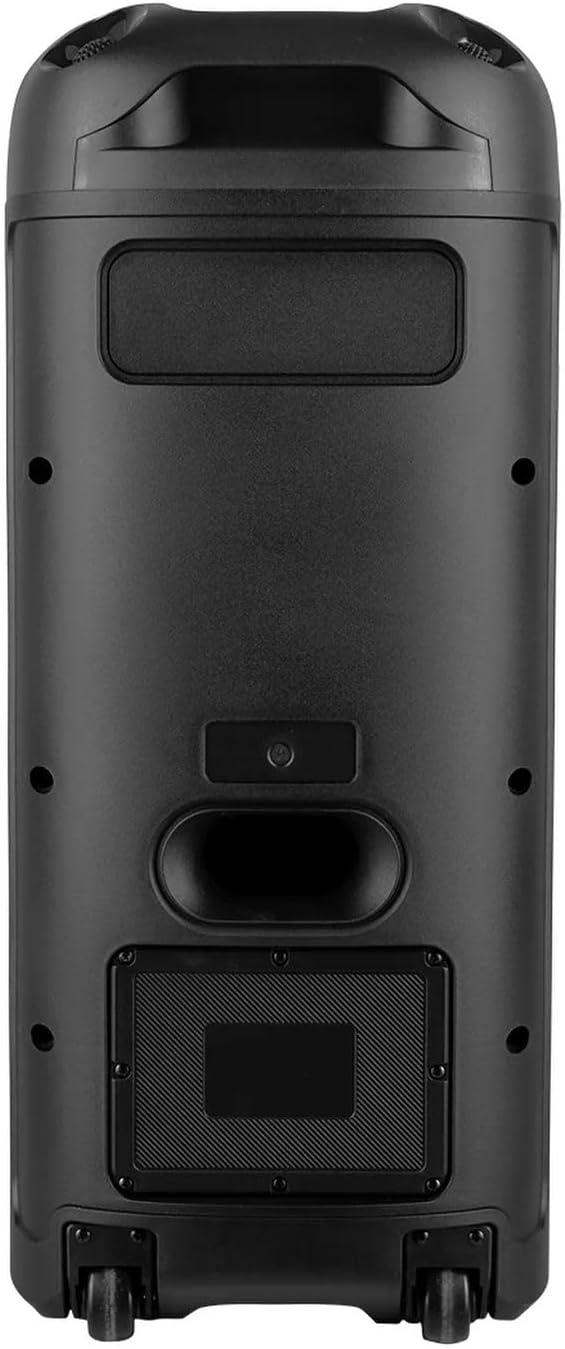
Imatge: Part posterior view of the Kaiser MSA-2073 speaker, highlighting the back panel and integrated wheels for portability.
Micròfon inclòs

Image: The microphone included with the Kaiser MSA-2073 speaker, featuring a power button and indicator light.
5. Configuració
5.1 Càrrega de l'altaveu
- Connect the provided USB charging cable to the speaker's power input.
- Connecteu l'altre extrem del cable USB a un adaptador de corrent USB adequat (no inclòs) o a un port USB alimentat.
- The charging indicator light will illuminate during charging. It will turn off or change color once fully charged.
5.2 Engegada/apagada
- Per encendre l'altaveu, feu lliscar el PODER interruptor a la posició 'ON'.
- To power off the speaker, slide the PODER switch to the 'OFF' position.
6. Instruccions de funcionament
6.1 Vinculació Bluetooth
- Power on the MSA-2073 speaker. It will automatically enter Bluetooth pairing mode, indicated by a flashing 'BLUE' display.
- Al dispositiu mòbil (telèfon intel·ligent, tauleta, etc.), activeu el Bluetooth i cerqueu els dispositius disponibles.
- Select "MSA-2073" from the list of devices.
- Once connected, the speaker will emit a confirmation sound, and the 'BLUE' display will stop flashing.
- Ara pots reproduir àudio des del teu dispositiu a través de l'altaveu.
6.2 KSR-LINK 9.2 (Linking Two Speakers)
The KSR-LINK 9.2 technology allows you to wirelessly connect two MSA-2073 speakers for a stereo sound experience.
- Ensure both MSA-2073 speakers are powered on and in Bluetooth mode.
- En un dels altaveus (aquest serà l'altaveu principal), premeu i manteniu premut el botó BT durant uns segons fins que sentiu un to d'emparellament.
- The two speakers will automatically search for and connect to each other. A confirmation sound will indicate a successful connection.
- Once linked, connect your mobile device to the primary speaker via Bluetooth as described in section 6.1. Audio will now play through both speakers.
6.3 Funcionament de la ràdio FM
- Premeu el botó MODE repetidament fins que aparegui «FM» a la pantalla.
- Premeu el botó Reproduir/Pausa per iniciar una cerca automàtica d'emissores FM. L'altaveu desarà totes les emissores trobades.
- Utilitza el Pista anterior / següent buttons to navigate between saved FM stations.
Reproducció de targeta USB / SD de 6.4
- Inseriu una unitat flaix USB al Port USB o una targeta SD a la MICRO SD Slot.
- L'altaveu canviarà automàticament al mode USB o SD i començarà a reproduir àudio files. Si no, premeu la tecla MODE botó per seleccionar l'entrada correcta.
- Utilitza el Controls de reproducció (Previous, Play/Pause, Next) to manage your music.
6.5 Microphone and Voice Effects
- Connect a microphone to either the MIC 1 or MIC 2 entrada.
- Ajusteu el volum del micròfon amb el botó VOL MIC perilla.
- Ajusteu l'efecte d'eco amb el botó ECO MIC perilla.
- Premeu el botó EFECTO VOZ button to cycle through five different voice effects.
6.6 Funció de mans lliures
When your smartphone is connected via Bluetooth, the speaker's hands-free function allows you to manage calls directly from the speaker.
- Respondre una trucada: Premeu el botó Reproduir/Pausa botó per respondre una trucada entrant.
- Finalització d'una trucada: Premeu el botó Reproduir/Pausa button again to end an active call.
- Rebutjar una trucada: Manteniu premut el botó Reproduir/Pausa botó per rebutjar una trucada entrant.
6.7 Control de llums LED
Premeu el botó LED button to cycle through different LED light modes or to turn the lights off.
7. Manteniment
- Neteja: Feu servir un drap suau i sec per netejar l'exterior de l'altaveu. No utilitzeu productes de neteja abrasius ni dissolvents.
- Emmagatzematge: Quan no l'utilitzeu durant períodes prolongats, guardeu l'altaveu en un lloc fresc i sec, allunyat de la llum solar directa.
- Cura de la bateria: Per allargar la durada de la bateria, eviteu descarregar completament l'altaveu amb freqüència. Carregueu-lo regularment, fins i tot si no l'esteu fent servir.
8. Solució De Problemes
| Problema | Possible solució |
|---|---|
| L'altaveu no s'encén. | Ensure the speaker is charged. Connect the USB charging cable and allow it to charge for a period. Check the power switch position. |
| No hi ha so de l’altaveu. | Check the master volume and input source. Ensure your connected device's volume is also up. If using a microphone, check its connection and volume. |
| La connexió Bluetooth falla. | Ensure the speaker is in Bluetooth mode. Make sure your device is within 10 meters of the speaker. Try unpairing and re-pairing the device. Restart both the speaker and your Bluetooth device. |
| La recepció de ràdio FM és deficient. | Try repositioning the speaker to improve signal reception. Perform an auto-scan again. |
| La targeta USB/SD no es reprodueix. | Ensure the USB drive or SD card is inserted correctly. Check that the audio files are in a compatible format. Press the MODE button to select the correct input. |
9. Especificacions
| Característica | Detall |
|---|---|
| Nom del model | MSA-2073 |
| Marca | Kaiser |
| Dimensions (P x A x A) | 34 x 32 x 71 cm |
| Potència d'àudio | 28,000 W PMPO / 70 W RMS |
| Altaveu AmpTipus de lificació | Passiva |
| Versió Bluetooth | 5.3 |
| Interval Bluetooth | Fins a 10 m |
| Impedància | 3 ohms |
| Microphone Voice Effects | 5 efectes |
| Tipus de muntatge | Pis |
| Piles necessàries | No (bateria interna recarregable) |
| ASIN | B0DZ85MJW9 |
| Product Launch Date | 4 de març de 2025 |
10. Garantia i Suport
This product comes with a standard manufacturer's warranty. For specific warranty details, claims, or technical support, please refer to the warranty card included in your package or contact Kaiser customer service directly. Keep your proof of purchase for any warranty-related inquiries.