
1. Introducció
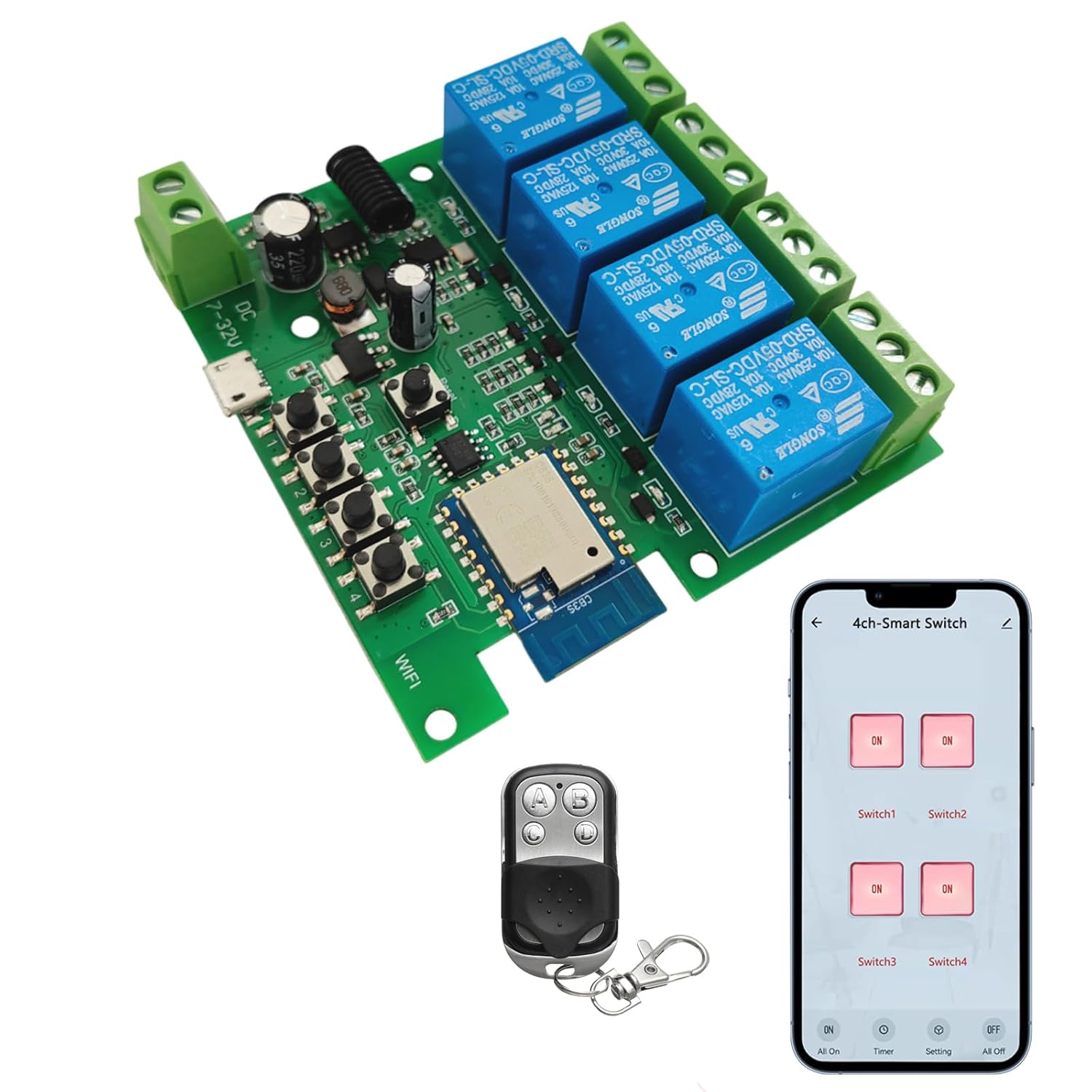
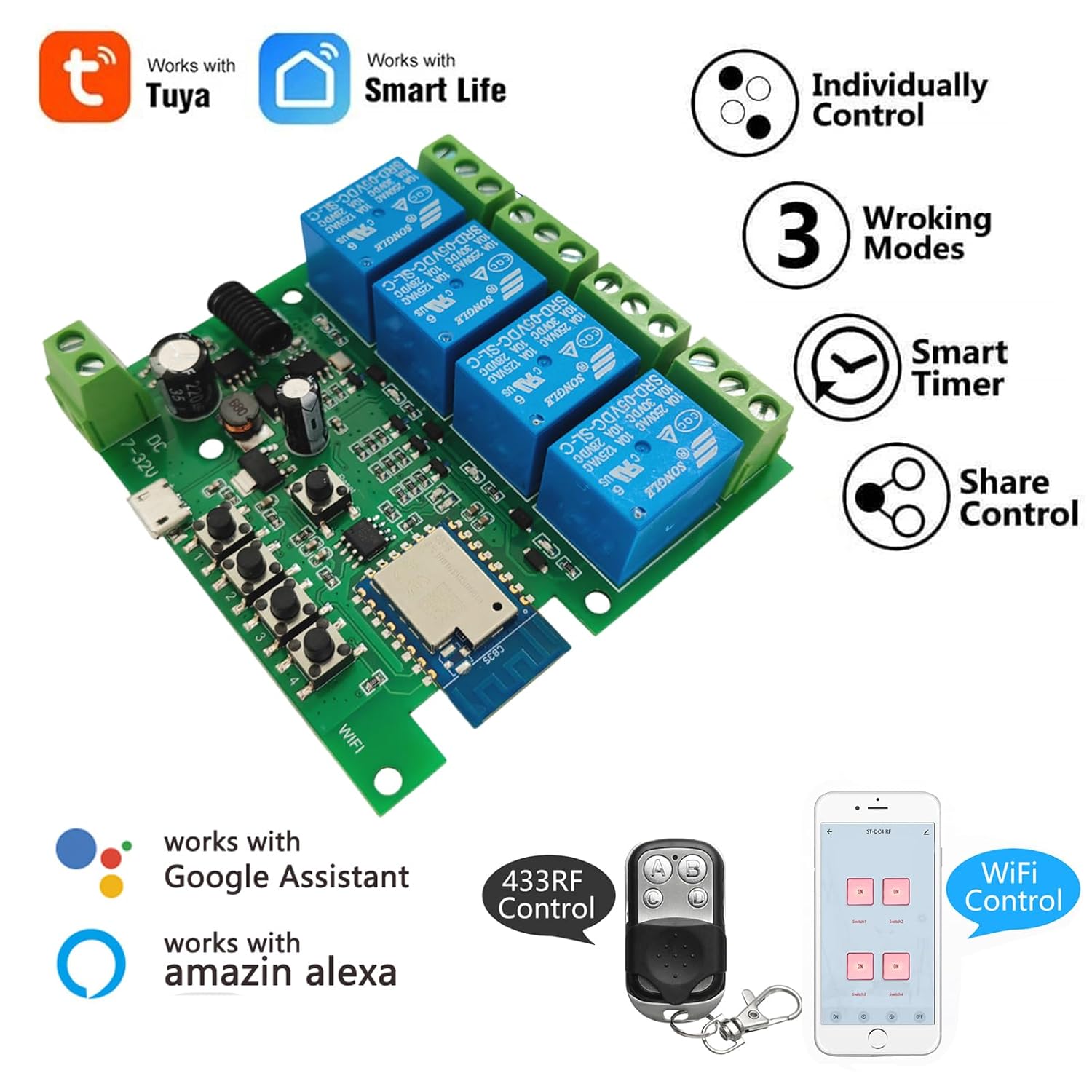
The Newgoal 4-Channel Smart Wireless Relay Switch is a versatile device designed for home automation, allowing remote control of connected appliances or power circuits. It supports multiple operating modes, including momentary (inching), self-locking, and interlock, and can be controlled via the Tuya Smart Life mobile application, a 433MHz RF remote control, or voice commands through Amazon Alexa and Google Home.
2. Informació de seguretat
- Ensure all power is disconnected before installation or wiring to prevent electric shock.
- This device operates with electrical currents. If you are unsure about electrical wiring, consult a qualified electrician.
- Do not exceed the maximum rated current of 10 Amperes o voltage de 250 V AC/DC.
- The device supports 2.4GHz Wi-Fi networks only. It is not compatible with 5GHz Wi-Fi or Mesh Wi-Fi systems.
- Mantingueu el dispositiu allunyat de l'aigua i de temperatures extremes.
3. Contingut del paquet
- 1 x Newgoal 4-Channel WiFi Relay Module
- 1 x 433 MHz RF Remote Control
- 1 x User Manual (English and Chinese)
4. Especificacions
| Característica | Especificació |
|---|---|
| Model | 4CH Tuya App/Smart Life |
| Dimensions | 7.4 x 7.4 x 1.9 cm |
| Pes | 98 g |
| Font d'alimentació | USB 5V or AC/DC 7-32V |
| Corrent nominal | 10 Amperes (per channel) |
| Vol. Operatiutage (Relay Output) | CA 0-250V / DC 0-30V |
| Tipus de contacte | Normalment obert (NO), comú (COM), normalment tancat (NC) |
| Tipus de circuit | 4 vies |
| Connectivitat sense fil | Wi-Fi 2.4 GHz (IEEE 802.11 b/g/n) |
| Control de RF | 433MHz (Fixed code / Learning code, up to 14 codes per gang) |
| Suport d'aplicacions | Tuya Smart Life (Android/iOS) |
| Control de veu | Amazon Alexa, Google Home |
| Modes de funcionament | Momentary (Inching), Self-locking, Interlock |
5. Producte acabatview

6. Configuració
6.1 Alimentació del dispositiu
The relay module can be powered in two ways:
- USB 5V: Connect a standard Micro USB cable to the 'Power Input 1' port.
- CA/CC 7-32V: Connect a power source within this voltage range to the 'Power Input 2' screw terminals.
Note: The power supply input is for the PCBA (circuit board) only. The relays themselves are switches without output; they control the power to your connected devices.
6.2 Wiring Connected Devices
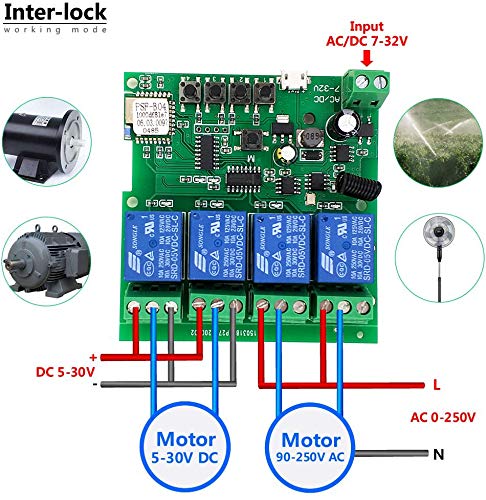
Refer to the wiring diagrams in Section 9 for specific connection instructions based on your desired operating mode and device type. Each relay has Normally Open (NO), Common (COM), and Normally Closed (NC) terminals. Connect your appliance's power line through the appropriate relay terminals.
6.3 App Installation and Device Pairing (Tuya Smart Life)
- Descarrega't el Tuya Smart or Vida intel·ligent aplicació des de l'App Store (iOS) o Google Play Store (Android).
- Registreu-vos o inicieu sessió al vostre compte.
- Ensure your smartphone is connected to a 2.4GHz Wi-Fi network. The device does not support 5GHz Wi-Fi.
- Power on the Newgoal relay module. The WiFi LED should blink, indicating it's in pairing mode. If not, press and hold the central button on the module for 5 seconds until the LED blinks rapidly.
- In the app, tap '+' to add a device. The app should automatically discover the device nearby. Follow the on-screen instructions to connect the device to your Wi-Fi network.
- Once connected, you can rename the device and individual channels within the app.
6.4 RF Remote Control Pairing
To pair the 433MHz RF remote control with the relay module:
- Press and hold one of the manual switch buttons (RF Pairing Button) on the relay module for 3 seconds. The corresponding LED will illuminate.
- While the LED is lit, press the desired button on your 433MHz remote control. The LED on the module will flash to confirm successful pairing.
- Repeat this process for each channel you wish to control with the remote. The module can learn up to 14 different 433MHz codes per channel.
To clear all paired RF codes for a specific channel, press and hold the corresponding manual switch button for 15 seconds until the LED flashes rapidly and then turns off.
7. Modes de funcionament
The Newgoal 4-Channel Smart Wireless Relay Switch supports three operating modes, which can be configured via the Tuya Smart Life app:
- Momentary (Inching) Mode: In this mode, the relay turns on for a set duration (e.g., 1 second) and then automatically turns off. This is ideal for applications like garage door openers or momentary button presses. You can configure two wiring ways: turn on for 1s then auto-off, or turn off for 1s then auto-on.
- Mode d'autobloqueig: The relay acts like a standard toggle switch. Pressing the button (in app or on remote) turns the relay ON, and pressing it again turns it OFF. This is suitable for controlling lights or other devices that need to stay on or off until manually changed.
- Mode d'enclavament: (Supported on 2-gang and 4-gang versions) In this mode, only one relay can be ON at a time. If one relay is activated, any other active relay in the group will automatically turn OFF. This is useful for controlling motors with forward/reverse functions or ensuring only one device operates at a time.
8. App Control (Tuya Smart Life)
Once paired, the Tuya Smart Life app provides comprehensive control and automation features:
- Encès/apagat remot: Control connected devices from anywhere with an internet connection.
- Horaris: Estableix horaris perquè els dispositius s'encenguin o s'apaguin automàticament a hores específiques.
- Funció de compte enrere: Set a timer for a device to automatically turn off after a specified duration.
- Compartició de dispositius: Comparteix el control del dispositiu amb els membres de la família.
- Gestió de grups: Agrupeu diversos dispositius per al control simultani.
- Automatització d'escenes: Create custom scenes and automations based on conditions like time, weather, or other smart devices.


8.1 Integració del control per veu
The device is compatible with Amazon Alexa and Google Home. After linking your Tuya Smart Life account in the Alexa or Google Home app, you can use voice commands to control your connected devices. For exampLI:
- "Alexa, turn on Switch 1."
- "Hey Google, turn off the living room light."
Note: Currently, US/UK English and German voice commands are supported.

9. Esquemes de cablejat
Proper wiring is crucial for safe and correct operation. Always ensure power is off before making any connections.


10. Manteniment
- Mantingueu el dispositiu net i lliure de pols.
- Avoid exposing the device to moisture or direct sunlight.
- Reviseu regularment les connexions del cablejat per assegurar-vos que siguin segures.
- Periodically update the Tuya Smart Life app to ensure optimal performance and access to new features.
11. Solució De Problemes
- El dispositiu no es connecta a la Wi-Fi:
- Assegureu-vos que la vostra xarxa Wi-Fi sigui de 2.4 GHz. Les xarxes de 5 GHz no són compatibles.
- Make sure the device is within range of your Wi-Fi router during pairing.
- Check if the Wi-Fi password entered in the app is correct.
- Try resetting the device by holding the central button for 5 seconds until the WiFi LED blinks rapidly, then attempt pairing again. - El comandament a distància RF no funciona:
- Ensure the remote control has a working battery (27A 12V).
- Re-pair the remote control with the specific channel on the module (refer to Section 6.4).
- Ensure the remote is within the maximum range of 30 meters (98 feet). - L'aparell connectat no respon:
- Verify that the relay module is powered on and the WiFi LED is solid (indicating a stable connection).
- Check the wiring connections to the appliance (refer to Section 9). Ensure they are secure and correct for the chosen operating mode.
- Confirm the appliance itself is functional. - El control per veu no funciona:
- Ensure your Tuya Smart Life account is correctly linked to your Amazon Alexa or Google Home app.
- Check that the device names in the smart assistant app match those in Tuya Smart Life.
- Verify your voice commands are in a supported language (US/UK English, German).
12. Garantia i Suport
For warranty information and technical support, please refer to the documentation provided with your purchase or contact Newgoal customer service through their official channels. Keep your purchase receipt for warranty claims.