
Neideso N700Pro128GB
Neideso N700Pro AI Dash Cam User Manual
Model: N700Pro128GB
Introducció
Thank you for choosing the Neideso N700Pro AI Dash Cam. This advanced 4-channel dash camera system provides comprehensive 360° monitoring of your vehicle's surroundings and interior. Equipped with a Smart Driving Monitor System (DMS), 5GHz Wi-Fi, GPS, superior night vision, and 24-hour parking mode, the N700Pro is designed to enhance your driving safety and provide reliable evidence in case of incidents. This manual will guide you through the installation, operation, and maintenance of your new dash cam.
Què hi ha a la caixa
Si us plau, verifiqueu que tots els components siguin presents abans de continuar amb la instal·lació.
- 1 x Neideso N700 Pro Smart Driving DMS Dash Cam
- 1 x càmera posterior
- 1 x Suport adhesiu 3M
- 1 x Car Charger with Type C USB Cable
- 1 x Car Wiring Tool
- 1 x Manual d'usuari
- 1 x Pel·lícula electrostàtica per a muntatge 3M
- 1 targeta de memòria SD de 128 GB (preinserida)
- 1 mòdul GPS
- 1 x Filtre CPL
- 1 cable de càmera posterior de 19.6 peus

Image: All components included in the Neideso N700Pro package.
Configuració i instal·lació
Proper installation is crucial for optimal performance. It is recommended to test the dash cam's functionality before finalizing the installation.
Main Dash Cam Installation
- Step 1: Prepare Mounting Surface. Clean the front windshield area thoroughly where the dash cam will be mounted. Apply the electrostatic film firmly, ensuring no air bubbles. Allow it to adhere for at least 30 minutes before attaching the dash cam. For optimal Driver Monitoring System (DMS) performance, install the AI camera in the center of the windshield.

Image: Step-by-step guide for preparing the windshield and applying the electrostatic film.
- Step 2: Route Front Camera Power Cable. Use the provided trim tool to carefully tuck the power cable along the windshield edge and down the A-pillar. Ensure the cable does not obstruct the driver's view o interferir amb els airbags.
- Step 3: Install Rear Camera. Mount the rear camera on the rear windshield. Conceal the power cord by routing it through gaps, such as from the front windshield to the roof, passenger-side ceiling, or rear seat to the ceiling.
- Step 4: Connect Power. Insert the power cord into the car's cigarette lighter socket. Ensure the connection is secure.
Instruccions de funcionament
Engegada i funcionament bàsic
La càmera del salpicader s'encendrà automàticament i començarà a gravar quan s'activi el contacte del vehicle. S'apagarà automàticament quan s'apagui el contacte.
Modes d'enregistrament
The N700Pro supports comprehensive multi-channel recording. You can select between two primary video recording modes:
- Mode d'4 canals: 3K (Front) + 1080P (Left) + 1080P (Right) + 1080P (Rear)
- Mode d'3 canals: 4K (Front) + 1080P (Left) + 1080P (Right)
These modes provide full coverage of the front, rear, and interior of your vehicle.

Image: Visual representation of the 4-channel recording capabilities, capturing views from front, rear, and both sides of the vehicle interior.
Control de veu intel·ligent
Operate your dash cam hands-free using simple English voice commands. This feature enhances driving safety by allowing you to manage settings without taking your hands off the wheel.
- "Fes una foto"
- "Inici del vídeo"
- "Turn on audio" / "Turn off audio"
- "Turn on WiFi" / "Turn off WiFi"
- "Turn on screen" / "Turn off screen"
Note: Only the voice options available in the device's menu are supported.

Image: Illustration of smart voice control functionality, showing a driver interacting with the dash cam using spoken commands.
App Control and 5GHz Wi-Fi
Connect your N700Pro to your mobile device via the dedicated app using its built-in 5GHz Wi-Fi for fast data transfer.
- View Enregistraments: Accés en directe view o reproduir menjar gravattage directly on your smartphone.
- Descarrega Footage: Easily transfer video files to your device for storage or sharing.
- Share Recordings: Share important moments or evidence directly from the app.
- Ajust de configuració: Configure dash cam settings conveniently from your phone.
Note: The N700Pro is not a cloud dash cam. Remote viewing beyond 6-7 meters from the vehicle is not supported.
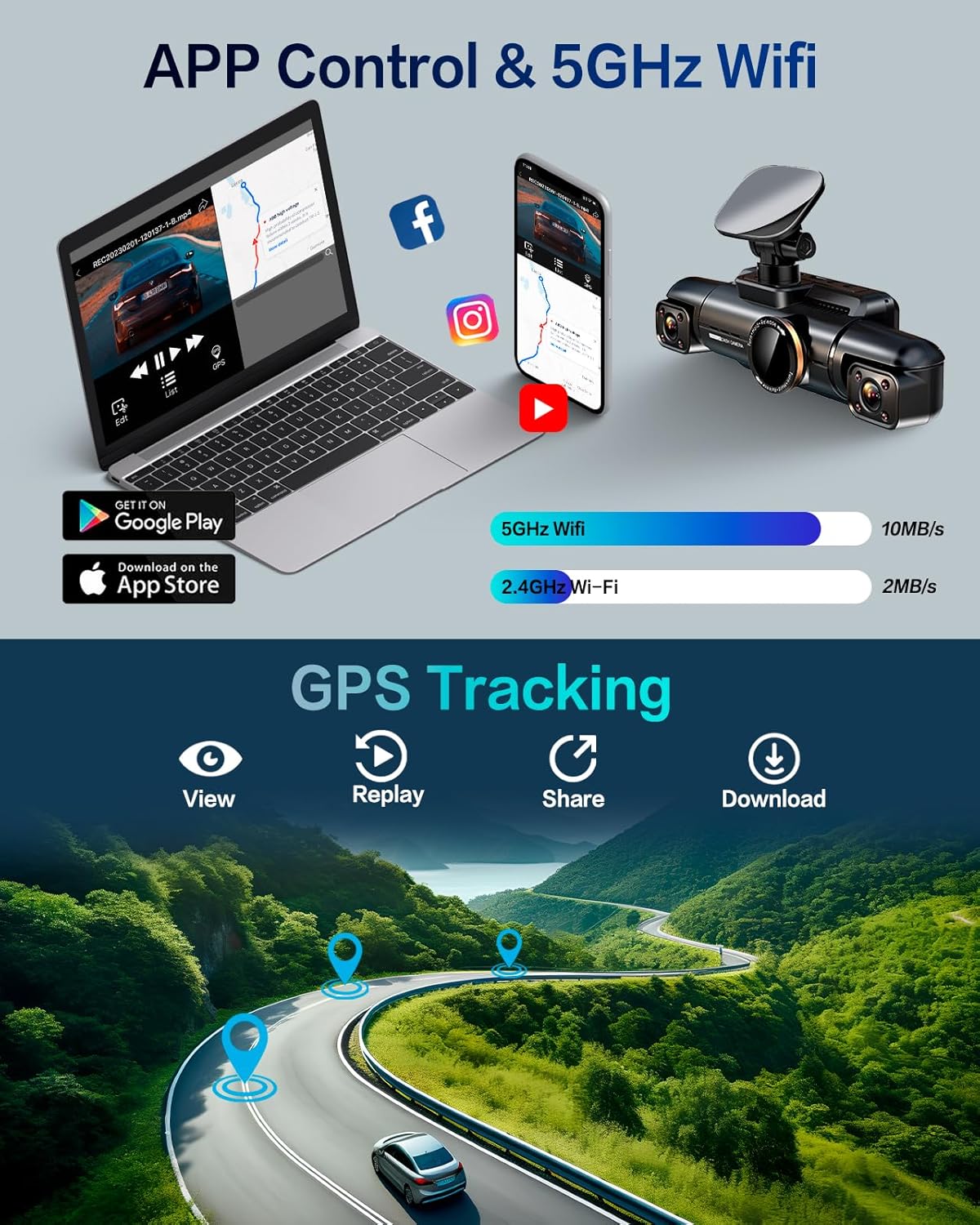
Imatge: Més deview of app control and 5GHz Wi-Fi connectivity, showing how to manage recordings and settings via a smartphone.
Driver Fatigue Monitoring System (DMS)
The integrated AI DMS continuously analyzes driver behavior to detect signs of drowsiness, inattention, or phone use. It provides real-time audible and visual alerts to promote safer driving.
- Detects drowsiness
- Identifies inattention
- Provides audible warnings
- Reduces accident risks
- Specific alerts for phone calls, yawns, smoking, eyes closing, distraction, and driver absence.

Image: Detailed explanation of the Driver Fatigue Monitoring System (DMS) and its various detection capabilities.
Mode d'aparcament les 24 hores
When your vehicle is turned off, the dash cam can activate parking mode to provide continuous surveillance.
- Monitors objects within 3-4 meters in front of the car.
- Automatically records video for one minute upon detection.
- Quick start in 5 seconds for continuous protection.
Note: A separate hardwire kit (ASIN: B0CDWT8BF4) is required to enable this function for continuous 24-hour protection.

Image: Visual guide to the 24-hour parking monitor, highlighting its ability to detect collisions and monitor the surroundings.
G-Sensor i enregistrament en bucle
The built-in G-sensor automatically detects sudden shakes or collisions. When an event is detected, the relevant footage is locked and protected from being overwritten, even during loop recording. These files are stored in a dedicated 'Event' folder.
Loop recording ensures continuous recording by overwriting the oldest video files when the SD card is full. Videos are typically recorded in 3-minute segments. The system supports up to a 256GB SD card.

Image: Explanation of loop recording and supported SD card capacities, showing how older files es sobreescriuen.

Image: Visual demonstration of the G-sensor's function, showing how it locks footage during impacts for evidence.
Visió nocturna superior
Equipped with 8 IR lamps and 6 glass lenses, the N700Pro adapts seamlessly to low-light conditions, ensuring clear and detailed recordings. The CPL filter helps reduce glare, which is crucial for evidence clarity.

Image: Comparison illustrating the superior night vision capabilities of the Neideso dash cam in low-light environments.
Seguiment GPS
The external GPS module adds location tracking capabilities to your recordings. GPS data can be viewed on Google Maps through the app or using the GXPlayer application on PC (Windows and Mac).
- Sistema Mac: Cerca "GXPlayer" in the Apple application market to install.
- Sistema Windows: The memory card will automatically generate the GXPlayer installation file. Locate GXPlayer in the file i instal·lar-lo.

Image: Demonstration of GPS tracking functionality, showing how recorded routes can be viewed on a map with video playback.
Manteniment
- Neteja: Feu servir un drap suau i sec per netejar la lent i el cos de la càmera del salpicader. Eviteu utilitzar netejadors o dissolvents abrasius.
- Gestió de la targeta SD: Regularly format the SD card (at least once a month) to ensure optimal performance and prevent data corruption. Back up important footage abans de formatar.
- Temperatura: The N700Pro is designed for durability in extreme temperatures (-22°F to 140°F). However, prolonged exposure to direct sunlight in very hot climates can affect battery life and performance. When parked for extended periods in extreme heat, consider removing the dash cam or parking in shade.

Image: Visual representation of the N700Pro's durable performance across a wide range of temperatures.
Resolució de problemes
| Problema | Causa possible | Solució |
|---|---|---|
| La càmera del salpicader no s'encén. | No power from car charger; loose connection; faulty charger. | Comproveu la connexió del carregador del cotxe i la presa de l'encenedor del vehicle. Proveu una font d'alimentació diferent si en teniu. |
| App connection is unstable or fails. | Interference; distance from device; app issues. | Ensure you are within 6-7 meters of the dash cam. Restart the dash cam and your phone's Wi-Fi. Reinstall the app if necessary. |
| Dash cam feels excessively hot. | Normal operation in high temperatures; prolonged direct sunlight. | The device is designed to operate in high temperatures. If overheating persists or causes malfunction, contact support. Avoid prolonged direct sunlight exposure when parked. |
| Cannot disable sounds or LED lights. | Feature not available or limited. | Refer to the user manual or app settings for available options. Some alerts or indicators may be mandatory for safety. |
| Mount is not secure or falls off. | Improper surface preparation; extreme temperatures; worn adhesive. | Ensure windshield is clean and dry before applying electrostatic film and 3M adhesive. Reapply with new adhesive if necessary. Avoid mounting on curved or textured surfaces. |
| El mode d'aparcament no funciona. | Kit de cablejat fix no instal·lat; configuració incorrecta. | Ensure the optional hardwire kit (ASIN: B0CDWT8BF4) is correctly installed and connected. Check parking mode settings in the app or device menu. |
| SD card full, not recording. | Loop recording not active; too many locked files; faulty SD card. | Ensure loop recording is enabled. Regularly format the SD card. Check for excessive locked files and delete unnecessary ones. Replace the SD card if it's old or corrupted. |
Especificacions
| Característica | Detall |
|---|---|
| Nom del model | Neideso N700Pro AI Dash Cam |
| Dimensions del producte | 2.1 x 2.1 x 7.34 polzades |
| Pes de l'article | 7.2 unces |
| Resolució de captura de vídeo | Up to 4K (Front), 1080P (Interior/Rear) |
| Tecnologia de connectivitat | Wi-Fi de 5 GHz |
| Característiques especials | Built-In WiFi, G-Sensor, Loop Recording, Night Vision, 360° all sides dash camera with Driver Fatigue Monitoring System (DMS), Voice Control, App Control, 4 channel dash cam, Built-In GPS |
| Emmagatzematge | 128GB SD Memory Card (included), supports up to 256GB |
| Orientació | Davant, posterior i interior |
| Tipus de muntatge | Muntatge del parabrisa |
| Temperatura de funcionament | -22 °F a 140 °F (-30 °C a 60 °C) |
Garantia i Suport
The Neideso N700Pro AI Dash Cam comes with a 2 any de garantia des de la data de compra, cobrint defectes de fabricació.
For technical support, warranty claims, or any inquiries regarding your product, please contact Neideso customer service through the contact information provided on the official Neideso weblloc web o la vostra plataforma de compra.
Please have your model number (N700Pro128GB) and purchase details ready when contacting support.
Ask a question about this manual
Ask about setup, troubleshooting, compatibility, parts, safety, or missing instructions. Manuals+ will review the question and use this page’s manual context to help answer it.