
1. Introducció
The ZIZEV AI Robot Dog is an advanced educational robotics platform designed for students and beginners in artificial intelligence. This programmable smart pet allows users to explore mechanics, electronics, programming, automation, and AI through interactive play and learning. It features flexible movement, multiple programming options, and extensive expansion capabilities.
This manual provides essential information for setting up, operating, and maintaining your ZIZEV AI Robot Dog. Please read it thoroughly before use.
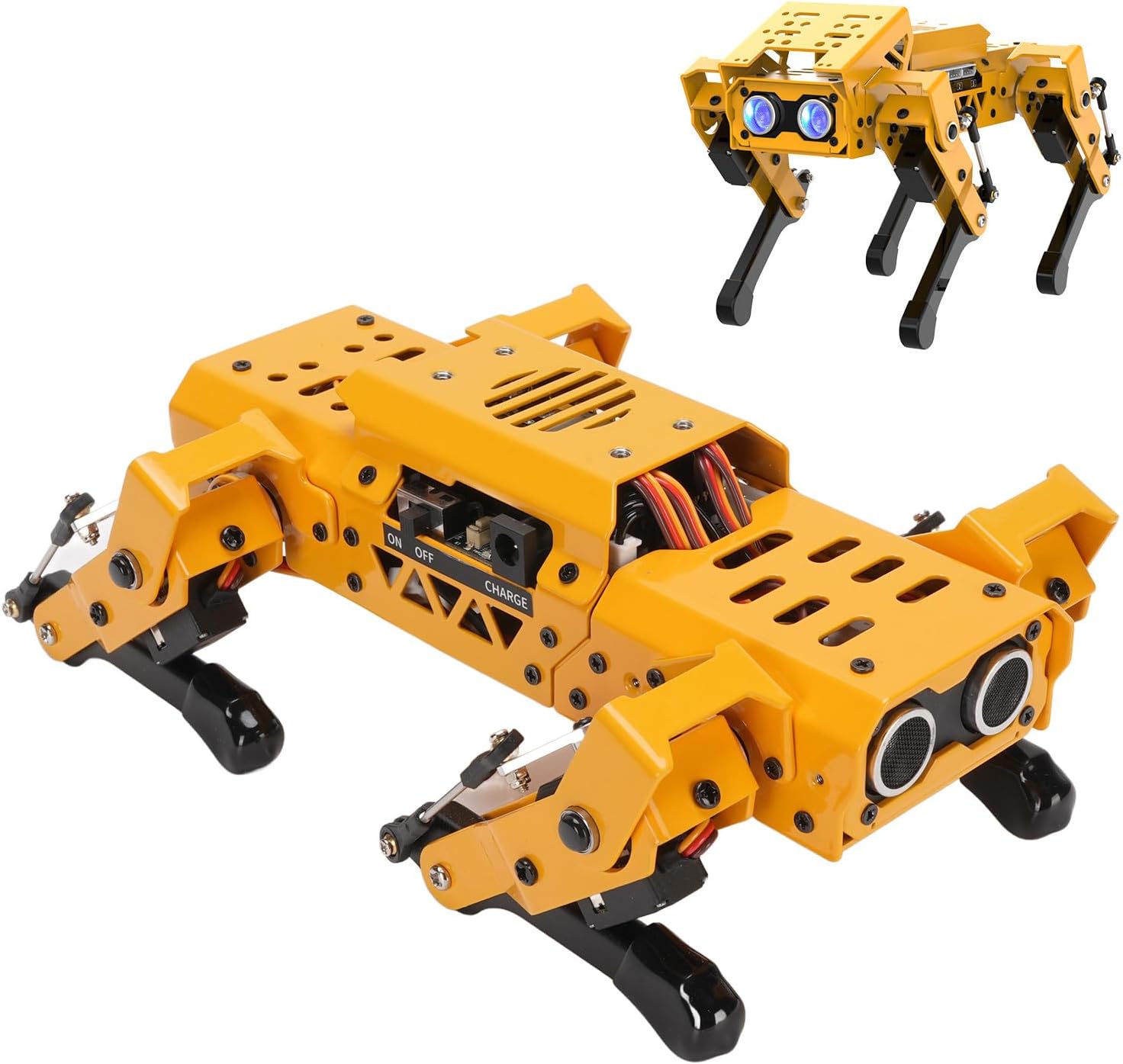
Image: The ZIZEV AI Robot Dog, showcasinel seu disseny i components.
2. Contingut del paquet
Before proceeding, please verify that all items listed below are included in your package.
- 1 x Robot Dog
- 1 x Robot Dog User Manual (this document)
- 1 x Head Extension Bracket
- 1 x Carregador
- 1 x Data Cable for Android
- 1 x Cross Screwdriver
- 1 x Screw Accessory Package (Total 34 Pieces)
- 1 x Module
- 1 x Module User Manual
- 2 x Hinge Bracket
- 1 x Voice Recognition Module
- 1 x MP3 Module (with Memory Card)
- 1 x Lattice Module
- 1 x Touch Sensor
- 1 x Sensor de llum
- 1 x Lector de targetes
- 3 x Colorful Balls
- 1 x Type C Data Cable
- 3 x Module Cable

Imatge: Més deview of all items included in the ZIZEV AI Robot Dog package.
3. Configuració
3.1 Engegada i càrrega inicials
The ZIZEV AI Robot Dog comes pre-assembled and ready for immediate use.
- Locate the Power Switch: The power switch and charging port are located on the side of the robot dog's main body.
- Encès: Slide the switch to the "ON" position to power on the robot dog.
- Càrrega: If the battery is low, connect the provided charger to the charging port. The robot dog's internal Lithium Ion Battery has a capacity of 1500mAh. The module's internal Lithium Ion Battery has a capacity of 300mAh.

Image: Detail of the ON/OFF switch and charging port on the robot dog.

Image: The robot dog connected to its charger, demonstrating the charging process.
3.2 Instal·lació del mòdul
The robot dog supports various sensors and electronic modules for expanded functionality. Refer to the separate Module User Manual for detailed installation instructions for each specific module.
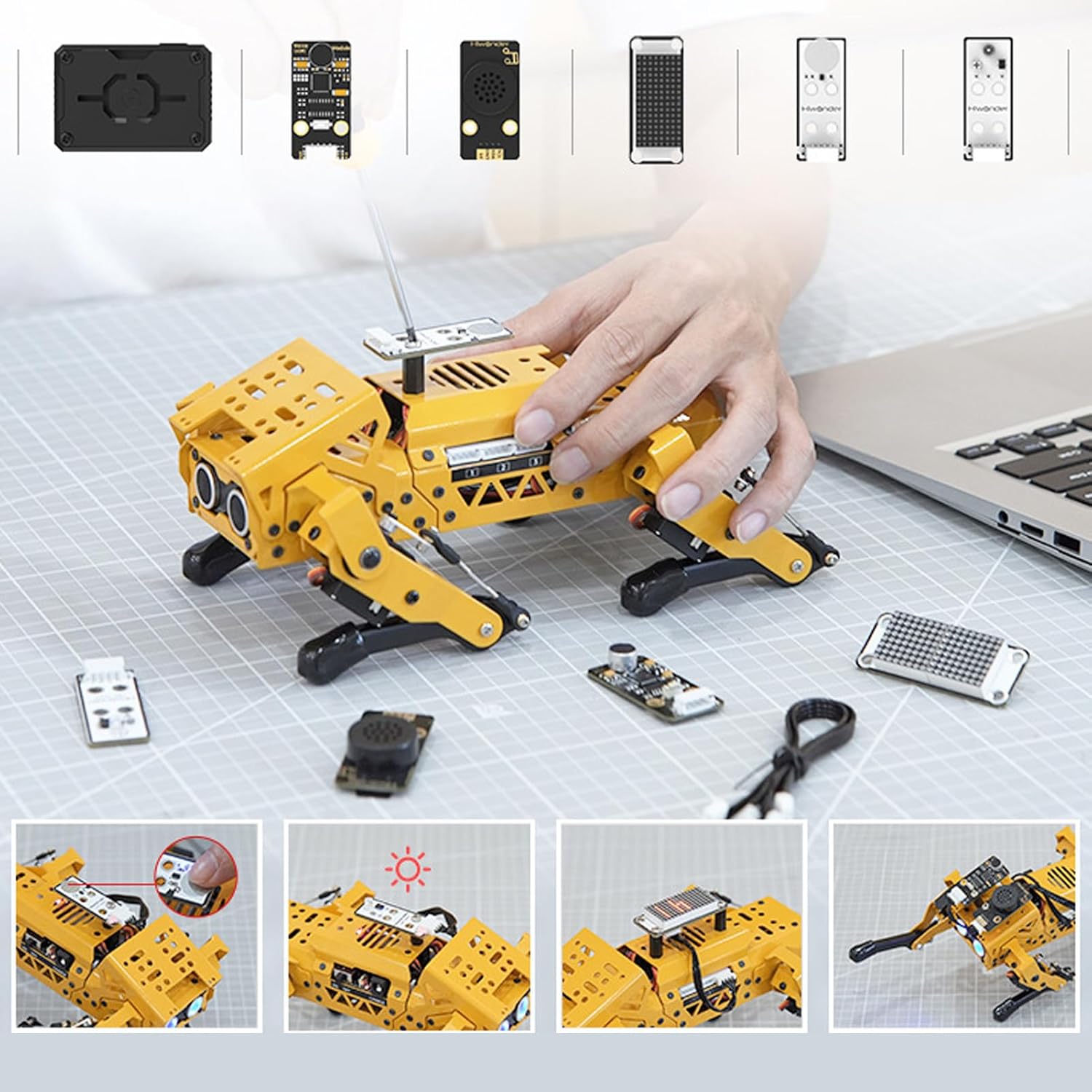
Image: Demonstrating the installation of an expansion module onto the robot dog.
4. Instruccions de funcionament
4.1 Movement and Kinematics
The robot dog features built-in inverse kinematics, allowing for real-time adjustments of walking direction and posture. This results in flexible and lifelike movements. It is equipped with 8 high-speed coreless servos for accuracy and robust force, enabling swift and accurate walking.

Image: The robot dog showcasing its flexible movement capabilities.

Image: The robot dog engaging with a red ball, illustrating its ability to interact with objects.
4.2 Opcions de programació
The ZIZEV AI Robot Dog supports multiple programming methods, catering to various skill levels.
- Control de programari per a PC: Utilize dedicated PC software for advanced programming and control.
- Control d'aplicacions mòbils: Control and program the robot dog via a mobile application.
- Python Programming: Program the robot using Python, suitable for more experienced users and for graphical programming.
- Scratch Programming: Use Scratch for a visual, block-based programming experience, ideal for beginners.
4.3 AI Visual Recognition
With its integrated AI capabilities, the robot dog can perform various visual recognition tasks.
- WiFi Real-Time Screen Return: View the robot's perspective in real-time on a connected device.
- Reconeixement de colors: Identify and distinguish different colors.
- Color Tracking: Follow objects based on their color.
- Reconeixement facial: Detect and recognize human faces.
- Visual Patrol: Navigate and patrol designated areas using visual cues.

Image: Visual demonstration of the robot dog's AI recognition capabilities.
5. Manteniment
Proper maintenance ensures the longevity and optimal performance of your ZIZEV AI Robot Dog.
- Neteja: Use a soft, dry cloth to gently wipe the robot's exterior. Avoid using harsh chemicals or abrasive materials.
- Cura de la bateria: Charge the robot dog's battery regularly, even if not in use, to maintain battery health. Avoid overcharging or completely draining the battery.
- Emmagatzematge: Store the robot dog in a cool, dry place away from direct sunlight and extreme temperatures.
- Estancament del cargol: Periodically check all screws and connections for tightness. Use the provided cross screwdriver for any adjustments.
- Module Handling: When installing or removing modules, do so carefully to avoid damaging connectors.
6. Solució De Problemes
If you encounter issues with your ZIZEV AI Robot Dog, refer to the following common problems and solutions.
- Robot does not power on:
- Assegureu-vos que l'interruptor d'alimentació estigui a la posició "ON".
- Check if the battery is charged. Connect the charger and allow it to charge for at least 30 minutes before attempting to power on again.
- Robot movements are erratic or unresponsive:
- Verify that all module cables are securely connected.
- Ensure the robot's battery is sufficiently charged. Low battery can affect servo performance.
- If using wireless control, check the connection between the robot and your control device (PC/mobile app).
- Modules are not detected or functioning:
- Refer to the specific Module User Manual for correct installation and software configuration.
- Ensure the module is properly seated in its port.
- Problemes de programació:
- Double-check your code for syntax errors or logical flaws.
- Ensure the correct programming environment (Python IDE, Scratch interface, mobile app) is being used and is properly connected to the robot.
- Consult online resources or community forums for programming assistance.
For further assistance, please contact ZIZEV customer support.
7. Especificacions
| Característica | Detall |
|---|---|
| Número de model | ZIZEVomh8tea4pk |
| Dimensions del producte | 13.77 x 6.69 x 5.51 polzades |
| Pes de l'article | 2.6 lliures |
| Robot Dog Battery Type | Lithium Ion Battery (Built-in) |
| Robot Dog Battery Capacity | 1500 mAh |
| Module Battery Type | Lithium Ion Battery (Built-in) |
| Module Battery Capacity | 300 mAh |
| MP3 Module Memory Card Support | Fins a 128G |
| Edat recomanada | 4 anys i més |
| Fabricant | ZIZEV |
8. Garantia i Suport
8.1 Informació de la garantia
Specific warranty details for the ZIZEV AI Robot Dog are typically provided at the point of purchase or within a separate warranty card included in the product packaging. Please retain your proof of purchase for warranty claims.
Generally, products are covered against manufacturing defects for a specified period. Damage resulting from misuse, accidents, unauthorized modifications, or improper maintenance is usually not covered under warranty.
8.2 Atenció al client
For technical support, troubleshooting assistance beyond this manual, or inquiries regarding warranty service, please contact ZIZEV customer support.
You may find contact information on the official ZIZEV weblloc web o a través del venedor on vau comprar el producte.
Visit the ZIZEV Store on Amazon