
1. Producte acabatview
The XUMO Stream Box Remote is designed to provide effortless navigation and control for your XUMO streaming experience. It offers quick access to channels, shows, and applications, enhancing your entertainment system.

Imatge 1.1: Frontal view of the XUMO Stream Box Remote, showcasing its button layout including power, input, volume, navigation, and dedicated app buttons.
Característiques principals:
- Compatibilitat universal: Designed to work seamlessly with a range of smart TVs, allowing control of both your TV and streaming services.
- Long-Range Performance: Provides reliable connection and performance across the room.
- Sleek, Ergonomic Design: Crafted for comfort, lightweight, and fits comfortably in hand.
2. Guia de configuració
2.1 Inserció de les bateries
The XUMO Stream Box Remote requires 2 piles AAA for operation. Follow these steps to insert them correctly:
- Localitzeu la tapa del compartiment de la bateria a la part posterior del comandament a distància.
- Feu lliscar la tapa cap avall o premeu el pestell (si n'hi ha) per obrir el compartiment.
- Introduïu dues piles AAA, assegurant-vos que els terminals positiu (+) i negatiu (-) estiguin alineats amb les marques de l'interior del compartiment.
- Tanqueu la tapa del compartiment de la bateria fent-la lliscar de nou al seu lloc fins que faci clic de manera segura.

Imatge 2.1: Davant i darrere view of the XUMO Stream Box Remote. The back view illustrates the location of the battery compartment.
2.2 Initial Pairing/Connection
In most cases, the XUMO Stream Box Remote is designed to connect automatically with your XUMO Stream Box or compatible smart TV upon battery insertion. If the remote does not respond immediately, follow these general steps:
- Ensure your XUMO Stream Box or TV is powered on.
- Apunta el comandament a distància cap al dispositiu.
- Press any button (e.g., the Home button or Power button) to initiate the connection.
- If the remote still does not respond, navigate to your TV's or Stream Box's settings menu (using an existing remote or on-device controls) and look for a 'Remote Control' or 'Bluetooth Devices' section to manually pair the new remote. Some users have reported success by pressing various buttons randomly around the center of the remote until a setup message appears on screen.
3. Instruccions de funcionament
3.1 Funcions dels botons
Familiarize yourself with the various buttons on your XUMO Stream Box Remote:
- Botó d'encesa: Encén o apaga el dispositiu connectat.
- Botó d'entrada: Passa ciclísticament per les fonts d'entrada disponibles (HDMI 1, HDMI 2, etc.).
- Pujar/baixar el volum: Ajusta el volum d'àudio.
- Botó de silenci: Silencia o activa l'àudio.
- Panell de navegació (circular): Used to move up, down, left, and right within menus and content.
- OK/Select Button (Center of Navigation Pad): Confirma les seleccions.
- Botó enrere: Torna a la pantalla o menú anterior.
- Botó d'inici: Returns to the main home screen of your XUMO Stream Box.
- Dedicated App Buttons (Netflix, Peacock, Prime Video, Xumo): Proporciona accés directe a aquestes aplicacions de transmissió en temps real.
- Teclat numèric (0-9): Used for direct channel entry or other numerical inputs.
- Voice Control Button (Microphone Icon): Activa les ordres de veu per a la cerca i el control.
3.2 Navegació bàsica
To navigate menus and select content:
- Utilitza el Bloc de navegació to move the cursor or highlight items on the screen.
- Premeu el botó Botó D'acord/Selecciona to open an app, select a movie, or confirm an action.
- Premeu el botó Botó enrere to go back one step in the menu hierarchy.
- Premeu el botó Botó d'inici to return to the main XUMO home screen at any time.
3.3 Control de veu
To use voice commands:
- Manteniu premut el botó Botó de control de veu (icona de micròfon).
- Speak clearly into the remote's microphone.
- Deixa anar el botó quan hagis acabat de parlar.
Examples of voice commands include: "Open Netflix," "Cerca action movies," "Go to channel 5," or "Turn up the volume."
4. Manteniment
4.1 Neteja del comandament a distància
To maintain the remote's appearance and functionality:
- Wipe the remote with a soft, dry cloth.
- Per a la brutícia persistent, lleugerament dampal drap amb aigua o un netejador suau i no abrasiu.
- Do not use harsh chemicals or abrasive materials, as they may damage the remote's surface or internal components.
4.2 Substitució de la bateria
Replace the batteries when the remote's response becomes sluggish or it stops functioning. Refer to Section 2.1 for detailed instructions on inserting batteries.
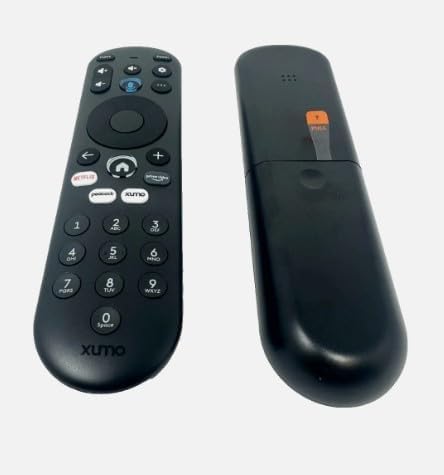
Imatge 4.1: Lateral view of the XUMO Stream Box Remote, illustrating its ergonomic design.
5. Solució De Problemes
If you encounter issues with your XUMO Stream Box Remote, try the following troubleshooting steps:
| Problema | Causa possible | Solució |
|---|---|---|
| El comandament a distància no respon | Dead or incorrectly inserted batteries; remote out of range; obstructed signal. | Replace batteries, ensuring correct polarity. Move closer to the device. Remove any objects blocking the line of sight between the remote and the device. |
| Remote not pairing/connecting | Initial pairing failed; interference. | Ensure the device is on. Try pressing various buttons on the remote to initiate connection. If necessary, manually pair through your TV/Stream Box settings (e.g., Bluetooth devices). |
| Limited functionality (e.g., only power works) | Partial pairing; device-specific settings. | Ensure the remote is fully paired. Check your TV/Stream Box settings for remote control options or universal remote setup. Some TVs may require manual power-on before the remote can control other functions. |
6. Especificacions del producte
| Especificació | Detall |
|---|---|
| Dimensions del producte | 7 x 2.5 x 7 polzades |
| Pes de l'article | 4 unces |
| Número de model | *Remote. SCXI11BEI |
| Piles necessàries | 2 piles AAA (no incloses) |
| Dispositius compatibles | Streaming Device (XUMO Stream Box, compatible Smart TVs) |
| Nombre màxim de dispositius compatibles | 2 |
| Color | NEGRE |
| Característica especial | Lleuger |
| Fabricant | XUMO |
| Marca | Genèric |
7. Garantia i Suport
This product is manufactured by XUMO and sold under the Generic brand. For specific warranty information, please refer to the retailer or the original purchase documentation. For technical support or further assistance, please contact the seller or refer to the support resources provided with your XUMO Stream Box.
Please note that while this remote is designed for broad compatibility, specific features and pairing methods may vary slightly depending on your XUMO Stream Box model or connected smart TV.