
Negreview BV6200PLUS
Negreview BV6200Plus Rugged Phone User Manual
Model: BV6200PLUS | Brand: Blackview
1. Introducció
Welcome to the user manual for your new Blackview BV6200Plus Rugged Phone. This device is engineered for durability and high performance, designed to withstand challenging environments while providing a seamless smartphone experience. Featuring an ultra-loud speaker, a massive 11000mAh battery, and the latest Android 15 operating system, the BV6200Plus is your reliable companion for any adventure.
This manual provides essential information on setting up, operating, maintaining, and troubleshooting your device to ensure you get the most out of its robust features.
2. Què hi ha a la caixa
Upon unboxing your Blackview BV6200Plus, please verify that all the following items are included:
- Negreview BV6200Plus Outdoor Smartphone
- Adaptador de càrrega
- Cable USB (tipus C)
- Eina d'expulsió de la safata SIM
- Protector de pantalla preaplicat
- Manual d'usuari (aquest document)

Image: Contents of the Blackview BV6200Plus retail package.
3. Producte acabatview
Familiarize yourself with the physical components of your Blackview BV6200Plus:
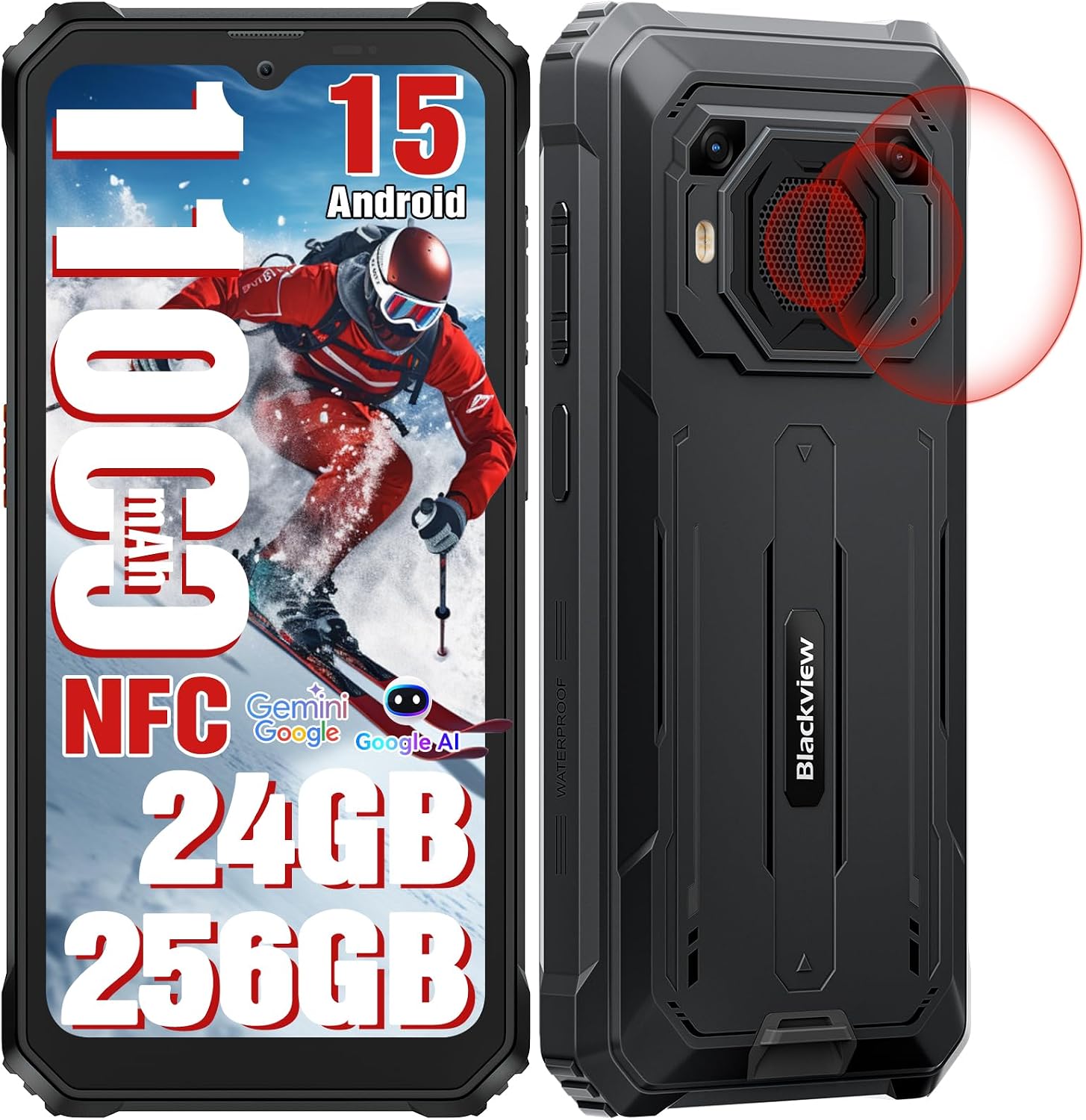
Imatge: Davant i darrere view del Negreview BV6200Plus.
3.1. Components físics
- Pantalla frontal: 6.56-inch HD+ IPS display with 90Hz refresh rate.
- Càmera frontal: 13MP AI camera, located at the top center of the display.
- Càmeres posteriors: 16MP AI main camera and a secondary camera.
- Super Speaker: Large 3W peak stereo speaker on the rear, delivering up to 98dB loudness.
- Botó d'engegada/Sensor d'empremtes dactilars: Located on the right side for secure unlock and power control.
- Botons de volum: Located on the left side, above the customizable shortcut button.
- Port USB tipus C: Located at the bottom, protected by a rubber flap, for charging and data transfer.
- Ranura per a targetes SIM/TF: Located on the left side, protected by a rubber flap, for dual SIM cards and expandable storage.
- Conector d'àudio de 3.5 mm: Per connectar auriculars.

Image: Key features and component locations.
4. Configuració inicial
4.1. Installing SIM and TF Card
- Locate the SIM/TF card slot on the left side of the phone.
- Carefully open the protective rubber flap.
- Introduïu l'eina d'expulsió de la safata de la SIM al forat petit que hi ha al costat de la safata i premeu suaument fins que la safata surti.
- Place your Nano-SIM cards (up to two) and/or a TF (microSD) card into the designated slots on the tray. Ensure the gold contacts face downwards.
- Empenyeu suaument la safata cap a dins de la ranura fins que quedi alineada amb el cos del telèfon.
- Close the rubber flap firmly to maintain water and dust resistance.

Image: Three-card slot for SIM and TF card installation.
4.2. Carregant la bateria
Your Blackview BV6200Plus is equipped with a large 11000mAh battery. For optimal performance, fully charge the device before first use.
- Open the protective rubber flap covering the USB Type-C port at the bottom of the phone.
- Connect the USB cable to the phone and the charging adapter.
- Connecteu l'adaptador de càrrega a una presa de corrent.
- The charging indicator on the screen will show the charging status. The phone supports 18W fast charging.
- Once fully charged, disconnect the cable and firmly close the rubber flap to maintain water resistance.

Image: Battery and charging features.
4.3. Encès / apagat
- Per encendre: Press and hold the Power button (right side) until the Blackview apareix el logotip.
- Per apagar: Mantingueu premut el botó d'engegada i, a continuació, seleccioneu "Apagar" de les opcions que apareixen a la pantalla.
- Per reiniciar: Mantingueu premut el botó d'engegada i, a continuació, seleccioneu "Reiniciar" de les opcions.
5. Com utilitzar el telèfon
5.1. Android 15 and DokeOS 4.0
Your BV6200Plus runs on the latest Android 15 system, customized with Blackview's DokeOS 4.0 for an enhanced user experience. DokeOS 4.0 offers improved privacy protection, app widgets, easy app sharing, and seamless customization with themes, file folders, and icons.

Image: DokeOS 4.0 user interface features.
5.2. Trucades i missatges
To make a call, open the Phone app and dial the number or select a contact. To send a message, open the Messages app and compose your text.
5.3. Internet i connectivitat
- Wi-Fi: Ves a Configuració > Xarxa i internet > Wi-Fi per connectar-te a les xarxes disponibles.
- Bluetooth: Go to Settings > Connected devices > Bluetooth to pair with Bluetooth devices (BT 5.0 supported).
- Dades mòbils: Ensure your SIM card is active and mobile data is enabled in Settings > Network & internet > Mobile network. The phone supports Dual SIM 4G.
- NFC: Use NFC for contactless payments (Google Pay) and quick data sharing. Enable NFC in Settings > Connected devices > Connection preferences > NFC.
5.4. Funcions de la càmera
The BV6200Plus features a 16MP AI main camera and a 13MP AI front camera. Open the Camera app to capture photos and 1080P videos.
- Modes: Explore various modes like Photo, Video, Portrait, and Underwater mode.
- AI Tools: Utilize AI features such as AI Erase and Sky Edit for professional-grade photo enhancements.

Image: Camera features and AI editing capabilities.
5.5. Super Speaker
Experience powerful audio with the 98dB Super Speaker. Ideal for music, movies, and hands-free calls in noisy environments.

Image: Detail of the 3W Ultra-loud Stereo Speaker.
5.6. Navigation and Outdoor Toolkit
The phone supports multiple navigation systems including GPS, GLONASS, Beidou, and Galileo for accurate positioning. The built-in Outdoor Toolkit app provides useful tools like a compass, barometer, and more.

Image: Navigation and Outdoor Toolkit features.
5.7. Característiques de seguretat
Unlock your phone instantly and securely using Face Unlock or the side-mounted Fingerprint Sensor.
6. Ruggedness and Durability
El Negreview BV6200Plus is built to endure harsh conditions, certified with IP68, IP69K, and MIL-STD-810H standards.
- Water Resistance (IP68 & IP69K): Submersible up to 1.5 meters for 30 minutes. Protected against high-pressure, high-temperature water jets.
- Dust Resistance (IP68 & IP69K): Totalment protegit contra l'entrada de pols.
- Drop Resistance (MIL-STD-810H): Can survive drops from up to 1.2 meters. Features a padded TPU cover, silicone-sealed display, thickened corners, reinforced double-shot molding back shell, and an anti-collision body design.

Image: Ruggedness features and certifications.

Image: Water and dust protection mechanisms.
7. Manteniment i cura
Per garantir la longevitat i el rendiment òptim del vostre Blackview BV6200Plus, follow these maintenance guidelines:
- Neteja: Utilitzeu un suau, damp cloth to clean the phone's surface. Avoid harsh chemicals or abrasive materials. Ensure all rubber flaps are securely closed before cleaning with water.
- Cura de la bateria: While the 11000mAh battery is robust, avoid extreme temperatures (both hot and cold) as they can affect battery life. Do not fully discharge the battery regularly.
- Actualitzacions de programari: Regularly check for system updates (Settings > System > System update) to ensure your phone has the latest features, security patches, and performance improvements.
- Protecció del port: Always keep the rubber flaps covering the USB port and SIM/TF card slot securely closed when not in use to prevent water and dust ingress.
8. Solució De Problemes
Aquí teniu solucions a problemes comuns que podeu trobar:
| Problema | Possible solució |
|---|---|
| El telèfon no s'encén | Ensure the battery is charged. Connect to the charger for at least 10 minutes, then try powering on. If it still doesn't turn on, perform a forced restart by holding the Power button for 10-15 seconds. |
| Senyal de xarxa deficient / Sense servei | Check if your SIM card is properly inserted. Verify that your carrier is supported (supports GSM networks like T-mobile and MetroPCS; incompatible with CDMA carriers like AT&T, Cricket Wireless, Verizon, Straight Talk, or U.S.Cellular). Try restarting the phone or toggling Airplane Mode on/off. |
| La bateria s'esgota ràpidament | Close unused apps running in the background. Reduce screen brightness. Disable Wi-Fi, Bluetooth, or GPS when not in use. Check battery usage in Settings to identify power-hungry apps. |
| Les aplicacions es bloquegen o es bloquegen | Clear the cache of the problematic app (Settings > Apps > [App Name] > Storage & cache > Clear cache). If the issue persists, try reinstalling the app. Ensure your system software is up to date. |
| Speaker volume is low | Ensure the volume is turned up. Check if the speaker grille is obstructed by dirt or debris. Clean gently if necessary. |
9. Especificacions tècniques
| Característica | Especificació |
|---|---|
| Model | BV6200PLUS |
| Sistema operatiu | Android 15 (DokeOS 4.0) |
| Processador | Octa Core Unisoc T606 (2 x A75 + 6 x A55 1.6GHz) |
| RAM | Fins a 24 GB (8 GB + 16 GB ampliat) |
| Emmagatzematge intern (ROM) | 256 GB |
| Emmagatzematge ampliable | Up to 2TB via TF card (microSD) |
| Mostra | 6.56 inches HD+ IPS, 90Hz Refresh Rate, 450 cd/m² brightness |
| Càmera posterior | 16MP AI Main Camera + 13MP Secondary Camera |
| Càmera frontal | Càmera AI de 13 MP |
| Capacitat de la bateria | 11000 mAh |
| Carregant | Càrrega ràpida de 18 W, càrrega inversa OTG |
| Altaveu | 3W Peak Stereo Speaker, 98dB Max Loudness |
| Durabilitat | IP68, IP69K, MIL-STD-810H Certified |
| Connectivitat | Dual SIM 4G, Bluetooth 5.0, Wi-Fi, NFC |
| Navegació | GPS, GLONASS, Beidou, Galileo |
| Mètodes de desbloqueig | Desbloqueig d'empremta digital, desbloqueig facial |
| Dimensions | 8.1 x 8.1 x 1.5 polzades (paquet) |
| Pes | 1.65 lliures |

Image: Processor and memory details.
10. Garantia i Suport
Negreview ofereix a 2 any de garantia for your BV6200Plus Rugged Phone, ensuring peace of mind regarding manufacturing defects and hardware issues. Additionally, we provide lifelong technical support to assist you with any questions or problems you may encounter during the product's lifespan.
For technical assistance, troubleshooting, or warranty claims, please contact Blackview customer support. You can find contact information on the official Blackview weblloc web o a través de la vostra plataforma de compra.

Image: Blackview informació d'atenció al client.
Vídeo oficial del producte
Vídeo: Presentació oficial del producte en vídeoasing the Blackview BV6200Plus's features, including its rugged design, powerful speaker, and long-lasting battery. This video provides a visual overview of the phone's capabilities and durability.
Ask a question about this manual
Ask about setup, troubleshooting, compatibility, parts, safety, or missing instructions. Manuals+ will review the question and use this page’s manual context to help answer it.