
1. Introducció
This manual provides detailed instructions for the proper use and maintenance of your Oakcastle HIFI500 Remote Control. This remote is designed as a replacement or spare for the Oakcastle HIFI500 audio system, ensuring seamless control over its functions. Please read this manual thoroughly before use to ensure optimal performance and longevity of your remote control.
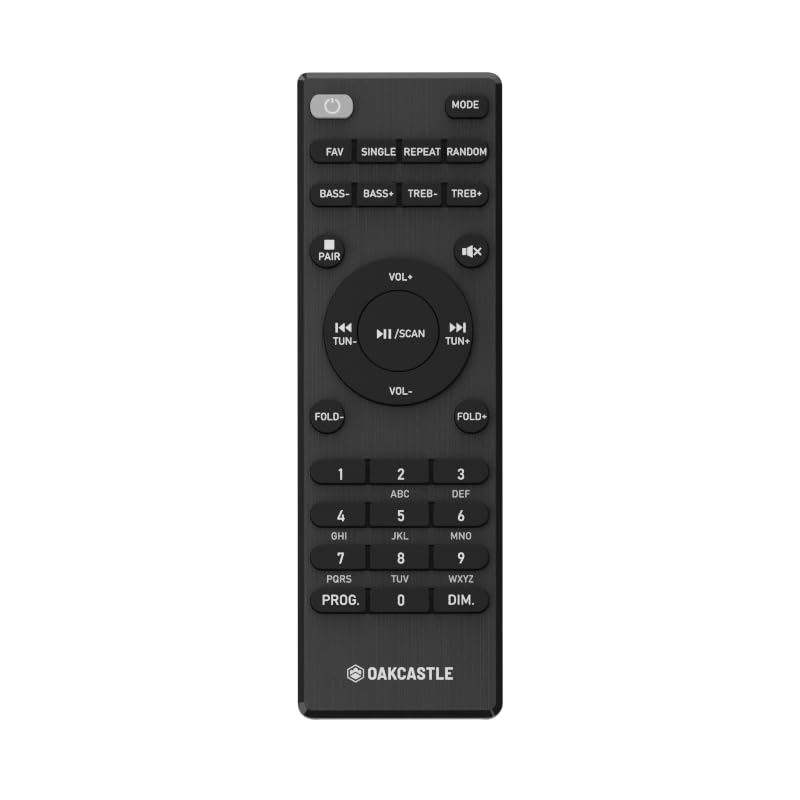
Figura 1.1: Davant view of the Oakcastle HIFI500 Remote Control. This image displays the compact design and button layout, including power, volume, source selection, and playback controls, typical for operating the HIFI500 audio system.
2. Configuració
2.1. Instal·lació de la bateria
The Oakcastle HIFI500 Remote Control requires two AAA batteries (not included) for operation. Follow these steps to install the batteries:
- Localitzeu el compartiment de la bateria a la part posterior del comandament a distància.
- Premeu la pestanya i feu lliscar la tapa de la bateria cap avall per obrir-la.
- Introduïu dues piles AAA, assegurant-vos que els terminals positiu (+) i negatiu (-) s'alineïn correctament amb les marques de l'interior del compartiment.
- Feu lliscar la coberta de la bateria al seu lloc fins que faci un clic de manera segura.
Nota: Always use new batteries and dispose of old batteries responsibly. Do not mix old and new batteries, or different types of batteries.
2.2. Ús inicial
Once batteries are installed, the remote control is ready for use with your Oakcastle HIFI500 audio system. Point the remote directly at the infrared (IR) receiver on your HIFI500 system. No additional pairing is typically required for this replacement remote.
3. Funcionament del comandament a distància
The Oakcastle HIFI500 Remote Control provides full functionality for your HIFI500 audio system. Below is a general guide to common button functions:
- Botó d'encendre (⏻): Turns the HIFI500 system on or off.
- Pujar/baixar el volum (Vol+ / Vol-): Ajusta el nivell de sortida d'àudio.
- Silencia (🔇): Temporarily silences the audio output.
- Source/Input (Font): Cycles through available audio inputs (e.g., CD, FM, Bluetooth, AUX).
- Controls de reproducció (▶ / ⏸ / ⏹ / ⏪ / ⏩): Controls media playback (Play, Pause, Stop, Rewind, Fast Forward) for compatible sources like CD or USB.
- Botons de navegació (▲ / ▼ / ◀ / ▶): Used to navigate menus and selections on the HIFI500 system display.
- Botó D'acord/Entrar: Confirma les seleccions.
- Teclat numèric (0-9): For direct input of radio frequencies, track numbers, or other numerical data.
Refer to your Oakcastle HIFI500 audio system's main user manual for specific functions and advanced operations.
4. Manteniment
4.1. Neteja
Per netejar el comandament a distància, netegeu suaument la superfície amb un drap suau i sec. Per a la brutícia resistent, netegeu lleugeramentampen the cloth with water or a mild, non-abrasive cleaner. Avoid using harsh chemicals, solvents, or abrasive materials, as these can damage the remote's finish or internal components.
4.2. Substitució de la bateria
Replace batteries when the remote's response becomes sluggish or stops working. Follow the battery installation steps outlined in Section 2.1. Always replace both batteries simultaneously with new ones.
4.3. Emmagatzematge
When not in use for extended periods, it is recommended to remove the batteries from the remote control to prevent leakage, which can cause damage. Store the remote in a cool, dry place away from direct sunlight and extreme temperatures.
5. Solució De Problemes
If you encounter issues with your Oakcastle HIFI500 Remote Control, please refer to the following common problems and solutions:
- El comandament a distància no respon:
- Comproveu si les piles estan correctament instal·lades amb la polaritat correcta.
- Substituïu les piles per unes de noves.
- Ensure there are no obstructions between the remote control and the HIFI500 system's IR receiver.
- Make sure you are within the effective range and pointing the remote directly at the HIFI500 system.
- Intermittent function:
- Això sovint indica que la bateria està baixa. Canvieu les piles.
- Ensure the remote's IR emitter is clean and free from dirt or smudges.
If the problem persists after trying these solutions, please contact Oakcastle customer support.
6. Especificacions
| Característica | Especificació |
|---|---|
| Model | HIFI500 Remote Control |
| Marca | Oakcastle |
| Tecnologia de connectivitat | Infrarojos (IR) |
| Font d'alimentació | 2 piles AAA (no incloses) |
| Nombre màxim de dispositius compatibles | 1 (Oakcastle HIFI500 Audio System) |
| Característica especial | Lleuger |
| Pes de l'article | 2.82 unces (aproximadament 80 grams) |
| Dimensions del paquet | 8 x 3.2 x 2.5 polzades (aprox. 20.3 x 8.1 x 6.3 cm) |
| Fabricant | MAJORIA |
7. Garantia i Suport
7.1. Informació de la garantia
This Oakcastle HIFI500 Remote Control is covered by a manufacturer's warranty. Please refer to the warranty card included with your original Oakcastle HIFI500 audio system or visit the official Oakcastle weblloc web per obtenir informació detallada sobre els termes i condicions de la garantia. Conserveu el comprovant de compra per a reclamacions de garantia.
7.2. Atenció al client
For technical assistance, troubleshooting beyond this manual, or warranty inquiries, please contact Oakcastle customer support. You can typically find contact information, including phone numbers, email addresses, and support portals, on the official Oakcastle weblloc.
Please have your product model (HIFI500 Remote Control) and purchase details ready when contacting support.


