
Introducció
This manual provides essential information for setting up, operating, maintaining, and troubleshooting your Nothing Phone (3a) Pro 5G. Please read this guide thoroughly to ensure optimal performance and longevity of your device.
Dispositiu acabatview
The Nothing Phone (3a) Pro 5G features a 6.77-inch Full HD+ Flexible AMOLED Display, powered by a Snapdragon 7s Gen 3 Processor. It includes a versatile camera system with a 50MP main, 50MP 3X Periscope, and 8MP ultra-wide rear cameras, alongside a 50MP front camera. The device is equipped with a 5000 mAh battery for extended use.
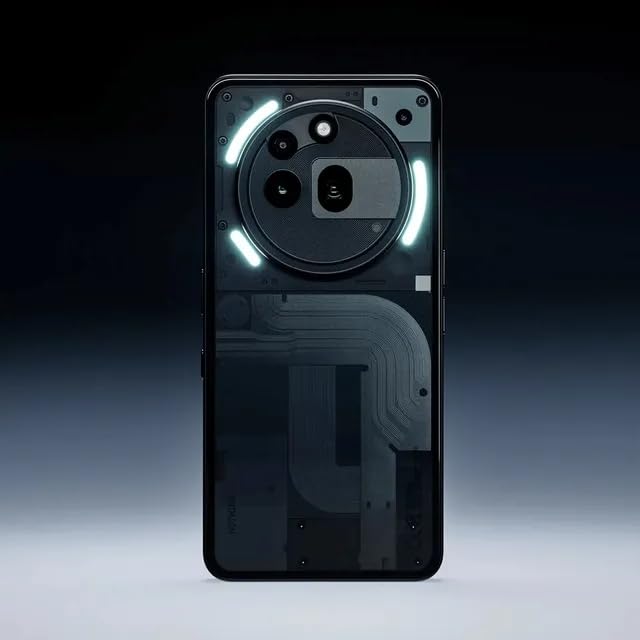
Imatge: Frontal view of the Nothing Phone (3a) Pro 5G, showcasinla seva pantalla i el seu disseny elegant.
Configuració
1. Inserció de la targeta SIM
- Localitza la safata de la targeta SIM al lateral del telèfon.
- Introduïu l'eina d'expulsió de la SIM al forat petit que hi ha al costat de la safata i premeu suaument fins que la safata surti.
- Col·loca la targeta o targetes Nano SIM a la safata amb els contactes daurats cap avall. Assegura't que estiguin orientades correctament.
- Empenyeu amb cura la safata cap al telèfon fins que encaixi al seu lloc.
2. Engegada i configuració inicials
- Press and hold the Power button until the Nothing logo appears.
- Segueix les instruccions que apareixen a la pantalla per seleccionar l'idioma, connectar-te a una xarxa Wi-Fi i configurar el teu compte de Google.
- Configure biometric security features such as fingerprint recognition for enhanced security.
3. Carregant la bateria
Before first use, fully charge your device. Connect the USB cable to the phone's charging port and the other end to a compatible power adapter. The phone supports fast charging.
Funcionament del vostre dispositiu
1. Navegació bàsica
- Gestos tàctils: Toca per seleccionar, llisca per desplaçar-te, pessiga per ampliar.
- Pantalla d'inici: Accedeix a aplicacions, widgets i notificacions.
- Notificacions: Feu lliscar el dit cap avall des de la part superior de la pantalla fins a view notificacions i configuracions ràpides.
2. Ús de la càmera
The Nothing Phone (3a) Pro 5G features a triple rear camera system (50MP Main, 50MP 3X Periscope, 8MP Ultra-Wide) and a 50MP front camera. Open the Camera app to access various modes like Photo, Video, Portrait, and Night mode.

Image: Details on the camera system, highlighting the 50 MP front camera, TrueLens Engine 3, and up to 60x ultra zoom with a 70mm periscope zoom lens.
- Càmera posterior: Utilize the 50MP main sensor for high-resolution photos, the 50MP 3X periscope lens for optical zoom, and the 8MP ultra-wide lens for expansive shots.
- Càmera frontal: The 50MP front camera supports ultra-clear 4K video recording for high-quality selfies and video calls.
- TrueLens Engine 3: Advanced camera software powered by AI enhances image processing for superior results.
3. Essential Key Functionality
The Essential Key allows for quick access to functions such as grabbing photos, recording your screen, and capturing your voice. Customize its actions in the phone's settings.
4. Connectivitat
- Xarxa 5G: The device supports 5G cellular technology for high-speed internet access.
- Wi-Fi i Bluetooth: Connect to wireless networks and Bluetooth devices via settings.
- USB: Feu servir el port USB-C per carregar i transferir dades.
Manteniment
1. Cura de la bateria
- Avoid extreme temperatures to prolong battery life.
- Feu servir només carregadors i cables homologats.
- Per a un estat òptim de la bateria, eviteu esgotar-la completament amb freqüència o mantenir-la al 100% durant períodes prolongats.
2. Neteja del dispositiu
Use a soft, lint-free cloth to clean the screen and body of your phone. Avoid harsh chemicals or abrasive materials. The device has a Water Resistant rating, but it is not waterproof; avoid submerging it in liquids.
3. Actualitzacions de programari
Comproveu i instal·leu regularment si hi ha actualitzacions de programari per assegurar-vos que el dispositiu tingui les darreres funcions, pegats de seguretat i millores de rendiment. Navegueu a Configuració> Sistema> Actualitzacions del sistema.
Resolució de problemes
Problemes comuns i solucions
- El dispositiu no s'encén: Assegureu-vos que la bateria estigui carregada. Connecteu-la a un carregador i espereu uns minuts abans d'intentar tornar-la a engegar.
- Les aplicacions es bloquegen o es bloquegen: Close the problematic app and reopen it. If the issue persists, restart your phone. Check for app updates in the Google Play Store.
- Mala connectivitat de xarxa: Check if Airplane Mode is off. Restart your phone. Verify your SIM card is correctly inserted. Contact your service provider if issues persist.
- El sensor d'empremtes dactilars no funciona: Ensure your finger is clean and dry. Re-register your fingerprint in settings if necessary.
- La bateria s'esgota ràpidament: Reduce screen brightness, disable unnecessary background apps, and limit location services. Check battery usage in settings to identify power-hungry apps.
Especificacions
Detailed technical specifications for the Nothing Phone (3a) Pro 5G:

Image: Information about the Snapdragon 7s Gen 3 5G processor, highlighting its 8-core CPU up to 2.5 GHz, Qualcomm AI Engine, and up to 20GB RAM Booster.
| Característica | Detall |
|---|---|
| Marca | Res |
| Model | Phone (3a) Pro 5G |
| Sistema operatiu | Android 15 |
| Mida instal·lada de la memòria RAM | 8 GB |
| Capacitat d'emmagatzematge de memòria | 128 GB |
| Model de CPU | Snapdragon 7s Gen 3 Processor |
| Velocitat de la CPU | 2.5 GHz |
| Tipus de visualització | AMOLED |
| Mida de la pantalla | 6.77 polzades |
| Resolució | 1080 × 2392 |
| Rear Camera Photo Sensor Resolution | 50 MP (Main) + 50MP (3X Periscope) + 8MP (Ultra-Wide) |
| Front Photo Sensor Resolution | 50 MP |
| Resolució de captura de vídeo | 4k |
| Capacitat de la bateria | 5000 milionsamp Hores |
| Battery Average Life (Talk Time) | 38 hores |
| Tecnologia cel·lular | 5G |
| Nivell de resistència a l'aigua | Resistent a l'aigua (IP64) |
| Funció de seguretat biomètrica | Reconeixement d'empremtes digitals |
| Nombre de ranures per a targetes SIM | Dual SIM (Nano) |
| Conector d'auriculars | Sense presa per a auriculars |
| Dimensions de l'article | 16.4 x 7.7 x 0.8 centímetres |
Informació de la garantia
The Nothing Phone (3a) Pro 5G typically comes with a standard manufacturer's warranty. Please refer to the warranty card included in your product packaging for specific terms, conditions, and duration. For warranty claims or service, retain your proof of purchase.
Additional protection plans may be available for purchase, such as extended warranty, screen protection, or accidental and liquid damage coverage. Check with your retailer for details.
Suport
For further assistance, technical support, or to access frequently asked questions, please visit the official Nothing support website or contact their customer service. You can find contact information on the manufacturer's weblloc web o a la documentació del producte.
Botiga oficial de la marca: Nothing Store on Amazon.in
Informació important de seguretat
- No intenteu desmuntar o reparar el dispositiu vosaltres mateixos.
- Mantingueu el dispositiu allunyat de la calor extrema, la llum solar directa i els líquids.
- Desfeu-vos del dispositiu i de la bateria de manera responsable d'acord amb la normativa local.
- Use only accessories approved by Nothing.