
1. Introducció
The AirheadStorm FS899C is a versatile digital multimeter designed for accurate electrical measurements. This device can measure AC/DC current and voltage, capacitance, continuity, resistance, frequency, non-contact voltage (NCV), and ambient temperature. Featuring a large backlit display and a rechargeable battery, it is suitable for both home and industrial electrical tasks.
This manual provides essential information for the safe and effective use of your FS899C Digital Multimeter. Please read it thoroughly before operation and retain it for future reference.
2. Contingut del paquet
Verify that all items listed below are present and in good condition upon opening the package:
- 1 x AirheadStorm FS899C Digital Multimeter
- 2 cables de prova (vermell i negre)
- 1 x cable de càrrega USB-C
- 1 x Manual d'instruccions (Aquest document)
- 1 x Caixa d’envasos

Figure 2.1: Contents of the FS899C package, including the multimeter, test leads, and charging cable.
3. Informació de seguretat
Always adhere to basic safety precautions when using electrical testing equipment to reduce the risk of fire, electric shock, or personal injury. Improper use can result in electric shock or damage to the meter.
- Inspect the Meter: Before each use, check the meter and test leads for any damage. Do not use the meter if it appears damaged or if the insulation on the test leads is compromised.
- Voltage Límits: No apliqueu més del volum nominaltage, tal com està marcat al comptador, entre els terminals o entre qualsevol terminal i terra.
- Proper Terminal Use: Ensure the test leads are connected to the correct input terminals for the measurement function selected.
- Avoid Live Circuits: Do not measure current on a circuit with voltage exceeding the meter's specified limits.
- Entorn de treball: Use the meter in a dry environment. Avoid using it in wet or damp condicions.
- Equips de protecció individual: Always wear appropriate personal protective equipment, such as safety glasses, when working with electrical circuits.
- Protecció contra impactes: The meter features an impact-resistant plastic housing designed to protect against damage from drops. However, avoid unnecessary drops and handle the device with care.
- Manteniment: Refer all servicing to qualified service personnel. Do not attempt to repair the meter yourself.
4. Característiques del producte
The AirheadStorm FS899C Digital Multimeter offers a range of features for efficient and accurate electrical testing:
- Capacitats de mesura versàtils: Accurately measures AC/DC current and voltage, capacitance, continuity, resistance, frequency, non-contact voltage (NCV), and ambient temperature.
- Bateria recarregable: Equipped with a USB-C rechargeable battery, providing up to 8 hours of operation after approximately 2 hours of charging.
- Pantalla gran retroil·luminada: Features a 4.8-inch display with backlight for clear visibility in various lighting conditions.
- Torxa integrada: A practical torch function assists in illuminating dark work areas.
- Funció de retenció de dades: Allows users to freeze the current reading on the display for convenient recording.
- Construcció duradora: Impact-resistant plastic housing provides protection against accidental drops.
- High Accuracy with True RMS: Offers precise measurements with a count capacity of up to 6000.
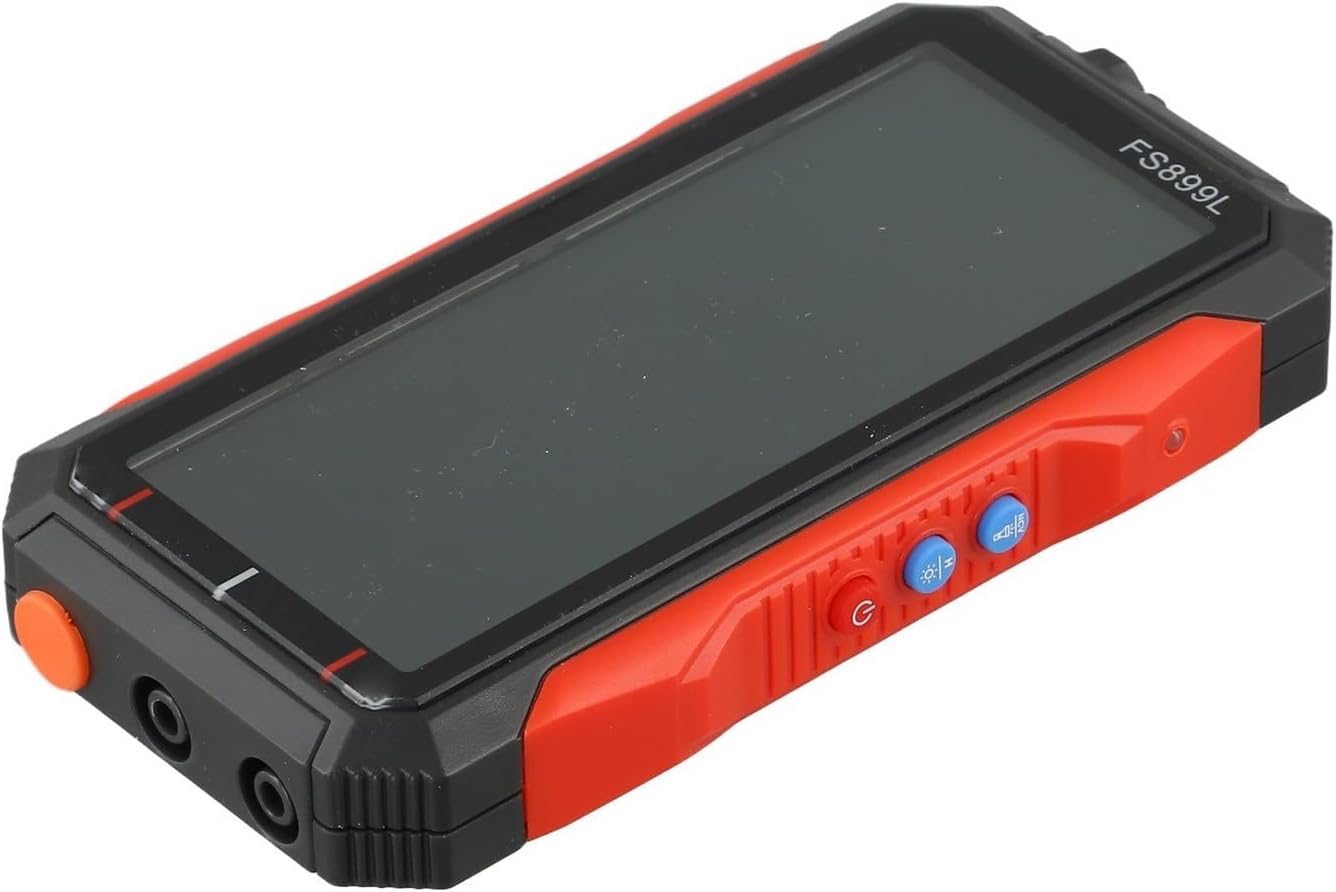
Figura 4.1: lateral view of the FS899C multimeter, highlighting its robust casing and control interface.
5. Configuració
5.1 Charging the Multimeter
- Locate the USB-C charging port on the side of the multimeter.
- Connect the provided USB-C charging cable to the multimeter and to a standard USB power adapter (not included).
- The charging indicator on the display will show the charging status. A full charge typically takes approximately 2 hours and provides up to 8 hours of operation.
5.2 Connexió dels cables de prova
Always ensure the multimeter is powered off before connecting or disconnecting test leads.
- Inseriu el vermell cable de prova a la VΩmA presa d'entrada per a volumtage, resistance, capacitance, frequency, and low current measurements.
- Inseriu el negre cable de prova a la COM presa d'entrada (comuna).
- Per a mesures de corrent elevat (fins a 10 A), inseriu el vermell cable de prova a la 10A presa d'entrada.
6. Instruccions de funcionament
6.1 Encès/Apagat
Manteniu premut el botó Poder button to turn the multimeter on or off.
6.2 Selecció de la funció
The FS899C typically features an auto-ranging function, simplifying operation. For specific modes, use the function buttons on the device.

Figure 6.1: The FS899C display showing active measurements for voltage, resistance, and temperature, along with mode indicators.
6.3 Common Measurements
- VoltagMesura (CA/CC):
- Connect the red lead to VΩmA and the black lead to COM.
- Seleccioneu el volum de CA o CC adequattagmode e.
- Connecteu les sondes de prova en paral·lel al circuit o component que s'està provant.
- Mesura de corrent (CA/CC):
- ADVERTIMENT: Ensure the circuit is de-energized before connecting the meter in series.
- For low current, connect the red lead to VΩmA; for high current (up to 10A), connect the red lead to 10A. Connect the black lead to COM.
- Select the appropriate AC or DC current mode.
- Connect the test probes in series with the circuit.
- Mesura de la resistència:
- Connect the red lead to VΩmA and the black lead to COM.
- Select the resistance mode (Ω).
- Ensure the circuit or component is de-energized before measuring resistance. Connect the probes across the component.
- Prova de continuïtat:
- Connect the red lead to VΩmA and the black lead to COM.
- Select the continuity mode (often indicated by a speaker icon).
- Touch the probes to the ends of the circuit or component. A beep indicates continuity.
- Mesura de la capacitat:
- Connect the red lead to VΩmA and the black lead to COM.
- Select the capacitance mode (F).
- Ensure the capacitor is fully discharged before testing. Connect the probes across the capacitor terminals.
- Mesura de freqüència:
- Connect the red lead to VΩmA and the black lead to COM.
- Select the frequency mode (Hz).
- Connecteu les sondes a la font del senyal.
- Vol. Sense contactetagDetecció de e (NCV):
- Seleccioneu el mode NCV.
- Hold the top of the multimeter near a live conductor. The meter will indicate the presence of AC voltage through an audible alarm and/or visual indicator.
6.4 Funció de retenció de dades
Premeu el botó MANTENIM button to freeze the current reading on the display. Press it again to release the hold function and resume live readings.
7. Manteniment
7.1 Neteja
Netegeu la c del comptadorasing amb anunciamp drap i un detergent suau. No utilitzeu abrasius ni dissolvents. Assegureu-vos que el mesurador estigui completament sec abans d'utilitzar-lo.
7.2 Cura de la bateria
The FS899C uses a rechargeable battery. To prolong battery life:
- Carregueu la bateria completament abans del primer ús.
- Eviteu descarregar completament la bateria amb freqüència.
- If storing the meter for an extended period, charge it periodically (e.g., every 3-6 months) to maintain battery health.
7.3 Inspecció dels cables de prova
Regularly inspect the test leads for any cuts, cracks, or damage to the insulation. Replace damaged leads immediately to prevent electric shock hazards.
8. Solució De Problemes
| Problema | Causa possible | Solució |
|---|---|---|
| El mesurador no s'encén. | Low or discharged battery. | Charge the multimeter using the provided USB-C cable. |
| Lectures incorrectes o inestables. | Funció incorrecta seleccionada; mala connexió del cable de prova; interferències externes. | Verify the correct measurement function. Ensure test leads are securely connected. Move away from strong electromagnetic fields. |
| "OL" or "OVERLOAD" displayed. | Measurement exceeds the meter's range. | Select a higher range if available, or ensure the measured value is within the meter's specifications. |
| No hi ha cap bip de continuïtat. | Open circuit; continuity mode not selected. | Check the circuit for breaks. Ensure the meter is in continuity mode. |
9. Especificacions
| Paràmetre | Valor |
|---|---|
| Model | FS899C |
| Mostra | 4.8-inch, Backlit |
| Count Capacity | Up to 6000 counts |
| DC Voltage Rang | 60mV to 600V (Accuracy: ±(1.2%+5d)) |
| Vol. ACtage Rang | 60mV to 600V (Accuracy: ±(1.5%+8d)) |
| Interval de corrent DC | 300mA to 10A (Accuracy: ±(2.2%+8d)) |
| Interval de corrent de CA | 300mA to 10A (Accuracy: ±(2.5%+8d)) |
| Interval de resistència | 600Ω to 60MΩ (Accuracy: ±(1.5%+10d)) |
| Interval de capacitat | 10nF to 60mF (Accuracy: ±(10%+88d)) |
| Interval de freqüència | (Specific range not provided, but implied by feature) |
| Bateria | Recarregable (USB-C) |
| Temps de funcionament | Up to 8 hours (after 2 hours charge) |
| Dimensions del producte | 6.3 x 4.72 x 1.38 polzades |
| Pes de l'article | 9.4 unces (267 grams) |
| Fabricant | AirheadStorm |
10. Garantia i Suport
For warranty information, technical support, or service inquiries regarding your AirheadStorm FS899C Digital Multimeter, please contact the retailer or manufacturer directly. Retain your proof of purchase for warranty claims.