Introducció
This manual provides essential information for the setup, operation, and maintenance of your replacement remote control for adjustable bed bases. Please read this manual thoroughly before use to ensure proper functionality and compatibility.
Nota important de compatibilitat:
Aquest comandament a distància és NOT universal. It is specifically designed to work with certain control box models. Before use, ensure your control box model (e.g., JLDP.15.005.102 CU358-2-L) matches the remote's compatibility. Refer to the images provided for visual verification of compatible control boxes and remotes. If your control box or old remote is not identical to those shown, this remote may not function correctly.

Imatge: Frontal view of the black replacement remote control, showing the power button, head and foot adjustment buttons, and Zero G button.
Configuració
1. Instal·lació de la bateria
El comandament a distància requereix two (2) AAA batteries for operation. Batteries are not included with this product. To install:
- Localitzeu el compartiment de la bateria a la part posterior del comandament a distància.
- Feu lliscar la tapa de la bateria oberta.
- Introduïu dues piles AAA, assegurant-vos de la polaritat correcta (+ i -) tal com s'indica a l'interior del compartiment.
- Col·loqueu la tapa de la bateria de manera segura.
2. Vinculació del comandament a distància
The remote control must be paired with your adjustable bed base's control box to function. The pairing process may vary slightly depending on your bed base model. Please refer to the instructions below and your bed base's original manual for specific details.
General Pairing Method (Refer to your bed base manual for specifics)
- Pas 1: Unplug the power cord from the wall outlet. Wait approximately 5 seconds, then plug it back into the outlet.
- Pas 2: Within 10 seconds of plugging in the power cord, locate the PAIR button on the back of the remote control. Press and hold the PAIR button.
- Pas 3: The PAIR button on the remote will illuminate blue and begin flashing. Continue holding the button until the LED light on the control box goes out.
- Pas 4: Deixeu anar el botó PARELLAR. Ara el comandament està emparellat amb la base ajustable.
- Pas 5: Proveu totes les funcions del comandament a distància per confirmar que l'aparellament s'ha realitzat correctament.

Image: Detailed diagram illustrating the general remote control pairing process, including visuals of the power down box, the remote's pair button, and the control box's LED light.
Pairing for Ease 3.0 Base
- Remove the rear cover of the remote to expose the PAIR button.
- Unplug the base from its power source. Wait 1 minute, then plug the base back in. Perform Step 3 within 10 seconds while the base control box light is still blinking.
- Manteniu premut el botó PAIR a la part posterior del comandament a distància. El botó PAIR s'il·luminarà i començarà a parpellejar.
- When the PAIR button stops flashing, the LED light on the control box will stop flashing. Release the PAIR button.
- Your remote is now paired to your base.
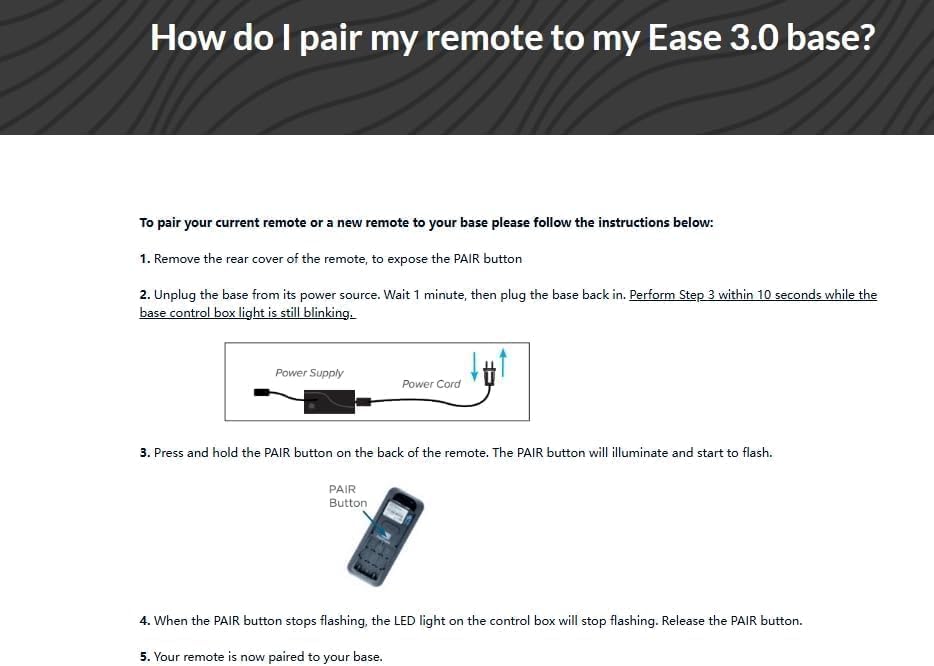
Image: Visual guide for pairing the remote with an Ease 3.0 adjustable bed base, showing power cord and remote's pair button.
Pairing for Ease 1.0 or Ease 2.0 (Prior Models)
- Please ensure your base remote has fresh batteries.
- Locate the Battery Backup Box and press the POWER DOWN button twice. A light on the Battery Backup Box will illuminate.
- On the back of the remote, press and hold down the PAIR button. The PAIR button will illuminate blue and start flashing. When the PAIR button stops flashing, the illuminated light on the Battery Backup Box will go out.
- Release the PAIR button and test all remote functions.

Image: Visual guide for pairing the remote with Ease 1.0 or 2.0 adjustable bed bases, showing the battery backup box and the remote's pair button.
Instruccions de funcionament
Once successfully paired, your remote control allows you to adjust your adjustable bed base. The remote features intuitive buttons for various positions and functions.
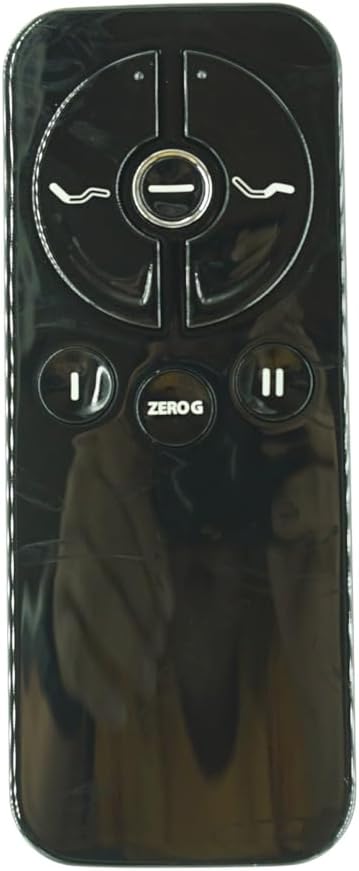
Imatge: Primer pla view of the remote control's buttons, including head up/down, foot up/down, power, pause/play, and Zero G.
- Power Button (Circle with vertical line): Turns the bed base on or off, or returns it to a flat position.
- Head Up/Down Buttons (Curved lines with arrows): Adjusts the head section of the bed base upwards or downwards.
- Foot Up/Down Buttons (Curved lines with arrows): Adjusts the foot section of the bed base upwards or downwards.
- Zero G Button: Activates the "Zero Gravity" preset position, which elevates the head and foot to a position that may relieve pressure on the back.
- Pause/Play Buttons (Vertical lines with triangle): These buttons may control massage functions or other auxiliary features if supported by your bed base. Refer to your bed base manual for specific functionality.
Manteniment
- Neteja: Netegeu el comandament a distància amb un drap suau i sec. No utilitzeu netejadors líquids ni materials abrasius.
- Substitució de la bateria: Replace batteries when the remote's response becomes sluggish or it stops functioning. Always replace both batteries at the same time with new AAA batteries.
- Emmagatzematge: Guardeu el comandament a distància en un lloc sec, allunyat de temperatures extremes i de la llum solar directa.
- Manipulació: Avoid dropping the remote control or exposing it to excessive force, as this may damage internal components.
Resolució de problemes
| Problema | Causa possible | Solució |
|---|---|---|
| El comandament a distància no respon. | Piles gastades o instal·lades incorrectament. | Canvieu les piles per piles AAA noves, assegurant-vos de la polaritat correcta. |
| Remote is not pairing with the bed base. | Incorrect pairing procedure or incompatible control box. | Review the "Pairing the Remote Control" section and ensure you are following the correct steps for your bed base model. Verify your control box model is compatible. |
| Algunes funcions no funcionen. | Partial pairing or feature not supported by bed base. | Attempt to re-pair the remote. Consult your bed base's original manual to confirm supported features. |
| El remot funciona de manera intermitent. | Piles baixes o interferències. | Replace batteries. Ensure no strong electronic devices are causing interference near the bed base. |
Important:
If your remote control is not identical to the one shown in the product images or your control box model is not listed as compatible, this replacement remote may not work. It is crucial to verify compatibility before purchase and use.

Image: Important tips for ensuring remote compatibility, displaying examples of control box labels and the appearance of an old remote for comparison.
Especificacions
- Número de model: for JLDP.15.005.102 CU358-2-L
- Marca: Genèric
- Color: Negre
- Bateries necessàries: 2 x AAA (no inclòs)
- Nombre màxim de dispositius admesos: 1
- Dispositius compatibles: Adjustable bed base (specific models only)
- Característica especial: Not Universal. Requires specific control box compatibility.
- Fabricant: Easytry
- País d'origen: Xina
Suport
For any issues or questions regarding the compatibility or functionality of your replacement remote control, please contact the seller directly. Providing detailed information about your control box and old remote control (including photos and model numbers) will help expedite support.
"Message us if any problems!"


