
1. Introducció
Thank you for choosing the G-TiDE Hibeat Bluetooth Headphones. This manual provides essential information for the safe and efficient use of your new headphones. Please read it thoroughly before using the product and retain it for future reference.
The G-TiDE Hibeat headphones offer a superior audio experience with advanced features such as Bluetooth 5.3 connectivity, NFC pairing, long-lasting battery, quick charging, and a triple microphone system with noise cancellation for clear calls. Their ergonomic design ensures comfort during extended use.
2. Informació important de seguretat
- No exposeu els auriculars a temperatures extremes, humitat ni substàncies corrosives.
- Eviteu deixar caure els auriculars ni sotmetre'ls a impactes forts.
- Do not disassemble or attempt to repair the headphones yourself. This may void the warranty and cause damage.
- Netegeu els auriculars amb un drap suau i sec. No utilitzeu netejadors líquids.
- Escolteu a nivells de volum moderats per evitar danys auditius. L'exposició prolongada a sons forts pot causar una pèrdua auditiva irreversible.
- Mantenir fora de l'abast dels nens.
3. Contingut del paquet
Si us plau, comproveu que tots els elements següents estiguin inclosos al vostre paquet:
- G-TiDE Hibeat Headphones
- Manual d'usuari (aquest document)
- Cable d'àudio de 3.5 mm
- Cable de càrrega
- Funda protectora
4. Producte acabatview
The G-TiDE Hibeat headphones are designed for comfort and high-quality audio. Below is an illustration of the product and its key components.
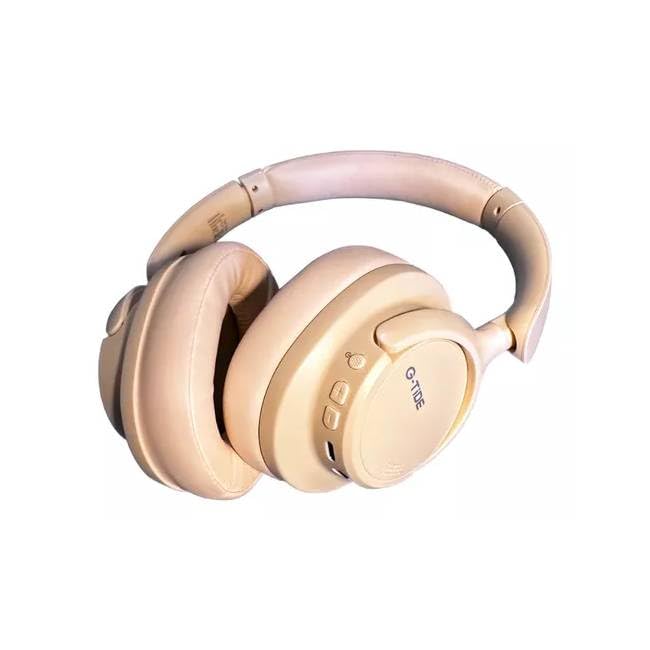
Image 1: G-TiDE Hibeat Bluetooth Headphones. This image shows the overall design of the headphones, highlighting the earcups and headband.
Característiques principals:
- Bluetooth 5.3: Ensures a fast and stable wireless connection up to 10 meters.
- Connectivitat NFC: Quick pairing for compatible Android devices.
- Llarga vida útil de la bateria: Up to 12 hours of continuous music or calls on a single charge (600mAh battery).
- Càrrega ràpida: Minimizes downtime for recharging.
- Triple Microphone System: Provides clear calls with noise cancellation technology.
- Physical Noise Cancellation Switch: Easily activate or deactivate noise cancellation.
- Adjustable and Comfortable Design: Ultra-comfortable ear cushions and a flexible structure for a perfect fit.
- Compatibilitat universal: Works with smartphones, tablets, and other Bluetooth-enabled devices.
5. Configuració
5.1 Càrrega dels auriculars
- Connecteu el cable de càrrega proporcionat al port de càrrega dels auriculars.
- Connecteu l'altre extrem del cable de càrrega a un adaptador de corrent USB (no inclòs) o al port USB d'un ordinador.
- The LED indicator on the headphones will illuminate to show charging status. It typically takes approximately 3 hours for a full charge.
- Once fully charged, the LED indicator will change color or turn off, depending on the model. Disconnect the charging cable.
Note: For optimal battery life, fully charge the headphones before first use.
5.2 Vinculació Bluetooth
- Encès: Press and hold the Power button on the headphones until the LED indicator flashes, usually blue and red, indicating pairing mode.
- Activa el Bluetooth: Al dispositiu (telèfon intel·ligent, tauleta, etc.), aneu a la configuració de Bluetooth i assegureu-vos que el Bluetooth estigui activat.
- Seleccioneu el dispositiu: In the list of available Bluetooth devices, select "G-TiDE Hibeat".
- Confirmeu la connexió: Once paired, the LED indicator on the headphones will typically show a steady blue light or flash slowly. A voice prompt may also confirm the connection.
5.3 NFC Pairing (for compatible Android devices)
- Ensure NFC is enabled on your Android device.
- Turn on the G-TiDE Hibeat headphones.
- Gently tap your Android device against the NFC area on the left earcup of the headphones.
- Follow the on-screen prompts on your device to confirm the pairing.
6. Instruccions de funcionament
6.1 Encès/Apagat
- Encès: Press and hold the Power button for approximately 3 seconds until the LED indicator lights up and you hear a power-on prompt.
- Apagar: Press and hold the Power button for approximately 5 seconds until the LED indicator turns off and you hear a power-off prompt.
6.2 Reproducció de música
- Reproduir/pausa: Premeu el botó multifunció (sovint el botó d'engegada) una vegada.
- Pujar el volum: Premeu el botó Volum +.
- Baixar el volum: Premeu el botó de volum -.
- Pista següent: Press and hold the Volume + button for 2 seconds.
- Pista anterior: Press and hold the Volume - button for 2 seconds.
6.3 Gestió de trucades
- Respondre/Finalitzar la trucada: Premeu el botó multifunció una vegada.
- Rebutja la trucada: Manteniu premut el botó multifunció durant 2 segons.
- Torna a marcar l'últim número: Premeu dues vegades el botó multifunció.
6.4 Cancel·lació activa del soroll (ANC)
The G-TiDE Hibeat headphones feature a physical switch for Active Noise Cancellation.
- Activa l'ANC: Slide the ANC switch to the "ON" position. An indicator light may illuminate.
- Desactiva l'ANC: Feu lliscar l'interruptor ANC a la posició "OFF".
Connexió amb cable 6.5 (cable d'àudio de 3.5 mm)
You can use the headphones with the included 3.5mm audio cable when the battery is low or with non-Bluetooth devices.
- Connecteu un extrem del cable d'àudio de 3.5 mm a la presa d'entrada d'àudio dels auriculars.
- Connecteu l'altre extrem al connector de sortida d'àudio de 3.5 mm del dispositiu.
- In wired mode, Bluetooth functions and ANC may be disabled or operate differently.
7. Manteniment i cura
- Neteja: Feu servir un drap suau, sec i sense borrissol per netejar els auriculars. No utilitzeu productes de neteja abrasius, alcohol ni dissolvents químics.
- Emmagatzematge: When not in use, store the headphones in the provided protective case to prevent dust and scratches. Keep them in a cool, dry place away from direct sunlight.
- Cura de la bateria: Per allargar la durada de la bateria, eviteu descarregar completament els auriculars amb freqüència. Carregueu-los regularment, fins i tot si no els feu servir durant períodes prolongats.
8. Solució De Problemes
| Problema | Causa possible | Solució |
|---|---|---|
| Els auriculars no s'engeguen. | Bateria baixa. | Carregueu els auriculars durant almenys 30 minuts. |
| No es pot emparellar amb el dispositiu. | Bluetooth not enabled on device; headphones not in pairing mode; too far from device. | Ensure Bluetooth is on. Put headphones in pairing mode. Move device closer (within 10m). Forget device and re-pair. |
| Sense so o amb un volum baix. | Volum massa baix als auriculars o al dispositiu; auriculars no connectats; sortida d'àudio incorrecta seleccionada. | Augmenta el volum tant dels auriculars com del dispositiu. Torna a connectar els auriculars. Comprova la configuració de sortida d'àudio del dispositiu. |
| Noise Cancellation not working. | ANC switch is off; environmental noise is too high for full cancellation. | Ensure the ANC switch is in the "ON" position. ANC reduces ambient noise but may not eliminate all sounds. |
| Mala qualitat de trucada. | Weak Bluetooth connection; environmental noise; microphone obstruction. | Move closer to your device. Ensure the microphone area is clear. Try moving to a quieter environment. |
9. Especificacions
| Nom del model | HIBEAT |
| Número de model | BT |
| Tecnologia de connectivitat | Sense fil (Bluetooth), amb cable (connector de 3.5 mm) |
| Tecnologia de comunicació sense fils | Bluetooth 5.3 |
| Capacitat de la bateria | 600mAh (approx. 12 hours playback) |
| Temps de càrrega | Aproximadament 3 hores |
| Material | Plàstic |
| Factor de forma | Sobre l'orella (circumaural) |
| Dispositius compatibles | Smartphones, tauletes |
| Característiques especials | NFC, Triple Microphone, Noise Cancellation Switch |
10. Garantia i Suport
G-TiDE products are manufactured to the highest quality standards. For warranty information, technical support, or customer service inquiries, please refer to the warranty card included in your product packaging or visit the official G-TiDE weblloc.
You can also contact G-TiDE customer support through the retailer where you purchased the product.