
Introducció
Thank you for choosing the AudioBox ABX-2140R Bluetooth Party Speaker. This powerful and versatile speaker is designed to deliver high-quality audio with deep bass and clear highs, perfect for any gathering. It features multiple playback options, sound-activated LED lights, and a wireless microphone for karaoke or announcements. This manual provides essential information for setup, operation, maintenance, and troubleshooting to ensure you get the most out of your speaker.
Informació important de seguretat
- Llegiu totes les instruccions abans de fer funcionar l'altaveu.
- Keep the speaker away from water and moisture.
- No bloquejar les obertures de ventilació.
- Utilitzeu només accessoris/accessoris especificats pel fabricant.
- Desendolleu l'altaveu durant tempestes amb llamps o quan no l'utilitzeu durant períodes prolongats.
- Demaneu tot el servei a personal de servei qualificat.
Contingut del paquet
Si us plau, comproveu el paquet per veure si hi ha els elements següents:
- AudioBox ABX-2140R Party Speaker
- Micròfon sense fil
- Adaptador de CA
Producte acabatview
The AudioBox ABX-2140R features a robust design with dual 12-inch woofers and integrated LED lighting. The control panel is located at the top for easy access to all functions.

Image: Top control panel showing various inputs and adjustment knobs for echo, bass, and treble.

Imatge: Frontal view of the speaker highlighting the dual 12-inch woofers and dynamic LED lighting.
Configuració
Carregant l'altaveu
Before first use, fully charge the speaker for approximately 4 hours using the provided AC adapter. The charging indicator light will change color (e.g., red to green) when fully charged. The speaker can be used while charging.
Positioning the Speaker
The ABX-2140R is designed for floor standing use. It features built-in wheels and a handle for easy transport. Position the speaker on a stable, flat surface.

Imatge: Part posterior view of the speaker, illustrating the integrated wheels and handle for portability.
Instruccions de funcionament
Encès/Apagat
Locate the power switch on the control panel. Press to turn the speaker ON or OFF.
Connexió Bluetooth
- Turn on the speaker. The display will show "BLUE" indicating Bluetooth mode.
- Activa el Bluetooth al teu dispositiu (telèfon intel·ligent, tauleta, etc.).
- Cerca "ABX-2140R" in your device's Bluetooth settings and select it to pair.
- Un so de confirmació indicarà que l'aparellament s'ha realitzat correctament.
Múltiples opcions de reproducció
The speaker supports various input sources:
- USB: Insert a USB drive into the USB port to play MP3 files.
- Micro SD: Insert a Micro SD card into the Micro SD slot to play MP3 files.
- Ràdio FM: Switch to FM mode and use the controls to scan for stations.
- AUX: Connect an external audio device using a 3.5mm AUX cable.
Ús del micròfon sense fil
The included wireless microphone can be used for karaoke or public address. Ensure the microphone has batteries and is powered on. Adjust the microphone volume and echo effects using the dedicated knobs on the control panel.
Llums de festa LED
The speaker features sound-activated LED lights that enhance the audio experience. These lights can be controlled via the control panel.

Image: The speaker displaying its dynamic LED lighting feature.
Pairing Two Speakers (WaveSync)
To pair two ABX-2140R speakers wirelessly for a stereo experience:
- Assegureu-vos que tots dos altaveus estiguin encesos i en mode Bluetooth.
- On one speaker (this will be the primary), press and hold the "WaveSync" button (or equivalent pairing button, refer to control panel diagram).
- L'altaveu principal cercarà l'altaveu secundari. Un cop connectat, sonarà un so de confirmació.
- Connecta el dispositiu a l'altaveu principal mitjançant Bluetooth. L'àudio ara es reproduirà a través dels dos altaveus.
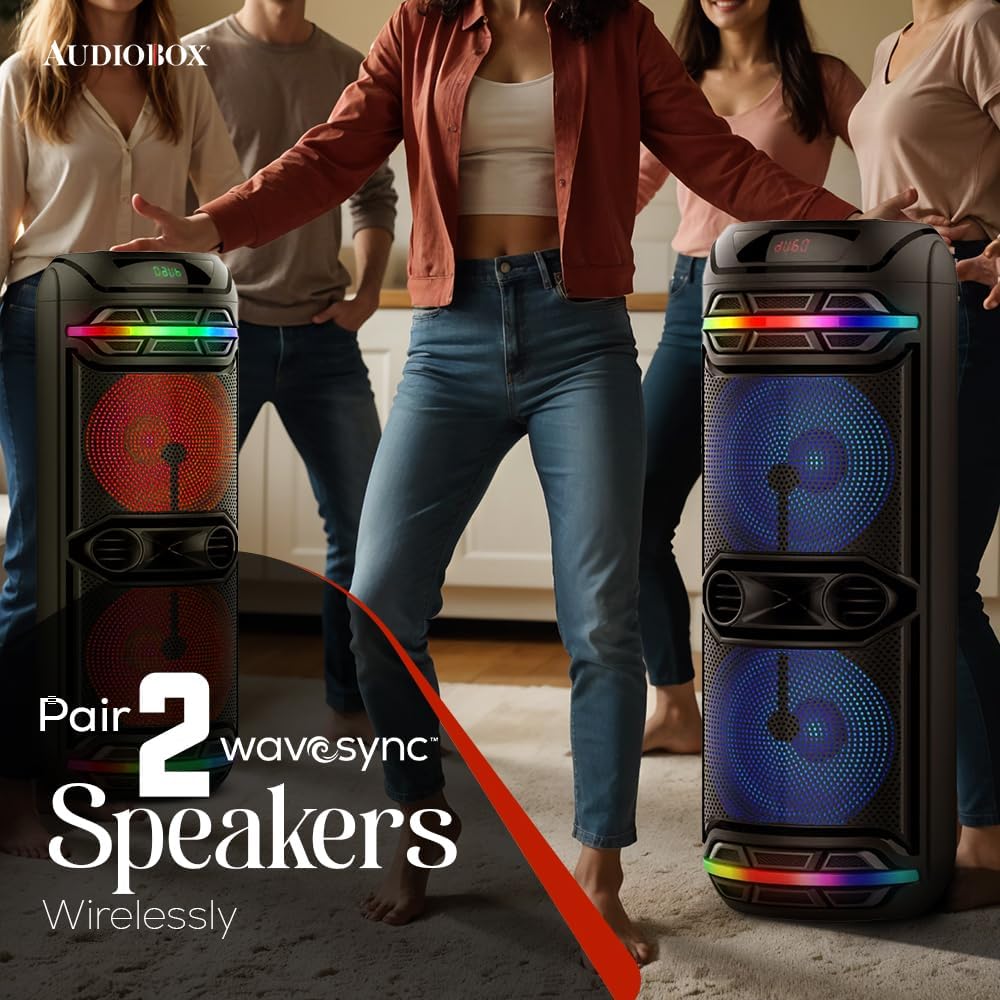
Image: Two AudioBox ABX-2140R speakers demonstrating wireless pairing for enhanced sound.
Manteniment
Neteja
Netegeu l'altaveu amb un drap suau i sec. No utilitzeu productes de neteja abrasius ni dissolvents.
Emmagatzematge
Guardeu l'altaveu en un lloc fresc i sec, allunyat de la llum solar directa i de temperatures extremes.
Resolució de problemes
| Problema | Causa possible | Solució |
|---|---|---|
| Sense poder | Battery drained; AC adapter not connected or faulty. | Charge the speaker using the AC adapter. Ensure the adapter is securely connected. |
| Sense so | Volume too low; incorrect input source; device not paired (Bluetooth). | Increase volume. Select the correct input source (Bluetooth, USB, AUX, FM). Re-pair Bluetooth device. |
| Bluetooth no connectat | Speaker not in Bluetooth mode; device too far; interference. | Ensure speaker is in Bluetooth mode. Move device closer to speaker. Avoid obstacles. |
| El micròfon no funciona | Microphone off; low batteries; microphone volume low. | Turn on microphone. Replace batteries. Increase microphone volume. |
Especificacions
- Model: ABX-2140R
- Potència de sortida: 40W RMS
- Woofers: Doble de 12 polzades
- Connectivitat: Bluetooth, USB, Micro SD, FM Radio, AUX
- Bateria: Rechargeable 7.4V 3000mAh
- Dimensions (L x A x A): 14 x 14 x 39 polzades
- Pes: 24 lliures
- Accessoris inclosos: Wireless Microphone, AC Adapter

Image: Diagram showing the dimensions of the speaker (14.17" L x 14.17" W x 38.39" H) and the wireless microphone.
Garantia i Suport
For warranty information or technical support, please contact the manufacturer, General Sound Co. Refer to your purchase documentation for specific warranty terms and contact details.
Manufacturer: General Sound Co
Per obtenir més ajuda, visiteu el Audiobox Store on Amazon.