
1. Introducció
The SpeaKa Professional SP-TR-450 is a wireless HDMI transmission set designed to transmit audio and video signals from an HDMI source device to an HDMI display device without the need for cables. This system supports 4K resolution at 30Hz and offers a transmission range of up to 50 meters, making it suitable for various applications including home cinema setups and presentations in large rooms. Its plug-and-play functionality ensures simple installation and reliable signal transmission.
2. Instruccions de seguretat
- Read this manual thoroughly before use to ensure proper operation and prevent damage.
- No exposeu el dispositiu a la humitat, la pluja ni a temperatures extremes.
- Avoid disassembling or modifying the device. Refer all servicing to qualified personnel.
- Use only the provided power cables and accessories.
- Ensure proper ventilation around the devices to prevent overheating.
- Mantingueu el dispositiu allunyat de camps electromagnètics forts.
3. Contingut del paquet
Si us plau, comproveu el paquet per veure si hi ha els elements següents:
- 1x HDMI Wireless Transmitter (TX)
- 1x HDMI Wireless Receiver (RX)
- 2x USB 2.0 A/M to Type-C Power Cables
- 1 x manual d'usuari

Image: The SpeaKa Professional SP-TR-450 Wireless HDMI Transmission Set, showing both the transmitter and receiver units along with the two USB-C power cables included in the package.
4. Producte acabatview
The SpeaKa Professional SP-TR-450 set consists of two compact units: a Transmitter (TX) and a Receiver (RX). Both units feature an integrated HDMI connector for direct connection to devices and a USB-C port for power supply. An LED display on each unit provides status indication.
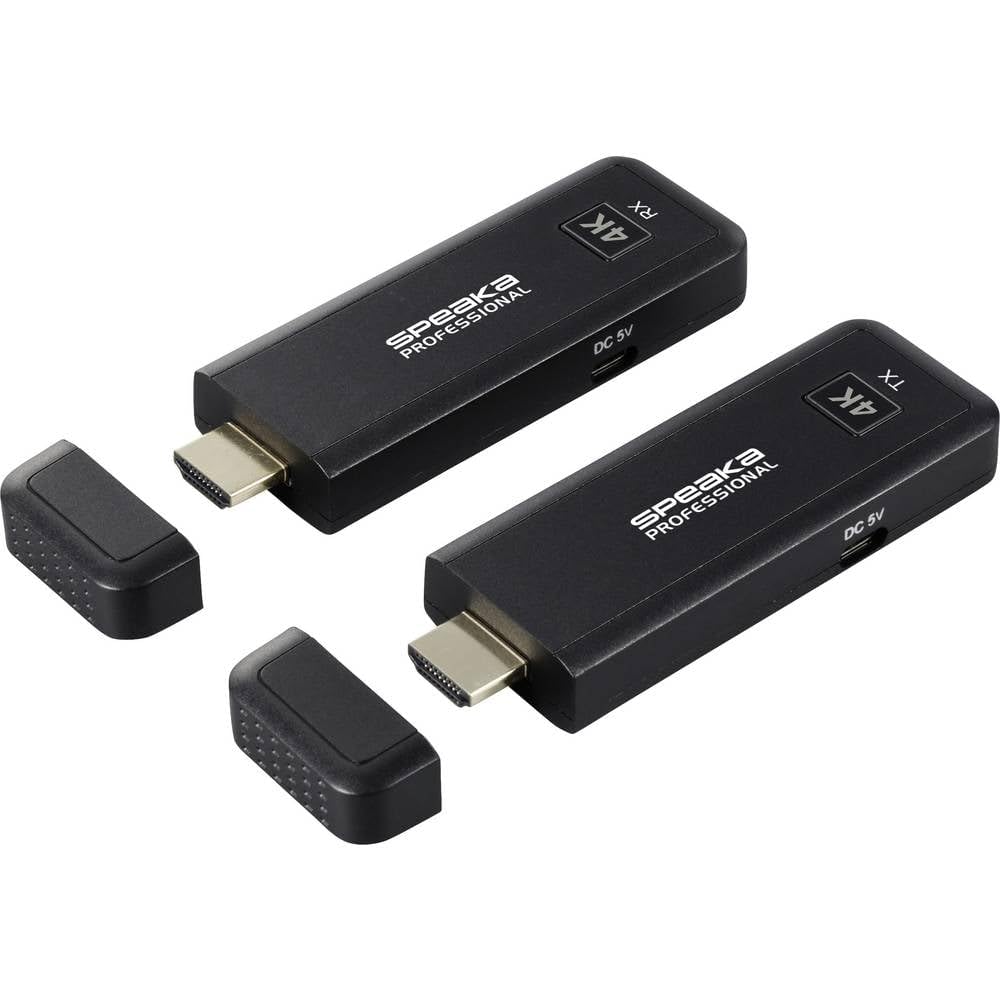
Imatge: Superior view of the SpeaKa Professional SP-TR-450 Wireless HDMI Transmitter (TX) and Receiver (RX) units, highlighting their compact design and LED indicators.
Característiques de la unitat:
- Connector HDMI: For direct connection to source (TX) or display (RX) devices.
- USB-C Power Port (DC 5V): Per connectar el cable d'alimentació.
- Pantalla LED: Indicates operational status and connection status.
- Reixes de ventilació: Ensures proper heat dissipation.

Imatge: Lateral view of the SpeaKa Professional SP-TR-450 units, showing the integrated HDMI connectors and USB-C power ports.
5. Instruccions de configuració
The SP-TR-450 features a plug-and-play design for easy setup.
- Connecteu el transmissor (TX): Plug the HDMI connector of the TX unit directly into the HDMI output port of your source device (e.g., laptop, Blu-ray player, game console).
- Power the Transmitter (TX): Connect one of the provided USB-C power cables to the DC 5V port on the TX unit. Plug the USB-A end of the cable into a USB power source (e.g., a USB port on your source device, a USB wall adapter, or a power bank).
- Connecteu el receptor (RX): Plug the HDMI connector of the RX unit directly into the HDMI input port of your display device (e.g., TV, projector, monitor).
- Power the Receiver (RX): Connect the second USB-C power cable to the DC 5V port on the RX unit. Plug the USB-A end of the cable into a USB power source (e.g., a USB port on your display device, a USB wall adapter, or a power bank).
- Dispositius d'encesa: Assegureu-vos que tant el dispositiu font com el dispositiu de visualització estiguin encesos.
- Emparellament automàtic: The TX and RX units will automatically pair and establish a wireless connection. The LED display on both units will indicate the connection status.

Image: An illustrative setup showing the SpeaKa Professional SP-TR-450 units connected to a source device (left) and a display device (right) via their HDMI ports and powered via USB-C cables.
6. Instruccions de funcionament
Once the setup is complete and both units are powered, the system will automatically begin transmitting the HDMI signal wirelessly.
- Pantalla LED: The integrated LED display on both the TX and RX units provides direct indication of the operational status. A stable light typically indicates a successful connection and active transmission. Refer to the specific LED patterns in the full manual for detailed status meanings.
- Rang de senyal: The system is designed for reliable transmission up to 50 meters in an open environment. Obstacles such as walls, furniture, and other wireless devices may reduce the effective range.
- Resolució: The system supports resolutions up to 4K (3840 x 2160 pixels) at 30Hz. Ensure your source and display devices are configured to compatible resolutions for optimal performance.
7. Manteniment
To ensure the longevity and optimal performance of your SpeaKa Professional SP-TR-450, follow these maintenance guidelines:
- Neteja: Use a soft, dry cloth to clean the exterior of the units. Do not use liquid cleaners or aerosols, as they may damage the components.
- Emmagatzematge: When not in use for extended periods, store the units in a cool, dry place, away from direct sunlight and extreme temperatures.
- Manipulació: Handle the units with care. Avoid dropping them or subjecting them to strong impacts.
- Ventilació: Ensure the ventilation grilles on the units are not blocked to prevent overheating.
8. Solució De Problemes
If you encounter issues with your SP-TR-450, please refer to the following common solutions:
- Sense senyal a la pantalla:
- Ensure both TX and RX units are properly powered and their LED displays are active.
- Verify that the HDMI cables (if used with adapters) and the units themselves are securely connected to the source and display devices.
- Check that the display device is set to the correct HDMI input.
- Try restarting both the source and display devices, then the TX and RX units.
- Reduce the distance between the TX and RX units and remove any potential obstructions.
- Poor Picture Quality or Intermittent Signal:
- Ensure the TX and RX units are within the recommended operating range (up to 50m line-of-sight).
- Minimize interference from other wireless devices (e.g., Wi-Fi routers, cordless phones) by repositioning the units.
- Check for physical obstructions between the TX and RX units.
- Verify that the power supply to both units is stable.
- Sense àudio:
- Ensure the audio output settings on your source device are correctly configured.
- Check the volume level on your display device.
- Confirm that the HDMI connection is secure.
9. Especificacions
| Característica | Especificació |
|---|---|
| Marca | SPEAKA PROFESSIONAL |
| Número de model | SP-TR-450 (Item Model Number: SP-12883548) |
| Color | Negre |
| Transmissió sense fils | 2.4 GHz, 5 GHz |
| Màx. Distància de transmissió | 50 meters (line-of-sight) |
| Màx. Resolució | 3840 x 2160 pixels (4K) at 30Hz |
| Connectivitat | HDMI, USB-C (for power) |
| Entrada de potència | DC 5V |
10. Garantia i Suport
The SpeaKa Professional SP-TR-450 comes with a 2 any de garantia del fabricant. Please refer to the terms and conditions provided with your purchase for full details.
For technical support or warranty claims, please contact your retailer or the SpeaKa Professional customer service. Keep your proof of purchase for warranty validation.