1. Introducció
This manual provides essential information for the proper use, setup, and maintenance of your new replacement remote control for adjustable bed bases. Please read this manual thoroughly before attempting to use the remote.
Producte acabatview
This remote control is designed as a replacement for specific adjustable bed base models, particularly those using Richmat control boxes. It is crucial to verify compatibility with your existing control box before use.

Figura 1: Frontal view of the replacement remote control, showing six circular buttons for bed adjustments and flat position.
Nota important de compatibilitat
This remote is NOT universal. It is specifically designed to work with certain Richmat control box models, such as Richmat NL200ULB 12778C0180410 and NL300B-L1 12778C0180412. To ensure compatibility, it is highly recommended to send clear pictures of your existing control box and the front and back of your old remote to the supplier for verification before attempting to pair or use this replacement remote.

Figure 2: Visual guide emphasizing the importance of sending pictures of your control box and old remote for compatibility verification.
2. Configuració
Instal·lació de la bateria
The remote control requires 2 AAA batteries (not included). Follow these steps to install the batteries:
- Localitzeu la tapa del compartiment de la bateria a la part posterior del comandament a distància.
- Feu lliscar la coberta cap avall o premeu el pestell per obrir-la.
- Insert 2 AAA batteries, ensuring the positive (+) and negative (-) terminals align correctly with the markings inside the compartment.
- Torneu a col·locar la tapa del compartiment de la bateria fent-la lliscar fins que faci clic de manera segura.

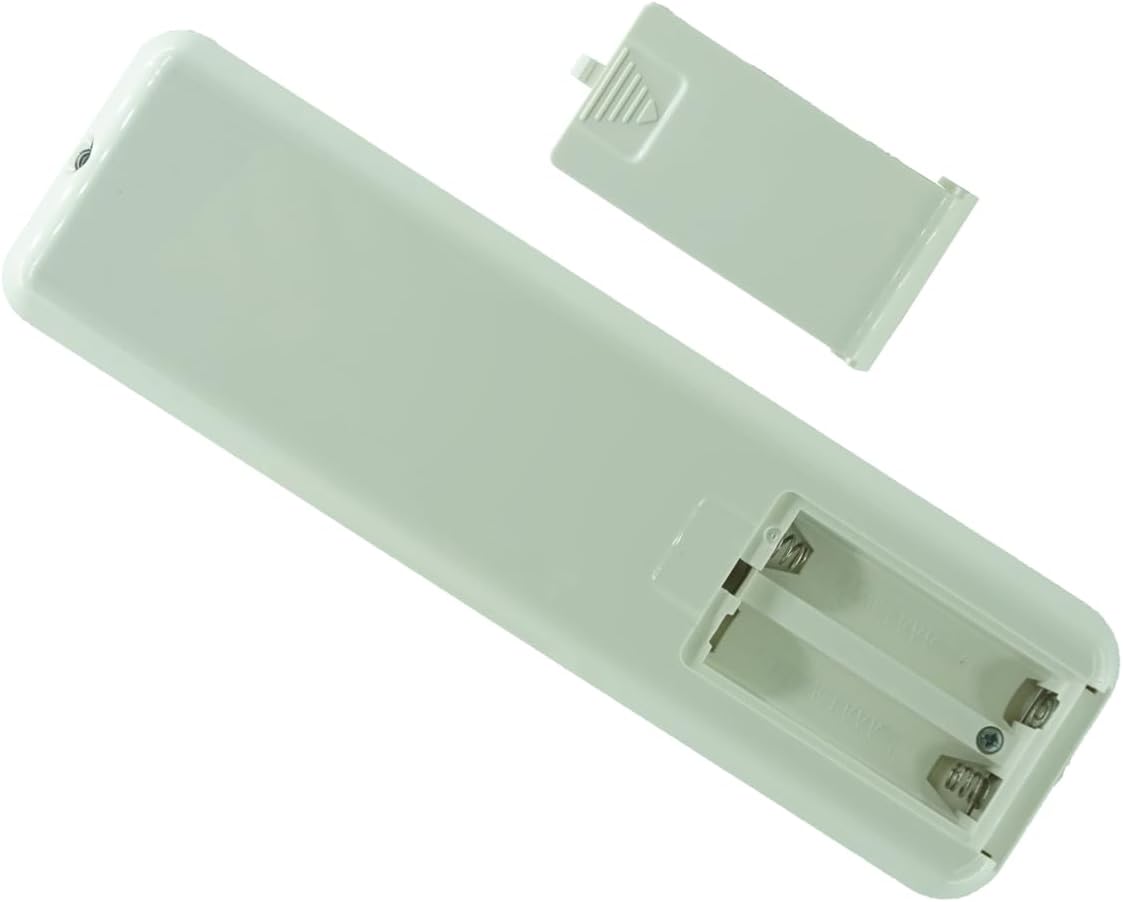
Figure 3: Images showing the back of the remote control with the battery compartment open, ready for AAA battery insertion.

Figure 4: Image showing the back of the remote control with the battery compartment securely closed.
3. Instruccions d'aparellament
To establish communication between the remote control and your adjustable bed base, follow these pairing steps carefully. This process must be completed within 15 seconds once initiated.
- Prepare the Bed Base:
- First, unplug the bed base from the power outlet.
- Espereu 5 segons.
- Plug the bed base back into the power outlet.
- Locate the Control Box: Find the control box under your bed. This box usually contains a "reset" or "learn" button.

Figure 5: Diagram illustrating the typical setup of the control box and its connections under an adjustable bed base.
- Inicia l'emparellament al comandament a distància: On the remote control, press and hold the "head up" button and the "foot up" button simultaneously for 10 seconds.
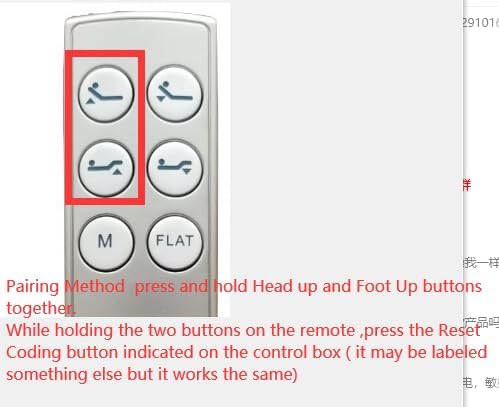
Figure 6: The remote control with the "head up" and "foot up" buttons highlighted, indicating the buttons to press for pairing.
- Activate Pairing on Control Box: While still holding the two buttons on the remote, quickly press and release the "reset" or "learn" button on the control box under the bed. Do not press and hold this button.
- Confirmeu l'aparellament: You will hear beeps from the bed base, indicating that the remote is successfully synced. Ensure the pairing light on the control box is illuminated during this process, as it will go out if not paired within 15 seconds.
Important: If 15 seconds pass without successful pairing, you must unplug the bed base from the power outlet again and restart the entire pairing process from Step 1.
4. Funcionament
Once paired, your remote control allows you to adjust the position of your adjustable bed base. The remote features dedicated buttons for various movements:
- Cap amunt/avall: Buttons with an icon of a person reclining with the head section elevated or lowered. These control the head section of the bed.
- Peu amunt/avall: Buttons with an icon of a person reclining with the foot section elevated or lowered. These control the foot section of the bed.
- M (Memory): This button is typically used to recall a pre-set favorite position. Refer to your bed base's specific manual for programming memory positions.
- PIS: This button returns the bed base to a completely flat position.
5. Solució De Problemes
El comandament a distància no respon
- Comproveu les bateries: Assegureu-vos que les piles estiguin correctament instal·lades i que no estiguin esgotades. Substituïu-les per piles AAA noves si cal.
- Verificar la compatibilitat: Confirm that this remote is compatible with your specific bed base control box model. Refer to the "Important Compatibility Note" in Section 1.
- Re-pair the Remote: Follow the "Pairing Instructions" in Section 3 carefully. Ensure all steps, especially the timing, are followed precisely.
- Power Cycle Bed Base: Unplug the bed base from the power outlet for 30 seconds, then plug it back in. This can sometimes reset the system.
Bed Base Not Moving
- Comproveu la connexió d'alimentació: Ensure the bed base is securely plugged into a working power outlet.
- Protecció de sobrecàrrega: Some bed bases have overload protection. If the bed has been used excessively, it might temporarily shut down. Wait 30 minutes for the system to reset.
- Obstruccions: Check for any obstructions under the bed that might be preventing movement.
6. Especificacions
| Característica | Detall |
|---|---|
| Model de producte | for Richmat HJC25Z-0-0 NLP200 127780C25 |
| Marca | Genèric |
| Dispositius compatibles | Adjustable bed base (specific Richmat control boxes) |
| Font d'alimentació | 2 piles AAA (no incloses) |
| Color | Negre |
| Característica especial | Not Universal; requires control box and old remote verification for compatibility. |
7. Manteniment
- Neteja: Netegeu el comandament a distància amb un drap suau i sec. No utilitzeu netejadors líquids ni materials abrasius.
- Substitució de la bateria: Replace batteries when the remote's performance degrades or if it stops responding. Always replace both batteries at the same time.
- Emmagatzematge: Guardeu el comandament a distància en un lloc sec, allunyat de la llum solar directa i de temperatures extremes.
- Eviteu les gotes: Protegiu el comandament a distància d'impactes físics, ja que les caigudes poden danyar els components interns.
8. Informació de la garantia
Specific warranty details for this product are not provided in this manual. Please refer to the product listing on the retailer's website or contact the seller directly for information regarding warranty coverage and terms.
9. Atenció al client
For further assistance, technical support, or inquiries regarding your remote control, please contact the seller or manufacturer through the platform where the product was purchased. Provide your order details and a clear description of the issue for prompt support.


