
Introducció
Thank you for choosing the arVin USB C Mobile Gaming Controller. This controller is designed to transform your USB-C enabled iPad or tablet into a portable gaming console, offering precise control and an immersive gaming experience. This manual provides detailed instructions for setup, operation, and feature utilization to help you get the most out of your device.

Image: The arVin USB C Mobile Gaming Controller connected to a tablet, showcasing its compatibility with various gaming platforms and remote play services.
Característiques del producte
- Joysticks d'efecte Hall: Experience 360° seamless pinpoint control with enhanced precision and durability.
- Disparadors d'efecte Hall: Enjoy unparalleled smoothness and responsiveness for a competitive gaming advantage.
- Plug and Play with Zero Latency: Direct USB-C connection eliminates Bluetooth pairing hassles and offers a 1000Hz high return rate for faster, more precise operation.
- Movable Type-C Port and Pass-Through Charging: The adjustable Type-C port ensures a stable connection. Supports PD fast charging up to 36W, allowing you to charge your device while playing (separate PD wall charger and Type-C cable required).
- Funció turbo: Assign A/B/X/Y/LB/RB/LT/RT/L3/R3/D-pad keys to manual turbo for rapid input.
- Programació de macros: Two programmable back buttons (M1 & M2) allow setting single or multiple key combinations for complex operations, improving efficiency and extending key lifespan.
- Disseny antilliscant: Ergonomic design with non-slip grips for comfortable and secure handling during extended gaming sessions.

Image: Detailed diagram highlighting the key features of the controller, such as Hall Effect joysticks and triggers, macro buttons, and the USB-C port.
Guia de configuració
- Prepara el teu dispositiu: Ensure your iPad or tablet has a USB-C port and its screen size is within 6.7-11 inches (length 6.02-10.87 inches).
- Connecteu el controlador: Gently stretch the controller and align the movable Type-C port with your tablet's USB-C port. Insert the tablet into the controller. The controller will power up automatically upon successful connection.
- Verifica la connexió: Once connected, a green indicator light on the controller will remain on. If the indicator is not green, press the FN + B buttons simultaneously on the controller to cycle through indicator colors until it turns green, indicating a successful connection.
- Col·locació segura: Ensure the tablet is securely seated within the controller's grips to prevent accidental dislodgement during gameplay.

Image: Step-by-step visual guide for connecting the controller to your tablet.
Video: Demonstrates the process of connecting the arVin USB C Mobile Gaming Controller to an iPad or tablet, including how to ensure the indicator light is green for proper connection.
Instruccions de funcionament
Once connected, the arVin USB C Mobile Gaming Controller functions as a standard gamepad. It supports a wide range of gaming platforms and applications:
- Serveis de streaming: Compatible with PS Remote Play, Xbox App, and Steam Link App for streaming games from PS5/PS4, Xbox One/Series S/X, and PC consoles.
- Jocs al núvol: Supports Xbox Game Pass, Nvidia GeForce Now, Luna, Google Stadia, and Rainway.
- Mobile Games & Emulators: Works with Apple Arcade, MFi games, and various emulators. Enjoy popular mobile titles such as Call of Duty Mobile (CODM), Call of Duty: Warzone Mobile, Genshin Impact, Minecraft, Roblox, Diablo Immortal, Asphalt 9/8, and many more.
Simply launch your desired game or streaming application, and the controller should be automatically recognized, allowing you to use its joysticks, buttons, and triggers for gameplay.

Image: The controller with a tablet, illustrating its broad compatibility with various gaming platforms and services.
Funció Turbo
The Turbo function allows for rapid, repeated input of a button press. This can be useful in games requiring quick, successive actions.
- Activació: Refer to the controller's specific instructions for activating Turbo mode for individual buttons (A/B/X/Y/LB/RB/LT/RT/L3/R3/D-pad).
- Beneficis: Helps reduce finger fatigue and can provide a competitive edge in certain game scenarios.

Image: Gameplay demonstration emphasizing the Turbo function for rapid button presses.
Programació de macros
The controller features two programmable back buttons (M1 and M2) for macro functions. This allows you to assign a sequence of button presses to a single button, simplifying complex in-game actions.
- Programació: You can set M1/M2 buttons to map basic functions like A/B/X/Y/LB/RB/LT/RT/L3/R3/D-pad, or create complex sequences of up to 16 combined function keys.
- Personalització: Refer to the controller's specific programming instructions for detailed steps on how to record and assign macros.
- Avançartages: Enhances gameplay efficiency, reduces repetitive strain, and provides a strategic advantage.
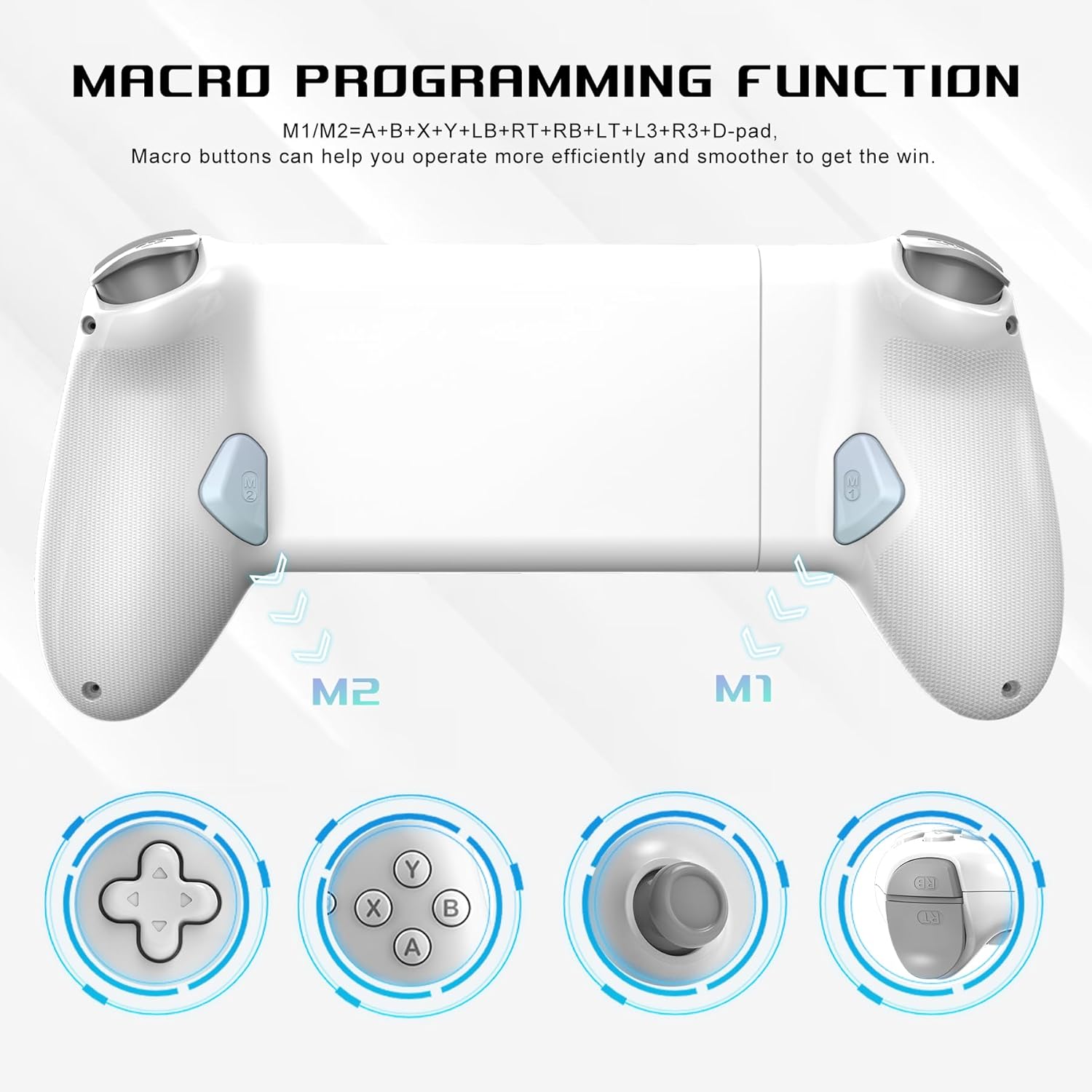
Image: Visual representation of the macro programming buttons and their potential for complex key assignments.
Càrrega Pass-Through
The controller supports pass-through charging, allowing you to charge your iPad or tablet while actively gaming. This feature ensures uninterrupted gameplay during long sessions.
- Especificacions de càrrega: Supports PD fast charging with a maximum current of 12V/3A and a maximum power of approximately 36W.
- Requisits: To utilize maximum 36W PD fast charging, an external PD wall charger adapter and a compatible Type-C cable are both required (not included).

Image: The controller connected to a tablet and a charging cable, demonstrating the pass-through charging capability.
Compatibilitat
This mobile gaming controller is compatible with USB-C interface iPads and tablets within specific dimensions:
- Mida de la pantalla: Supports screens within 6.7 to 11 inches.
- Longitud del dispositiu: Accommodates devices with lengths between 6.02 to 10.87 inches (153mm-276mm).
- Supported Models Include:
- iPad Pro (M4) 11", iPad Air (M2) 11", iPad Air 9.7", iPad mini 8.3"
- Samsung Galaxy Tab S9 FE 5G 10.9", Galaxy Tab A9+ 11", Galaxy Tab S8 11"
- MatePad 11.5"S, MatePad SE 11"
- Lenovo Tab M8 8", Legion Tab 8.8"
- Nota: This controller does not support mobile phones smaller than 6.7 inches.

Image: Visual guide to the controller's dimensions and a list of compatible tablet models.
Especificacions
| Característica | Detall |
|---|---|
| Marca | arVin |
| Nom del model | RM |
| Dispositius compatibles | USB-C iPads/Tablets (6.7-11 inches screen size, 6.02-10.87 inches length) |
| Tipus de controlador | Gamepad |
| Tecnologia de connectivitat | USB C Port (Wired) |
| Característiques addicionals | Ergonomic, Hall Effect Joysticks, Hall Effect Triggers, Turbo Function, Macro Programming, Pass-Through Charging |
| Quantitat de botons | 16 |
| Pes de l'article | 0.34 quilos |
| Color | Blanc |
Resolució de problemes
- Controller Not Powering On/Connecting:
Ensure your iPad or tablet is securely connected to the controller's USB-C port. If the indicator light is not green, press the FN + B buttons simultaneously on the controller to cycle through indicator colors until it turns green, indicating a successful connection.
- Retard d'entrada o falta de resposta:
This controller is designed for zero latency via its direct USB-C connection. Ensure the connection is firm. If issues persist, try disconnecting and reconnecting your device. Verify that the game or application you are using fully supports external controllers.
- Problemes de càrrega:
For pass-through charging, ensure you are using a compatible PD wall charger and a Type-C cable. The controller itself does not include a power source; it facilitates charging through your tablet's port.
- Macro/Turbo Functions Not Working:
Double-check the programming steps for your macros and turbo settings. Some games or applications may have specific limitations or require in-game settings adjustments for full controller support.