1. Introducció i finalview
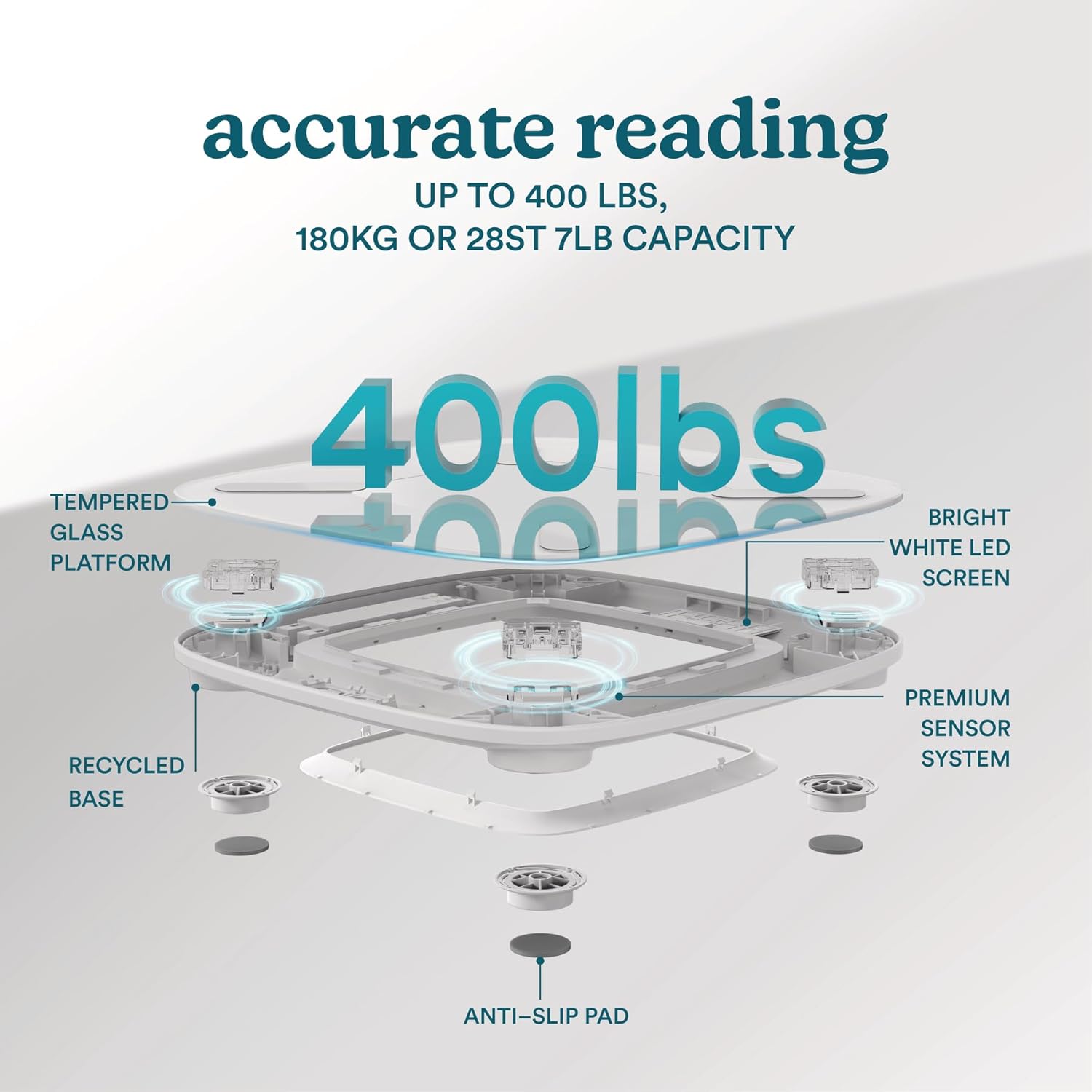
The HoMedics Digital Smart Scale is designed to provide accurate and comprehensive body composition analysis. Featuring a motion-sensing LED display and Bluetooth connectivity, it tracks 13 essential body metrics, helping you monitor your health and fitness journey with ease. The scale is built with a durable tempered glass platform and a base made from recycled materials, combining advanced technology with sustainable design.

Característiques principals:
- Best-in-Class Accuracy: Consistent, precise weight measurements with a high-visibility bright white LED display.
- 13 Essential Body Measurements: Tracks weight, body fat, BMI, skeletal muscle, muscle mass, BMR, protein, subcutaneous fat, visceral fat, fat-free body weight, bone mass, body water, and metabolic age.
- Comprehensive Health App: Free HoMedics Scales app for tracking daily metrics and progress.
- Multi-User Friendly: Automatically recognizes multiple users, with specialized modes for babies and athletes. Supports up to 400 lbs.
- Sostenibilitat: Made with recycled materials.
- Materials premium: Large, high-strength tempered glass platform (11.8” x 11.8”).
- Seamless Syncing: Bluetooth compatible with Apple Health, Google Fit, and Fitbit.
Què hi ha a la caixa:
- Homedics Glo Scale
2. Configuració
2.1 Instal·lació de la bateria
The HoMedics Smart Scale requires 4 AAA batteries (included). Open the battery compartment on the underside of the scale and insert the batteries, ensuring correct polarity (+/-). Close the compartment securely.

2.2 Descàrrega i emparellament de l'aplicació
- Descarrega'l gratis HoMedics Scales aplicació d'Apple App Store o Google Play Store.
- Activa el Bluetooth al teu telèfon intel·ligent.
- Open the HoMedics Scales app and follow the on-screen instructions to create your profile.
- Step onto the scale to activate it. The scale will automatically attempt to pair with your device via Bluetooth.
- Confirm the pairing within the app.

3. Instruccions de funcionament
3.1 Prendre una mesura
- Col·loqueu la bàscula sobre una superfície dura i plana. Eviteu catifes o terres irregulars.
- Step onto the scale barefoot. The motion-sensing ambient illumination will activate.
- Stand still on the scale until your weight is displayed on the LED screen.
- Your weight and other body composition data will automatically sync to the HoMedics Scales app on your paired smartphone.

3.2 Understanding Body Metrics
The HoMedics Scales app provides detailed insights into 13 body composition metrics. Refer to the app for definitions and personalized tracking of each metric:
- Pes
- Greix corporal
- IMC (índex de massa corporal)
- Múscul esquelètic
- Massa muscular
- BMR (taxa metabòlica basal)
- Proteïna
- Greix subcutani
- Greix visceral
- Pes corporal sense greixos
- Missa òssia
- Aigua corporal
- Edat metabòlica

3.3 Multi-User Recognition and Special Modes
The scale can automatically recognize multiple users based on their weight and body composition data. Ensure each user has a profile set up in the HoMedics Scales app. The app also offers specialized modes for babies and athletes to provide more accurate readings for specific user types.
4. Manteniment
4.1 Cleaning the Scale
Per netejar la bàscula, netegeu la superfície amb un drap suau iamp cloth. Do not use abrasive cleaners or immerse the scale in water. Ensure the scale is completely dry before storage or next use.
4.2 Substitució de la bateria
When the display indicates low battery or becomes dim, replace all 4 AAA batteries. Always replace all batteries at the same time with new ones of the same type.
4.3 Emmagatzematge
Store the scale in a cool, dry place. Avoid extreme temperatures or direct sunlight. For extended battery life, place the scale in a low-traffic area and use the low brightness setting for the ambient illumination.

5. Solució De Problemes
5.1 Problemes comuns i solucions
- L'escala no s'encén:
Check battery installation. Ensure batteries are new and correctly inserted. - Lectures inexactes:
Ensure the scale is on a hard, flat surface. Avoid carpets. Step onto the scale barefoot and stand still. Recalibrate by stepping on and off the scale quickly. - Problemes de connexió Bluetooth:
Ensure Bluetooth is enabled on your smartphone. Make sure the scale is active (step on it briefly). Close and reopen the HoMedics Scales app. If issues persist, try unpairing and re-pairing the device in your phone's Bluetooth settings. - No body composition data in app:
Ensure you are stepping on the scale barefoot. The bio-electrical impedance analysis (BIA) requires direct skin contact. Check that your profile is correctly set up in the app. - Display shows "Lo":
Indicates low battery. Replace all batteries. - Display shows "Err":
Indicates an error. Step off the scale, wait a few seconds, and step back on. If the error persists, contact customer support.
6. Especificacions
| Característica | Especificació |
|---|---|
| Número de model | SCL-BBC200-WT |
| Capacitat de pes | Up to 400 lbs (180 kg / 28 st 7 lb) |
| Tipus de visualització | LED blanc brillant |
| Material de plataforma | Vidre temperat |
| Material base | Material 100% reciclat |
| Dimensions | 11.8 cm x 11.8 cm x 0.2 cm (aprox.) |
| Font d'alimentació | 4 x piles AAA |
| Connectivitat | Bluetooth |
| Aplicacions compatibles | HoMedics Scales App, Apple Health, Google Fit, Fitbit |

7. Garantia i Suport
Els productes HoMedics es fabriquen amb els més alts estàndards de qualitat. Per obtenir informació detallada sobre la garantia i l'atenció al client, consulteu la targeta de garantia inclosa amb el producte o visiteu el lloc web oficial de HoMedics. weblloc web. També hi podeu trobar preguntes freqüents i informació de contacte per a assistència tècnica.
Per obtenir més ajuda, visiteu: www.homedics.com/support