
XIAOVV P5 Plus
Manual d'usuari de la càmera de seguretat exterior Xiaovv 4K
Marca: XIAOVV | Model: P5 Plus
1. Producte acabatview
The Xiaovv P5 Plus is a 4K outdoor solar-powered security camera designed for comprehensive surveillance. It features a dual-lens system for wider coverage, 360° PTZ capabilities, and advanced human detection with real-time alerts. Its wireless and solar-powered design ensures continuous operation without the need for frequent battery changes or external power sources.
Característiques clau
- Dual Lens, Dual Screen: Features a spherical camera and a sub-bullet camera for wider 4K resolution coverage. Allows automatic detection and tracking by the dome camera upon panoramic image selection.
- 100% Wireless & Solar Powered: Equipped with a 10000mAh high-capacity battery and a solar panel for continuous, uninterrupted power, providing 365 days of protection.
- Advanced PIR Detection & Real-time Alert: Utilizes sensitive PIR sensors and AI human motion detection to accurately identify human movement, reducing false alarms. Sends instant notifications and records video upon detection.
- 360° Panoramic Surveillance: Offers 355° horizontal and 90° vertical PTZ rotation for comprehensive monitoring without blind spots. Supports up to 5 customizable detection zones.
- 2-Way Audio & Intelligent Storage: Enables real-time communication with visitors. Supports multi-person sharing via QR code. Video can be stored on a micro SD card (up to 128GB, not included) or via encrypted cloud storage.

Figure 1.1: The Xiaovv P5 Plus 4K Outdoor Security Camera with its integrated solar panel, designed for wall mounting.
2. Guia de configuració
2.1 Contingut del paquet
Abans de començar la instal·lació, comproveu que tots els components siguin presents al paquet:
- Xiaovv P5 Plus Security Camera (1 unit)
- Solar Panel (integrated or separate, as per model design)
- Suport de muntatge
- Cargols de muntatge i tacs de paret
- Manual d'usuari (aquest document)
- USB Charging Cable (for initial charge if needed)
2.2 Instal·lació
The camera is designed for wall mounting. Choose a location that provides optimal sunlight exposure for the solar panel and a clear view de la zona que voleu controlar.
- Seleccioneu la ubicació de muntatge: Identify a sturdy wall or surface where the camera can be securely mounted. Ensure the solar panel receives direct sunlight for several hours daily.
- Marqueu els forats de perforació: Use the mounting bracket as a template to mark the positions for drilling.
- Forats: Drill holes at the marked positions. Insert wall plugs if mounting on masonry or drywall.
- Col·loqueu el suport de muntatge: Fixeu el suport de muntatge a la paret amb els cargols proporcionats.
- Muntar la càmera: Attach the camera assembly (with integrated solar panel) to the mounting bracket. Adjust the angle of the solar panel to maximize sun exposure.
- Càrrec inicial (opcional): Although solar-powered, it is recommended to fully charge the camera's internal battery via the USB port before first use, especially if the battery level is low.

Figure 2.1: Illustration of the camera mounted on a wall, showing the solar panel's angle adjustment for optimal sunlight and the camera's PTZ range.
2.3 Connexió a l'aplicació
To control and monitor your camera, you need to connect it to your smartphone via the dedicated app.
- Descarregar l'aplicació: Cerca the "Xiaovv" or specified companion app in your smartphone's app store (Google Play Store for Android, Apple App Store for iOS).
- Registra't/Iniciar sessió: Obriu l'aplicació i creeu un compte nou o inicieu sessió si ja en teniu un.
- Afegeix un dispositiu: Follow the in-app instructions to add your new camera. This typically involves scanning a QR code on the camera or manually selecting the device model.
- Connecta't a Wi-Fi: Ensure your smartphone is connected to a 2.4GHz Wi-Fi network. The app will guide you through connecting the camera to your home Wi-Fi network.
- Configuració completa: Once connected, you can name your camera and configure initial settings.
3. Instruccions de funcionament
3.1 Viu View i control PTZ
Access the live video feed through the app. You can control the camera's pan (horizontal) and tilt (vertical) movements directly from your smartphone.
- Open the app and select your camera from the device list.
- Use the on-screen joystick or swipe gestures to move the camera lens.
- The dual-lens system allows for a wider field of view and automatic tracking.
3.2 Detecció de moviment i alertes
The camera uses PIR sensors and AI to detect human motion and send alerts.
- Activa la detecció de moviment: Navigate to the camera settings in the app and ensure motion detection is enabled.
- Customize Detection Zones: Defineix àrees específiques dins de la càmera view (up to 5 zones) where you want motion detection to be active, reducing unnecessary alerts.
- Set Alert Sensitivity: Adjust the sensitivity of the PIR sensor to minimize false alarms from pets or environmental factors.
- Rebre notificacions: When motion is detected, the camera will send real-time notifications to your smartphone and begin recording.
- Smart Siren: Configure the smart siren to activate automatically upon detection of intruders, deterring unwanted activity.

Figure 3.1: The camera's intelligent PIR detection system, capable of identifying human, pet, vehicle, and package movements.

Figura 3.2: Un example of a real-time alert notification received on a smartphone when the camera detects an invasion.
3.3 Àudio bidireccional
The built-in microphone and speaker allow for real-time two-way communication.
- Del directe view, toca la icona del micròfon per parlar a través de la càmera.
- Tap the speaker icon to hear audio from the camera's vicinity.
3.4 Enregistrament i emmagatzematge
The camera supports both local and cloud storage options for recorded video.
- Targeta micro SD: Insert a micro SD card (up to 128GB, not included) into the designated slot on the camera for local storage of recordings.
- Emmagatzematge al núvol: The camera supports encrypted cloud storage. Refer to the app for subscription details and activation.
- Reproducció: Accés gravat footage through the app's playback feature, allowing you to review events by date and time.
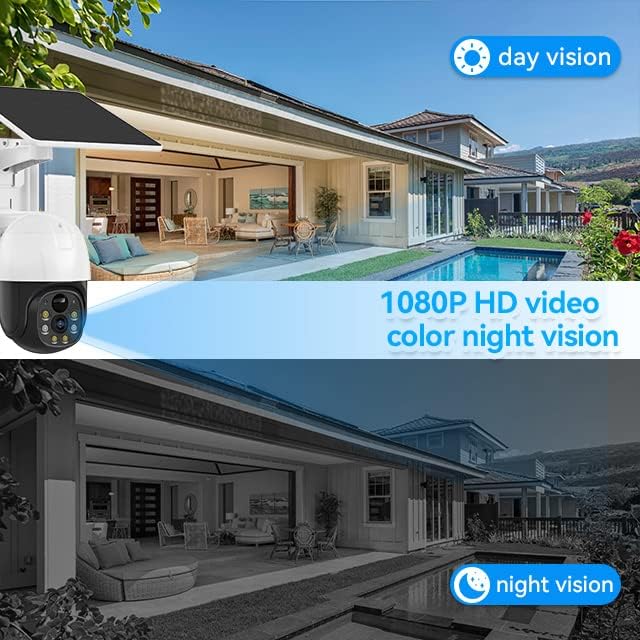
Figure 3.3: Comparison illustrating the camera's 1080P HD video quality during day vision and its capability for color night vision.
4. Manteniment
Un manteniment regular garanteix un rendiment òptim i una llarga vida útil de la càmera de seguretat.
- Neteja de la lent i del panell solar: Netegeu periòdicament la lent de la càmera i el panell solar amb un drap suau i sec.amp cloth to remove dust, dirt, or debris. This ensures clear video quality and efficient solar charging. Avoid abrasive cleaners.
- Salut de la bateria: The camera's 10000mAh battery is designed for long life. Ensure the solar panel receives adequate sunlight to keep the battery charged. In prolonged periods of low sunlight, consider a manual charge via the USB port if the battery level drops significantly.
- Actualitzacions de firmware: Check the app regularly for available firmware updates. Updates often include performance improvements, bug fixes, and new features. Follow in-app instructions for updating.
- Protecció del medi ambient: While the camera is IP65 weatherproof, extreme weather conditions (e.g., heavy snow, ice buildup) may temporarily affect performance. Ensure the camera is not obstructed by snow or ice.

Figure 4.1: Key features highlighting the camera's 100% wire-free design, IP65 waterproof rating, AI motion detection, 1080P color night vision, cloud/SD storage, and long battery life.
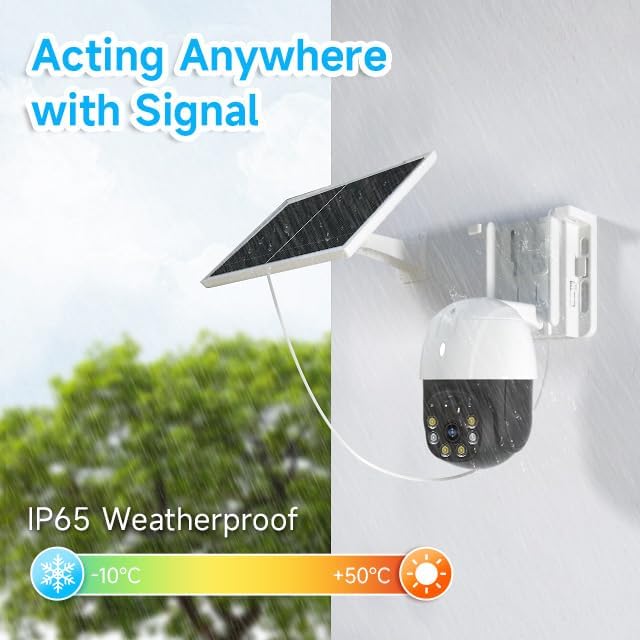
Figure 4.2: The camera's IP65 weatherproof rating, indicating its ability to operate in various outdoor conditions, including rain, and its operational temperature range from -10°C to +50°C.
5. Solució De Problemes
If you encounter issues with your Xiaovv P5 Plus camera, refer to the following common problems and solutions:
| Problema | Solució |
|---|---|
| La càmera no s'encén. | Charge the camera fully using the USB cable. Ensure the solar panel is in direct sunlight and free of obstructions. |
| No es pot connectar a la Wi-Fi. | Verify Wi-Fi password. Ensure you are connecting to a 2.4GHz network. Move the camera closer to the router or use a Wi-Fi extender. |
| Alertes freqüents de falsos moviments. | Adjust motion detection sensitivity in the app. Define specific detection zones to exclude irrelevant areas. |
| Poca qualitat de vídeo. | Clean the camera lens. Improve Wi-Fi signal strength. Ensure adequate lighting for optimal night vision performance. |
| L'àudio bidireccional no funciona. | Check audio settings in the app to ensure microphone and speaker are enabled. Verify app permissions on your smartphone. |
6. Especificacions tècniques
| Característica | Especificació |
|---|---|
| Nom del model | P5 Plus |
| Resolució de captura de vídeo | 4K |
| Viewangle ing | 360 Degrees (PTZ: 355° horizontal, 90° vertical) |
| Gamma de visió nocturna | 33 peus (visió nocturna en color) |
| Font d'alimentació | Solar Powered (with 10000mAh Lithium Ion Battery) |
| Tecnologia sense fils | Wi-Fi (2.4 GHz) |
| Opcions d'emmagatzematge | Targeta Micro SD (fins a 128 GB), emmagatzematge al núvol |
| Característiques especials | 2-Way Audio, Built-In Light, Night Vision, PTZ Technology, Weather Proof (IP65), Human Detection, Spotlight Siren |
| Tipus de muntatge | Wall Mount (Screw In) |
| Factor de forma | Dome / Bullet (Dual Lens Design) |
| Components inclosos | Camera, Solar panel |
| Dimensions del producte (L x A x A) | 18.49 x 18.49 x 18.49 cm |
| Pes de l'article | 1.48 kg |
| Ús interior/exterior | A l'aire lliure |
| Dispositius compatibles | Smartphone (via app) |
| País d'origen | Xina |
7. Garantia i Suport
7.1 Informació de la garantia
The Xiaovv P5 Plus Security Camera comes with a 1 anys de garantia des de la data de compra. Aquesta garantia cobreix els defectes de fabricació i els mals funcionaments en condicions d'ús normal. No cobreix els danys causats per un mal ús, accidents, modificacions no autoritzades o desastres naturals.
Conserveu el vostre comprovant de compra per a reclamacions de garantia.
7.2 Atenció al client
For technical assistance, troubleshooting beyond this manual, or warranty inquiries, please contact Xiaovv customer support. Refer to the product packaging or the official Xiaovv weblloc web per obtenir la informació de contacte més actualitzada (correu electrònic, telèfon o portal d'assistència).
When contacting support, please have your product model (P5 Plus) and purchase details ready.
Ask a question about this manual
Ask about setup, troubleshooting, compatibility, parts, safety, or missing instructions. Manuals+ will review the question and use this page’s manual context to help answer it.