
1. Introducció i finalview
The iCarsoft CR Eagle is an advanced wireless bidirectional diagnostic tool designed for comprehensive vehicle maintenance and repair. This 2025 version features significant upgrades from the CR MAX, including an Android 10.0 operating system, a larger 10.1-inch LCD touchscreen, increased memory, and a faster quad-core processor. It offers extensive diagnostic capabilities, including all system scans, bi-directional control, TPMS programming, ECU coding, and a wide array of reset and service functions.
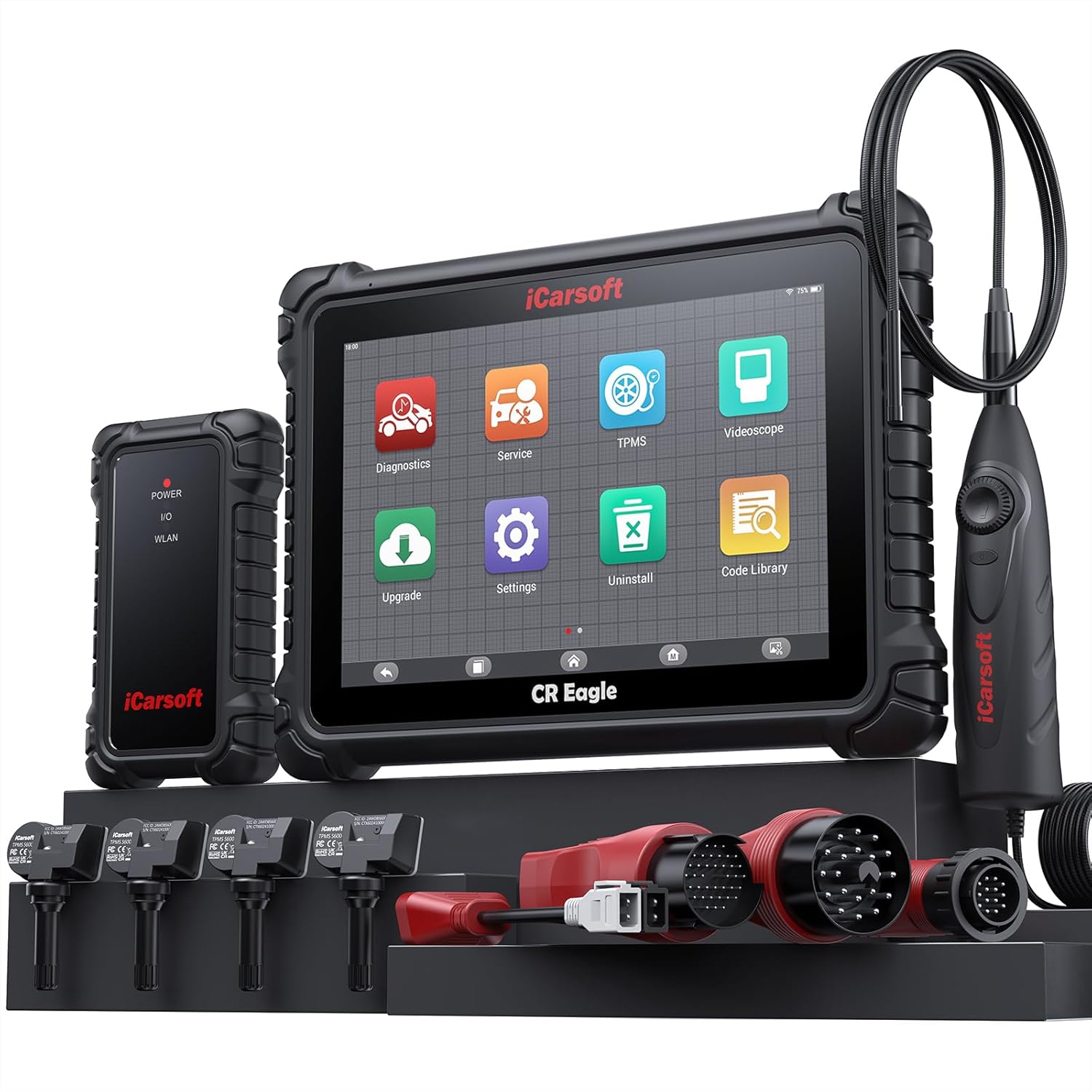
Figure 1: The iCarsoft CR Eagle diagnostic tool, showing the main tablet, wireless VCI connector, TPMS sensors, videoscope, and various OBD connection adapters.
Les característiques clau inclouen:
- Wireless VCI Connector: Enables faster and more stable diagnosis.
- Maquinari d'alt rendiment: Android 10.0, 10.1-inch LCD touchscreen (1280x800 resolution), Quad Core 2.0 GHz processor, 128GB memory, 10000mAh battery.
- Diagnòstic integral: All System Diagnostics with full OBD2 functions.
- Control bidireccional: Perform active tests on various vehicle components and control modules.
- TPMS Programming: Includes 4 TPMS sensors for activation, programming, and learning.
- Codificació de la ECU: Advanced coding services for specific vehicle brands (BMW, MINI, RollsRoyce, Audi, VW, Seat, Skoda, Bentley, Bugatti, Lamborghini).
- Extensive Reset Services: Over 49 common reset functions and 46 extra sub-services.
- Built-in Videoscope: Waterproof HD videoscope for visual inspection of hard-to-reach areas.
2. Configuració i ús inicial
2.1 Desembalatge i càrrega
Carefully unpack all components from the carrying case. Before first use, ensure the CR Eagle tablet is fully charged using the provided power adapter. The device is equipped with a 10000mAh Lithium Polymer battery for extended operation.
2.2 Connecting the VCI Connector
The Wireless VCI (Vehicle Communication Interface) connector is the primary link between the CR Eagle tablet and your vehicle. Locate your vehicle's OBD2 port, typically found under the dashboard on the driver's side. Plug the VCI connector firmly into the OBD2 port. The VCI will power on automatically.

Figure 2: Illustration of the wireless VCI connection, showing the VCI unit, the tablet, and the wireless communication range of 33-66 feet.
2.3 Pairing the Tablet with VCI
Once the VCI is connected to the vehicle and powered on, turn on the CR Eagle tablet. The tablet will automatically attempt to establish a wireless connection with the VCI. Follow any on-screen prompts to confirm the pairing. The wireless connection distance can range from 33 to 66 feet, allowing for flexible operation around the vehicle.
2.4 Using Specific Adapters
For certain vehicle models, specific connection adapters are required. The CR Eagle package includes:
- 38PIN plug for Mercedes Benz
- 20PIN plug for BMW
- 14 PIN plug for Mercedes Benz/Sprinter
- AI-4 plug for Audi
Ensure the correct adapter is used for your vehicle if it does not utilize the standard OBD2 port.
3. Instruccions de funcionament
3.1 Tots els diagnòstics del sistema
The CR Eagle can perform in-depth diagnostics across all available vehicle systems, including engine, transmission, ABS, airbags, and more. This function allows you to read and clear diagnostic trouble codes (DTCs), view live data, check I/M readiness, and perform various system tests.
- Auto-VIN: Automatically identifies vehicle information for quick setup.
- Llegir/Esborrar codis: Retrieve and erase DTCs from all accessible modules.
- Dades en directe: View dades de sensors en temps real en format de text o gràfic.
- Preparació I/M: Comprovar l'estat del sistema d'emissions.
- Congelar fotograma: View una instantània de les condicions del vehicle quan es va establir un codi d'error.
- Prova del sensor d'O2: Monitor oxygen sensor results.
- Monitorització a bord: Test specific components/systems.
- Prova del sistema EVAP: Diagnose evaporative emission control system.

Figura 3: Mésview of the All System Full OBD2 Diagnosis capabilities, showing various diagnostic icons and a vehicle system diagram.
3.2 Bi-directional Active Test
The bi-directional control function allows the CR Eagle to send commands to vehicle systems and components to test their functionality. This is crucial for verifying repairs and diagnosing issues that cannot be detected by reading codes alone. Examples include testing windows, wipers, fuel pumps, and various control modules.
- Actuation Tests: Directly activate components like fuel pumps, solenoids, relays, etc.
- Comprovacions del sistema: Perform tests on specific systems to verify proper operation.
- Verificació de components: Confirm if a unit is working correctly after replacement or software updates.

Figura 4: Examples of bi-directional actuation tests, including idle air control valve, ETC actuator, throttle position actuator, window, and door lock tests.
3.3 TPMS Functions
The CR Eagle provides comprehensive TPMS (Tire Pressure Monitoring System) services, including activation, programming, and learning for the included 4 TPMS sensors. This allows for accurate monitoring of tire pressure and temperature, contributing to driving safety and tire longevity.
- TPMS Activation: Activate new or existing TPMS sensors.
- TPMS Programming: Program new sensor IDs into the vehicle's ECU.
- Reaprenentatge del TPMS: Perform relearn procedures for TPMS sensors.
- TPMS Diagnosis: Read and clear TPMS fault codes.
- Monitorització en temps real: View live tire pressure and temperature data.

Figure 5: The CR Eagle tablet displaying TPMS functions, alongside the included TPMS sensors and a tire being serviced.
3.4 Reset and Service Functions
The tool supports over 49 common reset functions and 46 additional sub-services for routine maintenance and repair tasks. These functions help in resetting warning lights, adapting new components, and performing necessary calibrations.
Common reset functions include:
- Restabliment d’oli
- Restabliment de l'EPB (fre d'estacionament electrònic)
- Restabliment del sensor d'angle de direcció (SAS)
- Reinicialització de l'accelerador
- DPF (Diesel Particulate Filter) Reset
- Restabliment del BMS (sistema de gestió de bateries)
- ABS (Anti-lock Braking System) Reset
- Codificació d'injectors
- Restabliment de la suspensió pneumàtica
- Air Conditioner Reset
- Cap Lamp Restableix
- Body Stability Reset
- Control del motor
- Reaprenentatge de la transmissió
- Restabliment de l'airbag
- Seat Reset
- Door-win-roof Reset
- Restabliment ODO
- Fuel Pump Reset
- Air-Filter Reset
- Engine Idle Reset
- Reinicialització de la porta
- Immobilitzador
- EGR (Exhaust Gas Recirculation)
- Ajust de la columna de direcció
- Registre de bateries

Figure 6: A visual representation of the 49+ reset services and 46+ extra functions available on the CR Eagle, categorized for quick reference.
3.5 Codificació de la ECU
The ECU Coding service allows for advanced vehicle customization and optimization. This function is specifically supported for BMW, MINI, RollsRoyce, Audi, VW, Seat, Skoda, Bentley, Bugatti, and Lamborghini vehicles. It can be used to improve engine performance, optimize fuel efficiency, match newly installed hardware, customize driving modes, and fix or update original software bugs.
3.6 Videoscope Function
The integrated waterproof HD videoscope is a valuable tool for inspecting hard-to-reach areas within the vehicle, such as engine compartments, spark plug holes, or undercarriage components. The 3.28ft flexible articulating probe with a 5.5mm diameter and adjustable LED lights provides clear, real-time video (1280P HD) directly on the scanner screen, aiding in accurate diagnosis without extensive disassembly.

Figure 7: A mechanic using the iCarsoft CR Eagle's videoscope to inspect a vehicle engine, highlighting the probe and the tablet display.
4. Manteniment
4.1 Actualitzacions de programari
iCarsoft provides lifetime free software updates for the CR Eagle. Regularly check for and install updates to ensure your tool has the latest vehicle coverage, diagnostic functions, and bug fixes. Updates can typically be performed directly through the device when connected to Wi-Fi.
4.2 Hardware Care
Keep the device clean and free from dust and moisture. Store it in its protective carrying case when not in use. Avoid dropping the device or exposing it to extreme temperatures. The product is designed with solid hardware materials to withstand typical workshop environments.
5. Solució De Problemes
5.1 Problemes de connectivitat
- VCI no es connecta: Ensure the VCI is firmly plugged into the vehicle's OBD2 port and the vehicle's ignition is on. Check the power indicator on the VCI.
- Tablet not pairing: Restart both the tablet and the VCI. Ensure they are within the specified wireless range (33-66ft).
5.2 Diagnostic Functionality
- Function not supported: Not all functions are available for every vehicle model or year. Refer to the tool's vehicle coverage list or contact iCarsoft support for specific compatibility.
- Newer vehicle compatibility: If your car is a new model (after 2023), it is recommended to contact iCarsoft to check compatibility before attempting advanced diagnostics.
5.3 Rendiment general
- Funcionament lent: Ensure the device has sufficient battery charge. Close unnecessary applications running in the background.
- Problemes de pantalla: If the touchscreen is unresponsive, perform a soft reset of the device.
6. Especificacions
| Característica | Especificació |
|---|---|
| Marca | iCarsoft |
| Model | CR Eagle-E |
| Sistema operatiu | Android 10.0 |
| Mostra | Pantalla tàctil LCD de 10.1 polzades, resolució 1280 x 800 |
| Processador | Quad Core 2.0 GHz |
| Memòria | 128 GB |
| Bateria | Polímer de liti de 10000 mAh (inclòs) |
| Connectivitat | Wireless VCI, Wi-Fi (2.4/5 GHz), Bluetooth, USB Host, USB Type C |
| Videoscope Cable Length | 3.28 peus (1 metres) |
| Videoscope Probe Diameter | 5.5 mm |
| Videoscope Resolution | 1280P HD |
| Videoscope Lighting | 6 llums LED regulables |
| Pes de l'article | 13.52 lliures |
| Dimensions del paquet | 18.5 x 14.5 x 6.13 polzades |
| UPC | 850030851925 |
7. Garantia i Suport
iCarsoft is committed to providing comprehensive support for the CR Eagle diagnostic tool:
- Lifetime Software Free Update Service: Ensures your device always has the latest features and vehicle coverage.
- Lifetime Hardware Free Repair Service: Provides peace of mind regarding the durability and longevity of your investment.
- Lifetime Remote Technical Support Service: Access to expert assistance for any operational or diagnostic queries.
For technical assistance or any inquiries, please contact iCarsoft support at support@icarsoft.us. Support is available 7 days a week, 24 hours a day.

Figure 8: An image illustrating the commitment to lifetime free updates, hardware repair, and technical support provided by iCarsoft.