Introducció
Thank you for choosing the Luqeeg Digital Camera. This compact and portable camera is designed to capture high-quality photos and videos with ease. Featuring a 48MP image resolution, 4K video capability, 8X digital zoom, and a 2.7-inch LCD screen, it is suitable for various photography needs. This manual provides essential information for setting up, operating, and maintaining your camera to ensure optimal performance.
Informació de seguretat
- No exposeu la càmera a l'aigua ni a la humitat.
- Eviteu deixar caure la càmera o sotmetre-la a impactes forts.
- Keep the camera away from extreme temperatures.
- No intenteu desmuntar ni reparar la càmera vosaltres mateixos. Poseu-vos en contacte amb personal de servei qualificat.
- Feu servir només el cable de càrrega i la font d'alimentació especificats.
- Mantenir fora de l'abast dels nens petits.
Contingut del paquet
Si us plau, comproveu que tots els articles estiguin presents al vostre paquet:
- 1 x Luqeeg Digital Camera
- 1 x cable USB
- 1 x bossa d'emmagatzematge
- 1 x corda de mà
- 1 x Manual d'instruccions (Aquest document)

Figura 1: The Luqeeg Digital Camera shown with its included accessories: a USB cable, a storage bag, and a hand rope.
Càmera acabadaview
Davant View

Figura 2: Davant view of the camera, highlighting the lens, built-in flash, and microphone.
- Lent: Captura imatges i vídeos.
- Flash: Proporciona il·luminació en condicions de poca llum.
- Micròfon: Records audio during video capture.
posterior View
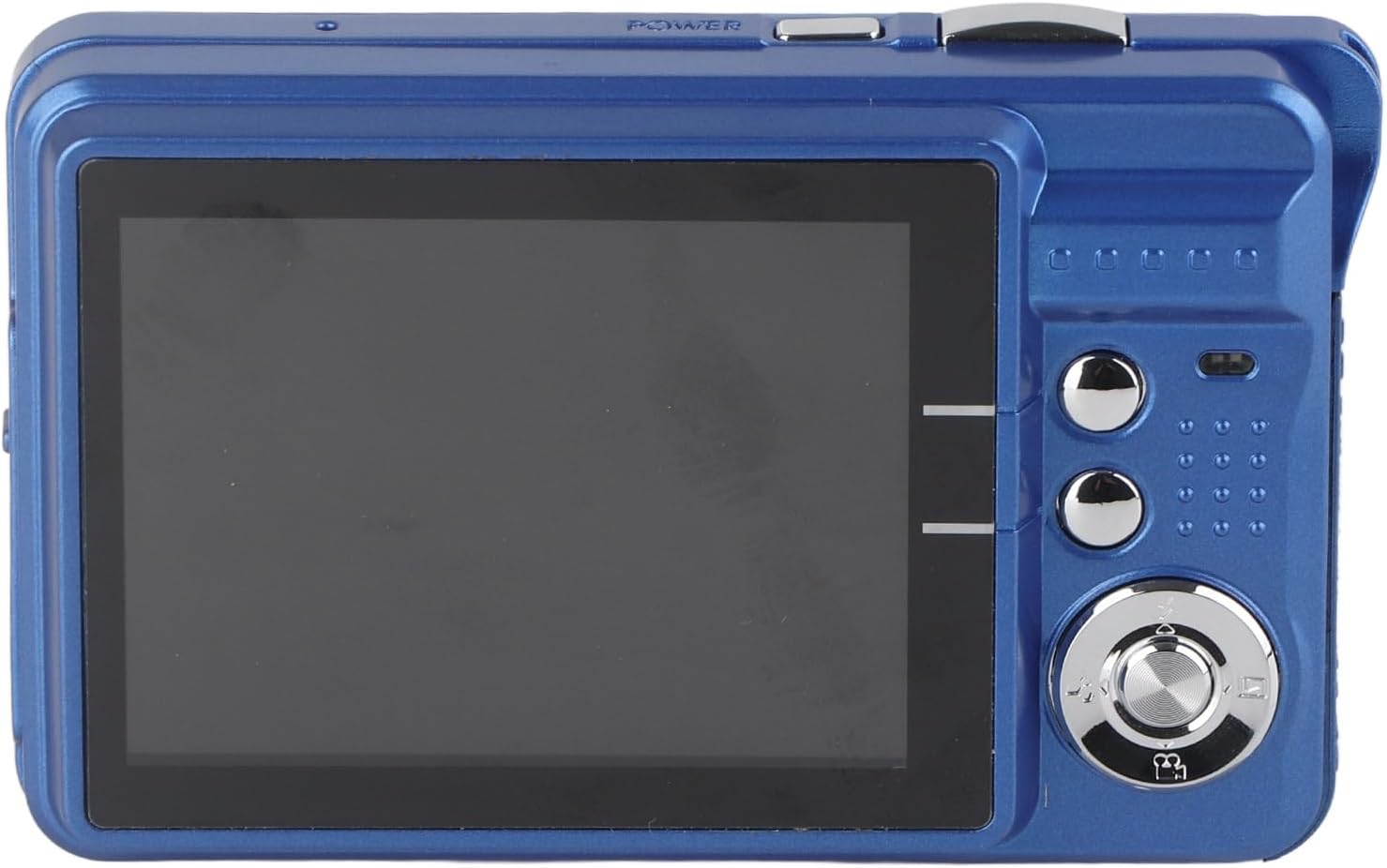
Figura 3: posterior view of the camera, showing the 2.7-inch LCD screen and control buttons.
- Pantalla LCD d'2.7 polzades: Mostra en directe view, menu, and playback.
- Botons de navegació: Used for menu navigation and settings adjustment.
- Botó de l'obturador: Captures photos and starts/stops video recording.
- Zoom Lever (T/W): Ajusta el zoom digital.
Configuració
1. Carregant la bateria
The camera features a built-in 550mAh lithium battery. Before first use, ensure the battery is fully charged.
- Connect the included USB cable to the camera's USB port.
- Connecteu l'altre extrem del cable USB a un adaptador de corrent USB (no inclòs) o al port USB d'un ordinador.
- The charging indicator light will illuminate. Once charging is complete, the light will change or turn off.
2. Inserció d'una targeta de memòria
The camera supports memory cards up to 128GB (not included). A memory card is required to save photos and videos.
- Localitzeu la ranura de la targeta de memòria al lateral de la càmera.
- Insert the memory card into the slot with the metal contacts facing the correct direction (refer to the diagram near the slot if available) until it clicks into place.
- To remove, gently press the card until it pops out.
3. Engegada inicial
Press and hold the power button (usually located on the top or side) for a few seconds until the LCD screen illuminates.
Funcionament de la càmera
1. Taking Still Images
- Hold the camera firmly and aim it so that your subject is visible on the 2.7-inch LCD screen.
- Menú de configuració: Press the appropriate button (e.g., 'A' for flash or a dedicated 'scene' button) to adjust flash settings or select a scene mode. Other settings can be accessed and adjusted through the main menu.
- Using Zoom: Use the zoom lever. Push towards 'T' (Telephoto) to zoom in on a distant subject, or push towards 'W' (Wide-angle) for a broader view. The camera features 8X digital zoom.
- Press the Shutter button fully to capture the image.
2. Gravació de vídeos
To record video, switch the camera to video mode (if applicable, usually via a mode button or menu option). Press the Shutter button once to start recording and again to stop.

Figura 4: The camera's 2.7-inch screen displaying a video playback icon, indicating video mode or playback.
3. Navegació del menú
Use the navigation buttons (up, down, left, right, OK/Set) to browse through the camera's menu options. The menu allows you to adjust various settings such as image resolution, video resolution, white balance, exposure, and more.
4. Mode de reproducció
A view your captured photos and videos, switch to playback mode (usually via a dedicated button or menu option). Use the navigation buttons to scroll through your media. Press the OK/Set button to view details or play videos.

Figura 5: The camera's 2.7-inch screen displaying a captured group photo, demonstrating image playback.
5. Built-in Fill Light
The camera includes a built-in fill light. This feature can be activated or deactivated as needed to provide additional illumination in low-light environments, helping to improve image quality.
Manteniment
Neteja de la càmera
- Feu servir un drap suau i sense borrissol per netejar el cos de la càmera.
- For the lens and LCD screen, use a specialized lens cleaning cloth and solution. Avoid harsh chemicals.
- Gently wipe away dust and smudges.
Emmagatzematge
When not in use, store the camera in the provided storage bag in a cool, dry place, away from direct sunlight and extreme temperatures.
Resolució de problemes
| Problema | Causa possible | Solució |
|---|---|---|
| La càmera no s'encén. | La bateria està esgotada. | Carregueu la bateria completament. |
| No es poden fer fotos/vídeos. | No memory card inserted or card is full. | Inseriu una targeta de memòria o suprimiu els elements innecessaris files. |
| Les imatges són borroses. | Camera shake, dirty lens, or subject too close/far. | Hold camera steady, clean lens, ensure proper distance. |
| Flash not working. | El flaix està desactivat o la bateria és baixa. | Enable flash in settings, charge battery. |
Especificacions
| Característica | Detall |
|---|---|
| Component fotosensible | CMOS 5MP processor |
| Resolució d'imatge | 48MP (8000x6000), 30MP (6400x4800), 24MP (5600x4200), 20MP (5200x3900), 18MP (4896x3672), 16MP (4608x3456), 12MP (4000x3000), 8MP (3264x2448), 7MP (3072x2304), 5MP (2592x1944), 2MP (1600x1200) |
| Format d'imatge | JPEG |
| Resolució de vídeo | 4K (3840x2160), 2.7K (2688x1520), FHD (1920x1080), HD (1280x720) |
| Format de vídeo | AVI |
| Mida de la pantalla | 2.7 polzades |
| Zoom digital | 8x |
| Obturador | Electrònica |
| Emmagatzematge | Supports up to 128GB memory card (not included) |
| Bateria | Bateria de liti integrada, 550mAh |
| Pes de l'article | 5.4 unces (aprox. 153 g) |
| Dimensions del paquet | 5.12 x 4.33 x 1.57 polzades |
| Número de model | Luqeegqk3hdfwgce-13 |
Garantia i Suport
For warranty information and customer support, please refer to the documentation included with your purchase or visit the official Luqeeg weblloc. Si teniu algun problema que no es tracta en aquest manual, poseu-vos en contacte amb el servei d'atenció al client per obtenir ajuda.


