
1. Introducció
Thank you for choosing the Hikity 1 DIN Android Car Stereo. This manual provides detailed instructions for the installation, operation, and maintenance of your new car multimedia system. Please read this manual thoroughly before use to ensure proper functionality and to maximize your user experience. Keep this manual for future reference.
2. Informació de seguretat
- Instal·lació professional recomanada: A causa de la complexitat dels sistemes elèctrics dels cotxes, es recomana la instal·lació professional per evitar danys a la unitat o al vehicle.
- Font d'alimentació: Assegureu-vos que la unitat estigui connectada a una font d'alimentació de 12 V CC amb un contacte negatiu a terra. Volum incorrectetage pot causar danys.
- Cablejat: Follow the wiring diagrams carefully. Incorrect wiring can lead to malfunctions, electrical shorts, or fire.
- Seguretat de conducció: No feu servir la unitat de manera que us distregui de la conducció. Prioritzeu sempre la seguretat viària.
- Temperatura: Eviteu exposar la unitat a temperatures extremes o a la llum solar directa durant períodes prolongats.
- Humitat: Mantingueu la unitat allunyada de l'aigua i de la humitat excessiva.
3. Contingut del paquet
Si us plau, comproveu el paquet per veure si hi ha els elements següents:
- 1 x Android Car Stereo
- 1 x cable d'alimentació
- 1 x Antena GPS
- 1 x Manual d'usuari
- 1 x antena WiFi
- 1 x Suport de muntatge
- 1 x càmera de seguretat
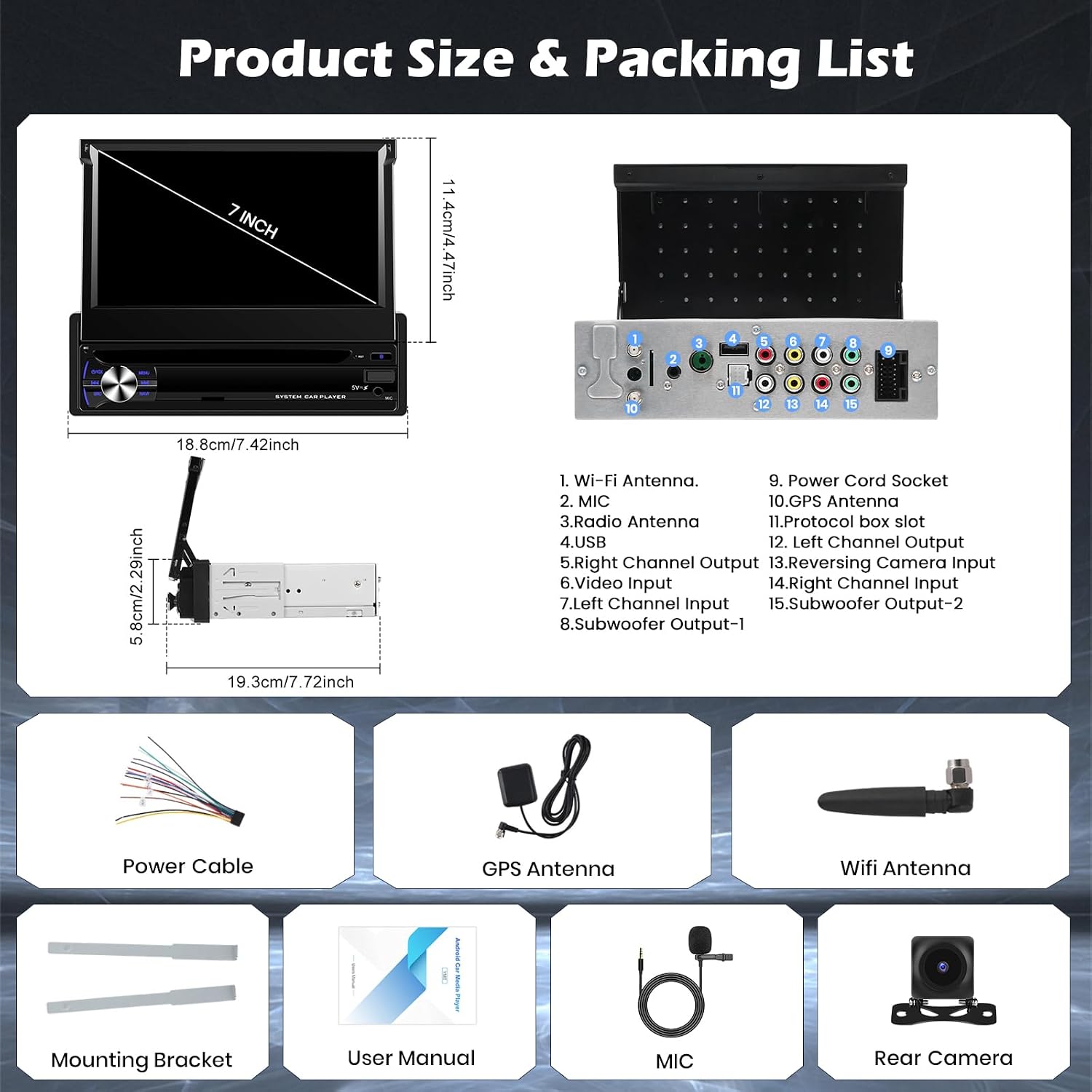
Image: Diagram showing the dimensions of the car stereo and a visual list of all included accessories: power cable, WiFi antenna, rear camera, mounting bracket, GPS antenna, and microphone.
4. Producte acabatview
The Hikity 1 DIN Android Car Stereo is a versatile multimedia system designed to enhance your driving experience. It features a 7-inch retractable IPS touchscreen and runs on Android 15 with 4GB RAM and 64GB storage.
Característiques principals:
- Sistema operatiu Android 15: Provides a smooth and modern user experience with access to various applications.
- 7-inch Retractable IPS Touchscreen: Offers a vivid and intuitive interface for navigation, media, and settings. The retractable design maintains dashboard aesthetics.
- CarPlay sense fil i Android Auto: Seamless smartphone integration for navigation, apps, and calls.
- Navegació GPS: Built-in GPS module with support for online and offline maps.
- Connectivitat Wi-Fi: Enables real-time updates, online streaming, and software updates.
- Bluetooth: Hands-free calling and audio streaming with an external microphone for clear communication.
- Ràdio FM/RDS: Integrated radio tuner for local broadcasts.
- Suport per a càmeres de marxa enrere: Includes a rear camera for safer parking maneuvers.
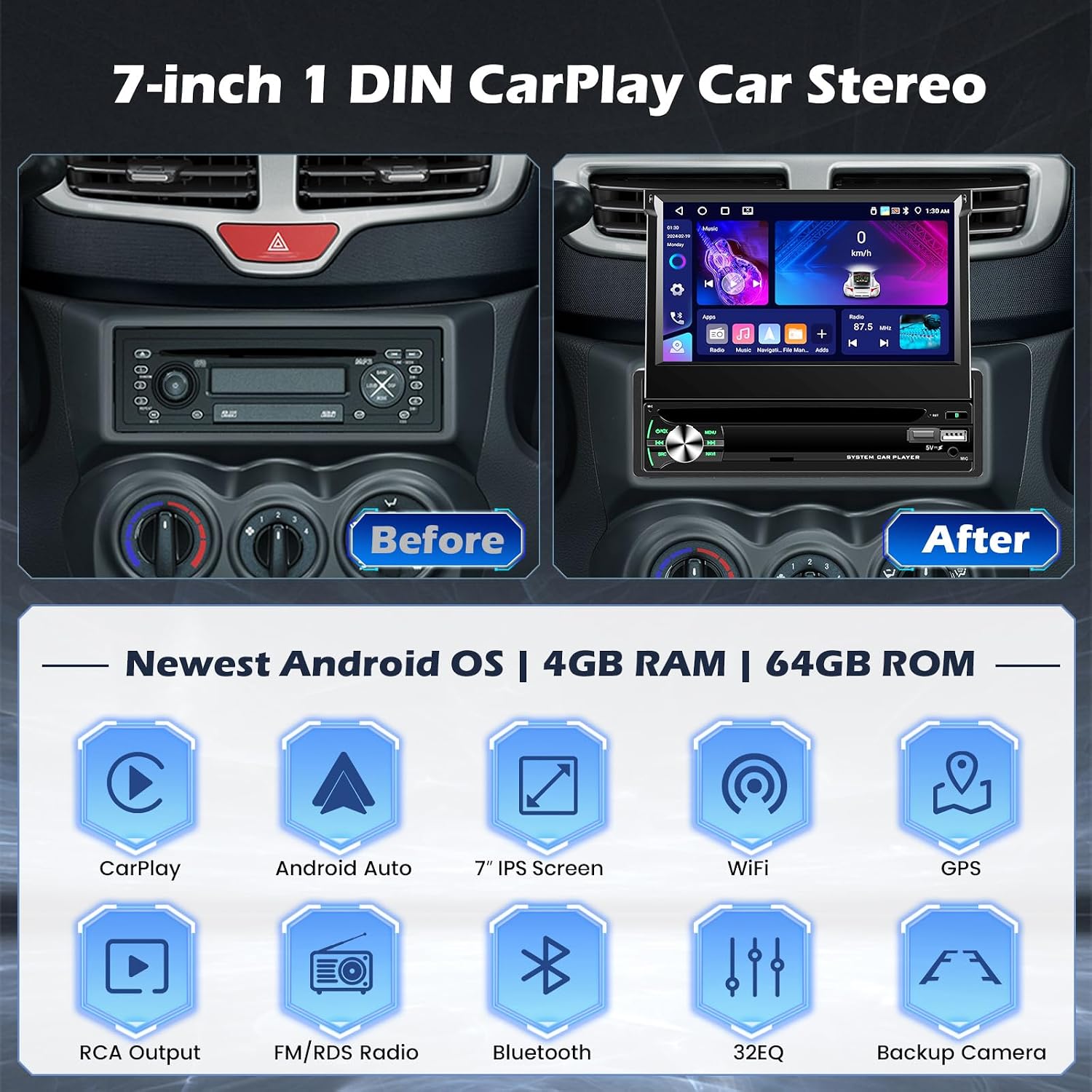
Image: A comparison of a car dashboard before and after installation, showing the 7-inch 1 DIN CarPlay car stereo. Below it are icons representing key features: CarPlay, Android Auto, 7" IPS Screen, WiFi, GPS, RCA Output, FM/RDS Radio, Bluetooth, 32EQ, and Backup Camera.

Image: The 7-inch IPS retractable touchscreen extended, with diagrams illustrating its 95-degree adjustable angle and retraction mechanism. Features like 1024*600 resolution, high temperature protection, scratch-resistance, and anti-knock are highlighted.
5. Configuració i instal·lació
5.1 Esquema de cablejat
Refer to the following diagrams for correct wiring connections. Incorrect wiring can damage the unit or vehicle. If you are unsure, consult a professional installer.

Image: A universal 16-pin ISO connector adapter for Android car stereos, showing the wiring harness.

Image: An RCA cable adapter with multiple connectors for audio output, video input, and subwoofer connections.

Image: A detailed wiring diagram for the car stereo, showing connections for power, speakers, antenna, and other peripherals. The diagram labels various input/output ports on the back of the unit and the corresponding wires in the harness.
5.2 Cablejat de la càmera de marxa enrere
The included backup camera requires specific wiring for proper function. The reverse input cable must be connected even if the reverse camera is not being used, as it can affect Bluetooth and WiFi signal reception.
- Red Cable (1): Connects to the positive terminal of the car's reverse light cable.
- Cable negre (2): Connects to the negative terminal of the car's reverse light cable.
- There is no need to connect the other two red extension cables (3) and (4) unless specified by your vehicle's setup.

Image: A diagram illustrating how to connect the backup camera, showing the red and black wires connecting to the reverse light and the video signal cable connecting to the head unit.
6. Instruccions de funcionament
6.1 Funcionament bàsic
The unit features a responsive 7-inch IPS touchscreen. Power on/off by pressing the power button. Adjust volume using the rotary knob or on-screen controls. Navigate through menus and applications by touching the screen.

Image: Various screenshots of the user interface (UI) design, demonstrating different app layouts, radio interface, and settings. It also shows the split-screen function with navigation and media playing simultaneously.

Image: A visual representation of the three-panel homepage display, showing customizable widgets for music, speed, and other applications.
6.2 CarPlay sense fil i Android Auto
Connect your smartphone wirelessly via Bluetooth or Wi-Fi to access CarPlay or Android Auto. This allows you to use navigation, make calls, send messages, and listen to music directly from your phone's interface displayed on the car stereo.
- Mètode de connexió: Typically, initial setup involves pairing via Bluetooth, which then establishes a Wi-Fi connection for data transfer.

Image: Screenshots demonstrating Wireless CarPlay and Android Auto interfaces, showing navigation, music playback, and various apps. It also highlights hands-free calling and the connection methods (USB, Bluetooth).
6.3 Navegació GPS
The built-in GPS module provides accurate navigation. You can use pre-installed map applications or download others from the Google Play Store via Wi-Fi. Ensure the GPS antenna is properly installed for optimal signal reception.

Image: A driver interacting with the car stereo for GPS navigation and voice control, showing map applications and voice assistant prompts.
6.4 Connexió Wi-Fi
Connect the car stereo to a Wi-Fi hotspot (e.g., from your smartphone) to access online features, download apps, stream media, and receive software updates.

Image: A visual representation of the built-in WiFi feature, showing various app icons connected to the car stereo screen, implying internet access for streaming and downloads.
Bluetooth 6.5
Pair your phone via Bluetooth for hands-free calling and audio streaming. The external microphone ensures clear voice quality during calls.
- Maridatge: Go to Bluetooth settings on the car stereo, enable Bluetooth on your phone, search for the car stereo, and pair.
- Trucades mans lliures: Use the touchscreen to dial, answer, or end calls.
- Música Bluetooth: Reprodueix àudio en streaming des del telèfon a l'estèreo del cotxe.

Image: Displays the Bluetooth interface for hands-free calling and music, the FM/RDS radio interface with frequency display, and a 32-band equalizer (32EQ) for audio customization.
Ràdio 6.6 FM/RDS
Access the radio function to listen to FM broadcasts. The RDS (Radio Data System) feature displays station information where available.
- Escaneig: Feu servir els controls en pantalla per cercar emissores o sintonitzar manualment una freqüència.
- Presets: Desa les teves emissores preferides per accedir-hi ràpidament.
6.7 Control del volant (SWC)
The unit supports the original SWC learning function, allowing you to map your vehicle's steering wheel buttons to control various functions of the car stereo.
- Configuració: Access the SWC settings in the system menu to configure the buttons.

Image: A car steering wheel with illuminated controls, alongside a screenshot of the car stereo's steering wheel control learning interface, showing options to assign functions like volume, track skip, and voice commands.
6.8 Càmera de marxa enrere
When the vehicle is shifted into reverse gear, the car stereo automatically displays the view from the connected backup camera, assisting with parking.
6.9 AI DSP (Digital Sound Processor)
The AI DSP feature allows for advanced audio customization, including 3D optimized sound, 5.1 panorama, strong bass, HiFi scene, pure vocals, and more. Activation may be required to use these features.

Image: The AI DSP interface showing various sound effect options like 3D optimized, 5.1 Panorama, Strong bass, HiFi scene, and Pure vocals, with a background image of a concert, indicating enhanced audio experience.
7. Manteniment
- Neteja de pantalla: Feu servir un drap suau i sense borrissol per netejar la pantalla tàctil. No utilitzeu productes de neteja abrasius ni dissolvents.
- Actualitzacions de programari: Comproveu periòdicament si hi ha actualitzacions de programari a través de la connexió Wi-Fi per garantir un rendiment òptim i l'accés a les noves funcions.
- Atenció general: Avoid spilling liquids on the unit. If the unit becomes wet, power it off immediately and allow it to dry completely before use.
8. Solució De Problemes
Si teniu problemes, consulteu els següents problemes i solucions habituals:
| Problema | Causa possible | Solució |
|---|---|---|
| Sense poder | Cablejat incorrecte; Fusible fundit; Problema amb la bateria del vehicle | Check power cable connections; Inspect vehicle fuses; Verify vehicle battery voltage. |
| Sense so | Speaker wiring incorrect; Volume too low; Mute activated | Check speaker connections; Increase volume; Deactivate mute function. |
| Senyal GPS feble/perdut | GPS antenna not properly installed or obstructed | Assegureu-vos que l'antena GPS tingui una visió clara view del cel; Comproveu la connexió de l'antena. |
| Problemes de connexió Bluetooth | Phone not discoverable; Incorrect pairing; Interference | Ensure phone Bluetooth is on and discoverable; Re-pair the device; Move away from other wireless devices. |
| La pantalla tàctil no respon | System freeze; Dirt on screen | Reinicieu la unitat; Netegeu la pantalla. |
Si el problema persisteix després de provar aquestes solucions, poseu-vos en contacte amb l'atenció al client.
9. Especificacions
| Característica | Especificació |
|---|---|
| Marca | Hikity |
| Número de model | Hikity-A4112H1MI2-63EU |
| Sistema operatiu | Android 15 |
| RAM | 4 GB |
| Emmagatzematge intern | 64 GB |
| Mostra | 7-inch IPS Retractable Touchscreen |
| Tecnologia de connectivitat | USB, Wi-Fi, Bluetooth |
| Característiques especials | Android Auto, Apple CarPlay, GPS Navigation, RDS, WiFi |
| Dispositius compatibles | Telèfons intel·ligents |
| Mode de sortida d'àudio | estèreo |
| Configuració del canal de so envoltant | 4.0 |
| Codificació de vídeo | H.264, H.265 |
| Color | Negre |
| Dimensions del producte (LxWxH) | 19.3 x 5.8 x 18.8 cm (7.6 x 2.3 x 7.4 polzades) |
| Potència de sortida | 45 watts (per canal), 180 watts (total) |
| Nombre de canals | 4 |
| Mètode de control | Toca |
| Tipus de sortida d'àudio | Altaveus |
| Formats suportats | .gif, .jpg, AVI, WAV, WMA |
| Pes de l'article | 1.73 quilos |
10. Garantia i Suport
Your Hikity car stereo comes with a 24 mesos de garantia des de la data de compra. Aquesta garantia cobreix els defectes de fabricació i garanteix que el producte compleix els estàndards de qualitat.
For any inquiries, technical assistance, or warranty claims, please contact our customer support. We offer online inquiry support with a guaranteed response within 24 hours.
Si us plau, conserveu el comprovant de compra per validar la garantia.