
1. Introducció
This manual provides essential information for the safe and efficient use of your paitanry Android Tablet 10 Inch. Designed for children and family use, this tablet combines robust features with parental control options to ensure a secure and engaging digital experience. Please read this manual thoroughly before operating the device.

Image: paitanry 10.1 inch Android 15 Kids Tablet with children enjoying the device.
2. Què hi ha a la caixa
Upon opening your paitanry Android Tablet package, you should find the following items:
- 1x Kids Tablet (Pink EVA Case)
- 1x Carregador
- 1 cable de càrrega tipus C
- 1x OTG Adapter
- 1 x manual d'usuari
Video: Unboxing the paitanry Kids Tablet, showing included accessories.
3. Configuració
3.1 Engegada inicial
- Remove the protective film from the screen, starting at the corner.
- Manteniu premut el botó d'engegada fins que s'encengui la pantalla.
- If the tablet does not power on, charge it for 2 hours and then try again.
- Wait for 1-3 minutes during initial startup until instructions for setting the language appear.
- Complete setup by following on-screen instructions. Your device is ready to use!
3.2 Connexió Wi-Fi
Per connectar-se a una xarxa Wi-Fi:
- Vés a Configuració > Xarxa i Internet > Wi-Fi.
- Activa/desactiva el Wi-Fi On.
- Seleccioneu la xarxa desitjada de la llista.
- Introduïu la contrasenya si us demana i toqueu Connecta't.
3.3 Google Kids Space & Parental Controls Setup
The tablet comes pre-installed with Google Kids Space. To set it up:
- Follow the on-screen prompts to create a Google account for your child or add an existing one.
- Utilize Google Family Link to manage screen time, filter content, and set learning goals.

Image: Google Kids Space interface on the paitanry tablet.
Vídeo: Acabatview of the paitanry Kids Tablet features, including Google Kids Space.
4. Instruccions de funcionament
4.1 Funcions bàsiques
- Botó d'encesa: Press and hold to power on/off. Short press to sleep/wake.
- Botons de volum: Ajusta el volum de l'àudio.
- Auriculars Jack: Connecteu auriculars de 3.5 mm.
- Port USB-C: Per a càrrega i transferència de dades.
- Ranura per a targeta MicroSD: Insert a MicroSD card for expandable storage.

Image: Diagram illustrating the location of ports and buttons on the tablet.
4.2 Navegació
The tablet uses standard Android touch gestures:
- Toca: Selecciona un element o obre una aplicació.
- Llisca: Desplaça't per pàgines o llistes.
- Pessigar: Apropar o reduir.
4.3 Ús de la càmera
The tablet features front and rear cameras. To use:
- Toqueu Càmera icona de l'aplicació.
- Switch between front and rear cameras as needed.
- Tap the shutter button to take photos or start/stop video recording.
5. Característiques
- Sistema operatiu: Android 15 for a stable and efficient user experience.
- Processador: High-performance Octa-Core A523 CPU.
- Visualització: 10.1-inch fully laminated 1280x800 HD screen with wide viewing angles. Features anti-blue light design and automatic brightness adjustment for eye protection.
- Memòria i emmagatzematge: 8GB RAM (4GB+4GB) and 64GB ROM. Expandable up to 1TB with a MicroSD card (sold separately).
- Connectivitat: Dual-Band WiFi 6 (2.4GHz + 5GHz) for smooth online activities.
- Bateria: 5000mAh long-lasting battery, providing 8-10 hours of continuous use.
- Funda protectora: Durable EVA case with anti-drop corners and a built-in stand for hands-free viewing.

Image: Visual overview of the tablet's key features.

Image: Close-up of the 10.1-inch HD IPS display with eye protection features.
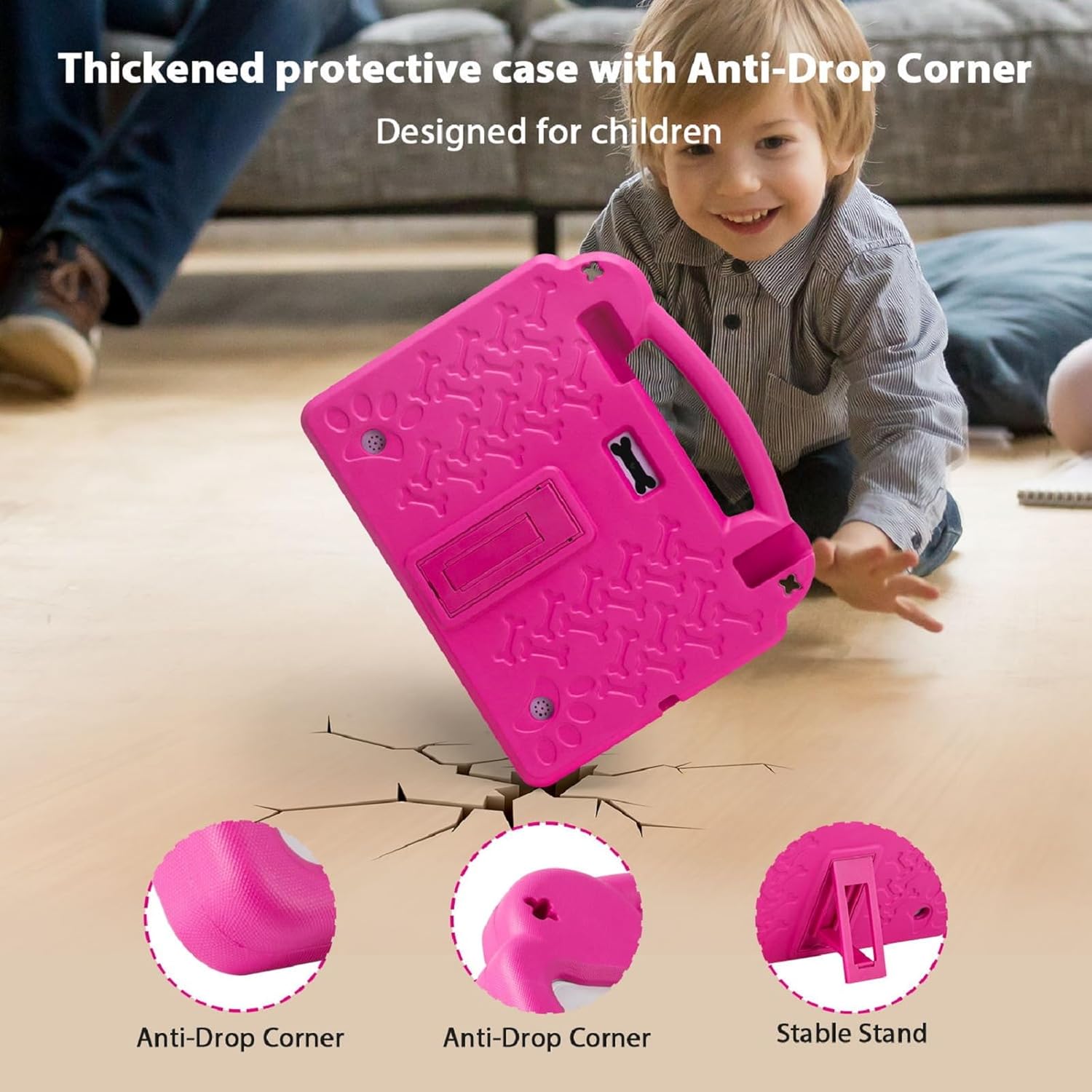
Image: The thickened protective EVA case highlighting anti-drop corners and the stable stand.

Image: Illustration of the 5000mAh battery capacity and usage times.
6. Manteniment
6.1 Neteja
- Use a soft, lint-free cloth to clean the screen. Avoid abrasive materials.
- For the case, a damp cloth with mild soap can be used, then wipe dry.
6.2 Cura de la bateria
- Eviteu exposar la tauleta a temperatures extremes.
- No permeteu que la bateria es descarregui completament amb freqüència.
- Use the provided charger for optimal battery life.
6.3 Actualitzacions de programari
Comproveu i instal·leu regularment si hi ha actualitzacions de programari per garantir un rendiment i una seguretat òptims. Aneu a Configuració > Sistema > Actualització del sistema.
7. Solució De Problemes
La tauleta 7.1 no s'encén
- Ensure the tablet is fully charged. Connect the charger and wait for at least 15 minutes before attempting to power on again.
- Premeu i manteniu premut el botó d'engegada durant 10-15 segons per realitzar un reinici forçat.
7.2 Rendiment lent
- Tanca les aplicacions de fons innecessàries.
- Esborra les dades de la memòria cau de les aplicacions que s'utilitzen amb freqüència.
- Ensure sufficient storage space is available. Delete old files or transfer them to expandable storage.
- Reinicieu la tauleta regularment.
7.3 Problemes de connectivitat Wi-Fi
- Comproveu si el Wi-Fi està activat a Configuració.
- Reinicieu el vostre encaminador Wi-Fi.
- Oblida't de la xarxa i torna a connectar-te tornant a introduir la contrasenya.
- Ensure the tablet is within range of the Wi-Fi signal.
8. Especificacions
| Característica | Especificació |
|---|---|
| Mida de la pantalla de peu | 10.1 polzades |
| Resolució de pantalla | 1280 x 800 píxels |
| Resolució de pantalla màxima | 1280*800 píxels |
| Processador | 2.4 GHz Octa-Core A523 |
| Xipset Brand | ARM (Allwinner) |
| RAM | 8GB (4GB+4GB) |
| Flash Memory Size (ROM) | 64 GB |
| Emmagatzematge ampliable | Fins a 1 TB amb targeta MicroSD (es ven per separat) |
| Tipus sense fil | 802.11ax (Dual-Band WiFi 6: 2.4G+5G) |
| Bluetooth | 4.2 |
| Durada mitjana de la bateria | 5-10 Hours (5000mAh) |
| Sistema operatiu | Android |
| Pes de l'article | 2.42 lliures |
| Dimensions del producte | 10.5 x 1.1 x 8.9 polzades |
| Color | Rosa |
| posterior WebResolució de la càmera | 5 MP |
| Davant WebResolució de la càmera | 2 MP |
9. Garantia i Suport
Your paitanry Android Tablet 10 Inch comes with a garantia de substitució gratuïta d'un any covering all quality-related issues from the date of purchase. Please inspect the package upon arrival and contact our professional after-sales team immediately if anything is missing or damaged.
For any questions regarding setup, daily use, or technical support, please contact our customer service team. We are dedicated to providing peace of mind for parents and endless fun for kids.
Contact information for support can typically be found on the product packaging or the official paitanry weblloc.