
Warm Audio WA-C1
Manual d'usuari del pedal de vibrato de cor analògic Warm Audio WA-C1
Model: WA-C1
Introducció
The Warm Audio WA-C1 is an all-analog chorus and vibrato pedal designed to deliver classic modulated tones. This manual provides detailed instructions for setting up, operating, and maintaining your WA-C1 pedal to ensure optimal performance.
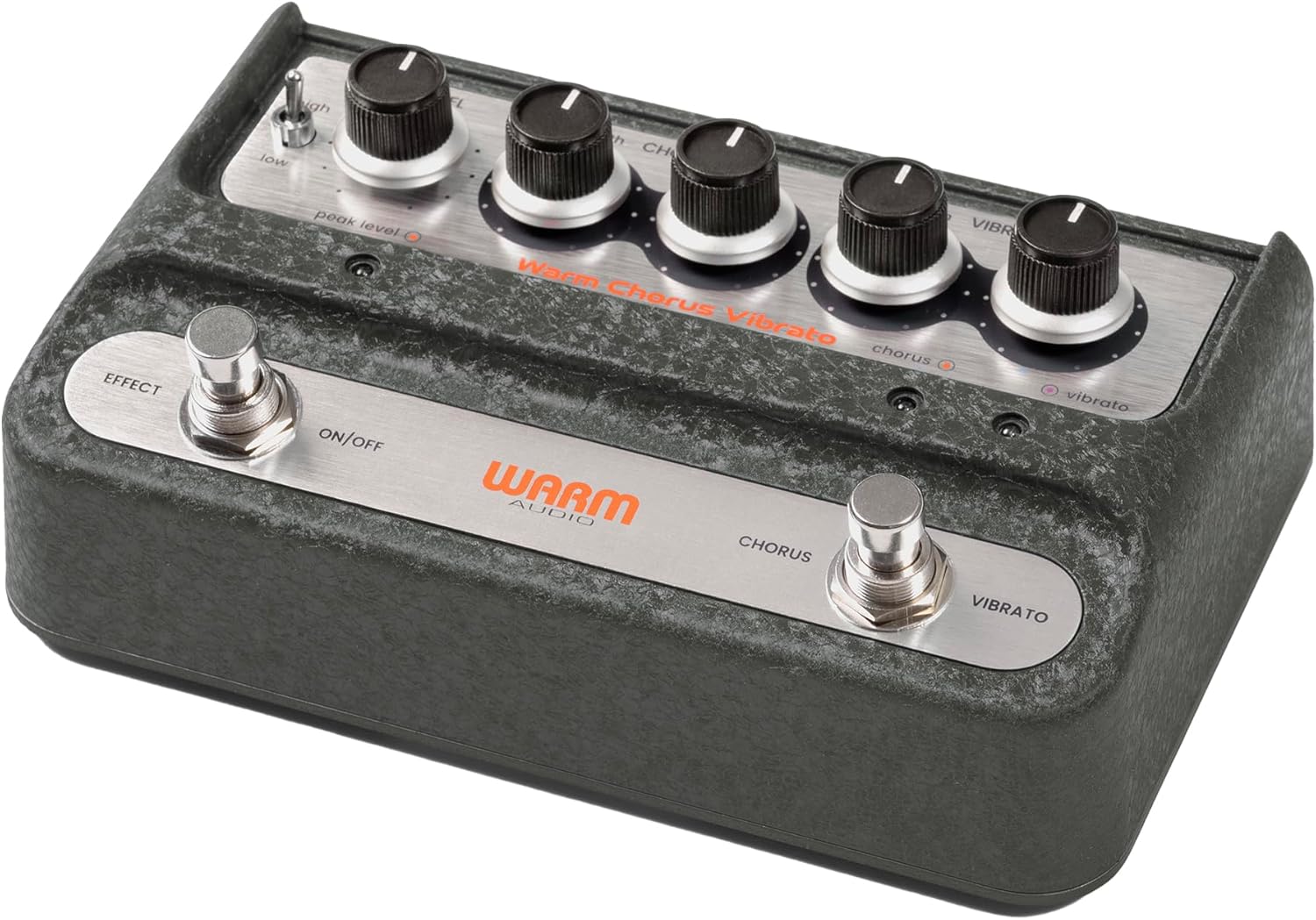
Image: Overall view of the Warm Audio WA-C1 Analog Chorus Vibrato pedal.
Instruccions importants de seguretat
- Llegiu atentament aquestes instruccions abans d'utilitzar.
- Conserveu aquestes instruccions per a referència futura.
- Presteu atenció a tots els avisos del producte i d'aquest manual.
- No utilitzeu aquest aparell prop de l'aigua.
- Netegeu només amb un drap sec.
- No bloquegeu cap obertura de ventilació. Instal·leu-ho d'acord amb les instruccions del fabricant.
- No instal·leu a prop de cap font de calor com ara radiadors, registres de calor, estufes o altres aparells (inclosos amplificadors) que produeixen calor.
- Utilitzeu només accessoris/accessoris especificats pel fabricant.
- Desendolleu aquest aparell durant les tempestes amb llamps o quan no l'utilitzeu durant llargs períodes.
- Demaneu tot el servei a personal de servei qualificat. El manteniment és necessari quan l'aparell s'ha fet malbé d'alguna manera, com ara el cable d'alimentació o l'endoll està danyat, s'ha vessat líquid o han caigut objectes a l'aparell, l'aparell ha estat exposat a la pluja o la humitat, no funciona amb normalitat. , o s'ha deixat caure.
Característiques
- Faithful recreation of a classic all-analog chorus/vibrato circuit.
- Premium all-analog preamp for responsive tone.
- Independent Depth and Rate controls for Chorus.
- Authentic Vibrato section.
- Switchable Hi-Z input for optimizing guitar clarity.
- Mono and Stereo output options.
Controls i connexions
Controls del panell frontal

Imatge: De dalt a baix view of the WA-C1 pedal's front panel, showing all control knobs and footswitches.
- Control de nivell: Adjusts the overall output volume of the pedal.
- DEPTH (Chorus) Knob: Controls the intensity or sweep range of the chorus effect.
- RATE (Chorus) Knob: Controls the speed of the chorus modulation.
- DEPTH (Vibrato) Knob: Controls the intensity or sweep range of the vibrato effect.
- RATE (Vibrato) Knob: Controls the speed of the vibrato modulation.
- EFFECT ON/OFF Footswitch: Engages or bypasses the entire pedal effect. The associated LED indicates the effect status.
- CHORUS/VIBRATO Footswitch: Toggles between Chorus and Vibrato modes when the effect is active. The associated LEDs indicate the selected mode.
- HIGH/LOW Switch: A two-position switch that adjusts the input gain, allowing for optimal signal handling from various instruments.
- PEAK LEVEL LED: Illuminates to indicate signal clipping or excessive input level. Adjust the HIGH/LOW switch or input signal to prevent clipping.
Connexions del panell posterior

Imatge: Part posterior view of the WA-C1 pedal, showing the power input, Hi-Z switch, input jack, and output jacks.
- POWER 9V Input: Connect a standard 9V DC power adapter (center negative, 2.1mm barrel connector). Ensure the power supply meets the pedal's requirements.
- Interruptor HI-Z: This switch adjusts the input impedance. Set to 'ON' for higher impedance instruments like guitars to enhance clarity in the high-end. Set to 'OFF' for lower impedance sources like keyboards.
- Jack d'ENTRADA: Connect your instrument (guitar, keyboard, etc.) to this 1/4-inch mono input.
- STEREO OUTPUT Jack: Use this 1/4-inch output for a stereo signal path, typically connecting to two amplifiers or a stereo effects loop.
- MONO OUTPUT Jack: Use this 1/4-inch output for a mono signal path, connecting to a single amplifier or the next pedal in your chain.
Configuració
- Connexió d'alimentació: Connect a compatible 9V DC (center negative) power adapter to the POWER 9V input on the rear panel. Do not use an incompatible power supply.
- Connexió de l'instrument: Connect your instrument to the INPUT jack on the rear panel using a standard 1/4-inch instrument cable.
- Connexió de sortida:
- For mono operation, connect the MONO OUTPUT jack to your amplificador o el següent pedal de la cadena de senyals.
- For stereo operation, connect both the MONO OUTPUT and STEREO OUTPUT jacks to two separate amplifiers or a stereo input device.
- Interruptor Hi-Z: If using a guitar, set the HI-Z switch to 'ON' for optimal high-end clarity. For other instruments like keyboards, set it to 'OFF'.
- Configuració inicial: Start with all DEPTH and RATE knobs at their minimum (fully counter-clockwise) and the LEVEL knob at noon (12 o'clock) for initial sound adjustments.
Instruccions de funcionament
- Implicant l'efecte: Press the EFFECT ON/OFF footswitch to activate the pedal. The corresponding LED will illuminate.
- Selecció del mode: With the effect active, press the CHORUS/VIBRATO footswitch to toggle between Chorus and Vibrato modes. The respective LED will indicate the active mode.
- Adjusting Chorus: In Chorus mode, use the DEPTH (Chorus) and RATE (Chorus) knobs to dial in your desired modulation intensity and speed.
- Adjusting Vibrato: In Vibrato mode, use the DEPTH (Vibrato) and RATE (Vibrato) knobs to dial in your desired modulation intensity and speed.
- Nivell de sortida: Use the LEVEL knob to adjust the overall output volume of the pedal. Ensure it matches or slightly boosts your bypassed signal level.
- Guany d'entrada: If your instrument's signal is too hot or too weak, use the HIGH/LOW switch to optimize the input gain. Monitor the PEAK LEVEL LED to avoid clipping.
Manteniment
- Neteja: Clean the pedal's exterior with a soft, dry cloth. Do not use liquid cleaners or solvents.
- Emmagatzematge: Store the pedal in a dry, cool environment away from direct sunlight and extreme temperatures.
- Font d'alimentació: Always use the correct 9V DC (center negative) power supply. Incorrect power can damage the unit and void the warranty.
- Footswitches and Jacks: Periodically check connections for any loose cables or debris.
Resolució de problemes
| Problema | Causa possible | Solució |
|---|---|---|
| No fa so quan s'acciona el pedal. |
|
|
| L'efecte és massa subtil o massa intens. |
|
|
| Distortion or unwanted noise. |
|
|
Especificacions
- Model: WA-C1
- Tipus d'efecte: Analog Chorus / Vibrato
- Format del senyal: Analògic
- Requisit d'energia: 9V DC, Center Negative (Power adapter not included)
- Entrada: 1/4-inch Mono Jack
- Sortides: 1/4-inch Mono Jack, 1/4-inch Stereo Jack
- Controls: Level, Chorus Depth, Chorus Rate, Vibrato Depth, Vibrato Rate, High/Low Switch, Hi-Z Switch
- Dimensions: Aproximadament 8 x 5.25 x 4 polzades (dimensions del paquet)
- Pes: Aproximadament 2 lliures (pes de l'article)
Garantia i Suport
Warm Audio products are designed for reliability and performance. For warranty information and technical support, please refer to the official Warm Audio weblloc web o poseu-vos en contacte amb el vostre distribuïdor autoritzat. Conserveu el rebut de compra com a comprovant de compra per a reclamacions de garantia.
Per a més ajuda, visiteu: www.warmaudio.com/support
Ask a question about this manual
Ask about setup, troubleshooting, compatibility, parts, safety, or missing instructions. Manuals+ will review the question and use this page’s manual context to help answer it.