
1. Introducció
Thank you for choosing the ODK 48 Inch Gaming Desk. This U-shaped computer desk is designed to provide an expansive and organized workspace for gaming, work, or study. It features integrated LED lighting, a built-in power outlet, a monitor stand, and storage shelves to enhance your setup. This manual provides essential information for assembly, operation, maintenance, and troubleshooting to ensure optimal use of your new desk.

Image 1.1: The ODK 48 Inch Gaming Desk, showcasing its U-shaped design and integrated features.
Vídeo 1.1: Un overview of the ODK U Shaped Gaming Desk, highlighting its design and key functionalities.
2. Informació de seguretat
Please read and understand all safety instructions before assembling and using the desk. Failure to follow these instructions may result in injury or damage to the product.
- Assembly requires careful handling of parts and proper use of tools to avoid injury. Always follow the provided instructions and safety guidelines during assembly.
- Assegureu-vos que tots els cargols i elements de fixació estiguin ben ajustats abans d'utilitzar-los. Comproveu-los periòdicament i torneu-los a apretar si cal.
- Do not overload the desk or shelves beyond their weight capacity. Refer to the specifications section for weight limits.
- Keep liquids away from electrical components, including the power outlet and LED lights, to prevent electric shock or damage.
- Col·loqueu l'escriptori sobre una superfície plana per evitar que bolqui.
- Mantingueu les peces petites i els materials d'embalatge lluny dels nens per evitar perills d'asfixia.
3. Contingut del paquet
Verifiqueu que tots els components siguin presents abans de començar el muntatge. Si falta alguna peça o hi ha alguna peça danyada, poseu-vos en contacte amb el servei d'atenció al client.
- Desk Panels (U-shaped desktop, monitor stand, shelves)
- Components del marc metàl·lic
- Built-in Power Outlet (3 AC ports, 2 USB ports)
- Tira d'il·luminació LED
- Ganxo per a auriculars
- Maquinari de muntatge (cargols, perns, clau Allen, etc.)
- Manual d'instruccions
4. Instruccions de muntatge (Configuració)
The ODK 48 Inch Gaming Desk is designed for quick and easy assembly. All necessary tools, pre-drilled holes, and clear, easy-to-follow instructions are included. It is recommended to assemble the desk with two people for optimal ease and safety.
- Desempaquetar components: Traieu amb cura totes les peces de l'embalatge i col·loqueu-les sobre una superfície neta i suau per evitar ratllades.
- Identifica les parts: Consulteu la llista de peces i els diagrames inclosos per identificar cada component.
- Muntatge del marc: Follow the step-by-step diagrams to connect the metal frame components using the provided hardware. Do not fully tighten screws until all parts are aligned.
- Adjunta els panells d'escriptori: Secure the U-shaped desktop panels to the assembled frame.
- Install Shelves and Monitor Stand: Attach the storage shelves and monitor stand as indicated in the manual. The storage shelves are movable and can be installed on the left or right side for flexible storage.
- Install Power Outlet and LED Lights: Integrate the built-in power outlet and attach the LED lighting strip according to the instructions.
- Fixeu el ganxo per als auriculars: Secure the headphone hook to the desired location.
- Ajustament final: Once all components are in place and aligned, securely tighten all screws and fasteners.
- Ajustar les coixinetes dels peus: Adjust the foot pads at the bottom of the desk legs to ensure stability on uneven floors.
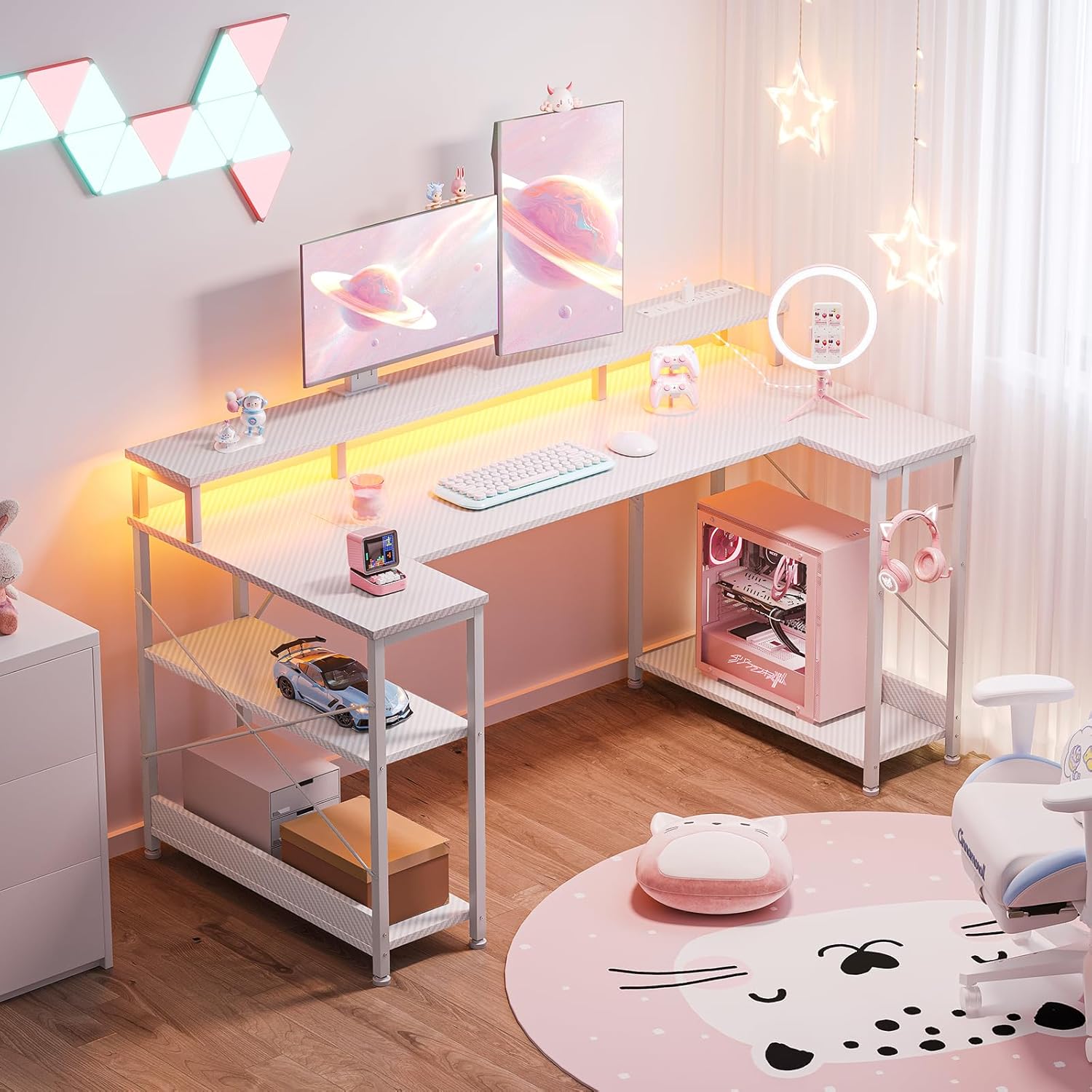
Image 4.1: Detailed product dimensions for assembly reference.
5. Instruccions de funcionament
5.1. Llums LED
The desk features customizable LED lights with 10 vibrant colors and 20 dynamic lighting modes. The LED strip is controlled via an inline remote.
- Encès/apagat: Premeu el botó d'engegada del comandament a distància per encendre o apagar els llums.
- Canvia els colors: Use the color selection buttons to cycle through the 10 available static colors.
- Seleccioneu modes: Use the mode buttons to choose from 20 dynamic lighting effects, such as flashing, fading, or strobing.
- Ajusta la brillantor/la velocitat: Use the brightness or speed adjustment buttons to customize the intensity of static colors or the pace of dynamic modes.

Image 5.1: The RGB LED Lights Strip and its remote control for color and mode selection.
5.2. Built-in Power Outlet
The desk includes a convenient built-in power outlet with 3 AC ports and 2 USB ports for charging and powering your devices.
- Ports de CA: Plug in your computer, monitors, or other AC-powered devices.
- Ports USB: Connect USB cables to charge smartphones, tablets, or other USB-powered accessories.
- Seguretat: Do not exceed the maximum power rating of the outlet. Avoid spilling liquids near the power strip.

Imatge 5.2: Primer pla view of the built-in power outlet, showing 3 AC and 2 USB ports.
5.3. Ganxo dels auriculars
A dedicated headphone hook is provided for convenient storage of your headphones, keeping them within reach and off the desktop.
5.4. Suport de monitor
The ergonomic monitor stand elevates your display(s) to eye level, promoting better posture and freeing up valuable desktop space underneath for other essentials.

Image 5.3: The ergonomic monitor stand elevating displays for improved viewcomoditat.
5.5. Storage Shelves
The desk includes integrated storage shelves that can be positioned on either the left or right side to suit your setup. These shelves provide additional space for books, gaming accessories, or a PC tower.

Image 5.4: The versatile storage shelves, offering flexible organization options.
6. Manteniment
Regular maintenance will help prolong the life and appearance of your ODK Gaming Desk.
- Neteja: Wipe the carbon fiber surface with a soft, damp drap. Eviteu netejadors abrasius o productes químics agressius que puguin danyar l'acabat.
- Pols: Regularly dust the desk and shelves to prevent buildup.
- Comprovació de fixació: Reviseu periòdicament tots els cargols i perns per assegurar-vos que romanen ajustats. Torneu a apretar-los si cal.
- Components elèctrics: Ensure the power outlet and LED lights are free from dust and debris. Do not attempt to repair electrical components yourself.
7. Solució De Problemes
If you encounter any issues with your ODK Gaming Desk, refer to the following common troubleshooting steps:
| Problema | Causa possible | Solució |
|---|---|---|
| L'escriptori està inestable | Fixacions fluixes; Sòl irregular | Check and tighten all screws. Adjust the leveling foot pads at the bottom of the legs. |
| Els llums LED no funcionen | Power connection issue; Remote battery low; Damaged LED strip | Ensure the LED strip is properly connected to a power source. Check the remote control battery. If issues persist, contact customer support. |
| La presa de corrent no funciona | No power to the desk; Overload; Faulty outlet | Ensure the desk's main power cord is securely plugged into a working wall outlet. Check if the circuit breaker has tripped. Reduce the number of devices plugged in. If still not working, contact customer support. |
For issues not covered here, please contact ODK customer support.
8. Especificacions
Detailed specifications for the ODK 48 Inch Gaming Desk:
- Marca: ODK
- Model: Escriptori de jocs de 48 polzades
- Forma: U-shaped / Rectangular
- Dimensions del producte (P x A x A): 26.77" x 47.24" x 34.84" (68 cm x 120 cm x 88.5 cm)
- Color: Carbon Fiber White
- Materials: Fusta dissenyada, Metall
- Pes de l'article: 39 lliures (17.7 kg)
- Nombre de prestatgeries: 2
- Endoll: 3 AC ports, 2 USB ports (5V/2A, 125V/2A)
- Característiques especials: LED lighting strip (10 colors, 20 modes), Monitor Stand, Headphone Hook, Adjustable Foot Pads
- Muntatge: Obligatori (eines incloses)
9. Garantia i Suport
The ODK 48 Inch Gaming Desk comes with a Garantia limitadaSi us plau, consulteu la targeta de garantia inclosa al paquet per conèixer els termes i condicions específics.
For technical support, missing parts, or warranty claims, please contact ODK customer service through the retailer where the product was purchased or visit the official ODK weblloc.