
1. Introducció
Welcome to the user manual for your new FLEXISPOT 63x28 Inch Dual Motor Electric Standing Desk. This manual provides essential information for the safe assembly, operation, maintenance, and troubleshooting of your desk. Please read it thoroughly before use and retain it for future reference.
2. Instruccions de seguretat
- Assegureu-vos que tots els components siguin presents i no estiguin danyats abans del muntatge. No utilitzeu el producte si hi falta alguna peça o si està danyada.
- Mantingueu els nens i les mascotes allunyats de l'escriptori durant el funcionament per evitar lesions.
- Do not place hands or other body parts near moving parts of the desk during height adjustment.
- Ensure the desk is placed on a level surface to prevent tipping.
- No sobrecarregueu l'escriptori. Consulteu les especificacions per conèixer la capacitat màxima de pes.
- Keep all electrical cords organized and away from moving parts to prevent damage or entanglement.
- Desendolleu l'escriptori de la presa de corrent abans de netejar-lo o fer-ne cap manteniment.
- Only use the desk for its intended purpose as a workstation.
3. Contingut del paquet
Verifiqueu que tots els elements que s'enumeren a continuació s'inclouen al vostre paquet:
- Desktop Surface (Black)
- Desk Frame (Black, including dual motors and lifting columns)
- Control Panel with Memory Controller
- Adaptador d'alimentació i cable
- Maquinari de muntatge (cargols, eines, etc.)
- Manual d'instruccions

Imatge: Més deview of the FLEXISPOT 63x28 Inch Dual Motor Electric Standing Desk, showing the desktop, frame, and control panel.
4. Instruccions de configuració
4.1 Desembalatge
Carefully remove all components from the packaging. Place them on a soft, clean surface to prevent scratches or damage during assembly. Keep all packaging materials until assembly is complete and you are satisfied with the product.
4.2 Muntatge del marc
Follow the detailed diagrams provided in the separate assembly guide to connect the lifting columns to the crossbar and attach the footings. Ensure all screws are tightened securely.
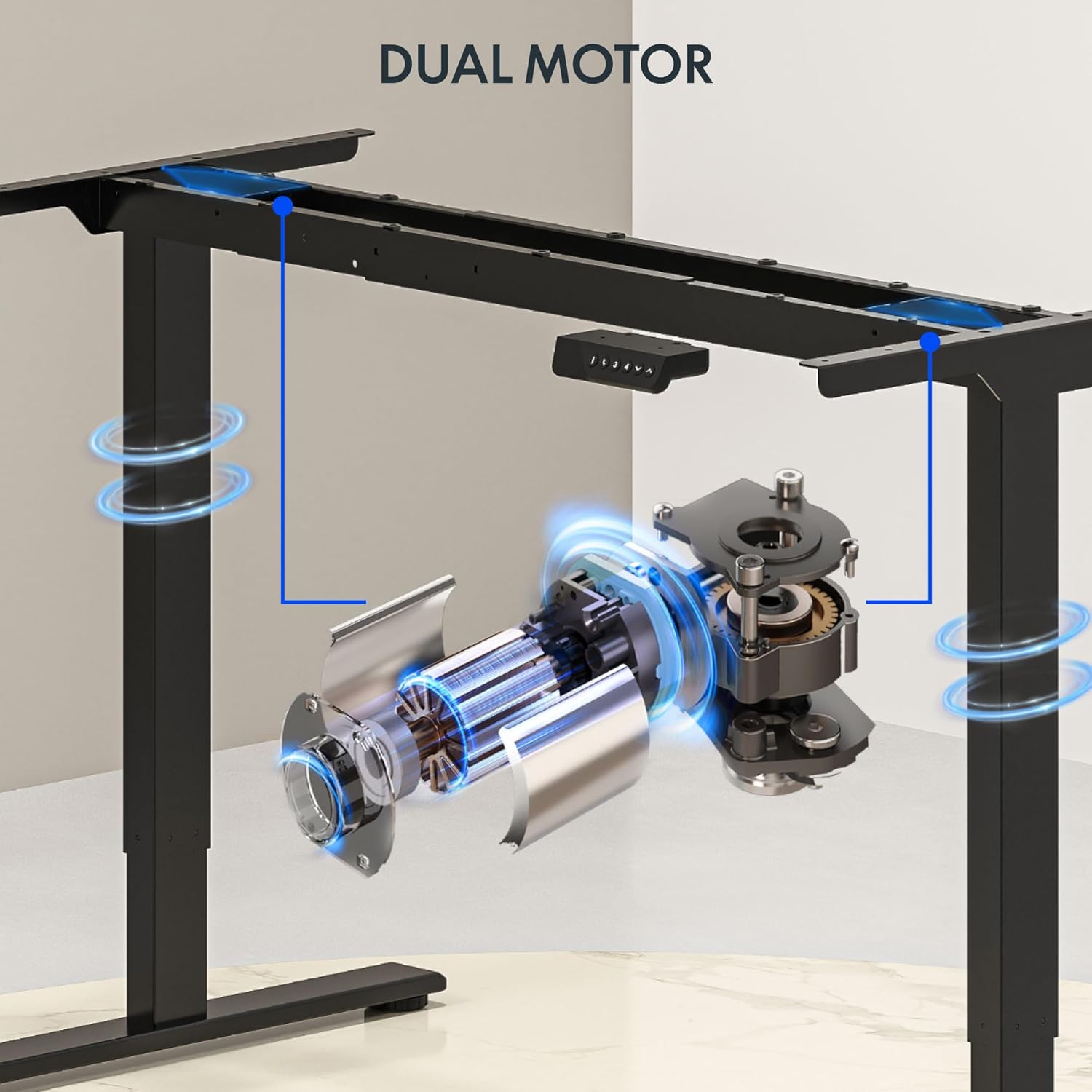
Imatge: Detallada view of the dual motor desk frame, illustrating the motor placement and structural components.
4.3 Connectar l'escriptori
Carefully place the desktop upside down on a soft surface. Align the assembled frame with the pre-drilled holes on the desktop. Secure the desktop to the frame using the provided screws. Once secured, carefully flip the desk upright with assistance.
4.4 Connexió del panell de control i de l'alimentació
Connect the control panel cable to the control box, and then connect the power adapter to the control box. Plug the power cable into a standard electrical outlet. The desk is now ready for initial operation.

Image: Close-up of the desk's control panel, showing the LED display and buttons for height adjustment and memory presets.
Video: Demonstrates the dual-motor strength and smooth operation of the FLEXISPOT standing desk, highlighting its robust design and functionality.
5. Instruccions de funcionament
5.1 Ajust de l'alçada
- Premeu el botó Up (∧) botó per aixecar l'escriptori.
- Premeu el botó Down (∨) botó per baixar l'escriptori.
- Release the button at your desired height. The LED display will show the current height.
5.2 Ús de preajustos de memòria
The control panel features four memory presets (1, 2, 3, 4) to save and recall your preferred sitting and standing heights.
- Ajusteu l'escriptori a l'alçada desitjada amb els botons Amunt/Avall.
- Premeu el botó "M" button (or similar memory set button, indicated by 'i' on some models) once. The display will flash.
- Immediately press one of the number buttons (1, 2, 3, or 4) to save the current height to that preset.
- Per recuperar una alçada desada, simplement premeu el botó numèric corresponent (1, 2, 3 o 4). L'escriptori es mourà automàticament a la posició desada.

Image: Close-up of the memory controller, highlighting the numbered preset buttons and the up/down controls for precise height adjustments.
5.3 Anti-Collision System
The desk is equipped with an anti-collision system. If the desk encounters an obstacle during height adjustment, it will automatically stop and reverse slightly to prevent damage. This feature enhances safety during operation.
6. Manteniment
- Neteja: Netegeu la superfície i el marc de l'escriptori amb un drap suau iamp drap. Eviteu netejadors abrasius o productes químics agressius que puguin danyar l'acabat.
- Inspecció: Regularly check all screws and connections to ensure they are tight. Re-tighten if necessary.
- Gestió de cables: Ensure all cables are neatly organized and not pinched or tangled, especially during height adjustments.
- Cable d'alimentació: Inspect the power cord for any signs of damage. If damaged, discontinue use and contact customer support.
7. Solució De Problemes
| Problema | Causa possible | Solució |
|---|---|---|
| L'escriptori no es mou. | Power cable disconnected; motor cable loose; overload. | Check power connection; ensure all cables are securely plugged in; reduce weight on desk. |
| L'escriptori es mou de manera irregular o fa un soroll inusual. | Càrrega desigual; connexions fluixes; obstrucció. | Distribute weight evenly; check and tighten all screws; remove any obstructions. |
| Height presets not working. | Presets not properly set. | Re-program the memory presets following section 5.2. |
| Anti-collision system frequently triggers. | Obstacles in the path of movement; sensitivity setting too high. | Clear the area around the desk; consult the full manual for adjusting anti-collision sensitivity if available. |
If you encounter issues not listed here or if the solutions do not resolve the problem, please contact FLEXISPOT customer support.
8. Especificacions
| Característica | Detall |
|---|---|
| Marca | FLEXISPOT |
| Model | 63x28 Inch Dual Motor Electric Standing Desk |
| Dimensions de l'escriptori | 63" d'amplada x 28" de profunditat |
| Interval d'alçada | 28.3" a 47.6" |
| Capacitat màxima de pes | 198 lliures |
| Tipus de motor | Motor dual |
| Tauler de control | Memory Controller with 4 Presets |
| Material d'escriptori | Engineered Wood (Black Top) |
| Material del marc | Alloy Steel (Black Frame) |
| Característiques especials | Dual Motor, 198 lbs Heavy-Duty Capacity, Memory Controller, 63"x28" Large Desktop |

Image: Diagram illustrating the dimensions of the FLEXISPOT 63x28 Inch Electric Standing Desk, including height range, width, and depth.
9. Garantia i Suport
9.1 Garantia limitada
This FLEXISPOT product comes with a limited warranty against defects in materials and workmanship. The specific terms and duration of the warranty may vary. Please refer to the warranty card included in your package or visit the official FLEXISPOT weblloc per obtenir informació detallada sobre la garantia.
The warranty typically covers the desk frame, motors, and control panel under normal use conditions. Damage resulting from misuse, accidents, unauthorized modifications, or improper assembly is not covered.
9.2 Atenció al client
For technical assistance, warranty claims, or any questions regarding your FLEXISPOT standing desk, please contact our customer support team:
- Weblloc: www.flexispot.com
- Correu electrònic: support@flexispot.com
- Telèfon: (Refer to your product packaging or weblloc web per a números de contacte regionals)
Please have your model number (B0F29ZD4DN) and purchase date ready when contacting support.